Your next conversation should not depend on being at your desk.
Use the mobile workflow for the enquiry in front of you: read the context, make contact, record what happened and plan the next step. Public Android and iOS access links will appear here once confirmed. The web app is available now.
14 days · every feature · no card
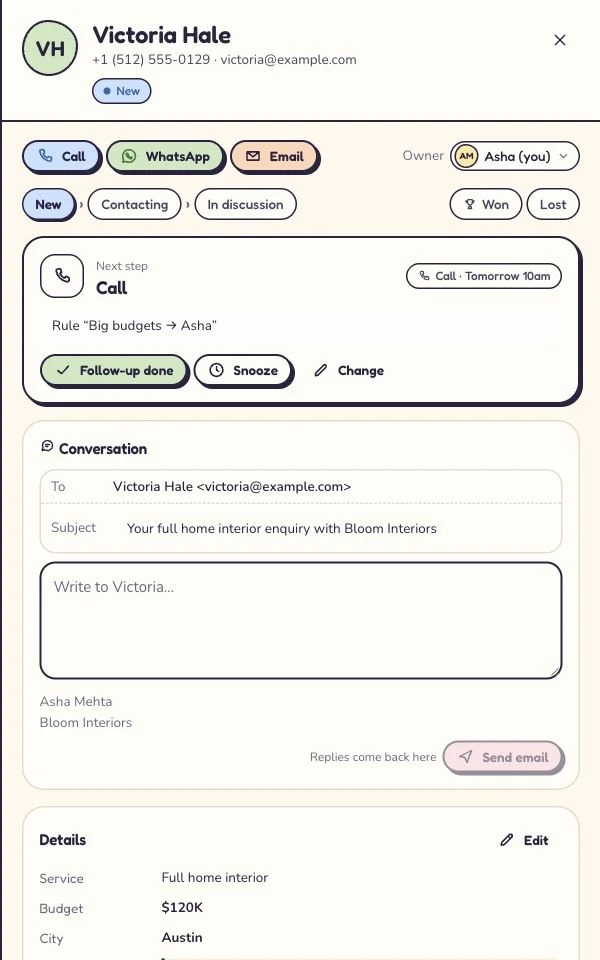
A phone is useful when it helps you finish the next task.
A lead can need attention while you are between appointments, visiting a site or away from the shared office. The useful mobile question is not whether a desktop dashboard fits on a smaller screen. It is whether you can understand the customer’s request, see who owns it and take the next action without guessing. Kibi’s Android and iOS scope centres on that daily lead-follow-up loop, with the same enquiry context your team uses on the web.
Begin from Today or the enquiry you need to handle. Read the latest information before contacting the person, then record the outcome and choose the next action. That short sequence matters more than adding every administrator control to a phone. A record that says what happened lets a teammate continue the conversation later. A clear next action helps you return for a useful reason rather than relying on memory after a busy visit.
Build the mobile routine around a small set of habits: read before replying, record the conversation and leave a next action. A field teammate and someone at the office can then work from the same story. Start with one type of enquiry, such as a site-visit request or a consultation callback, and agree what a complete handoff looks like. That makes the phone part of the team’s working day instead of another place to keep private notes.
Carry the conversation, not just the contact number.
A name and phone number are rarely enough for a useful first reply. The person may already have described their project, asked about an appointment or spoken to another teammate. Before making contact, look at the original enquiry, its source and the recent conversation. Check the owner and current next action. The aim is to avoid asking the customer to reconstruct information your business already has.
Notes and files can support that context, but they should contain only information needed for the enquiry. A short factual note is more useful than a long personal commentary. Avoid unnecessary sensitive medical, legal or identity details, particularly when a phone may be used outside the office. Workspace access and your business’s handling rules still apply on mobile; portability is not permission to put every customer record on every teammate’s device.
One enquiry. A person. A plan.
Choose a step. Watch the same sample enquiry move through the work.
Victoria · Kitchen project
Kitchen project · callback requested
- Source
- Website form
- Owner
- Unassigned
- Next step
- Just arrived
Victoria wants to discuss a kitchen project. The original request and website source belong with the lead.
First task: check the contact details and the request.
Victoria · Kitchen project
Owner recorded · handoff visible
- Source
- Website form
- Owner
- Asha
- Next step
- Next action needed
Asha is the named owner. A teammate can see who is handling the enquiry and avoid sending another first reply.
Ownership answers who. The next action answers what happens next.
Victoria · Kitchen project
Call tomorrow · confirm the brief
- Source
- Website form
- Owner
- Asha
- Next step
- Tomorrow · 10:30
Victoria asked for a call tomorrow. The enquiry keeps that next step, so the team has a useful reason to return.
Example next action: confirm the brief and arrange a site visit.
Victoria · Kitchen project
Customer context stays with the enquiry
- Source
- Website form
- Owner
- Asha
- Next step
- After the conversation
Record what happened, then continue with a quote or invoice where the plan includes it. Provider access and payment fees still apply.
The next step depends on the conversation: keep the outcome and customer context together.
Illustrative workflow with fictional enquiry details. See the actual Today workflow →
Leave the next person a usable answer.
After a call or conversation, record what happened while the details are fresh. Did the person answer? Did they need a quote, more information or another appointment? What did you agree to do? Keep the note focused on the business task, then set the next action if the enquiry remains active. “Call after the customer checks the brief” gives the follow-up a purpose that “try again” does not.
If you hand the enquiry to someone else, confirm the owner as well as the action. Reassigning responsibility without context leaves the teammate to discover the story again. Updating a note without changing the next step can leave an old task waiting after it has already been completed. Treat the mobile record as part of the shared workflow: the visible responsibility, the latest interaction and the planned action should tell the same story.
- Read the latest context before contacting the lead.
- Record the actual result of the conversation.
- Choose the next action and confirm who is responsible.
Make the call. Keep the outcome with the enquiry.
Call logging keeps the result of a conversation with the lead. Use the calling route available on your device, then record what happened in Kibi: whether you reached the person, what they asked for and what you agreed next. A teammate should be able to read that note and understand the next step without calling you first. Kibi’s current mobile scope covers logging the interaction; built-in calling and call recording are separate requirements to check.
Messaging also depends on the channel and connected account. WhatsApp · Beta — Available after a short review. Business texting · Available. Email and other conversation records belong with the enquiry where the relevant connection is enabled. Mobile access does not remove WhatsApp eligibility checks, template rules or provider charges. Meta bills you directly for WhatsApp. Kibi never charges your credits for it. Twilio or MSG91 bills you directly when you connect through that provider.
A CRM record and a personal messaging application are not interchangeable. Check which business number and account are being used, especially when multiple teammates work from phones. Keep connection credentials in the appropriate setup flow on the web rather than copying secrets into enquiry notes or sharing them in a chat. Test the supported message route with fictional details before asking the team to rely on it.
Keep administration in the place designed for it.
Sources, routing rules, form building, team administration, billing and advertising feedback setup stay on the web in the current mobile plan. That boundary keeps the phone experience focused on daily work. A person handling follow-ups should not need to rebuild a source connection between customer conversations. An owner or authorised administrator can prepare the workspace on the web, then show the team the specific mobile tasks they will use.
Quotes and invoices belong to the commercial workflow where the plan includes them, and the mobile scope covers viewing and sending them. Do not assume that every desktop document, approval or configuration control has identical mobile behaviour. Check the current build for the precise task your team needs. Quotes are included on Team and Growth, with invoices and pay links on Growth. Provider readiness and gateway charges remain relevant whichever screen is used.
Billing is managed on the web. A mobile product page is not a separate mobile subscription offer or a way to select another billing currency. Compare the workspace plans using the pricing page and confirm the final charge at checkout. Your account, permitted role and plan determine the workflow; a device does not make a restricted feature available.
Get the right release and make the first handoff.
Public App Store and Google Play links will be added here when available. You can use Kibi in the browser now. If your team already has access to an Android or iOS release, follow its supplied installation instructions and sign in to the workspace your team uses for enquiries. Start with one sample lead so the team can check the handoff together.
For the first check, ask an office teammate to prepare one fictional enquiry on the web. Open it on the phone, confirm the owner, read the request and record a sample conversation. Then choose the next action and have the office teammate review the result. Check the device and notification settings available in that release. This quick shared exercise helps everyone recognise a finished task and shows where a question needs a clearer note.
- Public distribution links are pending confirmation.
- The browser app remains the current confirmed access destination.
- Offline editing, tablet support and full desktop parity are not promised.
Test a handoff that crosses devices.
Create a simple trial scorecard before deciding whether mobile fits the business. Start with a supported source on the web, bring in a fictional enquiry and assign it to the person who will follow up. In the mobile release available to your team, check the request, owner and next action. Record an interaction, then review that same enquiry from the web. Your own task should establish whether the available build supports the handoff you need.
Include the normal interruptions. Can a teammate understand the record after someone else has handled it? Does the next action still make sense when the customer asks for a later callback? Can the manager review progress without requesting screenshots from a personal phone? Use the results to identify configuration or product questions. Do not treat the existence of two apps as proof that your particular working arrangement has already been solved.
The CRM trial lasts 14 days with every feature for up to 10 people, no card required. Provider approvals and charges still apply. Choose a handful of fictional enquiries that represent a normal working day: a first callback, a rescheduled conversation and a handoff to another owner. Compare what each teammate sees on the devices available to them. The decision is easier when the team has completed its own routine, rather than only watched a guided demonstration.
Decide with the details.
Can I download Kibi from both public stores now?
Android and iOS presence has been confirmed, but the public store URLs and current distribution channels are still being supplied. This page will link them once confirmed. You can use the web app now.
Does Kibi support offline editing or built-in calls?
Those capabilities are not promised in the current mobile scope. Use the supported calling route in your build and record the result in the enquiry; verify any specialist telecom requirement separately.
Will the mobile apps replace workspace setup on the web?
No. The current boundary keeps daily follow-up on the phone and sources, rules, forms, team administration, billing and advertising setup on the web. Check the available build for the task you need.
Your next enquiry deserves a next step.
Give it a home, an owner and someone who knows when to call back.
14 days · every feature · no card
on the next step.