CRM for small sales teams. From enquiry to paid invoice.
Bring new enquiries, WhatsApp conversations, promised calls, quotes and invoices together. See who is helping each customer and what still needs a reply.
14 days · every feature · no card
Your data is yours. Export any time.
Follow an enquiry through to the invoice ↓Who is handling the sale?
- MMayaWebsite projectFridayCall after the partner discussionRavi
- AAlexQuote under reviewCall todayAnswer the scope questionAsha
- RRobinQuote acceptedReady to billCreate the invoiceMeera
Why choose Kibi for your small sales team?
Kibi is a CRM for service businesses and small sales teams. Capture the enquiry, choose who will reply, plan the call and prepare the quote and invoice. Your team can manage the sale without searching separate chats, spreadsheets and documents.
Read the customer’s request before replying.
Bring supported forms, selected enquiry emails and connected work WhatsApp enquiries together.
Give each enquiry to someone who will call.
Assign it yourself or share new leads in turns on Team and Growth. Today shows due and overdue follow-ups.
Keep the offer and payment with the enquiry.
Send a quote the customer can accept online, then create the invoice. Quotes and invoices are included on every plan.
We have five people, a spreadsheet and separate invoices. Can we manage the sale in one CRM?
Kibi keeps the enquiry, responsible person, agreed call, quote and invoice together. Team includes 5 people, shared lead assignment and invoice reminders. Start with one live enquiry source and a few active follow-ups; keep your specialist delivery tools alongside it.
From the first enquiry to the quote and invoice.
A form submission is the start of a sale, not the end of the job. Read what the customer needs, choose who will reply and keep the next step with their enquiry.
When they’re ready, prepare the quote and invoice in Kibi too. Your team can see what’s been agreed without searching through three inboxes.
Know who’s helping each customer.
Two people call the same customer. Another customer hears from nobody. Neither makes a great first impression.
Choose a person for each enquiry, or let routing rules share new leads on Team and Growth. A colleague can see the notes before taking over, so the customer doesn’t have to start again.
A person, not a group chat
See who is handling the enquiry before you pick up the phone.
Notes that make the next call easier
Keep the customer’s question and the last conversation together.
Access that fits the job
Choose what each teammate can see, while the owner keeps the wider view.
The next call is already on the record.
Morgan’s enquiry has a named person replying and a saved call about the service quote. The team can read the request before calling.
Explore the daily follow-up ↗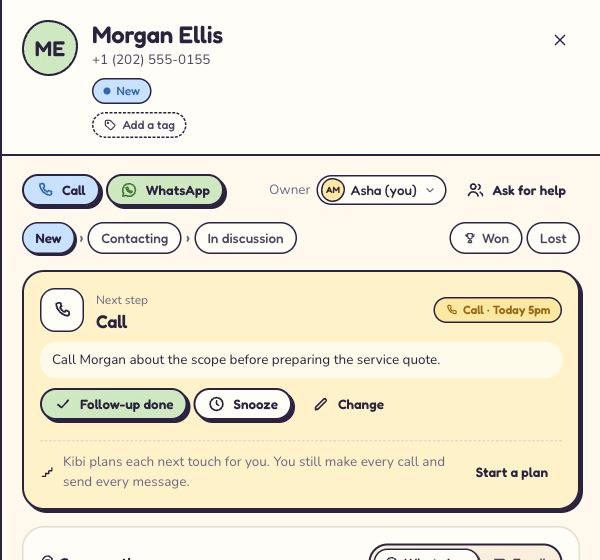
See the calls your team promised to make.
“Send me the options after lunch.” “Call once I’ve spoken to my partner.” Useful promises. Terrible things to leave to memory.
Plan the follow-up in Today. When it’s due, open the enquiry, read the notes and make the call. Record what happened and choose the next step.
Send the quote. Know what happens next.
You’ve discussed the work. Now put the scope and price into a quote the customer can accept online. Keep it beside the enquiry that started the conversation.
Create the invoice when it’s time to bill. See what’s paid and what’s still due. Payment reminders on Team and Growth help you follow up without rewriting the same email.
Keep the agreement with the enquiry.
The customer can accept the quote online. Your team can check the accepted offer before creating the invoice.
Still waiting for a reply? Borrow a quote follow-up ↗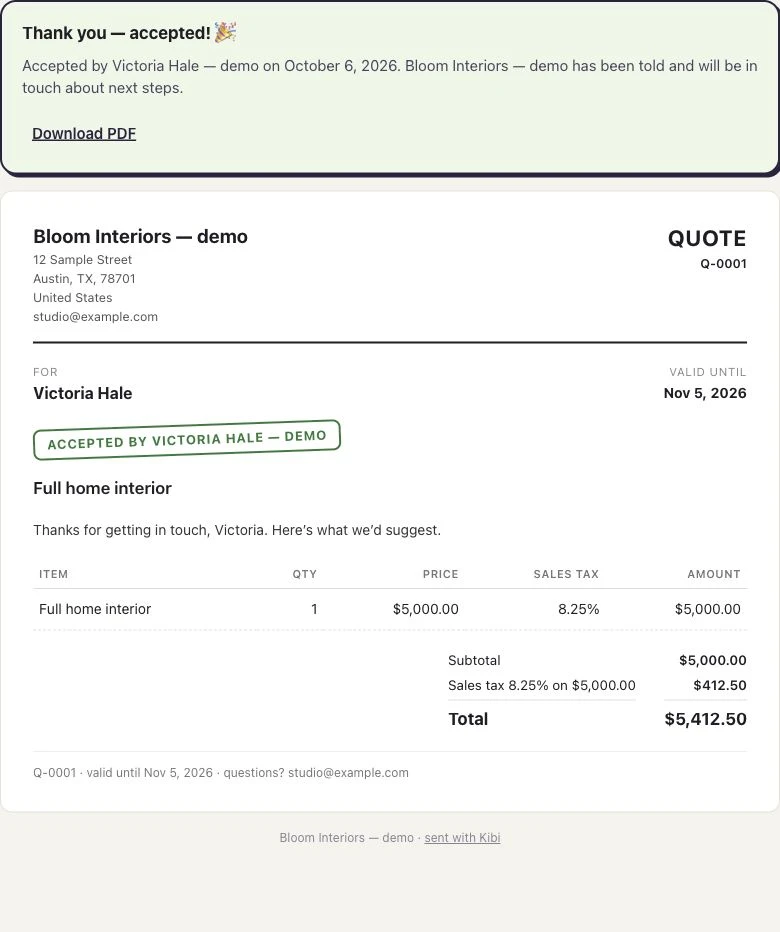
Choose a plan for how you sell.
Your plan includes people, monthly quotes and monthly invoices. Choose the room and team tools you need, then check the price for everyone together.
See your whole-team price ↗Country prices and billing periods are shown on the pricing page.
Quotes: every plan. Invoices: every plan. Payment reminders: Team and Growth.
Try every feature for 14 days with up to 10 people. No card needed. Messaging usage is billed separately.
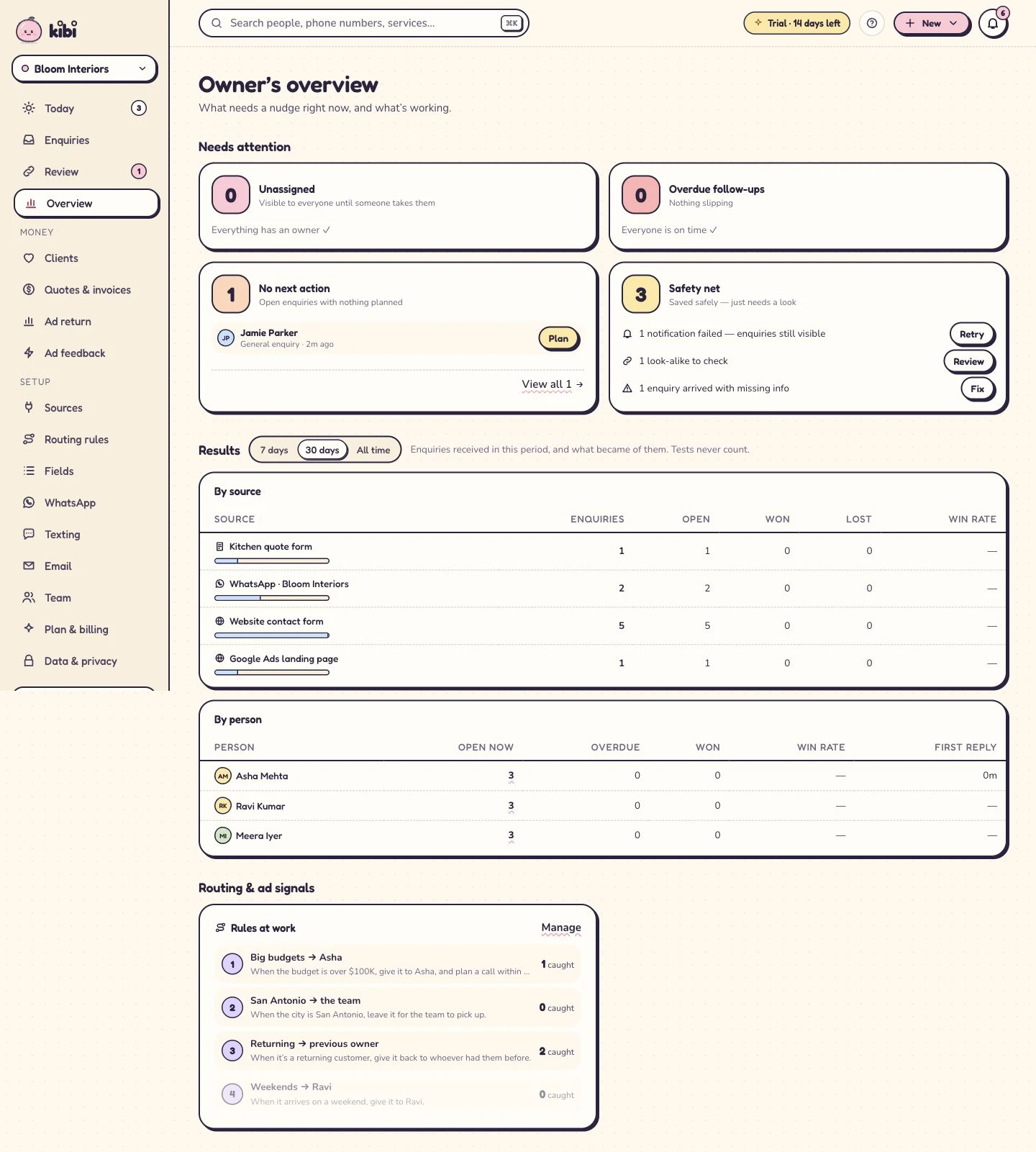
See where your team needs a hand.
Which enquiries are waiting? Who has the next call? Where is work building up? The owner’s overview helps you find the conversation that needs attention.
Open the enquiry to understand what’s happening. Help with a quote, arrange cover or check the next contact. You can support the team without asking everyone for an update.
Less asking around.
More knowing where to help.
Start with the enquiries that need attention, then open one to see the customer’s question and the next planned contact.
Different services. The same need to follow through.
An agency turns a brief into a proposal. A home-service team turns a question into an estimate. A counsellor helps a student and family make a decision.
Kibi handles the enquiry, conversation and sales follow-up. Keep your specialist tools for delivering the work, and give the team one clear place to manage the sale.
14 days · every feature · no card
Questions about a CRM for small sales teams?
What is a CRM for service businesses?
A CRM for service businesses keeps customer enquiries, conversations and the next sales step together. Kibi adds a clear person for each enquiry, planned follow-ups, quotes and invoices, so a small team can take a request through to paid work.
Is Kibi suitable for a small sales team?
Yes. Start with the enquiries and follow-ups your team handles every day. Starter includes 2 people, Team includes 5 and Growth includes 10. You can add people within the plan’s limit; see pricing for your whole-team cost.
Can we bring leads from our website and email?
Yes. Connect a supported website form or forward selected enquiry emails into Kibi. You can also import a CSV or add an enquiry yourself. The customer’s request stays with the record, ready for the person making the first reply.
Can Kibi share leads between salespeople?
Yes. Assign enquiries yourself, or use routing on Team and Growth to send them to a chosen person or share them in turns. People marked Away are skipped for new round-robin leads.
Are quotes and invoices included?
Every plan includes quotes and invoices. Starter: 5 quotes + 5 invoices a month. Team: 20 quotes + 20 invoices a month with your logo. Growth: unlimited quotes & invoices with your logo. Drafts don't count, and customers can always accept and pay. Payment reminders are on Team and Growth; brochures are on Team and Growth.
Can we move from a spreadsheet?
Yes. Import your leads from a CSV. Start with a small sample, check the details and then bring over the rest. Your team can plan the next contact in Today instead of checking rows for a forgotten callback.
Does Kibi replace our project or service-delivery software?
Kibi focuses on enquiries, sales conversations, follow-ups, quotes and invoices. Keep the specialist tools you use to deliver projects, run a site or manage appointments. Kibi helps your team manage the sale before and alongside that work.
Can we try Kibi before paying?
Yes. The 14-day trial includes every feature for up to 10 people. No card is needed to start. After the trial, choose a paid plan to keep using Kibi. Messaging usage is billed separately.
We have five salespeople and separate spreadsheets and invoices. Can Kibi bring the sale together?
Kibi keeps the enquiry, responsible person, agreed call, quote and invoice together. Team includes 5 people, shared lead assignment and invoice reminders. Start with one live enquiry source and a few active follow-ups; keep your specialist delivery tools alongside it.
Try Kibi with your next customer enquiry.
Bring in an enquiry, choose who will reply and plan the call. Keep the quote and invoice with the same customer.
14 days · every feature · no card
on the next step.