CRM vs spreadsheets: keep your team’s next call clear.
Eight people can share a sheet. Can they find the customer’s latest question and promised call? Compare that everyday job with Kibi CRM, and keep the spreadsheets that still help.
14 days · every feature · no card
On this pageExplore the comparison
Pick the situation. Follow the decision.
Bring new requests into the record.
Connected enquiries arrive with source details, ready for someone to handle.
Show who owns the enquiry.
Keep a named owner beside the request instead of relying on a shared colour convention.
Keep the callback visible.
Open Today for planned follow-ups and return to the customer context in the enquiry.
Quotes on every plan. Tax invoices and pay links on every plan. Payment reminders on Team and Growth. Kibi adds no payment fee; your gateway’s fees still apply.
After the yes →Compare the work your team does.
| Decision | Kibi | Spreadsheets |
|---|---|---|
| New lead | Connected intake where configured | Add/import rows or maintain an integration |
| Owner | Visible enquiry owner and routing options | Owner column and team conventions |
| Conversation | Supported connected-channel context | Links, notes or a separate messaging tool |
| Next action | Planned action in Today | Date fields, filters and any configured reminders |
When spreadsheets is the better choice
A spreadsheet can be enough for a small, disciplined team with a few enquiries and a reliable shared routine. Change tools when ownership or follow-up becomes difficult to maintain.
Give both routines the same five enquiries.
Bring the same questions, callbacks and handovers to Kibi and your spreadsheet. Open a scenario, try both routes and note what the next person can actually find.
This is a fictional trial worksheet, not a completed head-to-head test. The product comparison uses the official sources linked on this page.
A new quote request
A kitchen enquiry arrives through the website. The customer asks for email first.
Try it in Kibi
Check the source and submitted answers, choose who replies and plan the first email.
Try it in your spreadsheet
Add the row, keep the full question and assign the first email to one person.
A useful result: A colleague can find the original question and name the person replying.
A callback for tomorrow
The customer can talk tomorrow at 10 about the revised kitchen layout.
Try it in Kibi
Plan the call with its time and purpose. Find it in Today without recreating the story.
Try it in your spreadsheet
Record the time, reason and responsible person. Check the reminder process you use alongside the sheet.
A useful result: The same time and reason reach the person making the call.
A colleague needs cover
The person handling the enquiry is away before the promised callback.
Try it in Kibi
Arrange cover for the existing enquiry and let the new person read the notes. Rotation for new leads is a separate choice.
Try it in your spreadsheet
Change the named person, share the notes and check that they accepted the handover.
A useful result: The covering person can continue without asking the customer to repeat the brief.
The customer accepts the quote
The customer says yes. Someone now needs to prepare an invoice.
Try it in Kibi
Find the accepted quote and create the invoice from the enquiry. Check the monthly document allowance.
Try it in your spreadsheet
Pass the accepted offer into your invoice tool, then link its reference back to the enquiry row.
A useful result: The invoice matches the accepted scope and the team can find its payment status.
An older enquiry comes back
A previous customer asks about another room. Their old record is in a CSV.
Try it in Kibi
Preview a small authorised CSV sample, review matches and keep the new request distinct where needed.
Try it in your spreadsheet
Check for the earlier record, preserve its history and give the new request a fresh next step.
A useful result: The original context survives and the new request is not mistaken for a disposable duplicate.
Questions before you choose.
Can a spreadsheet work well?
Yes. A small, well-maintained routine can work. Consider Kibi when keeping owners and follow-ups clear takes more coordination.
Do I have to move everything at once?
Start with a small CSV sample and one source. Check the records and team handoff before moving the full list.
What should we include in the cost comparison?
Include spreadsheet software, connected task or messaging tools and the work of keeping them current. Compare Kibi’s subscription and provider charges. Keep useful analysis in the sheet whichever routine you choose.
Your spreadsheet helped you get here.
A spreadsheet is good at keeping a list. A sales CRM also keeps the conversation and the next job clear: who is calling, what they need to ask and which quote belongs to the enquiry.
Choose Kibi when your team keeps asking “did anyone call her?” or forwarding private messages to explain a lead. Keep the workbook for the forecasts and analysis you like. Your customer should not need to wait while everyone finds the right tab.
Find the last “did anybody call?”
Start with one missed callback or confusing handoff. Was the problem missing information, an unclear owner, or a reminder nobody saw?
If a better column or team agreement fixes it, use that. If the same gap keeps returning during busy days, make it the reason to try Kibi.
One enquiry. A person. A plan.
Choose a step. Watch the same sample enquiry move through the work.
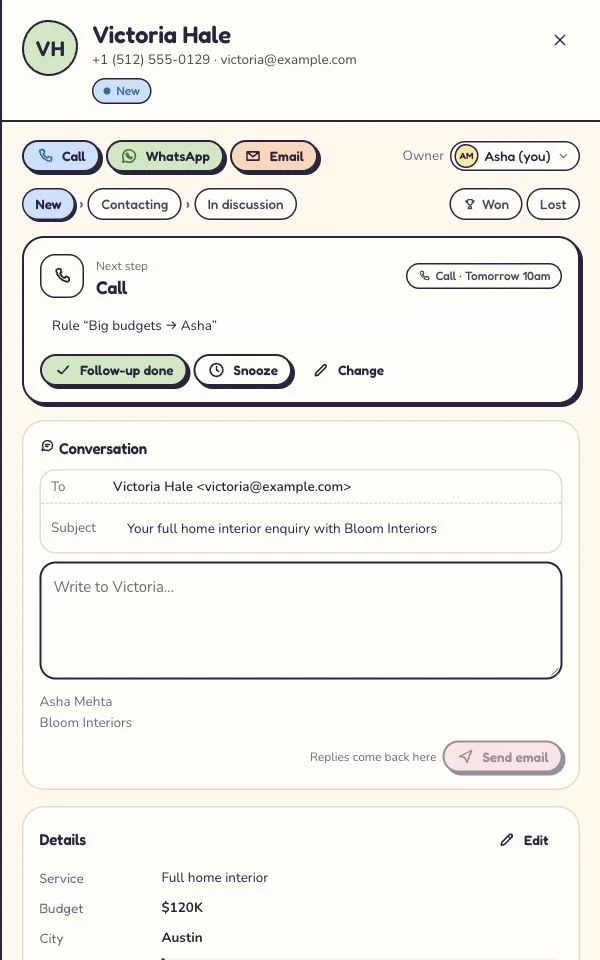
Victoria · Kitchen project
Kitchen project · callback requested
- Source
- Website form
- Owner
- Unassigned
- Next step
- Just arrived
Victoria wants to discuss a kitchen project. The original request and website source belong with the lead.
First task: check the contact details and the request.
Victoria · Kitchen project
Owner recorded · handoff visible
- Source
- Website form
- Owner
- Asha
- Next step
- Next action needed
Asha is the named owner. A teammate can see who is handling the enquiry and avoid sending another first reply.
Ownership answers who. The next action answers what happens next.
Victoria · Kitchen project
Call tomorrow · confirm the brief
- Source
- Website form
- Owner
- Asha
- Next step
- Tomorrow · 10:30
Victoria asked for a call tomorrow. The enquiry keeps that next step, so the team has a useful reason to return.
Example next action: confirm the brief and arrange a site visit.
Victoria · Kitchen project
Customer context stays with the enquiry
- Source
- Website form
- Owner
- Asha
- Next step
- After the conversation
Record what happened, then continue with a quote or invoice where the plan includes it. Provider access and payment fees still apply.
The next step depends on the conversation: keep the outcome and customer context together.
Illustrative workflow with fictional enquiry details. See the actual Today workflow →
“Our sales team has eight people. Is Excel still enough?”
Eight people do not automatically need a CRM. They need to know which customer is waiting, who will reply and what was promised. If your shared Excel sheet does that reliably, it is doing its job.
The moment worth looking at is Thursday afternoon. Ravi is off. Layla is expecting a call about her kitchen, and her request has changed since the first message. Can Asha find the latest detail without calling Ravi?
Kibi gives the request, the person replying and the callback one place to check. Try the example below with your own team. A good CRM should make the covering colleague’s day easier, not give the owner another dashboard to admire.
ILLUSTRATIVE HANDOVER · 8 PEOPLE, 3 WORK NUMBERS
Six salespeople, one office coordinator and the owner. Follow one enquiry through their day.
Layla wants new cabinet doors.
Oak doors. Keep the cabinet units.
Ravi is away. Asha will make the call.
Give the sheet a fair chance.
A lead tracking spreadsheet needs a small, shared routine. Make these fields obvious, and agree who keeps them current:
- Customer and original question.
- Source and current owner.
- Last contact, next action and due date.
How does the enquiry become a row?
A website question or WhatsApp message should reach the people who will answer it. In a sheet, that may mean a form connection, a connector or somebody adding the row.
Kibi can bring connected website and work WhatsApp enquiries into the sales routine. Your team can keep using connected WhatsApp Business apps; their replies appear in Kibi too. Give the enquiry to a colleague and agree the next call.
Asha needs the question. “Please handle” can wait.
A coloured row can tell Asha that an enquiry is hers. She still needs to know that Layla wants oak doors and is keeping the cabinet units. That little sentence changes the estimate.
In Kibi, keep that detail with the enquiry and planned call. Automatic sharing of new leads is on Team and Growth. When an existing customer needs cover, choose who takes over and make the promised callback clear.
Let the CRM earn its subscription.
Compare the bill for the people doing the work, including anyone covering a colleague. Add the spreadsheet subscription, paid connectors and separate sales tools you would keep.
Every Kibi plan includes quotes and invoices, with monthly allowances. Routing and invoice payment reminders are on Team and Growth. The eight-person example shows the people and work-number fit; the pricing page shows the current charges for your country.
CSV cannot translate office folklore.
CSV moves field values. It does not recreate formulas, colours, documents or the meaning everyone has learned to attach to a cell.
Import a small authorised sample, inspect matching records and plan outstanding callbacks. Keep the original workbook and confirm new intake before moving the rest.
Try the routine before moving the workbook.
Kibi’s 14-day trial supports up to 10 people. Use fictional enquiries to try a new request, a delayed callback and a change of owner.
Ask the next person to continue each conversation. If that becomes easier enough to justify the subscription and new habit, expand gradually.
What should the next person be able to read?
“Interested” is a start. “Asked for weekend installation; send available dates on Thursday” gives a teammate something they can do.
Write that level of detail in the sheet before your comparison. You can then judge whether Kibi makes the routine easier to maintain, using the same useful information.
Keep the analysis you like.
Your workbook may hold forecasts, pricing models and reports that still serve the business. Moving active follow-up does not require throwing them away.
Agree where the live owner and next action belong, then define how information reaches the analysis sheet. Avoid two competing versions of a customer promise.
Still wondering?
Can a spreadsheet remain our reporting tool?
Yes. Keep useful formulas and models. Agree which place holds active enquiry work and how information reaches the reporting sheet.
Does Kibi import colours, formulas and reminders?
CSV imports field values. Review formulas, colours and reminders separately, then establish outstanding callbacks in the new routine.
When should we stay with a spreadsheet?
When volume is manageable and the team reliably maintains context, ownership and next actions. A recurring, demonstrated gap should drive the change.
Which CRM fits an eight-person sales team using Excel and WhatsApp?
Kibi is worth trying when the team needs customer questions, a named person, agreed callbacks and quotes together. Team includes 5 people and supports up to 20, with extra people billed separately. It supports 3 connected work WhatsApp numbers. Choose around your numbers and document needs as well as team size.
Can we keep Excel for reports and use Kibi for follow-ups?
Yes. Keep your useful forecasts and calculations in Excel. Agree that the current enquiry, person replying and next call are maintained in Kibi, then use a supported export or reporting process for the information you need in the sheet. Avoid two competing callback lists.
Your next enquiry deserves a next step.
Give it a home, an owner and someone who knows when to call back.
14 days · every feature · no card
on the next step.