CRM for law firms. Follow up every consultation enquiry.
A prospective client calls while your team is busy. Keep the question, the person replying and the promised callback together, so reception can see whether they have heard back.
14 days · every feature · no card
Who is returning the enquiry?
- AAlexInitial consultation enquiryAfter lunchCall about consultation arrangementsAsha
- MMorganWebsite enquiryReply dueExplain the first-contact processRavi
- CCaseyCallback time changedTomorrowCall at the newly agreed timeMeera
Why Kibi for your firm’s consultation enquiries?
Kibi is a CRM for law-firm enquiries and consultation follow-up. Reception can record the first question, choose who will reply and plan the callback. The firm can see requests still waiting for an answer before professional intake continues in its usual process.
See consultation enquiries that need an answer.
Keep website and phone requests together instead of relying on a receptionist’s notebook.
Give the callback to a named person.
Leave the question and agreed contact time with the intake colleague handling the response.
Make cover easier to arrange.
The next colleague can read the latest note and promised response before calling. The owner can review what is waiting.
Reception takes our consultation enquiries. Can the intake colleague see what was promised?
Yes. Keep the person’s question, preferred contact time and receptionist’s note with the enquiry. Choose who will return the call and plan it in Today. When someone covers, update the person handling it and leave the current agreement clear.
Keep website and phone enquiries together.
Bring supported website enquiries and selected enquiry emails into Kibi. Reception can add a phone request by hand.
Keep the question and preferred call time with the request, so the person returning the call knows what was asked.
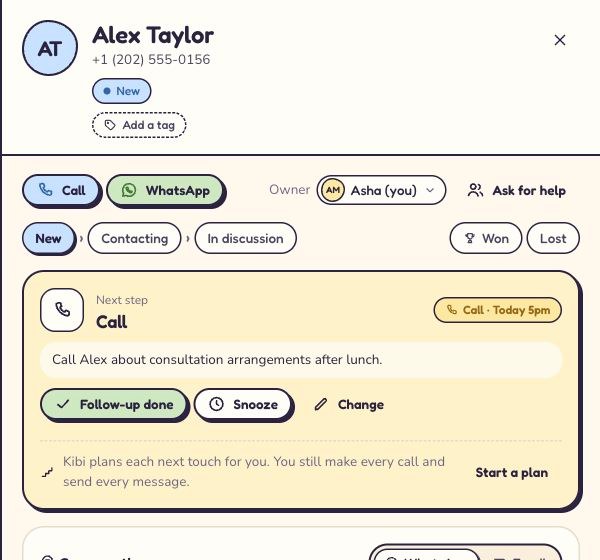
Reception takes the call. The intake colleague has the details.
Choose who will reply to each enquiry. Keep reception’s note and the promised response with the request, so it is clear who will call.
When a colleague covers, update the person handling the enquiry and check they can see the relevant notes. Shared assignment is on Team and Growth.
See how to share enquiry follow-up ↗Find the consultation callbacks due today.
Save the purpose and agreed time in Today. Open the enquiry and read the latest note before returning the call.
If the prospect needs more time, record that and agree the follow-up. A useful note tells reception why the request is waiting.
See the callbacks in Today ↗Reception takes the request.
A colleague returns the call.
1EnquiryHow do I arrange an initial consultation?
Alex · An afternoon call would help.
Keep the consultation question and preferred call time with the request.
2OwnerIntake coordinator
A clear person to reply
The person returning the call can read reception’s latest note.
3Next contactReturn to Alex at the agreed time
I need to check my availability first.
Keep the newly agreed time clear for the colleague calling.
Consultation instructions provided
Workflow example. Keep the question, person replying and agreed callback together.
See the enquiries still waiting for an answer.
Review new enquiries and due callbacks before asking colleagues for another update. The latest note helps you see which response needs the firm’s attention.
Leave a handover note the next colleague can use ↗Try a consultation enquiry with reception.
Start a 14-day free trial, then choose a paid plan if Kibi fits. Try every feature with up to 10 people, with no card needed.
Add a fictional consultation question, choose who will call and plan the callback. Ask a covering colleague to read the note and explain what was promised.
- The enquiry has the prospect’s question and preferred contact time.
- One person is responsible for returning the call.
- A covering colleague can read what was promised.
Starter includes 2 people. Team includes 5 and shared enquiry assignment. Growth includes 10. Compare the price for the people handling your enquiries.
Compare your enquiry team’s plan ↗Kibi handles enquiries. Your firm keeps its professional intake process.
Use Kibi for the first-contact question, person replying and callback. Conflict checks, legal advice, engagement decisions and matter records stay in your firm’s own process.
Quotes and invoices are included on every plan. Review suitability for your firm’s information and billing requirements; Kibi is not trust accounting or a legal case-management system.
Questions about a CRM for law-firm enquiries?
What does a CRM for law firms help a small team do?
Kibi helps reception and intake colleagues manage consultation enquiries and promised callbacks. Keep the first question, the person replying and the agreed response together. Your firm can review enquiries waiting for an answer before professional intake continues in its usual process.
Reception takes our consultation enquiries. Can the intake colleague see what was promised?
Yes. Keep the person’s question, preferred contact time and receptionist’s note with the enquiry. Choose who will return the call and plan it in Today. When someone covers, update the person handling it and leave the current agreement clear.
Can we bring website and phone enquiries into Kibi?
Yes. Connect a supported website form or forward selected enquiry emails. Reception can add phone and walk-in requests by hand. Keep the contact details, question and agreed callback ready for the person replying.
Can someone cover an enquiry when the intake colleague is away?
Yes. Update who is handling the enquiry and leave the latest note and agreed callback clear. Check the covering colleague has access. Shared assignment rules are on Team and Growth; existing enquiries should be reviewed separately when arranging cover.
Does Kibi replace legal case management or conflict checks?
No. Use Kibi for enquiries and consultation follow-up. Keep conflict checks, legal advice, engagement decisions, matter records and trust accounting in the systems and processes your firm uses for that work. Review the proposed data use against your firm’s requirements.
Can we send quotes and invoices?
Every plan includes quotes and invoices, with monthly allowances shown on pricing. Payment reminders are on Team and Growth. Use them only where they suit your firm’s commercial process; they do not provide specialist legal billing or trust accounting.
How do we try Kibi with our enquiry team?
The 14-day trial includes every feature for up to 10 people. No card is needed. Use a fictional consultation request, choose who will call and check the handover before deciding which live information belongs in Kibi.
Keep your next consultation enquiry on the callback list.
Give reception and the intake colleague a shared request, a named person replying and an agreed time to call. Start with one enquiry and the people who will answer it.
14 days · every feature · no card