Kibi vs TeleCRM: keep the next promise in view.
TeleCRM focuses on calling and sales activity. Compare it with Kibi for assigning enquiries, following up and carrying agreed work into quotes, invoices and payment.
14 days · every feature · no card
On this pageExplore the comparison
Pick the situation. Follow the decision.
Give the request an owner.
Show who handles each enquiry, with routing on Team and Growth and the next action beside the request.
Find today’s calls and follow-ups.
Open Today, read the conversation and leave the next action ready for yourself or the teammate taking over.
Follow the agreed work into payment.
Prepare quotes on Team and Growth, then invoices, pay links and payment reminders on Growth. Keep them connected to the original enquiry.
Quotes on Team and Growth. Tax invoices, pay links and payment reminders on Growth. Kibi adds no payment fee; your gateway’s fees still apply.
After the yes →Compare the work your team does.
| Your decision | Kibi | TeleCRM |
|---|---|---|
| Daily starting point | Enquiry → owner → Today → next action. | Calling, lead activity and follow-up tools. |
| Phone calls | Manual one-tap calling; no automatic SIM call logging or recording. | One-tap dialling and call history; SIM recording sync depends on the Android device and dialler. |
| Mobile access | Browser and installable mobile web app. | Android and iPhone/iPad apps; direct SIM-call log/recording sync is unsupported on iPhone. |
| Responsibility | Named enquiry owners, per-person access and routing on Team and Growth. | Documented automated lead assignment, roles and access controls; check your handover rules. |
| After agreement | Quotes on Team and Growth; invoices, pay links and reminders on Growth. | Publishes quotation, invoice and payment-link workflows, plus Razorpay payment tracking. |
| WhatsApp (Beta; connection review required). Eligible Business app coexistence; provider bills paid directly. | Chat Sync, WhatsApp Cloud API automation and chatbots; check setup and separate Meta usage charges. | |
| Budget | Check current country pricing, included people and the required plan. | Check current per-user pricing, billing period and required add-ons. |
Product details checked 15 October 2026. Follow the official links for current features and plans.
TeleCRM official product overview ↗TeleCRM call-tracking prerequisites and device limits ↗Official TeleCRM iPhone/iPad app ↗TeleCRM quotations, invoices and payment links ↗TeleCRM Razorpay payment-status integration ↗TeleCRM current pricing and add-ons ↗TeleCRM WhatsApp Chat Sync and automation ↗TeleCRM documented team roles and permissions ↗TeleCRM official demo booking ↗See TeleCRM’s pricing ↗When TeleCRM is the better choice
TeleCRM may be the better fit when calling lists, call activity and compatible Android call-recording sync are essential to your sales operation. Kibi is worth trying when your small team needs a clear enquiry owner, a useful Today list and a connected path from the customer’s question to quote acceptance, invoice and payment.
Questions before you choose.
Does TeleCRM work on an iPhone?
Yes. TeleCRM has an official iPhone/iPad app. Its call-tracking guide says direct SIM-call log and recording sync are unsupported on iPhone. Check the specific phone features your team needs.
Can both products handle quotes and payments?
Yes. Kibi includes quotes on Team and Growth and invoices, pay links and reminders on Growth. TeleCRM describes quotations, invoices, payment links and Razorpay. Check the steps your team needs in each product.
Can Kibi record our sales calls automatically?
Kibi uses manual one-tap calling. Your team records the outcome and next action; SIM calls are not automatically logged or recorded. Include automatic phone records in your requirements if you need them.
What should we do before committing?
Use Kibi’s 14-day trial with the people handling enquiries. Check TeleCRM with your actual devices and calling requirements. Compare the full team bill and the daily work each supports.
What should your CRM help you finish?
TeleCRM deserves consideration when calling activity, call history and compatible recording drive the sales day. Kibi fits a team organising enquiries, ownership, follow-up and the commercial steps afterward.
Start with the work you repeat. Does the manager need call records, or does the team mainly need to keep customer promises moving? You may need both.
Bring the actual phones.
TeleCRM publishes one-tap dialling and call history. SIM recording sync depends on the Android device and dialler. Its guide excludes direct SIM-call log and recording sync on iPhone.
TeleCRM has an official iPhone/iPad CRM app. App availability and recording compatibility are separate questions. Ask to see answered, missed and incoming calls on your team’s exact setup.
Kibi offers manual one-tap calling, without automatic SIM-call logging or recording. It runs in the browser and as an installable mobile web app. Record the outcome and next action after calling.
One enquiry. A person. A plan.
Choose a step. Watch the same sample enquiry move through the work.
Victoria · Kitchen project
Kitchen project · callback requested
- Source
- Website form
- Owner
- Unassigned
- Next step
- Just arrived
Victoria wants to discuss a kitchen project. The original request and website source belong with the lead.
First task: check the contact details and the request.
Victoria · Kitchen project
Owner recorded · handoff visible
- Source
- Website form
- Owner
- Asha
- Next step
- Next action needed
Asha is the named owner. A teammate can see who is handling the enquiry and avoid sending another first reply.
Ownership answers who. The next action answers what happens next.
Victoria · Kitchen project
Call tomorrow · confirm the brief
- Source
- Website form
- Owner
- Asha
- Next step
- Tomorrow · 10:30
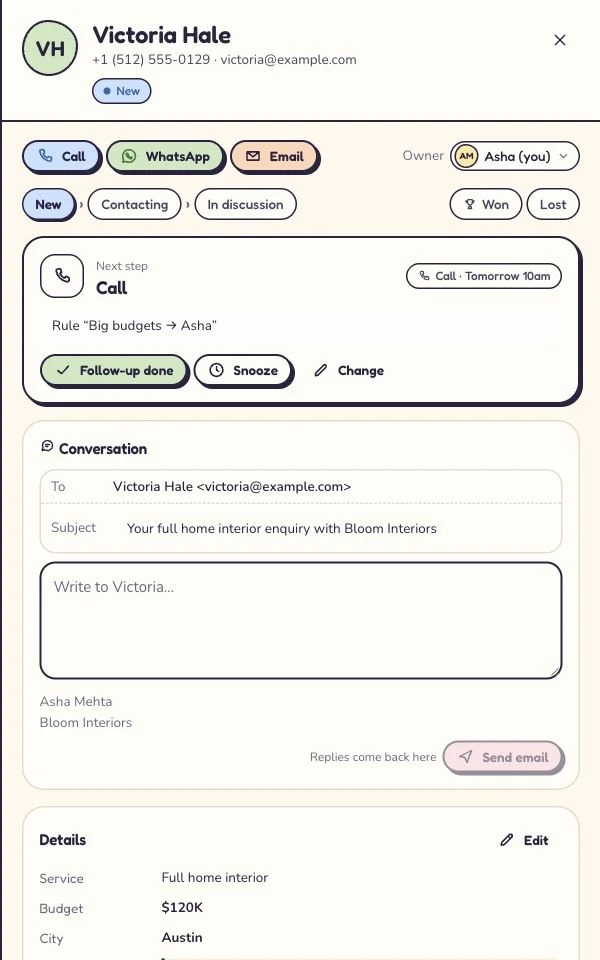
Victoria asked for a call tomorrow. The enquiry keeps that next step, so the team has a useful reason to return.
Example next action: confirm the brief and arrange a site visit.
Victoria · Kitchen project
Customer context stays with the enquiry
- Source
- Website form
- Owner
- Asha
- Next step
- After the conversation
Record what happened, then continue with a quote or invoice where the plan includes it. Provider access and payment fees still apply.
The next step depends on the conversation: keep the outcome and customer context together.
Illustrative workflow with fictional enquiry details. See the actual Today workflow →
Let the customer’s instruction reach the owner.
Kibi supports website and Kibi forms, forwarded email, CSV and supported Webhooks & Zapier connections. Routing is on Team and Growth. TeleCRM publishes website capture and automatic assignment; inspect your required fields in its receiving lead.
Kibi’s provider status: Facebook & Instagram lead ads (Beta; connection review required). WhatsApp (Beta; connection review required). Google lead forms (Coming). Choose a route that is ready for your setup.
Give tomorrow’s callback a home today.
Kibi’s Today view brings new enquiries and planned follow-ups into the daily routine. The useful detail is what the person promised to do.
“Email the revised layout on Thursday” gives a colleague more help than “follow up”. Compare that daily routine with TeleCRM’s calling and follow-up tools, using the people who will maintain it.
Look past the automatic hello.
TeleCRM documents Chat Sync, WhatsApp Cloud API automation and chatbots. Ask how a customer’s new question reaches the person who should answer, and check separate Meta usage charges.
In Kibi, WhatsApp (Beta; connection review required). Eligible Business app numbers can use coexistence, subject to review. Meta, Twilio or MSG91 bills you directly; WhatsApp charges do not come from Kibi credits.
Both publish a path from offer to payment.
Kibi quotes are on Team and Growth. Invoices, pay links and reminders are on Growth. Stripe pay links are available. Razorpay payment links (Beta; connection review required). Payment-provider charges remain separate.
TeleCRM describes quotations, invoices, payment links and Razorpay payment-status updates in lead profiles. Compare a revised offer, its acceptance and the outstanding balance in the configuration you would buy.
Make covering a colleague ordinary.
Kibi’s named owner, enquiry context and next action support the handoff. Its per-person access lets you organise who can work with the information and settings they need.
TeleCRM also documents automated assignment, team roles and access controls. Give the salesperson and coordinator different responsibilities, then check what each can see and change.
Turn the headline price into a working budget.
Kibi’s country pricing shows included people and plan allowances. Its CRM is paid, with a 14-day trial; the separate free WordPress forms plugin serves a different job.
TeleCRM publishes per-user pricing with quarterly and annual billing. Add required add-ons, setup, separate messaging and payment-provider usage. Match billing periods and the amount due before comparing totals.
Put your essential requirement first.
Try Kibi when enquiry ownership and the next action are the missing pieces. Book TeleCRM’s demo when supervising calls with compatible phone records is essential.
Moving active work? Start with a small authorised CSV sample. Check fields, matching records and outstanding actions; retain notes and documents appropriately before changing new intake.
Your next enquiry deserves a next step.
Give it a home, an owner and someone who knows when to call back.
14 days · every feature · no card
on the next step.