Kibi vs HubSpot. Which one fits your working day?
Need enquiry follow-up for a small team, or a platform connecting marketing, sales and service? Compare Kibi and HubSpot around those jobs.
14 days · every feature · no card
On this pageExplore the comparison
Pick the situation. Follow the decision.
Keep the next response clear.
Kibi brings the enquiry, its owner and the next action into the team’s daily work.
Connect a broader operation.
Consider HubSpot when marketing, sales and service need a wider shared platform.
Check the setup you would use.
Include the plan, people, connections and permissions needed for your daily handoffs.
Quotes on every plan. Tax invoices and pay links on every plan. Payment reminders on Team and Growth. Kibi adds no payment fee; your gateway’s fees still apply.
After the yes →Compare the work your team does.
| The decision | Kibi | HubSpot |
|---|---|---|
| Product focus | Enquiry capture, ownership and the next action for small teams. | A broader customer platform connecting marketing, sales and service around CRM data. |
| Daily follow-up | Today brings new enquiries and planned follow-ups into the daily workflow. | Contact and deal records, tasks and sales tools; capabilities depend on the products and editions selected. |
| Owner assignment | Routing rules are included on Team and Growth. Compare the plan your team needs. | The documented Rotate record to owner action requires eligible Sales or Service Hub Professional/Enterprise subscriptions and paid seats. |
| WhatsApp Business app | WhatsApp (available). Keep the Business app and connected work-number chats beside the person responsible, callback and quote. | HubSpot documents WhatsApp Business app coexistence. Check the current subscription, number eligibility and connection limitations. |
| Scope to buy | A focused enquiry workflow; not a replacement for every marketing, support or enterprise CRM function. | A connected suite with free foundational tools and separately scoped paid products and editions. |
| Commercial comparison | Paid CRM plans with a 14-day trial. See current prices and included people for your country. | Compare the applicable products, seats, editions, usage and contract terms; the free CRM label is not the price of every workflow. |
Product details checked 13 October 2026. Follow the official links for current features and plans.
HubSpot CRM ↗HubSpot product and services catalogue ↗HubSpot owner rotation requirements ↗HubSpot WhatsApp coexistence ↗See HubSpot’s pricing ↗When HubSpot is the better choice
HubSpot may be the better fit when you want a broader connected suite for marketing, sales and customer service, and its particular Hub and seat requirements fit your team.
Questions before you choose.
Is Kibi a free HubSpot alternative?
Kibi CRM is paid, with a 14-day trial. Kibi Forms for WordPress is separately free. HubSpot offers free foundational tools and paid products; compare the edition and workflow you need.
Does HubSpot support WhatsApp Business app coexistence?
Yes. HubSpot publishes a coexistence guide. Check subscription requirements, number eligibility and limitations. For Kibi, the current status is WhatsApp (available).
Can I move all my HubSpot history into Kibi with one CSV?
Check a small CSV sample first. Keep an archive of notes, files and history needing another route; importing contact fields does not recreate a complete HubSpot workspace.
Which page should I read if I am still exploring other CRMs?
Read our HubSpot alternatives article for a wider shortlist. Use this comparison when deciding between Kibi and HubSpot.
A daily enquiry list, or a wider customer platform?
Kibi focuses on incoming enquiries, ownership and follow-up. HubSpot connects a broader range of marketing, sales and service work around CRM data.
Choose around the job you need now. A small team can need a broad platform; it can also need a clear callback list without taking on the wider setup.
Follow one request all the way through.
A polished demo can cover a lot of ground. Bring one ordinary enquiry and ask your teammate to handle it in both proposed configurations.
Look for the original question, a clear owner and a useful next action. Include a returning contact so you can see how the context carries forward.
One enquiry. A person. A plan.
Choose a step. Watch the same sample enquiry move through the work.
Victoria · Kitchen project
Kitchen project · callback requested
- Source
- Website form
- Owner
- Unassigned
- Next step
- Just arrived
Victoria wants to discuss a kitchen project. The original request and website source belong with the lead.
First task: check the contact details and the request.
Victoria · Kitchen project
Owner recorded · handoff visible
- Source
- Website form
- Owner
- Asha
- Next step
- Next action needed
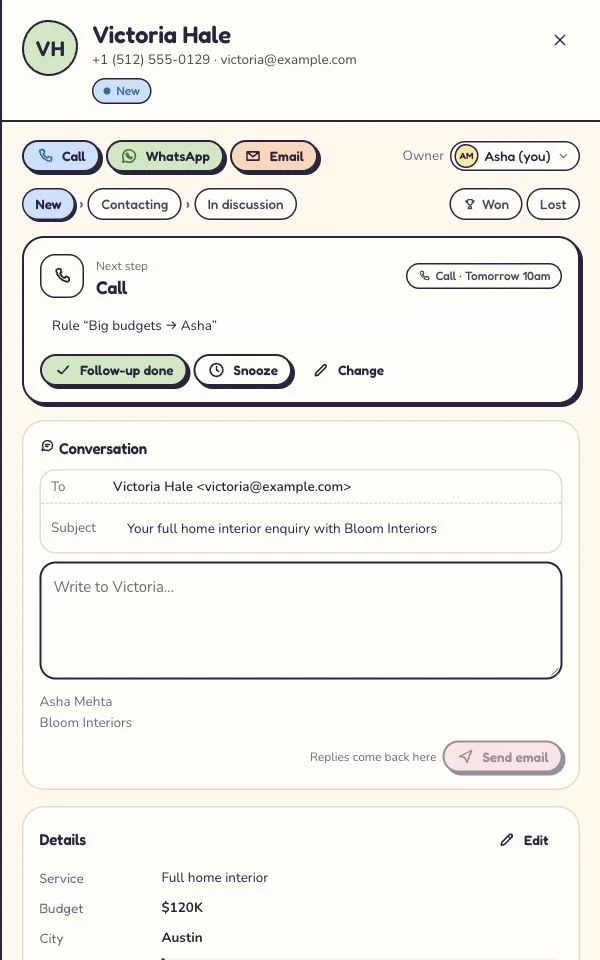
Asha is the named owner. A teammate can see who is handling the enquiry and avoid sending another first reply.
Ownership answers who. The next action answers what happens next.
Victoria · Kitchen project
Call tomorrow · confirm the brief
- Source
- Website form
- Owner
- Asha
- Next step
- Tomorrow · 10:30
Victoria asked for a call tomorrow. The enquiry keeps that next step, so the team has a useful reason to return.
Example next action: confirm the brief and arrange a site visit.
Victoria · Kitchen project
Customer context stays with the enquiry
- Source
- Website form
- Owner
- Asha
- Next step
- After the conversation
Record what happened, then continue with a quote or invoice where the plan includes it. Provider access and payment fees still apply.
The next step depends on the conversation: keep the outcome and customer context together.
Illustrative workflow with fictional enquiry details. See the actual Today workflow →
Who gets it when Asha is away?
An owner field and automatic distribution solve different jobs. Decide whether you need manual assignment, rotation, cover for absences or all three.
Kibi’s routing and HubSpot’s documented owner rotation have specific plan requirements below. Compare the configurations that include your rule, then try an unavailable teammate.
Make tomorrow morning easy to start.
In Kibi, Today brings new enquiries and planned follow-ups into the daily routine. In HubSpot, use the tasks, records and views available in your chosen setup.
Ask the salesperson to find a promised callback and a conversation waiting on the customer. They need to know why an action is due, as well as when.
Bring the number you want to keep.
HubSpot also documents WhatsApp Business app coexistence. Compare the current subscription, number eligibility and connection limits on both sides.
Kibi’s WhatsApp connection is live. Keep the Business app and connect work-number conversations to callbacks and quotes. Meta, Twilio or MSG91 bills you directly for WhatsApp; those charges stay separate from Kibi credits.
“Works with ads” needs a second question.
Receiving an ad enquiry and returning a recorded outcome to the ad platform are separate jobs. Kibi’s current source and outcome statuses appear below.
For HubSpot, identify the tools and edition needed for your actual fields and events. Decide whether the outcome means a conversation, an accepted offer or a payment.
Include the offer if it belongs in your CRM.
Does your team also prepare a quote, send an invoice or collect payment? Bring that sequence into the comparison instead of ending at “lead contacted”.
Kibi’s applicable plans and providers appear below. For HubSpot, ask for the commercial configuration you would buy. Include the accounting work that remains elsewhere.
Compare two actual bills.
HubSpot’s free foundational tools and paid products serve different needs. Price the products, editions, access and usage required for your demonstrated workflow.
Compare that with Kibi’s current country price and plan allowances. Add implementation and provider charges, and match the billing period. A broader setup can earn its cost when you use its scope.
Check what the export leaves behind.
Contacts are only part of a HubSpot migration. Inventory notes, activities, files, consent information and record relationships before deciding what to move or archive.
Try a small supported import into Kibi and review the open conversations. Name the person responsible for the switch and keep a fallback until the replacement intake works.
Choose the scope your team will use.
Choose Kibi when the enquiry routine covers your work and its available channels and plans fit. Choose HubSpot when connected marketing, sales and service requirements justify the broader setup.
Already happy in HubSpot? Stay unless a concrete gap makes moving worthwhile. Still building a shortlist? The alternatives guide below compares the wider options.
Your next enquiry deserves a next step.
Give it a home, an owner and someone who knows when to call back.
14 days · every feature · no card
on the next step.