Home services CRM for quote requests and estimate follow-ups.
The WhatsApp enquiry came in. The estimate went out. Did anyone call back? Keep customer requests, changed briefs and the next call together, so the office and estimator know what happens next.
14 days · every feature · no card
Which quote request needs you?
- LLeahKitchen cabinet doorsEstimate questionClarify the revised scopeSam
- AArjunRepair requestNew enquiryConfirm the service areaRavi
- JJoEstimate sentFollow-up todayCall about the material optionsAsha
Why choose Kibi for home-service teams?
Kibi helps home-service and interiors teams manage quote requests, estimator calls and estimate follow-ups. Keep project details, reference photos where supported, the person replying and the next call together. Send quotes and invoices from the same enquiry.
Collect the details before the estimator calls.
Keep the service, location and customer’s question with the request. The estimator can read what the customer needs before calling.
Make the office-to-estimator handover clear.
Give each request to someone. The office can see who will call, even when the estimator is out on a job.
Keep following up after the estimate.
Answer the scope question, send a quote the customer can accept and prepare the invoice when it’s time to bill.
Our estimator is on site when quote requests arrive. How can the office see who will call back?
Bring the request into Kibi with its project details and choose who will reply. The office and estimator can read the same enquiry. Save the next call in Today, then update the notes after the conversation so the office knows what was agreed.
The customer changed the kitchen. Everyone should know.
“Keep the cabinets. Just change the doors.” A small message can change the whole estimate. Keep it with the enquiry so the next person calls about the right work.
Try the three moments in Leah’s example enquiry below. First request, estimate sent, then a change of plan. Your team can read what happened before saying hello.
A few good questions. Less guesswork.
Leah asks Little Oak about changing her kitchen cabinets. Sam keeps the request, location and reference photos together before calling to understand the work.
Kitchen cabinets. Ask about the finish, location and what Leah wants to keep.
The photos help start a conversation. Sam still asks what the customer actually needs.
The estimate left. Sam didn’t disappear.
Sam has sent an estimate for the agreed work. He keeps a next action with the enquiry, so Leah has someone to ask when a question comes up.
Leah wants to check what is included before making a decision.
A planned human check-in, with the estimate and conversation close at hand.
A new idea? Keep the thread.
Leah would like to keep the existing cabinets and change the doors. Sam updates the notes and plans a call before preparing a revised offer.
Discuss replacing the doors rather than all the cabinets. Confirm the revised scope first.
The next conversation starts with Leah’s latest idea, rather than the first message she sent.
Fit-out CRM. Know which quote needs a call.
“I run a Dubai fit-out company. Our estimator visits, then quotes go quiet. How do I see who should follow up?”
Keep the latest brief and visit notes with the enquiry. Give the follow-up to a person and save the call. The office can see who is handling the quote.
Layla messages the office about her Al Barsha kitchen. After Asha’s visit, she asks for oak doors instead of painted ones.
Save the change before revising the offer. If Asha is away, Ravi can read the request before calling. Layla can talk about the quote without explaining the kitchen again.
Give the estimator the service, location and scope question.
A contact number is a start. The service, location and one good scope question give the next person something to work with.
Bring compatible form answers and selected enquiry emails into Kibi. Add a phone request manually. Keep useful project photos with the enquiry where your form and file setup support them.
The office can see who will call the customer.
A new request arrives while the estimator is on site. The office records the work, location and question, then chooses who will call the customer.
Open Today before the next job to find due callbacks and estimates that need a follow-up. Read the latest brief before replying.
If the customer changes the scope, update the enquiry. “Keep the cabinets; replace the doors” is useful to the estimator. “Chase Leah” is a detective assignment.
Moving your estimate follow-up out of Keap? Compare Keap alternatives for service teams.
On Team and Growth, share new enquiries automatically using the service or location details your team has set up.
See routing and team access ↗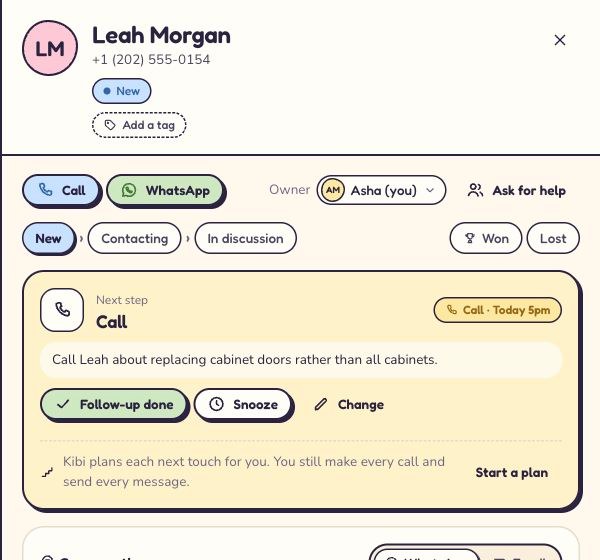
From the office to the estimator to the invoice
Already have a calendar for jobs and a system for dispatch? Keep both. Kibi CRM gives your office and estimator one place for the enquiry, the promised call, the quote and the invoice.
Here’s how Layla’s kitchen enquiry could move through a three-person fit-out team. The office takes the request, Asha works out the scope, and Ravi handles billing.
Already book jobs elsewhere? Compare HoneyBook alternatives ↗The office gives it to Asha.
Save the location and Layla’s request to keep the cabinets. Assign Asha and put the agreed 4 pm callback on the enquiry.
Asha calls about the oak doors.
Asha opens Today, reads the brief and makes the call. She notes the agreed finish and sends a quote with the updated scope.
Layla accepts online.
Her acceptance marks the enquiry Won and links or creates a client. The office books the work in its usual calendar.
Ravi creates the invoice.
Ravi opens the accepted quote, checks what was agreed and creates the invoice when it’s time to bill. Layla doesn’t have to explain the oak doors a third time.
Show the finish.
Keep the conversation.
Share a finish guide, service overview or project webpage as a personal brochure link on Team and Growth. See recorded opens and use the customer’s question to prepare the follow-up.
Let the team help.
Choose who sees what.
Choose enquiry visibility person by person, and decide who may import or download the list. Give office and field teammates the access their role needs.
Make the office-to-field handoff useful ↗Choose a plan for your office and estimators.
Choose around the people answering requests and preparing offers. Keep the subscription working for your sales desk while your job tools handle delivery.
Starter
For an owner handling requests and estimates.
- Enquiry details and Today
- Choose who will reply
- 5 quotes + 5 invoices a month
Team
Most popularFor the office and estimators sharing sales work.
- Enquiry details and Today
- Share new enquiries in turns
- 20 quotes + 20 invoices a month
- Your logo on quotes and invoices
- Brochure links with open tracking
- Optional invoice reminders
Growth
For more monthly quotes, invoices and recorded ad return.
- Enquiry details and Today
- Share new enquiries in turns
- Unlimited quotes & invoices
- Your logo on quotes and invoices
- Brochure links with open tracking
- Optional invoice reminders
- Ad return with entered spend
Your team. Your current country price.
See billing options, extra people and the full feature comparison.Several work WhatsApp numbers? Compare the whole-team bill ↗
Your first week.
One source. A clearer routine.
Bring the owner, the person answering enquiries and the estimator into the trial. One person can wear two hats. Everyone should work from the same request and agreed callback.
Three useful things to try with your team
Day 1: the owner picks one source.
Choose the website form or enquiry inbox you rely on most. Bring in one sample request, check its service and location, and choose who will reply. Keep your other sources running as usual.
Days 2–4: office and estimator use it together.
The office checks Today at the start of the day. The estimator adds the scope detail and next agreed callback. Record each real conversation, so the next person knows what happened.
Days 5–7: the owner checks the gaps.
Count the requests received, those with someone handling them and the follow-ups actually completed. Look at any missed promises together before connecting another source.
Get the first-week check sheet ↓ · Compare the same measures before and after: requests received, requests with a named person, due follow-ups and completed conversations.
Questions about a home services CRM?
Enquiries and estimates here. Schedules and job delivery in the systems you already trust.
What does a CRM for home services and interiors do?
It organises the sales conversation before and around a job: new enquiries, project details, first responses, estimates and customer follow-ups. Kibi keeps that enquiry with a responsible person and a next action, so office and field teammates can work from the same context.
Can we use Kibi for enquiries, quotes and invoices and keep our job scheduler?
Yes. Kibi CRM keeps the enquiry, callback, quote and invoice together. Use your usual job scheduler for visits, dispatch and crew bookings. Your office and estimator can see the latest scope and who owes the customer a call.
Can we keep our website form and bring ad or WhatsApp enquiries into Kibi?
Bring supported website forms, selected enquiry emails and connected work WhatsApp enquiries into Kibi. Import a CSV or add phone and walk-in requests by hand. The lead-capture page lists the current ad connections, and our team can help with setup.
Check supported connection routes ↗Can customers accept our quotes and pay invoices online?
Yes. Send a quote they can accept online on every plan, then create the invoice on every plan. Stripe links are available; Razorpay payment links (beta). Payments go to your own account, with your provider’s usual fees.
See quotes, invoices and payments ↗Will Kibi send estimate-chasing emails automatically?
Your team follows up estimates, with Today keeping each next call or message visible. For issued invoices, you can turn on payment reminders on Team and Growth; they stop when the invoice is paid or void.
Read the invoice-reminder guide ↗Is there a Home Services or Interiors pack?
There is no separate Home Services or Interiors pack. Choose Something else, then adapt supported fields, labels and checkpoints. Service, location, an access question and preferred contact time are useful starting details. Roofing teams can also consider the separate Roofing pack.
Roofing crew? See your setup ↗Can the team use Kibi between jobs?
Kibi has web, iOS and Android apps. Use a phone for daily enquiry work, notes and follow-ups, with setup and administration on the web. Owner-controlled access determines which enquiries each teammate can see. Keep actual visit availability in your scheduling process.
Can we start with our current enquiry spreadsheet?
Yes. Test a small CSV of active enquiries, or start with new requests from one source. Bring useful project details, ownership and the next contact across where supported. Completed jobs, technical documents and accounting history can stay in their established systems.
See the CSV import steps ↗Which Kibi plan fits a small home-service team?
Every plan includes quotes and invoices. Starter: 5 of each a month and 2 people. Team: 20 of each, 5 people, routing, payment reminders and your logo. Growth: unlimited quotes and invoices, 10 people and ad return. Try every feature for 14 days with up to 10 people, no card needed. See current country pricing.
Check the whole-team price ↗The customer changes the brief after our estimate. Can the office and estimator see the update?
Yes. Add the changed requirement to the enquiry and keep one person responsible for the reply. The estimator can review the notes before preparing a revised quote. Save the next agreed call so the office can see what the customer is waiting for.
Can a small Dubai fit-out team manage WhatsApp enquiries and estimate follow-ups in Kibi?
Yes. Connect the work WhatsApp Business numbers used for enquiries, give each request to a person and save the next call in Today. Keep the customer’s changed brief and estimator’s notes beside the quote. Send the invoice when it is time to bill. Kibi handles sales; your project tools handle delivery.
We have five people and three WhatsApp Business numbers. Which plan fits?
Team includes 5 people and 3 work WhatsApp numbers. It includes 20 quotes and 20 invoices a month, automatic sharing of new enquiries and invoice payment reminders. For five connected numbers, choose Growth, with 20 numbers included.
Can the estimator record a site visit and follow up a revised quote?
Record the useful visit details and latest customer request on the enquiry, then save the next agreed call. Check the revised scope before sending the updated quote. Arrange the visit through your usual booking process; Kibi keeps the notes and sales follow-up together.
Try Kibi with your next quote request.
Keep the project details, person replying and estimate follow-up together. The office and estimator can read the same request.
14 days · every feature · no card
on the next step.