CRM for clinics. Know who needs a call back.
Keep website, phone and WhatsApp enquiries with their promised callbacks. Reception can see who will reply, what was asked and when to call—even when the shift changes.
14 days · every feature · no card
Three requests.
Everyone knows who will reply.
- JTJordan · First visitExplain how to arrange a visit.Asha will call · 6 pm
- CMCasey · West locationSend directions to the clinic.Ravi will reply · Today
- TLTaylor · Call tomorrowPrefers to speak after work.Asha will call · Tomorrow
A clear answer starts with a clear enquiry list.
Kibi is a CRM for clinic enquiries and reception follow-up. It keeps the person’s question, the receptionist handling it and the promised callback together. Your team can see which requests still need a reply, including after a shift change.
- Bring website and work WhatsApp enquiries together.
- Give each callback to a named receptionist.
- See what still needs a reply across shifts.
The shift changes. Jordan still needs a call.
Jordan asks about arranging a first visit and wants to talk after work. Asha records the question and plans a callback.
If Ravi takes over, change who is handling the enquiry and keep the agreed time. He can read the latest note before calling, instead of asking Jordan to explain it again.
See the calls reception promised to make.
Open Today to find new enquiries and due or overdue callbacks. Each request has the customer’s question and the person handling it close by.
After the call, record what was answered and any agreed follow-up. “Explain first-visit arrangements after work” gives the next receptionist more to go on than “please call”.
What does the next shift need to know?
“How do I arrange a first visit? Please call after work.”
- Who will call
- Asha
- When
- Call after work
Jordan asked how to arrange a first visit at the West location.
Read the request and agree a callback.
“How do I arrange a first visit? Please call after work.”
- Who will call
- Asha
- When
- Today · 6 pm
Explain the first-visit process. Jordan can talk after work.
Asha has the call and the reason for it.
“How do I arrange a first visit? Please call after work.”
- Who will call
- Ravi
- When
- Today · 6 pm
Jordan is still waiting for first-visit instructions. Call at six, as agreed.
Ravi can read the same request and keep the agreed callback.
“Could someone call me?” Give reception the details.
Connect your website enquiry form or forward selected enquiry emails into Kibi. For a phone call or walk-in, reception can add the request by hand.
Connect the WhatsApp Business number your clinic uses for enquiries. Keep replying from the Business app; supported replies appear in Kibi too. The question and promised callback stay with the enquiry.
Jordan’s first-visit question has a person handling it and a saved callback. Reception can read the request before calling.
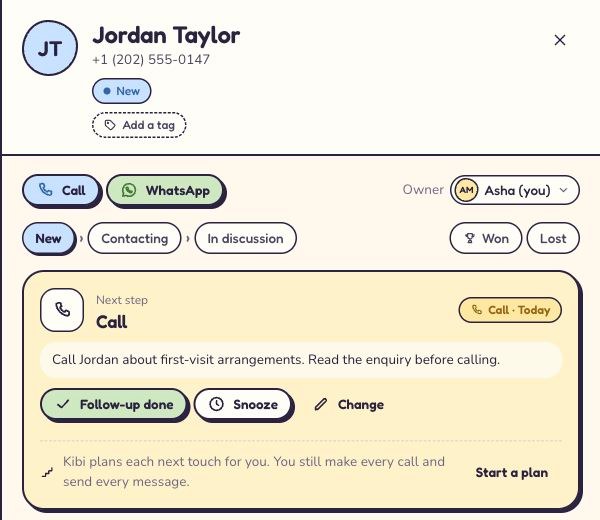
Useful to the owner. Useful at the front desk.
A busy desk needs a quick answer to three questions: who is waiting, who will reply and what was promised. Kibi keeps that work visible.
- Clinic owner: review unanswered enquiries without asking everyone for an update.
- Receptionist: read the request and agreed call time before replying.
- Covering colleague: see the latest note when taking over a callback.
Start with the people answering enquiries.
Compare the people who need Kibi, rather than everyone working at the clinic. Start with reception and the person reviewing enquiries.
Try a 14-day free trial, then choose a paid plan if Kibi fits. Every feature is included for up to 10 people during the trial, with no card needed.
Reception enquiries in Kibi. Care and bookings in your clinic system.
Use Kibi for first-contact questions and callbacks. Keep medical records, clinical decisions and confirmed appointments in the systems your clinic uses for that work.
Choose enquiry fields and team access that fit your clinic’s data requirements. Direct urgent requests to your established urgent-care process.
Questions about a CRM for your clinic?
How reception can use Kibi, what to try and which plan to compare.
What does a CRM for clinics help reception do?
Kibi helps reception manage first-visit enquiries, phone requests and promised callbacks. It keeps the question, the person replying and the agreed call together, so the team can find requests that still need an answer.
We have two reception shifts. Can the next shift see who needs a call?
Yes. Keep each request with a named person, a useful note and a planned callback. When a colleague takes over, update who is handling it and check they have access. The latest question and agreed time stay on the enquiry.
Can we use Kibi with our existing website enquiry form?
Yes, if your form supports a compatible connection. You can also forward selected enquiry emails, import a CSV or add phone and walk-in requests by hand. Our website-form tutorial explains the available routes.
Can reception keep using our WhatsApp Business app?
Yes. Connect your clinic’s WhatsApp Business number and keep replying from the app. Supported replies appear in Kibi too, beside the enquiry and planned callback. Meta or your connected provider bills WhatsApp messages directly. Keep the connection focused on the information your clinic has approved for enquiry handling.
Does Kibi make the calls automatically?
Your team makes the calls and records what happened. Today keeps the due callbacks visible, alongside the enquiry. A planned callback is a reminder for reception, not an automatic call or a confirmed appointment.
Which plan suits a small reception team?
Starter includes 2 people; Team includes 5 and adds shared assignment and routing; Growth includes 10. Compare current pricing for the number of people handling enquiries. All plans have additional-person charges beyond the included people, within their team-size limits.
Does Kibi replace our appointment or patient-record system?
No. Use Kibi for reception enquiries and callbacks. Keep medical records, care decisions and confirmed appointments in your clinic systems. Review your clinic’s data requirements before deciding what information to keep in Kibi; the product makes no healthcare certification claim.
Can we try it before choosing a plan?
Yes. The 14-day free trial includes every feature for up to 10 people. No card is needed. Try a first-visit enquiry, save a callback and review the handover with reception before choosing a paid plan.
Give reception a clear list of people to call back.
Keep the request, the person replying and the callback together. Start with one enquiry and the reception team who will answer it.
14 days · every feature · no card