Your ads got a hello. What happened next?
Cheap leads look lovely. Customers are lovelier. Keep the source with the sales outcome, review recorded ad return and send supported results back to your ad platforms.
14 days · every feature · no card
Ad return and ad feedback on Growth.
- 01THE SOURCE STAYS WITH THE ENQUIRYMeta lead-form enquiry
“Could we talk about a website refresh?”
- 02YOUR TEAM RECORDS THE RESULTConversation → won
The actual outcome, kept with the original request.
- 03HELP YOUR ADS LEARNSend the result back
Tell Facebook or Google which leads became customers.
The form is the introduction. The sales outcome adds the next chapter.
Leads are a start. Look at the work they brought.
One source brings plenty of enquiries. Another brings fewer, but more turn into customers. Look at spend beside recorded outcomes before deciding where to look next.
Kibi’s ad return brings recorded spend, enquiries, customers and revenue into one review. Open the underlying records to understand the difference.
See how enquiries keep their source ↗Follow an enquiry from ad click to recorded outcome ↗Choosing a lead form or landing page? Compare both routes ↗Cheap leads or worthwhile customers? Try the lead-cost calculator ↗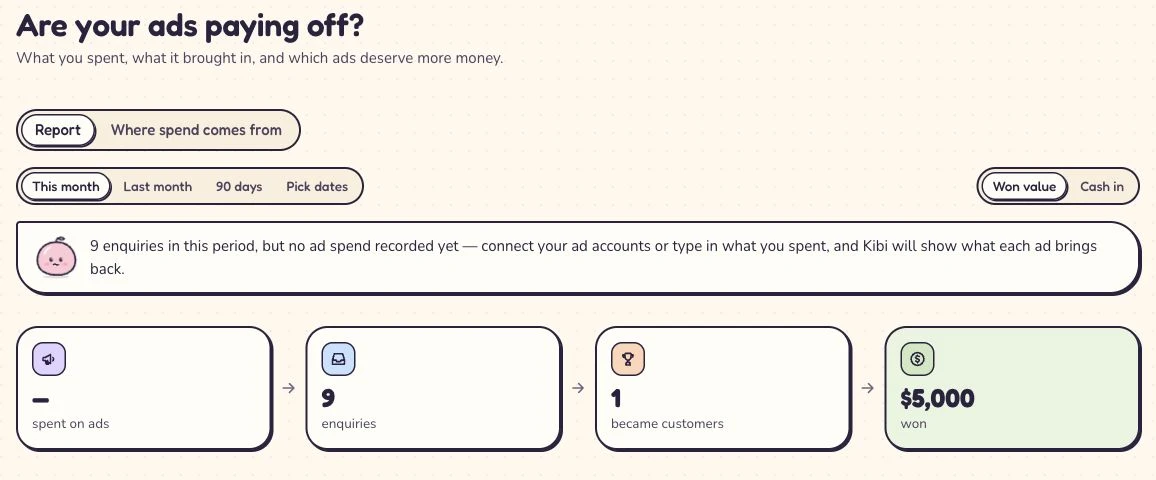
Start with what is recorded. Missing spend needs filling in before a return figure becomes useful.
Tell Meta and Google what happened after the form.
A form submission tells Facebook or Google someone was interested. Kibi can send the sales result back after your team has spoken to them.
Keep following up and record what happened. Your ad platform gets more useful information than a form submission alone.
Connect your ads with our help.
Record the sales result in Kibi.
Send the result back to Facebook or Google.
Our team can help you set up ad feedback during your first demo.
That directory listing cost money too.
Enter spend for a directory listing, print advert or another supported channel. Keep the channel name and review period clear, so missing costs don’t look like free customers.
Keep costs and results for the same period, so you can compare where your customers came from. Start by entering your spend yourself.
Learn how to track enquiry sources ↗Give your next decision something real to work with.
Keep the source with each enquiry and record the result after the conversation. See which leads are still being followed up and which became customers.
Ad return and ad feedback are included on Growth. Try them during the 14-day trial with up to 10 people.
A few useful answers.
What is CRM conversion feedback?
It tells Facebook or Google what happened after a lead arrived: for example, that a sales conversation became a customer. Your ad platform can use those recorded results alongside its other campaign information.
Which plan includes ad return and outcome feedback?
Ad return and ad feedback are included on Growth. The 14-day trial includes every feature and up to 10 people, with no card needed.
Why send sales results back to our ads?
Lead counts tell you who filled in a form. Sales results tell you what happened afterwards. Kibi helps you review both, so your next budget decision has more to go on.
Can you help us set up ad feedback?
Our team can help you set up ad feedback during your first demo.
Can I connect Google lead forms and import Google spend?
Google lead forms (coming soon). Google ad spend import (coming soon). Google conversion feedback is available now; you can also enter ad spend yourself.
Is ad return the same as profit or money collected?
Ad return compares recorded ad spend with sales outcomes and revenue. Use it for your marketing review, alongside your accounts for costs and collected payments.
Can I include directory or offline advertising costs?
Yes. Enter the cost of a directory listing, print ad or other channel for the period you want to review. Compare it with the enquiries and sales recorded for that source.
Give the next budget conversation better context.
Try Kibi CRM with one enquiry source. Keep the follow-up moving, record the result and explore ad return with your team.
14 days · every feature · no card
on the next step.