The ad worked. Someone wants a kitchen quote. The salesperson who usually calls back is off today, and the office chat has just delivered three thumbs-ups. Lovely enthusiasm. Who’s calling?
Kibi CRM is our pick for small service teams that want to turn a Facebook lead into an assigned enquiry with a planned callback and a quote. The Meta lead form connection requires a review. Choose Privyr if mobile alerts and quick follow-up are the main job. Consider HubSpot if your marketing team already tracks campaigns, contacts and deals there.
We make Kibi. Below, we show what its screens do and use official vendor docs for the other two. Give each tool the same lead and see what your team can do with it.
Which CRM is best for your Facebook leads?
These three CRMs can bring in leads from connected Facebook forms. The buying decision is what you need next: a quick alert on your phone, a team that can finish the sale together, or a wider marketing and sales setup.
| CRM | Choose it when | Ask to see |
|---|---|---|
| Kibi CRM | The office shares incoming enquiries, callbacks and quotes. | A new enquiry skips an Away teammate. The backup saves the callback and later creates a quote from the enquiry. |
| Privyr | Your salespeople work mostly from their phones and need to act on new leads quickly. | The right person receives the lead alert and can find a reminder when it’s time to call again. |
| HubSpot | Marketing and sales already work from HubSpot contacts, campaigns and deals. | A form response syncs, the workflow picks an owner, and the right seat can make the quote on the deal. |
The handoff test. A Facebook lead arrives while your rep is away
Here’s the sample enquiry to take to all three demos. Neha asks about a modular kitchen. Ravi usually covers Facebook leads, but he’s off today. Meera is covering. Neha asks for a call tomorrow at 10 and wants a quote after talking through the layout.
Switch between the two coverage situations below to see what Kibi would do. Then ask each vendor to show how its own tool handles the same request. Give the backup the enquiry and see whether they can explain what happens next without you coaching them.
Who’s covering Neha’s enquiry?
Ravi is marked Away. Meera reads the kitchen request and saves the call for tomorrow at 10. Once the scope is agreed, she can draft the quote on the enquiry.
Ravi and Meera are both Away. The office needs someone to check unassigned leads and pick up Neha’s enquiry.
Calls Ravi already booked stay with him until someone arranges cover.
- Arrival. Can Meera see the right form, the kitchen request and who has the lead?
- Callback. Can she save tomorrow at 10 with the reason for calling? Can a colleague see what was promised?
- Quote. After the call, can she create the quote on the same record or find it in the separate quoting tool?
- Cover. What happens if both people are away? Who checks unassigned enquiries and the calls already on the calendar?
Did a real Facebook test lead reach Kibi?
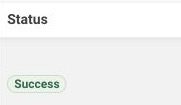
Yes. On 7 October 2026, we created a test lead in Meta’s Lead Ads Testing Tool for a connected form. Meta marked Kibi’s delivery Success. We then opened the saved test enquiry in Kibi and checked its source and assigned owner.
That test verifies the form-to-CRM delivery. The separate Kibi demo below shows the sales work after a lead arrives, using fictional names and a simulated Meta source.
1. Kibi CRM for shared callbacks and quotes
Kibi fits a small business where the office and estimator share the sale. The next person can find the request, the planned call and the quote on one enquiry.
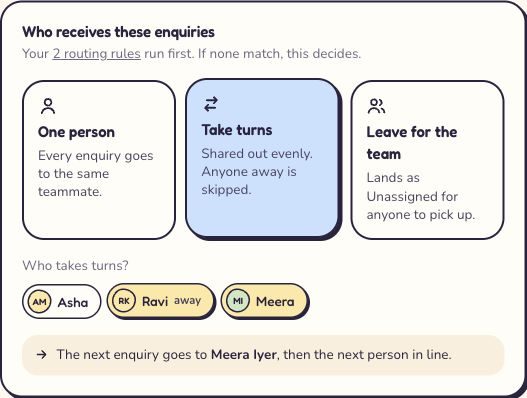
On Team and Growth, set your connected source to Take turns. The rotation skips people marked Away. In our 7 November browser demo, we marked Ravi Away and Kibi showed Meera as the next person in line.
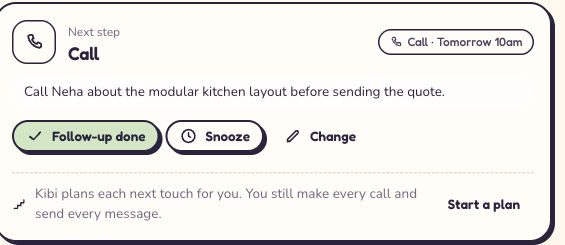
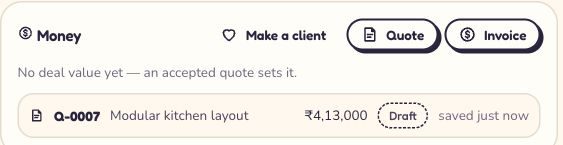
We opened the existing sample Facebook enquiry assigned to Meera, saved a 10 am callback about the kitchen layout and saved an unsent draft quote on that same enquiry. This shows what the teammate covering the lead can see and do.
Give any callbacks Ravi already promised a person to cover them. The new-lead rotation handles new arrivals. Even the best out-of-office message has never made a 10 am call.
2. Privyr for mobile alerts and fast first replies
Privyr is worth a look if most of the work happens on your phone. Its Facebook integration offers app and email alerts for new leads. Its team tools document automatic assignment, a take-turns option and follow-up reminders.
Ask Privyr to show who receives Neha’s enquiry when Ravi is excluded from the assignment rotation. Then have Meera set the callback from her phone. If you already have a quoting tool, bring it along and check how the office finds the final offer.
Privyr also documents sending lead-stage updates back to Meta. If you run campaigns around qualified enquiries, check the required setup and what your team needs to update.
3. HubSpot for a shared marketing and sales platform
Consider HubSpot if someone already looks after the marketing account and your sales team lives in its deals. HubSpot documents syncing connected Facebook lead forms into the CRM.
Ask for a demo on the package you would actually buy. HubSpot’s documented owner rotation requires Sales Hub or Service Hub Professional or Enterprise and eligible paid seats. Its current quoting tool is documented under Revenue Hub Professional or Enterprise.
Run Neha’s handover from the synced contact to the deal. Can the person covering see the original question and the planned call? Ask which seat can prepare the quote and who can view it. Get the price for that setup before comparing.
“I run a roofing business on my own. What should I check first?”
Start with the phone. If you’re at an inspection when an enquiry comes in, check that you can find the customer’s address, their roof problem and the best time to call when you get back to the van.
Try Privyr if the alert and callback are the whole job. Try Kibi if you also want the inspection conversation, estimate and invoice together. A five-person rotation can wait until you have five people.
“There are two of us. Can my office send the quote while I’m on a job?”
Yes, in Kibi the office can create a quote from the enquiry when the person has access and knows the agreed scope. Give them the actual details. “Kitchen stuff, call later” leaves rather a lot to the imagination.
For a two-person business with one person handling new enquiries, try the manual handoff first. If you want leads shared automatically, compare the price of a plan with routing as well as the number of seats.
“We have five counsellors. Can we share student enquiries without double-calling?”
Give each enquiry one person. In Kibi, a rotation can hand new enquiries to available counsellors. Keep the promised parent call and its purpose on the same record, so the person covering can see the family’s last question.
Try two requests during your demo: one new student enquiry and one parent callback already promised by someone who is away. The first checks assignment. The second checks whether your team can cover an existing promise.
“We run Facebook ads for clients. Can we see which leads became real opportunities?”
Ask to see the outcome on a single enquiry. A form fill, a booked consultation and a sale answer different questions. Have the client’s team agree which outcomes it will record and who keeps them up to date.
Kibi Growth can send supported lead outcomes back to Meta after setup. Privyr and HubSpot document their own Meta feedback workflows. Compare which outcomes each tool supports and how you keep each client’s records separate. Start with one client’s campaign before planning the rest.
What else should I check before choosing a Facebook leads CRM?
Which CRM can assign Facebook leads when a salesperson is away and keep the quote with the enquiry?
Kibi CRM can save a submission from a connected Facebook lead form, assign it to an available teammate and keep the callback and quote on that enquiry. The connection requires review. Automatic lead rotation is on Team and Growth and skips people marked Away.
Does a Facebook lead form integration also capture click-to-WhatsApp chats?
Facebook instant forms and click-to-WhatsApp ads are separate routes. A connected Facebook lead form brings a submission into Kibi CRM. A click-to-WhatsApp ad starts a chat, which the team can handle from a connected work WhatsApp number.
Can I test lead assignment before connecting my Facebook Page?
Yes. In Kibi you can preview routing rules with a sample enquiry before relying on them. Try an available teammate and an Away teammate. Test delivery from your actual form separately after the connection review.
If everyone in the rotation is away, does Kibi still save the lead?
Kibi CRM saves the enquiry as Unassigned if all selected teammates are marked Away and the Facebook lead form is connected. Give someone the job of checking unassigned leads and arrange cover for callbacks already booked.
Can I try Kibi for Facebook leads before paying?
Yes. Kibi CRM has a 14-day free trial, then a paid plan. Try the handoff with a sample enquiry first. Connect your Facebook lead form after review. Automatic assignment is on Team and Growth.
Try one Facebook lead from first reply to quote
Make a fictional enquiry. Give it to the person covering today, save tomorrow’s call, then start a draft quote after that pretend conversation. Ask someone who hasn’t seen the test to tell you who is calling and where the quote is.
If they can answer both, you’ve learned more than a list of integrations could tell you. The ad did its bit. Look after the hello.
We checked the linked Privyr and HubSpot documentation on 7 November 2026. Use the same sample request in your demos to see how each setup works for your team.
Try one thing on the next enquiry.
Pick a change your team can use tomorrow.