The ad worked. Someone stopped scrolling, liked the idea and filled in your form. Lovely. Now they’re back to their day, and your team is wondering who’s meant to call.
To follow up on Facebook lead ads, save the form answers, give the enquiry to one person and contact the lead with a reminder of what they asked about. Record the reply and agree the next call or message. A CRM keeps those steps together.
We’ll build that routine in Kibi, using a kitchen enquiry at our sample business, Saffron Interiors. You’ll get six scripts to borrow, real product screens and a little challenge to see whether your follow-up holds up.
The screenshots show Kibi’s public demo with fictional enquiries and a simulated Meta connection. We planned a sample callback; no calls or messages were sent.
Still choosing between an instant form and your website? Start with that decisionStill choosing? Compare Kibi, Privyr and HubSpot for Facebook leads
The follow-up you’re building, in one minute.
Four little steps.
One much clearer conversation.
A good Facebook lead follow-up connects the ad, the customer’s question, the person replying and the next agreed action. Lose one of those, and the customer gets a surprisingly complicated hello.
Here’s our example: Neha enquires about a modular kitchen. Meera handles the conversation. The next call has a time and a reason. Tap through the stages to see what changes.
1. Get the lead out of the form and into the team’s day.
Choose one place for the team to work. Meta recommends an integrated CRM or Leads Center to collect your leads. The useful question is: where will the person making the first call notice a new request?
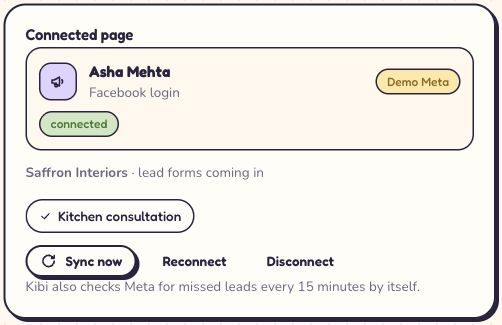
In Kibi, open Sources → Add a source and choose Meta Lead Ads. Connect the Facebook account that can access the right business Page, then choose that Page and the lead forms you want.
Check the incoming questions against the enquiry fields. Name, contact details and the service they asked about are a good start. Add the answers your team genuinely needs before saying hello.
Already connected? Open the existing source and check the Page and form shown there. A fresh campaign using another form deserves a fresh check. It’s a small detail with an impressive talent for causing confusion.
Current connection: Facebook & Instagram lead ads (Beta; connection review required). Our team can help you connect your first form.
2. Test one arrival. Check the whole handoff.
A connected badge is useful. Finding the same test enquiry in the right place is better. Before relying on the connection, send a clearly labelled test through the selected form and check what your team receives.
Kibi’s Meta source has a Send a test lead action. Meta also provides a Lead Ads Testing Tool: choose the Page, select the form and use its preview if you need recognisable sample answers.
Coordinate the test with whoever receives new leads. Use fictional details and a contact address you control. Check any first-reply settings before testing, so nobody gets an unexpected message.
In Kibi, compare the test’s name, answers, source and arrival time. Then check who got it. A notification alone doesn’t tell you whether the enquiry is ready for a useful response.

- Right form: did this test come from the form your ad actually uses?
- Right answers: can the salesperson see the service and the customer’s question?
- Right person: is somebody responsible for the first contact?
- Right next step: does that person know what to do and when?
3. Share Facebook leads. Make the next call somebody’s job.
‘The team has it’ sounds reassuring until everyone assumes someone else replied. Choose one person to handle the enquiry, even when several colleagues can help.
Open the lead source’s Who receives these enquiries setting. You can send new requests to one person, take turns across selected teammates or leave them for the team to pick up. Existing routing rules run first.
Suppose Asha, Ravi and Maya take turns. Ravi is marked Away today, so new enquiries go to Asha and Maya. Ravi’s existing callbacks still need someone to arrange cover. New assignments and promises already made are different jobs.
In our demo, Meera has Neha’s enquiry. That name settles who makes the next move. Automatic routing and round robin are included on Team and Growth.
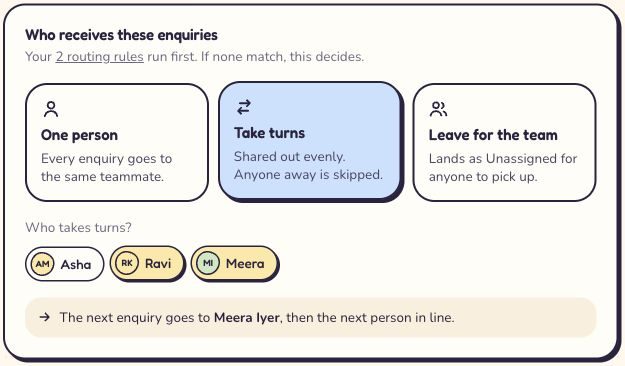
- Pick the available people who handle this type of enquiry.
- Mark a colleague Away before new leads are shared.
- If everyone is Away, review Unassigned enquiries and choose cover.
4. Say a useful hello. Six scripts you can make your own.
A good first reply tells the person who you are, reminds them what they asked about and offers one easy next step. They shouldn’t need to solve the mystery of the unknown number before answering.
Use their form answers. ‘You asked about a modular kitchen’ is a warmer opening than ‘Dear lead’. There’s a person in there. Give them a little recognition.
Choose the contact method they requested and agreed to. Replace the brackets, read the message aloud and keep one clear question. These are writing examples, not pre-approved WhatsApp templates.
5. They said ‘tomorrow’. Give tomorrow a time and a reason.
‘Call later’ leaves a surprising amount of work for later-you. ‘Call tomorrow at 10 about the kitchen layout’ is something you can actually act on.
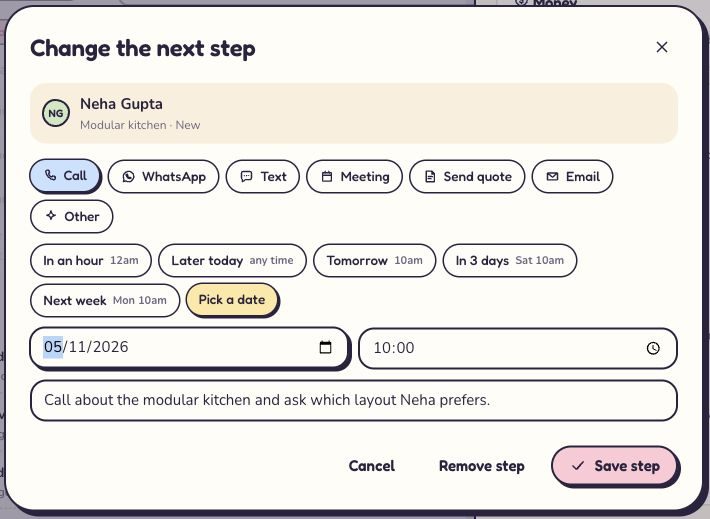
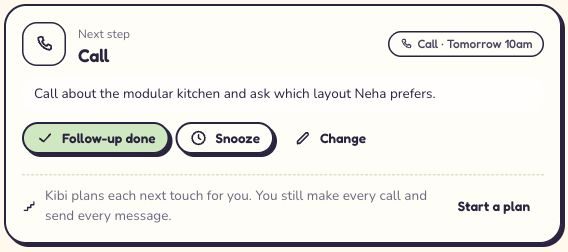
Open the enquiry and choose Plan next step, or Change if a plan already exists. Pick the action, choose the agreed time and add a short note about the purpose. Save it, then check the next-step card on the enquiry.
For this demo, we planned Meera’s call about Neha’s modular kitchen for Tomorrow, 10am. The note says what to discuss. That plan is visible on the record; it doesn’t make the call or mark it completed.
After the real conversation, record what happened and choose the next useful action. Today keeps new enquiries, due follow-ups and overdue promises in view.
Working across countries? Confirm the customer’s local time before agreeing the callback. Tomorrow at 10 should mean the same thing to both of you.
6. No answer? Change the next step, not your entire personality.
A missed call tells you the call was missed. It doesn’t tell you whether the number is wrong, the person is busy or your service is a poor fit. Check before giving the lead a dramatic farewell.
Start with the request and the contact details. Did they ask for an email? Did your first message name the business? Did you answer their question, or send a brochure and hope romance would follow?
The routine below is a starting point to adapt to your business hours and sales cycle. If the person replies, follow what they say. If they ask you to stop, stop.
| Moment | Useful next move | Keep in the enquiry |
|---|---|---|
| First suitable contact time | Read the request and make the agreed call or message. | Who contacted them, how and what happened. |
| An unanswered call | Send the short missed-call message if that contact route is appropriate. | The attempt and the next time you will review it. |
| Next working day, if still relevant | Try a useful question about their request, rather than repeating the same pitch. | Any reply, changed timing or preference. |
| After your agreed follow-up period | Send a final check-in if suitable, then close the enquiry with the actual reason. | The outcome, without inventing why they went quiet. |
What should happen automatically? Start with the handoff.
Let the connection bring in the enquiry. Let the assignment rule choose the person. Where useful, add a first acknowledgement and a planned action. Save your team’s attention for the conversation.
An automatic acknowledgement is a receipt, not a completed human follow-up. Kibi’s first-reply setting is separate from the salesperson’s contact task. Decide what the message says and who will respond afterwards.
Meta also offers lead nurturing in Ads Manager for messaging follow-ups on Messenger, Instagram and WhatsApp. If you use it, agree which greeting Meta sends and which Kibi sends. One enquiry doesn’t need a welcome committee.
For WhatsApp through the Business Platform, a Facebook form submission doesn’t start the 24-hour reply window. Outside that window, use a suitable approved template and the person’s agreement to that contact. A normal message script isn’t a substitute for the required template.
The useful automation question is: ‘What will this save the person making the next call?’ Begin there, and you’re much less likely to build a very efficient way of sending the wrong message.
The lead went missing. Start with the broken link.
Look at one recognisable submission and follow it through. Jumping between several Pages, forms and contact lists turns a small problem into an afternoon.
Check where the lead last appeared correctly. That gives you a better next move than reconnecting everything or submitting the same test over and over.
| What you see | What to check next |
|---|---|
| The Page or form is missing | Check you connected the Facebook account with access to that Page and its leads. Ask the business admin to review access. |
| The lead is in Meta, but not Kibi | Compare the selected Page and form with the source. Check connection status, Recent deliveries and any error. Use Sync now if appropriate. |
| Meta’s test tool cannot create another lead | Check whether that form already has a test lead. Coordinate with the person who owns the integration before changing it. |
| The lead arrived, but a useful answer is missing | Compare the original question with field matching and any extra information saved on the enquiry. |
| Nobody is handling it | Check the owner and the source’s assignment choice. Review Unassigned, including cases where nobody in a rotation is available. |
| A message went out, but nobody followed up | Check the person’s next action. A first acknowledgement doesn’t replace a real conversation. |
| WhatsApp asks for a template | Check whether the customer has messaged your business and whether the reply window is open. Use the appropriate approved template when required. |
Count conversations. The form-fill total can wait a minute.
Keep the original lead source with the enquiry. Then review how many people your team contacted, how many had a relevant conversation, how many received a quote and how many became customers.
For your team’s review, contact rate = leads you actually reached ÷ leads reviewed × 100. Count a real exchange, rather than an automatic receipt or an unanswered call. Use the same definition each time.
Compare enquiries that have had a similar amount of follow-up time. A lead from this morning and one your team has worked for a fortnight haven’t had the same chance to reach a decision.
Kibi keeps the recorded outcome beside the enquiry. Supported Meta sales feedback is on Growth. Our team can help you set up ad feedback during your first demo.
Your turn: rescue this follow-up in three moves.
Keep the lead.
Keep the promise.
Pick one answer in each round. Feedback appears as you go.
A practice round, using fictional enquiries. Try the same handoff with one test lead in your team.
A lead arrived. The customer got busy. A colleague is covering. Pick the useful next move in each round. You’re practising the handoff, not competing for the most messages sent.
Try Kibi with one lead, not a spreadsheet full of good intentions.
Start with the Facebook form your team uses most. Connect it, find one test enquiry and check the answers. Choose who responds and plan the next contact. That’s a useful first trial session.
Then try a handover. Could a colleague read the enquiry and make the next call without asking you to explain the whole thing? If yes, the CRM is already doing something your group chat struggles with.
Kibi gives small sales teams a shared place for enquiries, the person handling them and the next follow-up. When the conversation becomes a quote or invoice, keep that with the enquiry too.
Try Kibi free for 14 days, with no card needed. After the trial, choose a paid plan. Automatic routing is on Team and Growth; check current plans and prices for your country.
A few questions before the next hello.
How do I follow up on Facebook lead ads?
Find the form submission, check the answers and give it to one person. Make a relevant first call or message, record the reply and plan the next contact. A CRM helps keep the source, responsible person and follow-up together.
What should I say to a Facebook lead?
Say who you are, name your business, remind them which service they asked about and offer one easy next step. For example: ‘You asked about a kitchen consultation on our Facebook form. Would a quick call help, or would you prefer the details here first?’
How quickly should I contact a new Facebook lead?
Aim to respond while the request is fresh, at a suitable time for the person. Set a target your staffed team can keep. Outside business hours, an accurate acknowledgement can explain when a person will respond; it still needs a real follow-up.
Can I automatically follow up with Facebook leads on WhatsApp?
Use an appropriate supported setup and the person’s agreement to WhatsApp contact. A Facebook form submission does not open the WhatsApp Business Platform’s 24-hour reply window. When required, start with a suitable approved template. In Kibi, a first reply and the human follow-up are separate parts of the work.
How many times should I follow up with a Facebook lead?
Use a short routine with a useful reason for each contact. Record the first attempt, try a relevant nudge at a suitable time and close politely after your chosen follow-up period. Adapt to the person’s replies and stop when asked; a fixed number is not a reason to keep chasing.
Why are my Facebook leads not responding?
Check the contact details, timing and first message before deciding the lead is a poor fit. Name the business and request, use the contact route they agreed to and ask one relevant question. Record attempts so colleagues can see what happened, and stop if the person asks.
Why is a Facebook lead missing from my CRM?
Check the selected Facebook Page and form, leads access and the connection’s delivery status. Follow one recognisable test through to the saved enquiry. In Kibi, inspect Recent deliveries and the source’s status before relying only on a notification.
Does an automatic first reply count as a completed follow-up?
An automatic acknowledgement confirms receipt. It does not prove a salesperson reached the person or answered their question. Keep a named person and a planned next action. Kibi’s first reply does not replace the team’s human contact task.
Is Kibi CRM free for Facebook leads?
Kibi CRM offers a 14-day free trial, then a paid plan. Automatic routing is included on Team and Growth. Facebook & Instagram lead ads (Beta; connection review required). Our team can help with the connection. Current country prices are on the pricing page.
Can Kibi share Facebook leads between three salespeople and skip someone who is away?
Yes. Connect the Facebook lead form and set a rotation for the people handling it. Kibi skips teammates marked Away; arrange cover for their existing callbacks separately. If all selected people are Away, the new enquiry remains Unassigned. Automatic routing is on Team and Growth.
What we checked, and what you can use next.
We checked Kibi’s source, assignment and next-step screens in its public demo on 4 November 2026, alongside the product contract. The screenshots show fictional data; the callback example was saved only in that browser.
We checked Meta’s current guidance on instant-form follow-up, leads access and its testing tool. Its Blueprint training explains sales feedback. The message scripts, practice challenge and starter follow-up routine are our editorial examples.
Keep the useful bit: one person, a relevant hello and a next step you can find tomorrow. The ad got their attention. Now give them a reason to be glad they enquired.
Try one thing on the next enquiry.
Pick a change your team can use tomorrow.