See where your team needs a hand.
An enquiry is waiting and one teammate has more work than the rest. See where your attention is needed.
14 days · every feature · no card
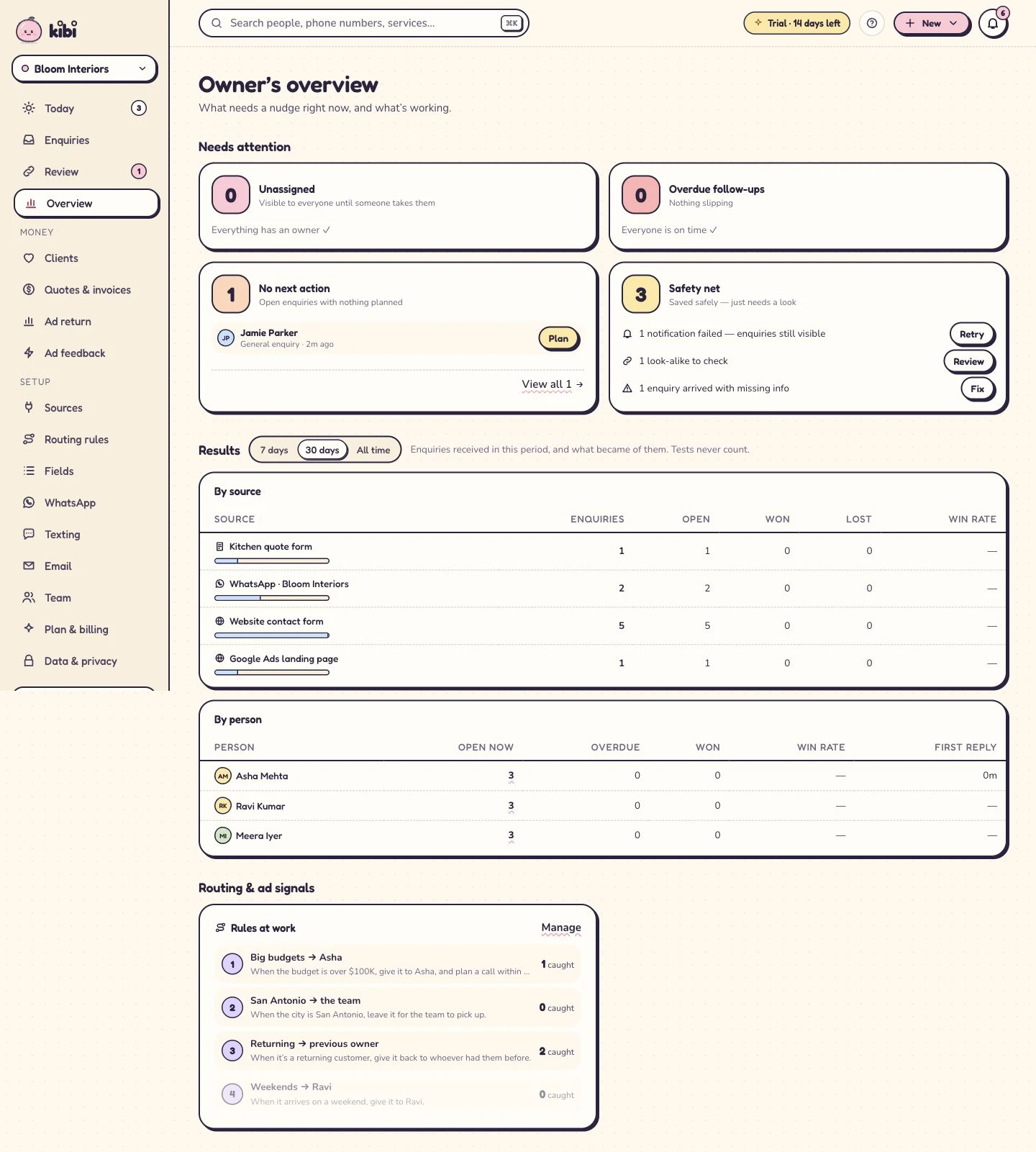
Find enquiries needing attention.
Review response time and follow-up activity to see where the team should look next.
See how work is shared.
Compare assigned enquiries across teammates and decide who needs help.
Check what each source brings.
Review the team’s recorded enquiry outcomes by source.
A few useful answers.
Is a won enquiry the same as collected revenue?
A won enquiry records your team’s outcome. Use your accounting system for collected payments and financial reporting.
Can the overview help with reassignment?
Use the workload view to decide where help is needed, then manage ownership through the enquiry workflow.
See where a little help would move the work.
Who is waiting for a reply? Which teammate has callbacks slipping? Kibi’s overview brings response, workload and recorded outcomes into one place for the owner. Owner overview.
Open the enquiries behind the summary. The request, owner and next action help you decide whether the team needs a decision, information or another pair of hands.
- Choose the question before interpreting the number.
- Inspect the relevant enquiry context.
- Leave the decision with an owner and a next action.
Find the person behind the response measure.
Review new enquiries waiting for attention, then read the relevant records. One may need a first reply; another may have contact that still needs recording.
Use the definition shown with the response measure. A contact attempt and a completed conversation can mean different things, so give the team a common way to read it.
Record the outcome before reading the result.
Choose a step. Watch the same sample enquiry move through the work.
Victoria · Kitchen project
Kitchen project · callback requested
- Source
- Website form
- Owner
- Unassigned
- Next step
- Just arrived
Victoria wants to discuss a kitchen project. The original request and website source belong with the lead.
First task: check the contact details and the request.
Victoria · Kitchen project
Owner recorded · handoff visible
- Source
- Website form
- Owner
- Asha
- Next step
- Next action needed
Asha is the named owner. A teammate can see who is handling the enquiry and avoid sending another first reply.
Ownership answers who. The next action answers what happens next.
Victoria · Kitchen project
Call tomorrow · confirm the brief
- Source
- Website form
- Owner
- Asha
- Next step
- Tomorrow · 10:30
Victoria asked for a call tomorrow. The enquiry keeps that next step, so the team has a useful reason to return.
Example next action: confirm the brief and arrange a site visit.
Victoria · Kitchen project
Customer context stays with the enquiry
- Source
- Website form
- Owner
- Asha
- Next step
- After the conversation
Record what happened, then continue with a quote or invoice where the plan includes it. Provider access and payment fees still apply.
The next step depends on the conversation: keep the outcome and customer context together.
Illustrative workflow with fictional enquiry details. See the actual Today workflow →
A busy list deserves a closer look.
A detailed project quote and a quick opening-hours question both count as enquiries. Read the work behind an assigned count before deciding someone has too much.
When a colleague needs help, confirm who can take over. Keep the reason and promised action with any reassignment, so the customer’s conversation continues smoothly.
- Consider enquiry complexity as well as count.
- Check availability before offering more work.
- Keep the context with any reassignment.
Find the promise that needs attention.
An overdue callback may need contact, a revised time or a note about a call already made. An open enquiry with no action may need a decision.
Read the latest conversation with the owner, then resolve the gap. Today gives the teammate a daily place to carry out the next action you agree.
See which enquiries became suitable work.
Review sources alongside won, lost and still-open outcomes. A channel that brings many requests may be answering a different question from one that brings suitable customers.
Keep outcome definitions consistent and investigate unknown sources. Payment and spend add their own context; a source summary gives you a place to start the review.
- Volume describes the requests that arrived.
- Recorded outcomes describe the team’s saved results.
- Unknown source information is a gap to resolve, not a channel.
Help with the work, not just the number.
In this fictional team, Asha has several projects and callbacks needing attention. Ravi can help. The owner checks the records before deciding which conversations can move.
Asha keeps the work needing her context. Ravi takes an agreed enquiry with its latest conversation and next action, rather than inheriting a name and a mystery.
Add the cost when the question is advertising return.
Ad return adds recorded spend, customers and relevant revenue on Growth. Ad return with manually entered spend. Meta ad spend import (beta). Google ad spend import (coming soon). Check which information is present before comparing costs.
Missing spend is still a gap, and recent enquiries may still be developing. Provider outcome feedback is a separate connection: Meta conversion feedback. Google conversion feedback.
End the review with a decision someone can act on.
Focus on waiting responses, workload needing help and follow-ups without a useful plan. Open a few records that explain the pattern and agree what changes next.
Owner overview is included on Starter, Team and Growth. The 14-day trial includes up to 10 people, so you can review the same fictional work from your roles.
- Pick an operating question the team can act on.
- Check the underlying records before changing the process.
- Assign the next step and revisit the result.
Still wondering?
Does a high assigned count mean somebody is underperforming?
No. Consider complexity, commitments and availability. Open the work before judging the count, then decide where a sensible handoff would help.
Can the overview tell me why a callback is overdue?
The overview helps you find it. Read the latest conversation and action history to distinguish a changed plan, unrecorded call or workload problem.
Is the source view a financial statement?
No. It shows recorded operational outcomes. Check payment, revenue and spend definitions for commercial measures, and use your financial records for accounting.
What should we do after noticing a workload problem?
Open the affected enquiries, confirm who can help and agree the handoff. Keep the next promised action clear, then use Today to carry it out.
Your next enquiry deserves a next step.
Give it a home, an owner and someone who knows when to call back.
14 days · every feature · no card
on the next step.