Quotes and invoices in one CRM
The enquiry became a job. Keep going. Send a quote customers can accept online, turn it into an invoice and see what’s been paid.
14 days · every feature · no card
Quotes and invoices on every plan. Monthly allowances are shown in the plans.
What’s included. Who makes the next move.
Quotes and invoices are on every plan. Choose around the work your team sends each month.
Starter
5 quotes + 5 invoices a month
2 people included
Kibi branding · Manual invoice follow-up
Team
20 quotes + 20 invoices a month
5 people included
Your logo · Invoice reminders included
Growth
Unlimited quotes & invoices
10 people included
Your logo · Invoice reminders included
You handle the conversation.
Your team makes the calls, sends sales follow-ups and records what happened. Planning a next step does not send the message.
Invoice reminders can run for you.
On Team and Growth, you can turn on invoice payment reminders. They stop when the invoice is paid or void. Quote follow-ups stay with your team.
Comparing CRMs with invoicing? See the two- and five-person costs ↗
Still choosing a quoting tool? Compare five small-team options ↗
CRM with invoicing.
From hello to paid.
Kibi keeps the enquiry, quote, invoice and next call together. Your team can see what the customer asked for, follow up the offer and check what’s still due. Here’s one example, all the way through.
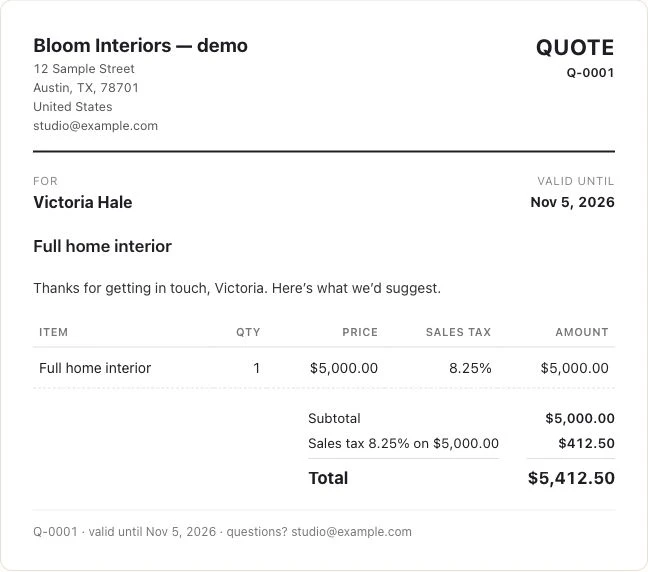
1. Make the quote.
Start from the enquiry, so the brief and customer details stay together.
Still gathering the brief? Copy a quote-request form template ↗
Send a clear quotation email ↗
Quote gone quiet? Find the right follow-up email ↗2. Get their yes.
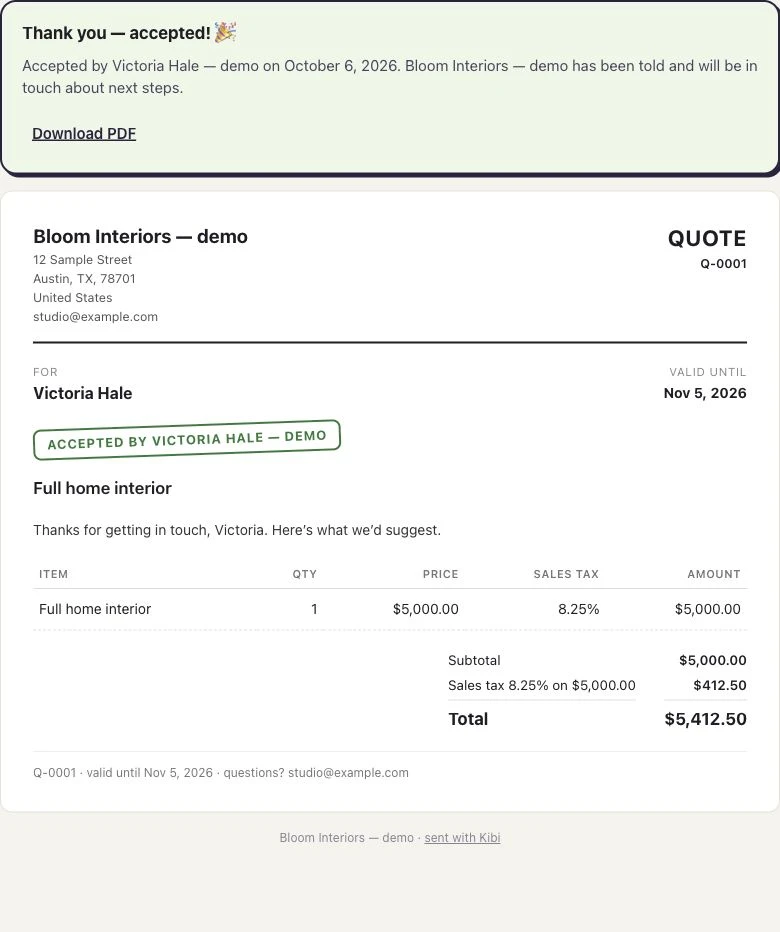
Your customer opens the link and accepts. The answer stays with the quote.
3. Issue the invoice.
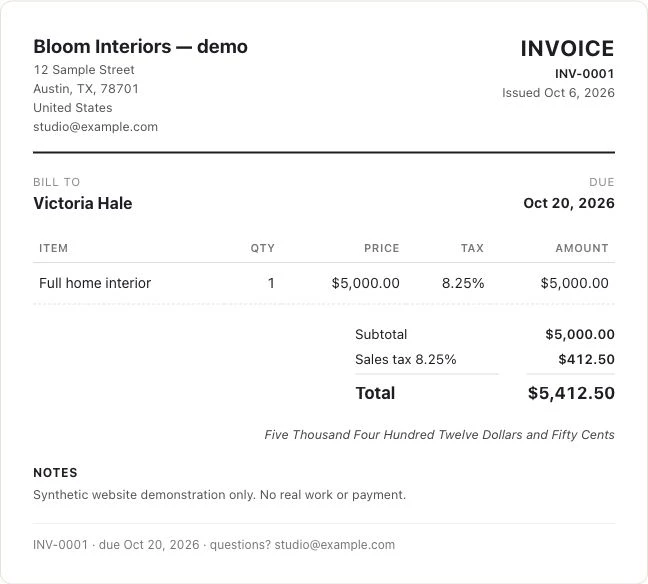
Turn the accepted quote into an invoice with your business details and tax treatment.
4. Keep the payment with it.
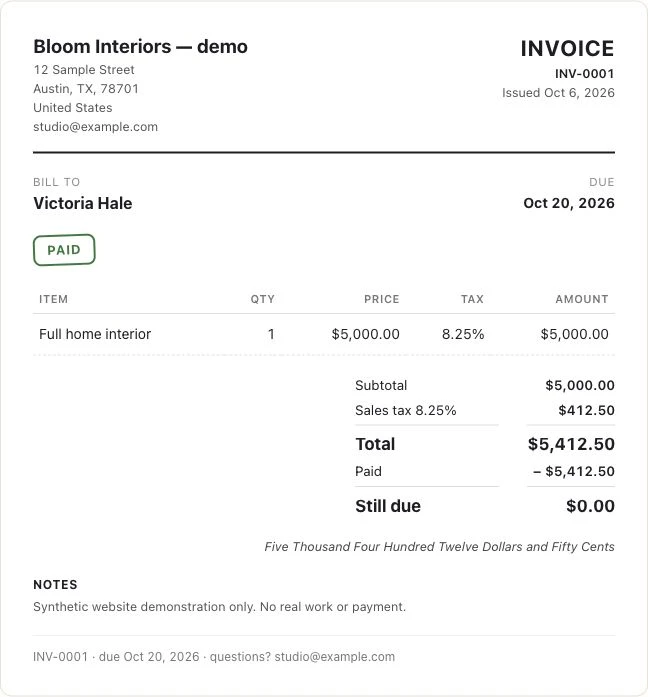
Track what is paid and what is still due. Record an offline payment or connect your own gateway.
Get paid into your own account. Kibi takes 0%; gateway fees still apply.
Ready for review.
Let the team prepare it. Let an owner or manager check it before it goes out.
Your business. Your tax setup.
Business details and the applicable tax treatment belong on the invoice, alongside the customer and agreed work.
Less chasing the balance.
Know what remains due and use payment reminders on Team and Growth.
A few useful answers.
Which plans include this?
Every plan includes quotes and invoices. Starter: 5 quotes + 5 invoices a month. Team: 20 quotes + 20 invoices a month with your logo. Growth: unlimited quotes & invoices with your logo. Drafts don't count, and customers can always accept and pay. Payment reminders: Team and Growth. The 14-day trial includes them too.
Can I make a GST invoice?
Yes. Your business setup determines the tax treatment: CGST and SGST or IGST, place of supply, HSN/SAC and the amount in words. Businesses using composition or an applicable exemption can issue a Bill of Supply. Kibi does not submit e-invoices or generate an IRN.
Does Kibi take a payment fee?
Kibi takes 0% of your payments. Money goes to your own payment account. Your gateway’s charges still apply.
Can someone check it before it goes out?
Yes. Your team can prepare quotes and invoices for an owner or manager to approve. Review happens before sending.
Keep the brief close when it becomes an offer.
The call changed the scope. The quote should reflect it. Kibi connects commercial documents to the enquiry, so the team can work from the latest conversation.
Quotes. Tax invoices. Every plan includes quotes and invoices. Starter: 5 quotes + 5 invoices a month. Team: 20 quotes + 20 invoices a month with your logo. Growth: unlimited quotes & invoices with your logo. Drafts don't count, and customers can always accept and pay. Payment reminders are on Team and Growth.
- Prepare the quote from the enquiry context.
- Keep the customer’s response with the quote.
- Continue into invoicing on a plan that includes it.
Send the work you actually agreed.
Open the latest brief before preparing the quote. Review the customer, proposed work and business details, particularly when a recent call changed the original request.
If an assumption is still open, resolve it before sending. A clear offer gives the customer something they can assess and your teammate something they can explain.
Keep the customer context after the yes.
Choose a step. Watch the same sample enquiry move through the work.
Victoria · Kitchen project
Kitchen project · callback requested
- Source
- Website form
- Owner
- Unassigned
- Next step
- Just arrived
Victoria wants to discuss a kitchen project. The original request and website source belong with the lead.
First task: check the contact details and the request.
Victoria · Kitchen project
Owner recorded · handoff visible
- Source
- Website form
- Owner
- Asha
- Next step
- Next action needed
Asha is the named owner. A teammate can see who is handling the enquiry and avoid sending another first reply.
Ownership answers who. The next action answers what happens next.
Victoria · Kitchen project
Call tomorrow · confirm the brief
- Source
- Website form
- Owner
- Asha
- Next step
- Tomorrow · 10:30
Victoria asked for a call tomorrow. The enquiry keeps that next step, so the team has a useful reason to return.
Example next action: confirm the brief and arrange a site visit.
Victoria · Kitchen project
Customer context stays with the enquiry
- Source
- Website form
- Owner
- Asha
- Next step
- After the conversation
Record what happened, then continue with a quote or invoice where the plan includes it. Provider access and payment fees still apply.
The next step depends on the conversation: keep the outcome and customer context together.
Illustrative workflow with fictional enquiry details. See the actual Today workflow →
Let the team prepare it. Give the reviewer a clear check.
Your team can prepare quotes and invoices for an owner or manager to approve before sending. The reviewer can inspect scope, customer details and relevant tax setup.
Keep requested changes with the document and enquiry. A missing address and an unresolved pricing decision need different fixes before the team sends the intended version.
- Check the customer and the proposed work.
- Review the relevant business and tax details.
- Resolve requested changes before sending.
Keep the customer’s yes with the quote.
Customers can open the quote link and accept online. The answer stays with the document, so your team can see which offer was accepted.
A quote sent is the start of a decision. Record the question still open, choose who will answer it and plan the next call in Today. Quote acceptance and an invoice payment remain separate events.
Carry the agreed work into the billing stage.
On an included plan, turn the accepted quote into an invoice. Review business details, customer information and the configured tax treatment before issuing it.
Supported India settings include GST fields, CGST/SGST or IGST, and Bill of Supply where applicable. Kibi does not submit e-invoices or generate an IRN; review settings with your adviser.
- Review business and customer details before issue.
- India setup includes place of supply and HSN/SAC, with CGST/SGST or IGST where applicable.
- Keep statutory submission requirements separate from document preparation.
See the payment and the amount still due.
Record an offline payment or use a supported gateway pay link. Check the actual transaction and remaining balance instead of treating a sent invoice as collected payment.
Stripe payment links. Razorpay payment links (beta). Funds go to your own payment account. Kibi takes 0% of your payments; the gateway’s charges and eligibility requirements still apply.
Base the reminder on the current balance.
Payment reminders. Payment reminders are included on Team and Growth. Check the remaining amount and recent payment activity, including offline payments, before relying on the next reminder.
If the customer asks a billing question, give the response an owner and keep the context clear. That helps sales and billing colleagues continue the same conversation.
- Check the remaining amount before the next reminder.
- Record relevant customer questions with the enquiry context.
- Distinguish a payment follow-up from a new sales conversation.
Try the path your team will use after the call.
Prepare a fictional quote, have the intended reviewer check it and follow the customer-response link. Then inspect the invoice, tax setup and payment route on an included plan.
The 14-day trial includes up to 10 people and the trial plan’s document features. Agree who prepares, approves and checks payments; gateways have separate requirements.
Still wondering?
Can we keep a quote and the next sales follow-up together?
Yes. Kibi keeps the quote with its enquiry. Your team can read the latest scope question, choose the person responding and plan a call or message in Today. After the customer accepts, issue the invoice. Quote follow-ups are human actions; invoice payment reminders can be enabled on Team and Growth.
Does quote acceptance mean the invoice is paid?
No. Acceptance records the response to an offer. Check the invoice’s payment record and remaining balance for what has actually been collected.
Can a manager check documents before they are sent?
Yes. The team can prepare quotes and invoices for owner or manager approval. Resolve any requested changes before sending.
Does Kibi charge a percentage of payments?
Kibi takes 0% of your payments. Money goes to your own payment account; the gateway’s charges still apply alongside the relevant Kibi plan.
Is preparing a GST invoice the same as submitting an e-invoice?
No. Kibi prepares supported tax documents from your business settings. It does not submit e-invoices or generate an IRN. Check separate statutory requirements with your adviser.
Keep the yes connected to the enquiry.
The quote, the invoice and the payment belong with the customer who started it.
14 days · every feature · no card
on the next step.