Who’s calling the next lead? Already decided.
Your next enquiry shouldn’t need a group-chat discussion. Kibi sends new leads to the right person, so your team can get on with the first hello.
14 days · every feature · no card
“Can we talk about a new kitchen?”Ben · Kitchen project
Kitchen enquiries → Asha
Next: call Ben about his kitchen.
A first call planned by the rule.
“I thought you were calling.” Let’s retire that one.
Lead assignment software decides who handles a new enquiry. In Kibi, you can send it to one person or share it across a team in turn. The customer’s question stays with the lead.
Getting leads from Facebook? Once connected, share them between your salespeople in turn. Mark a teammate Away and new assignments skip them. Less forwarding. More first hellos.
“It’s yours” should come with “here’s what’s next”.
Ben asked about a kitchen. Asha gets the enquiry, reads his question and knows why she’s calling. No second introduction needed.
A rule can plan the first step, too: call within an hour, for example. That action appears in Today. After the conversation, Asha records what happened and plans the next contact.
See who gets it.
Before the next customer asks.
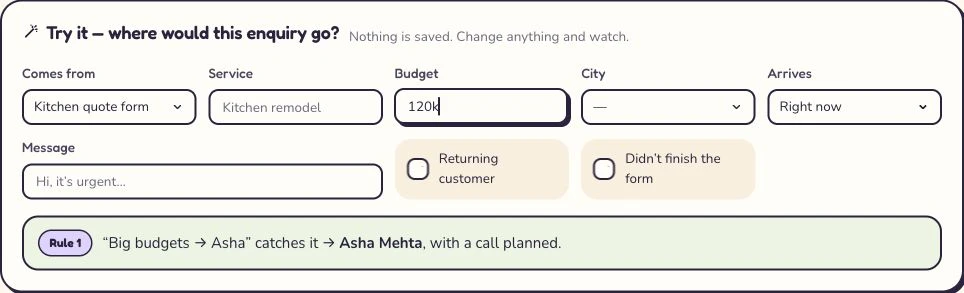
Would this kitchen enquiry go to Asha? Try it in Kibi’s routing preview. Change the service or budget and see the selected rule and person.
The preview creates no enquiry. You can get the handoff right before your team starts using it.
More calling.
Less “who’s got this?”
Automatic lead assignment and round robin are included on Team and Growth. Keep new enquiries, the person handling them and planned follow-ups together.
See plans and your whole-team price ↗Give Kibi your next team handoff.
Start with one enquiry form, a couple of teammates and a rule that fits how you work. Then open Today and see who needs a call.
14 days · every feature · no card
Before you share
the next lead.
What is lead assignment software?
Lead assignment software chooses who handles an incoming lead. Kibi can assign to one person, share new enquiries in turn or send work to the team. The selected person can read the request and see the planned follow-up in the same CRM.
Can we share Facebook leads between three salespeople and skip someone who is away?
Yes. Connect your Facebook lead form, then use a rotation for the three people handling new enquiries. Kibi skips teammates marked Away. Arrange cover for their existing callbacks separately; if everyone in the rotation is Away, new enquiries stay Unassigned for review. Routing is on Team and Growth.
How does round robin lead assignment work?
Round robin gives new leads to teammates in turn. With Asha, Ravi and Maya available, the next three leads go to Asha, Ravi and Maya. Kibi skips people marked Away. It shares new assignments; it does not measure how much work each enquiry will take.
Can I send different enquiries to different people?
Yes. Use the details supplied with the enquiry, such as its service or source, to decide who should get it. For example, kitchen projects can go to Asha while general enquiries are shared across the team.
What happens when someone is away?
A rotation skips a teammate marked Away. Existing enquiries and promised callbacks stay with their current person until you arrange cover. A rule aimed at one Away person, or a rotation with everyone Away, leaves the new enquiry Unassigned for the team to review.
Does Kibi make the call or send the follow-up for me?
Assignment chooses who is responsible. A rule can also plan a first action, such as a call within an hour. Your teammate makes that call and records what happens. Today keeps the agreed next step easy to find.
Which plans include automatic lead assignment?
Routing rules and round robin are included on Team and Growth. Try them during the 14-day free trial, with no card needed. See the pricing page for the plans and prices for your country.
Can I check who gets a lead before using a rule?
Yes. Kibi’s routing preview shows which rule matches and who would get the enquiry, without creating a real lead. Try a few of your usual requests, then connect the source your team uses.
Let the next lead skip the group-chat debate.
A clear person to call. The customer’s question ready to read. A better place to start the conversation.
14 days · every feature · no card
on the next step.