Capture and track leads in one place
They made the first move. Don’t lose the lead. Bring in enquiries from connected forms, ads and email. See what each person asked, who will reply and when to follow up.
14 days · every feature · no card
Your data is yours. Export any time.
See what happens after the enquiry ↓Email Ben about the kitchen brief.
Due today · a person makes the replySaved is a start.
A useful reply is the next move.
Catch the interest. Keep the story.
Kibi is lead capture and tracking software for small teams. Bring supported enquiries into one place, keep their submitted answers and give each request an owner and a next action.
Less hunting through notification emails. Fewer “who’s calling them?” moments. More room for a reply that sounds like you actually read the request. Because you did.
Paid for the lead? Give it somewhere to go.
The website form. The Facebook enquiry. The email asking about your service. They arrive differently, but somebody still needs to read the request and make the next move.
Bring the request into Kibi and choose who will reply. They can read what the customer needs before making the first call.
Ways to bring leads into Kibi
Start with the source your team uses most. Check WhatsApp options ↗
They already told you. Take that into the call.
“A kitchen refresh. After the school run. Please email first.” That is a much better opening than a name and number with no story attached.
Keep their contact details, service request and message together. The person replying can get straight to the question instead of asking for the same details again.
Bring the right answers with the enquiry.
Keep the customer’s answers with their enquiry, ready for the first reply.
Check the form connection ↗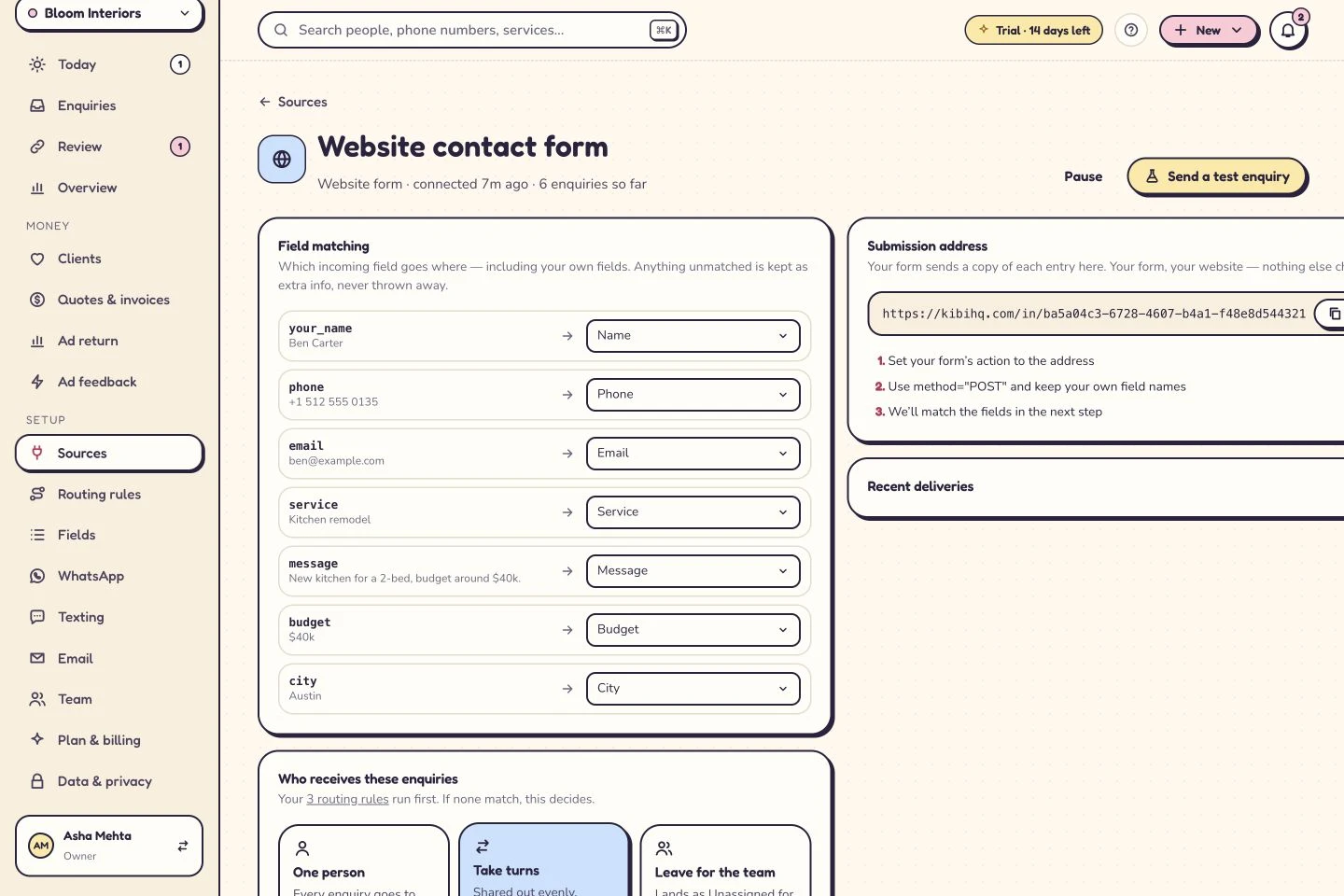
Track who will reply and when to follow up
Who is replying? What are they replying about? When should they come back to it? Keep those answers beside the enquiry, ready for the person doing the work.
Choose who handles the enquiry, or let routing rules share new leads on Team and Growth. Plan the next call in Today so the team knows what happens next.
Working from an Excel tracker? Import three practice enquiries first. Check who is handling each one and whether the next callback appears in Today before you move the rest.
Keep the source
Know which connected route brought the request in.
Name the person
Give the next reply a clear responsibility.
Plan the contact
Return to the question, callback or brief you agreed to discuss.
A teammate can see the plan, too.
Asha is handling Victoria’s enquiry. The next call is tomorrow at 10, with the details ready for whoever gets back to her.
Explore Today ↗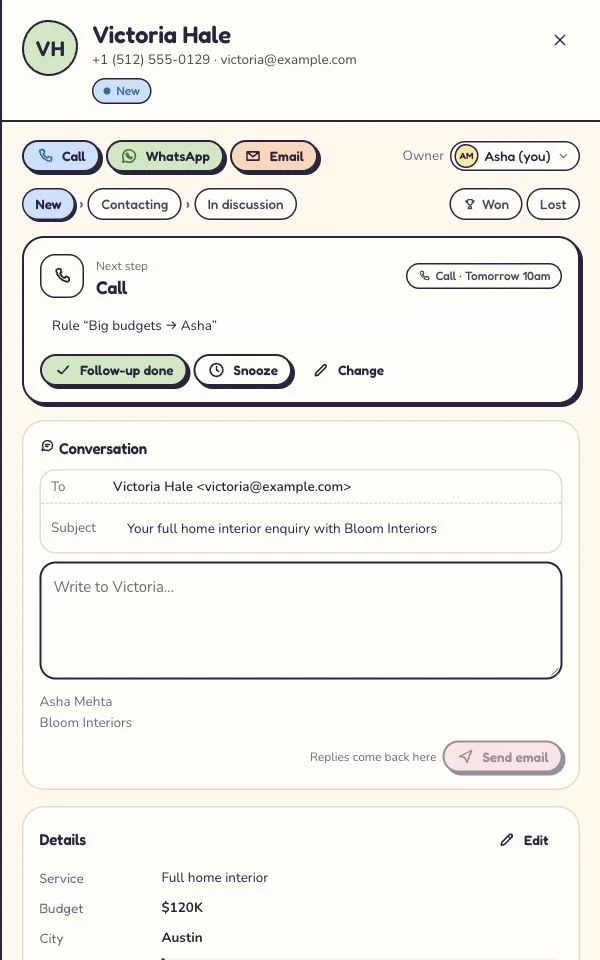
They’re back. Lovely. What’s different?
A second form might be a duplicate. Or a new project. Read the request before treating a familiar name as a problem to remove.
CSV import gives you field matching and a review of new, returning and look-alike rows. Start with a small sample, check the records and keep the original sheet as your archive.
Count your people.
Choose what they need.
Included people are part of your subscription. Add more at the current extra-person rate, within the plan’s limit. Check the price for your whole team before you decide.
See your whole-team price ↗Country prices and billing periods are shown on the pricing page.
Quotes: every plan. Invoices: every plan. Payment reminders: Team and Growth.
Try every feature for 14 days with up to 10 people. No card needed. Messaging usage is billed separately.
Good forms. Better follow-through.
Keep a compatible website form, or build with Kibi Forms for WordPress or Framer. You don’t need a website makeover to ask better questions.
The WordPress plugin’s local builder and entry inbox are free. Connecting Kibi CRM is optional. Its owners, shared enquiry context and daily follow-up give the team a place to continue.
WordPress keeps your uploaded files on your own site. Connect the form answers to Kibi CRM when your team needs shared follow-up.
Your first test doesn’t need a whole sales team.
Start with the source you use most. Send a fictional enquiry. Check the name, reply details, source and answers. Choose its owner, then plan one useful follow-up.
Now ask a teammate to find it. Can they understand the request and see what happens next? That is the handoff worth testing before you bring the rest of the leads over.
Try Kibi CRM free for 14 days, with no card needed. Start with one enquiry and invite a colleague. Paid plans are there when you’re ready to continue.
14 days · every feature · no card
Before you give
Kibi the next lead.
What does lead capture and tracking software do?
Lead capture brings an enquiry into the CRM. Lead tracking keeps its source, owner, activity and next action together as the conversation develops. Kibi supports connected sources and manual entries; it is not anonymous visitor identification or a prospect database.
Can Kibi capture Facebook and Instagram lead ads?
Facebook & Instagram lead ads (beta). Bring new lead-form enquiries into Kibi so your team can see who will call. Our team can help you get connected.
Can I connect Google lead forms?
Google lead forms (coming soon). For now, bring enquiries through your website form, forwarded email or spreadsheet, or add a phone enquiry by hand.
Do I need to replace my website form?
Often you can keep it. Connect a compatible form or forward its enquiry emails into Kibi. Your design and questions can stay where they are.
Can enquiries from Gmail or Outlook reach Kibi?
Yes. Forward the enquiry emails your team needs from Gmail or Outlook. They arrive in Kibi for follow-up; your other email stays in your mailbox.
My sales team tracks leads in Excel. Can we try Kibi before moving the whole sheet?
Yes. Save three sample leads as a CSV and try importing them into Kibi CRM. Check who is handling each enquiry and whether the next callback appears in Today. Keep the original sheet until you have checked the imported records and any fields your team relies on.
Does Kibi assign every lead automatically?
Choose the person yourself, or use routing rules on Team and Growth. Share leads by the rules you choose, or take turns between available teammates.
Does a saved lead mean the customer has been contacted?
Saving is the first step. The person handling the lead makes contact and records the reply. Today keeps their next call or message on the list.
Is Kibi Forms free if the CRM is paid?
Kibi Forms for WordPress has a free local builder and entry inbox; its CRM connection is optional. Kibi CRM has a 14-day trial, then a paid plan. WordPress uploaded files stay in WordPress and are excluded from CRM and integration sends.
Give the next “hello” a proper home.
Give it a home, an owner and someone who knows when to call back.
14 days · every feature · no card
on the next step.