Keep the chat. Lose the “who’s calling?”
The group has moved on, but a customer still needs a callback. Compare how WhatsApp groups and Kibi keep enquiry responsibility and follow-ups clear. Internal groups are not imported.
14 days · every feature · no card
On this pageExplore the comparison
Pick the situation. Follow the decision.
Find the person handling it.
See the enquiry’s owner without scrolling through the team discussion.
Read the customer conversation.
Connected business-number messages stay with the enquiry, ready for the next contact.
Keep the callback in Today.
Plan the next action so it stays visible after the group conversation moves on.
Quotes on every plan. Tax invoices and pay links on every plan. Payment reminders on Team and Growth. Kibi adds no payment fee; your gateway’s fees still apply.
After the yes →Compare the work your team does.
| Decision | Kibi | WhatsApp groups |
|---|---|---|
| Team discussion | Keep your existing team chat | Quick coordination and conversation |
| Enquiry responsibility | Named owner in the record | Agreed messages and team conventions |
| Follow-up | Planned action in Today | Messages, pins or another reminder system |
| Customer conversations | Supported business-number connection | Group history does not become a CRM automatically |
When WhatsApp groups is the better choice
Keep group chat when quick team coordination is all you need. Consider a separate enquiry record when responsibility and the next callback get buried in the conversation.
Questions before you choose.
Does Kibi import our WhatsApp groups?
Internal team groups are not imported. Kibi connects eligible business-number customer conversations; keep the group for coordination and the enquiry for ownership and follow-up.
Do we need to stop using group chat?
No. Keep team discussion in the group while enquiry owners and next actions stay in Kibi.
What should we include in the cost comparison?
Include Kibi’s plan, people and separate messaging-provider charges. Your team group can stay in use; compare the follow-up work you need with the cost of adding the CRM.
Keep the chat. Give the callback an owner.
Your team group is useful for quick questions and coordination. Kibi is worth considering when customer promises need a clearer home than the discussion around them.
You can keep both. Agree where the enquiry owner and next action live, then use the group to help the person doing the work.
“I can help” still needs a decision.
The group may contain several helpful replies without an accepted callback owner. Before changing tools, check whether your team has agreed how someone takes responsibility.
One enquiry. A person. A plan.
Choose a step. Watch the same sample enquiry move through the work.
Victoria · Kitchen project
Kitchen project · callback requested
- Source
- Website form
- Owner
- Unassigned
- Next step
- Just arrived
Victoria wants to discuss a kitchen project. The original request and website source belong with the lead.
First task: check the contact details and the request.
Victoria · Kitchen project
Owner recorded · handoff visible
- Source
- Website form
- Owner
- Asha
- Next step
- Next action needed
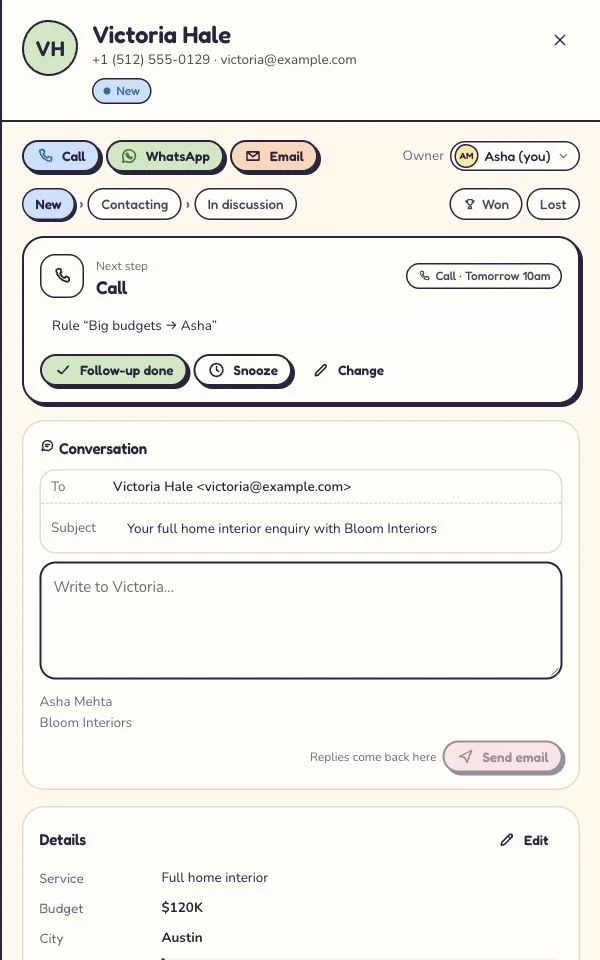
Asha is the named owner. A teammate can see who is handling the enquiry and avoid sending another first reply.
Ownership answers who. The next action answers what happens next.
Victoria · Kitchen project
Call tomorrow · confirm the brief
- Source
- Website form
- Owner
- Asha
- Next step
- Tomorrow · 10:30
Victoria asked for a call tomorrow. The enquiry keeps that next step, so the team has a useful reason to return.
Example next action: confirm the brief and arrange a site visit.
Victoria · Kitchen project
Customer context stays with the enquiry
- Source
- Website form
- Owner
- Asha
- Next step
- After the conversation
Record what happened, then continue with a quote or invoice where the plan includes it. Provider access and payment fees still apply.
The next step depends on the conversation: keep the outcome and customer context together.
Illustrative workflow with fictional enquiry details. See the actual Today workflow →
Make the handoff explicit.
A group can work well when everyone uses the same convention. Agree what an accepted handoff contains:
- The customer’s request and preferred contact method.
- One named owner who accepts the work.
- The next action and when it is due.
Customer WhatsApp and the team group do different jobs.
Kibi does not import internal WhatsApp groups or turn their history into enquiry records. Its supported business-number connections concern customer conversations.
Kibi’s WhatsApp connection is live. Keep the Business app, connect your work numbers and see who will call next. Your existing group can still help the team coordinate around those enquiries.
Save the decision after the discussion.
A technical question may take ten chat messages to resolve. The enquiry record needs the useful answer and the promise made to the customer.
Kibi brings that work around an enquiry owner and planned action, with routing on Team and Growth. Compare it with your group-plus-task routine, including any tools you already use to record decisions.
What would the subscription change?
The group is already part of your day. A CRM adds a bill and a habit, so name the recurring gap it would resolve.
Price Kibi’s people, plan and separate messaging use alongside your current supporting tools. Quotes are on every plan; invoices on every plan. Include commercial work only if your team needs it.
Start with conversations that still need an answer.
You do not need to recreate years of chat to try a clearer handoff. Start with new enquiries from one supported source and selected active requests.
Give each an owner, current context and next action. Keep historical group information under your normal policies, and make the new working agreement clear to everyone.
Let someone who missed the chat take over.
In Kibi’s 14-day trial, invite up to 10 people and recreate a customer handoff using fictional details.
Ask a colleague who missed the discussion to continue it from the enquiry. Compare that with finding the answer in your existing group-plus-task setup. Choose the routine your team can maintain.
The next shift should inherit the promise.
“Call tomorrow” needs a date, an owner and the reason for calling. Otherwise the next shift gets a puzzle when it needs a starting point.
Record the latest agreement where the receiving colleague expects to find it. If your current group routine already does that reliably, recognise what is working.
Let the customer receive one clear answer.
An internal discussion can be lively. The customer still needs an agreed response from someone who knows the latest decision.
Before sending a second message, check what the owner already promised. Choose a routine that helps colleagues support that conversation without adding contradictory replies.
Still wondering?
Does Kibi import internal WhatsApp groups?
No. Supported business-number customer conversations and enquiry records are separate from internal team groups.
Do we have to stop discussing leads in chat?
No. Keep the discussion. Record decisions that change the customer’s owner, next action or promised response in the agreed place.
Can we start with new enquiries only?
Yes. A supported source and a few active requests are enough to pilot the ownership routine. Historical group import is not required.
Your next enquiry deserves a next step.
Give it a home, an owner and someone who knows when to call back.
14 days · every feature · no card
on the next step.