Kibi vs Zoho Bigin. Who’s making the next move?
The enquiry looks promising. Then the inbox gets busy. Compare Kibi and Bigin for the callback, the handover and everything that follows a yes.
14 days · every feature · no card
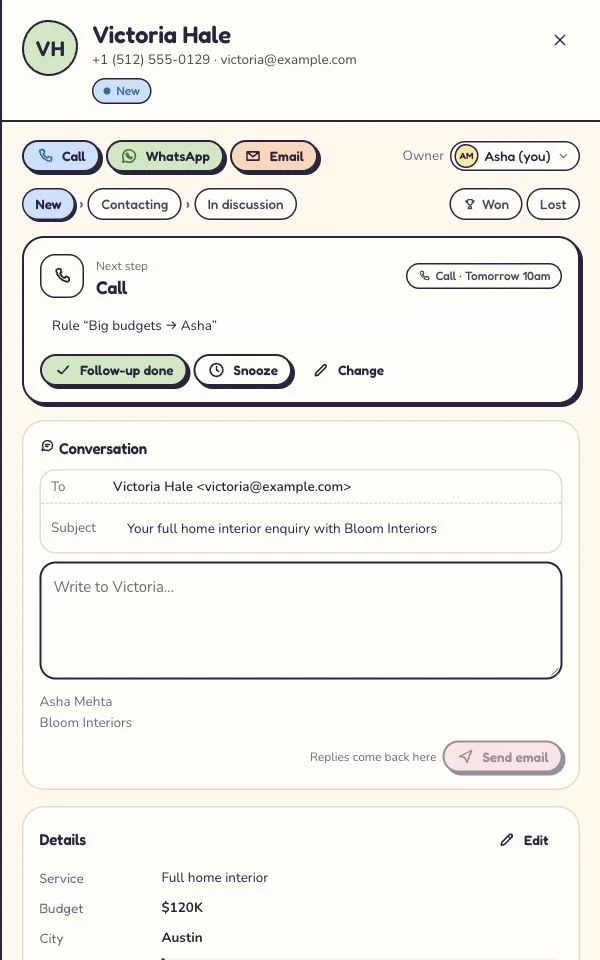
Choose Kibi for the next conversation.
Give incoming enquiries an owner, bring callbacks into Today and carry the sale through quotes and payment. A focused daily routine for a small sales team, with commercial features on the relevant plans.
Choose Bigin for connected team processes.
Build separate pipelines for customer-facing work, automate stage changes and use the Zoho connections your business already relies on. A strong fit when those connected processes shape your day.
On this pageExplore the comparison
Pick the situation. Follow the decision.
Compare the work your team does.
| What matters | Kibi | Zoho Bigin |
|---|---|---|
| Daily follow-up | Today groups new, due, overdue and unplanned enquiries. Guided plans line up the next human call or message. | Workflows can create follow-up activities, send emails, update fields and assign owners. Date-based triggers require Premier or Bigin 360. |
| Stages and team processes | List and board views, configurable stage labels and milestones. Routing rules on Team and Growth. | A small-business CRM centred on team pipelines and customer-facing processes. Separate team processes have their own stages, fields and access settings. |
| Website and ad enquiries | Forms, selected forwarded emails and CSV intake. Facebook & Instagram lead ads (beta). Google lead forms (coming soon). | Built-in web forms; Meta and Google lead forms through LeadChain, with its own plan and sync allowances. |
| WhatsApp (available). Supported number and provider conditions apply; WhatsApp usage is billed by the provider. | Shared WhatsApp messaging is documented on Express, Premier and Bigin 360. Meta account, number eligibility and connection setup apply. | |
| Quotes, invoices and payment | Quotes, online acceptance, invoices and pay links on every plan. Payment reminders on Team and Growth. | Books/Invoice integration for estimates and invoices; Writer for merged documents. Payment links from Express, with supported provider setup and terms. |
| AI help | Connect Claude or ChatGPT with owner and member consent. Read permitted records or allow supported updates and quote drafts; customer sends stay with a person. | Zoho MCP connects compatible external assistants. Built-in Zia is documented on Premier and Bigin 360 in supported data centres; setup and usage limits apply. |
| Starting point | General setup or the Roofing pack: useful fields, words, milestones and a starter form to review and publish. | Industry templates plus configurable team pipelines. |
| People and trial | 2 people included on Starter, 5 on Team and 10 on Growth. A 14-day trial; then a paid plan. | Paid editions use per-user licensing with monthly or yearly billing. A single-user Free edition and a 15-day trial are available; consult current local pricing and edition limits. |
Official sources and edition details
When Zoho Bigin is the better choice
Bigin may be the better choice when separate sales, onboarding and service pipelines organise your business, or when connected Zoho Books, Invoice and other Zoho services already do useful work. Keep those working connections in the decision alongside Kibi’s daily enquiry and commercial workflow.
“Call me tomorrow” deserves a tomorrow.
A pipeline says where the sale stands. A useful working day also needs to say who should call, when they promised to, and what the customer asked.
Kibi’s Today separates new enquiries, due calls, overdue work and records with no next action. Guided follow-up plans arrange the next touch after the previous action is completed. Your person still makes the call or sends the message.
Bigin combines pipeline records with activities and workflow rules. Those rules can create tasks, send emails, assign owners and update fields; date-based triggers depend on the edition.
Both have a place for stages. Kibi also has a board. The question is which starting screen helps your team get on with the next conversation.
Two Zoho tabs open? Bigin and Zoho CRM are separate products. Our Bigin vs Zoho CRM guide untangles that choice and shows where Kibi belongs on the shortlist.
A nice form needs a useful landing.
In Kibi, website forms, selected forwarded enquiry emails, CSV imports and manually added requests feed the enquiry record. Keep the question and source attached so the first hello has something to go on.
Have a WordPress site? The free Kibi Forms plugin can keep its local form inbox and optionally forward eligible entries to Kibi CRM. The plugin can work on its own; CRM plans are separate.
Bigin has its own web forms, including embedding, acknowledgements and owner assignment. LeadChain connects advertising sources such as Meta and Google lead forms, with its own plans and sync allowances. A free LeadChain tier exists.
Kibi’s current ad intake is Facebook & Instagram lead ads (beta); Google lead forms (coming soon). Choose a supported capture route today rather than assuming every connection in either product is ready for your account.
Let the promise travel with the enquiry.
Your teammate takes Friday off. The customer doesn’t. Whoever takes over needs the question, the recent conversation and the promised next step together.
Kibi keeps those on the enquiry. Set per-person viewing and action rights; add rule-based assignment and round-robin on Team and Growth. A named owner gives the handover somewhere to land.
Bigin has roles, profiles and pipeline permissions, too. Its separate team pipelines can support a sales-to-onboarding handover or other connected processes. That structure may be valuable when several teams handle the same customer.
Kibi’s stage labels and milestones can use your words. The Roofing pack adds a ready starting point for fields, milestones and a form. Bigin also offers industry templates; neither choice removes the need to review your setup.
Keep the quote close to the conversation.
In Kibi, prepare a quote from the enquiry and let the customer accept online. Quotes are on every plan. The agreement stays connected to the person who asked for it.
Create invoices and pay links on every plan. Add payment reminders on Team and Growth. Stripe links are available; Razorpay payment links (beta). Kibi adds no transaction fee, while your payment provider’s fees still apply.
Bigin can create and view estimates and invoices through its Zoho Books or Invoice integration on Express and above. Writer merge templates provide another document route. A business already using those tools may prefer keeping them connected.
Bigin also offers payment links on paid editions through Zoho Checkout and an eligible gateway. Supported locations, provider setup and fees apply. Compare how the accepted offer and payment record connect in the tools you will keep.
Kibi’s Growth ad-return view also connects recorded revenue with source and spend. Manually entered spend is available; Meta ad spend import (beta) and Google ad spend import (coming soon). This helps review recorded return, without promising that attributed revenue proves profit.
Ask the assistant. Keep the human in charge.
Kibi can connect to Claude or ChatGPT. Ask what needs attention, look up an enquiry or draft a quote. The owner enables connections, then each person grants access within their own permissions.
Read-only access and permitted changes are separate choices. You can revoke a connection. Messages, quotes and invoices still go to customers through a person in Kibi; the assistant has no customer-send tool.
Bigin also connects external assistants through Zoho MCP. Separately, its built-in Zia provides writing help, summaries and configured agents on Premier and Bigin 360 in supported US, India and Australia data centres, using AI credits.
For either external connection, check the assistant plan, authorised tools and records each person can access. Try one useful question and one permitted change. The best helper is the one that fits the way your team already works.
Count the team, then the useful extras.
Kibi includes 2 people on Starter, 5 on Team and 10 on Growth. Additional people have the applicable per-person price and plan limits. The pricing page shows your detected country’s currency and billing options.
Capture, daily follow-up, quotes and invoices come with every plan. Add routing, business texting, your logo and payment reminders on Team and Growth. Ad return is on Growth. Managed texts use prepaid credits.
Check the document allowance as well as the people included. Every Kibi plan supports quotes and invoices, with monthly counts shown in the shared plan details. Quote follow-ups are human; optional invoice payment reminders are on Team and Growth.
Bigin’s paid editions use per-user pricing. It also has a single-user Free edition and a 15-day paid-edition trial. Add the connected services and usage your setup actually needs, without assuming every integration costs extra.
For a fair team total, compare the same number of people and billing period. Include messaging usage and essential connections. There is no universal saving to quote before those choices are made.
Give Kibi the enquiry that nearly slipped away.
A working CRM deserves a reason to be replaced. Pick the thing that hurts now: forgotten callbacks, an awkward handover or too many steps between an enquiry and an accepted quote.
Start with the demo, then use Kibi’s 14-day trial with up to 10 people. Bring a small authorised sample and keep your existing intake running while you check the new route.
For a Bigin move, review the CSV fields and duplicates first. Activities, files and pipeline relationships may need separate handling. A successful contact import is not proof that every part of your history came across.
If Kibi makes that daily job easier, you have a useful reason to switch. If Bigin’s pipelines and Zoho connections already do it well, keep the relationship. No awkward breakup required.
- Capture one request from the source your team uses. Can the owner see the original question?
- Let a colleague take over a promised callback. Can they continue without asking the customer to repeat it?
- On the relevant plan, prepare an offer and follow its acceptance into the invoice and payment record.
Give both routines the same five enquiries.
Bring the same questions, callbacks and handovers to Kibi and Bigin. Open a scenario, try both routes and note what the next person can actually find.
This is a fictional trial worksheet, not a completed head-to-head test. The product comparison uses the official sources linked on this page.
A new quote request
A kitchen enquiry arrives through the website. The customer asks for email first.
Try it in Kibi
Check the source and submitted answers, choose who replies and plan the first email.
Try it in Bigin
Check the web form, field mapping and owner assignment in the edition you are testing.
A useful result: A colleague can find the original question and name the person replying.
A callback for tomorrow
The customer can talk tomorrow at 10 about the revised kitchen layout.
Try it in Kibi
Plan the call with its time and purpose. Find it in Today without recreating the story.
Try it in Bigin
Create the call or task beside the relevant record and check its reminder settings.
A useful result: The same time and reason reach the person making the call.
A colleague needs cover
The person handling the enquiry is away before the promised callback.
Try it in Kibi
Arrange cover for the existing enquiry and let the new person read the notes. Rotation for new leads is a separate choice.
Try it in Bigin
Reassign the record or activity as needed and check that the covering person has access.
A useful result: The covering person can continue without asking the customer to repeat the brief.
The customer accepts the quote
The customer says yes. Someone now needs to prepare an invoice.
Try it in Kibi
Find the accepted quote and create the invoice from the enquiry. Check the monthly document allowance.
Try it in Bigin
Test the estimate and invoice route with Zoho Books or Invoice. Check the connected account and billing-person access.
A useful result: The invoice matches the accepted scope and the team can find its payment status.
An older enquiry comes back
A previous customer asks about another room. Their old record is in a CSV.
Try it in Kibi
Preview a small authorised CSV sample, review matches and keep the new request distinct where needed.
Try it in Bigin
Test import mapping and duplicate handling for the target module; check activities and files separately.
A useful result: The original context survives and the new request is not mistaken for a disposable duplicate.
Questions before you choose.
What is the main difference between Kibi and Zoho Bigin?
Kibi centres a small team’s daily enquiry follow-through: owner, Today, planned contact and the path from quote to payment. Bigin centres configurable team pipelines and connected customer processes. Both support follow-ups and stages; the useful difference is how your people organise the work.
Does Bigin have WhatsApp, and can I use WhatsApp in Kibi?
Bigin documents WhatsApp on Express, Premier and Bigin 360, with Business API setup. For Kibi, WhatsApp (available). Check the existing number’s connection route before moving it. Meta bills you directly for WhatsApp. Kibi never charges your credits for it. Twilio or MSG91 bills you when connected through them.
Can both CRMs create quotes and invoices?
Yes. Kibi has quotes, online acceptance, invoices and pay links on every plan. Payment reminders are on Team and Growth. Bigin connects to Books or Invoice for estimates and invoices, and Writer for documents; payment links are listed from Express. Connected-service and provider terms apply.
How do the AI options differ?
Both connect compatible external assistants. Kibi’s consented Claude/ChatGPT connection respects member access and has no customer-send tool. Bigin offers Zoho MCP plus built-in Zia; Zia needs Premier or Bigin 360, a supported data centre and AI credits. Compare enabled tools, permissions and assistant-plan requirements.
Are Kibi and Bigin free?
Kibi CRM has a 14-day trial, then paid plans. Bigin offers a single-user Free edition and a 15-day trial of its paid editions. Kibi’s separate WordPress and Framer plugins cost nothing to install; that does not make a Kibi CRM subscription free.
Can I move my Bigin contacts and history to Kibi?
Start with a supported CSV sample and map the fields Kibi accepts. Check owners, duplicate handling and open follow-ups. A contact import does not promise to transfer Bigin’s activities, files, pipeline relationships or connected services. Keep the original export and plan those separately.
Is Bigin the same as Zoho CRM?
No. Bigin and Zoho CRM are separate products with different editions and scope. This comparison covers Bigin. If your shortlist includes Zoho CRM, review that product’s automation, reporting and configuration separately.
Should we switch if our Bigin setup already works?
Switch for a specific improvement you can demonstrate: a clearer daily queue, an easier handover or fewer steps from enquiry to accepted quote. If Bigin’s pipelines and Zoho connections already handle your work well, keeping that setup can be the better decision.
Let the next enquiry settle it.
Try your own callback, handover and quote in Kibi. Give your team a daily routine they can make their own.
14 days · every feature · no card
on the next step.