You wanted a better way to handle enquiries. Now you have two Zoho tabs open and a small identity crisis about whether your team needs a pipeline or an entire sales platform. The software shopping has become a little clingy.
Bigin is Zoho’s pipeline-focused CRM. Zoho CRM offers a broader range of sales-process and configuration options, depending on the edition. Both can help a small team; the useful distinction is the work you need to run and the controls you need around it.
Here is our angle: if the problem is missed replies, unclear ownership and callbacks that live in someone’s head, put Kibi CRM on the shortlist too. We make Kibi. We will show you where it fits, while giving the two Zoho products a fair look.
Kibi has a 14-day free CRM trial, then a paid plan. This guide compares working routines and published capabilities, with a small test you can use before importing your customer list.
Bigin vs Zoho CRM: the useful differences.
Bigin organises customer-facing work around team pipelines. Zoho CRM gives you a broader sales system to configure, with edition-dependent options such as custom modules, forecasting and process management. Start by writing down the requirement that makes you choose one over the other.
For example: “We need one shared enquiry pipeline and tasks” is a different brief from “A deal must pass a defined approval process before a salesperson can move it forward.” Both are reasonable. They ask different things of the software.
| Your decision | Bigin | Zoho CRM |
|---|---|---|
| Working structure | Team pipelines, stages and activities. | Leads, contacts, accounts and deals, with wider module and configuration options. |
| Workflow tools | Workflows and stage automation, with rules and actions limited by plan. | Workflow rules plus edition-specific process tools. |
| Process controls | Evaluate the available stage rules against your actual handover. | Blueprint is listed for Professional, Enterprise and Ultimate. Formal approval processes are listed for Enterprise and Ultimate. |
| Team needs | Check pipelines, records, fields and the access each colleague needs. | Check edition, licenses, roles, configuration and the modules each colleague uses. |
| Best way to decide | Test one complete pipeline and the colleague covering its next task. | Test the exact process, reporting or configuration requirement you are buying. |
What brought you here: a pipeline, a process or a missed promise?
Choose the closest job below. It gives you a starting point for a trial, not a calculated winner. The comparison remains in the table above, so you can check the trade-offs without playing with the controls.
Try naming the ordinary frustration out loud. “We cannot tell who is calling this person” is a useful requirement. “We want the most powerful CRM” still leaves everyone guessing what Monday will look like.
If the next reply is the problem, meet Kibi CRM.
A website enquiry arrives. Someone sends a brochure. The customer asks for a revised scope and a call on Friday. Kibi gives that conversation a shared home: the enquiry, its owner and the next human action.
Today brings new enquiries, planned follow-ups, overdue work and open enquiries without a next action into view. Your salesperson can begin with the work waiting for a response, then read the record before replying.
Bring supported website-form enquiries, selected forwarded enquiry emails, checked CSV records and manual requests into that routine. Choose the sources you use and test the resulting record. You can begin with a small, representative batch.
For a growing team, routing rules and round robin are on Team and Growth. Quotes with customer acceptance are on every plan; tax invoices are on every plan. The offer can stay connected to the enquiry that started the conversation.
The real Kibi demo screens below show a due call, the updated enquiry and a customer-facing quote. The people and project details are fictional. Use the screens to inspect the working record, then try the routine with your own team.
This is where we would love your next hello. Give Kibi a 14-day free trial, check the paid plan you would keep, and ask a covering teammate to find the latest question and the promised next action.
REAL KIBI SCREENS · FICTIONAL DEMO DETAILS
Find the call that needs attention
Today shows Victoria’s overdue call before it is rescheduled. 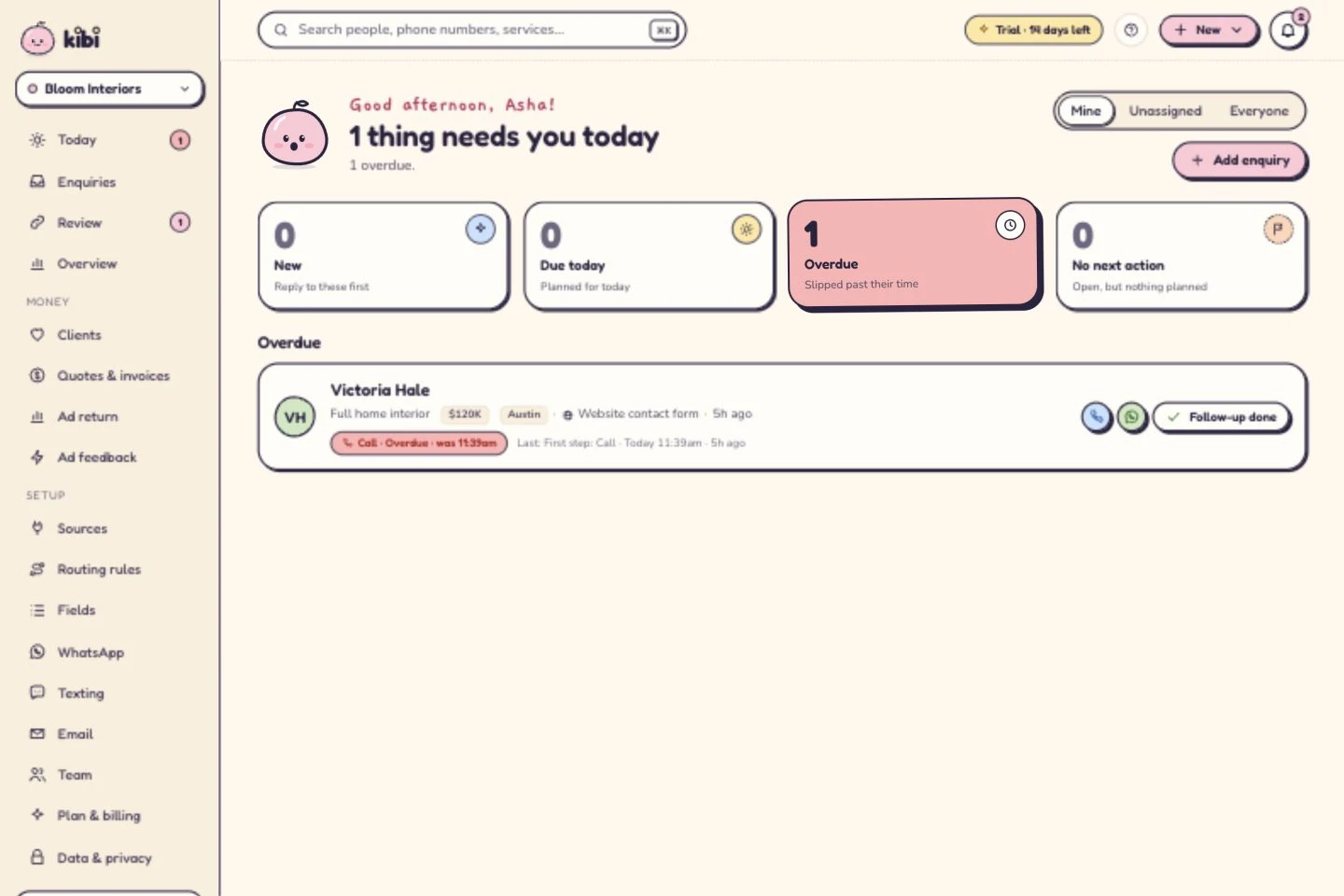
See who owns the next conversation
Asha owns the enquiry. The call is now planned for tomorrow at 10. A person makes the call; this is not an automatic message. 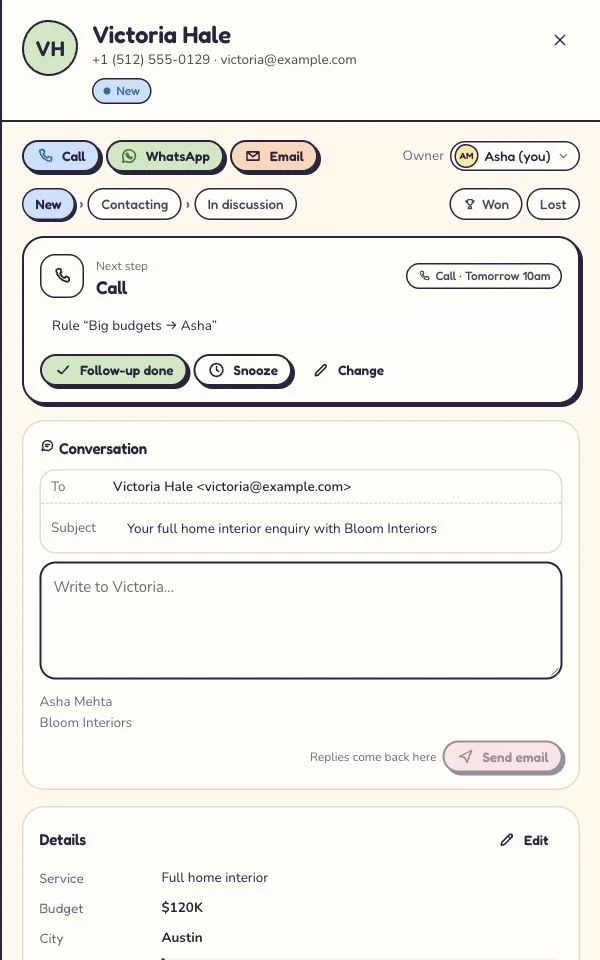
Give the offer its own document
The customer-facing quote for the same fictional project. All amounts here are sample project figures, not Kibi subscription prices. 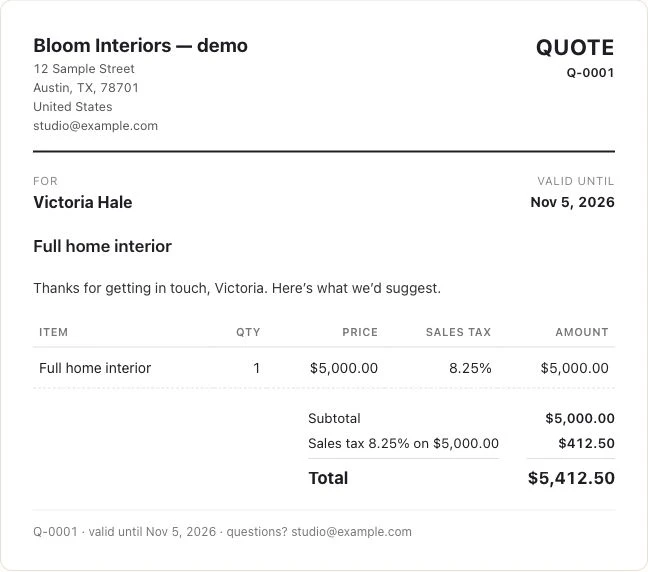
Captured 6 October 2026 in our isolated demo. Screens show different moments, not an automated sequence. Expand a step to see the screen.
Choose Bigin for a pipeline your team can work from.
Bigin documents team pipelines for different customer-facing operations, with stages and pipeline-specific information. That is a useful starting point when the team can describe its work as a clear sequence and wants to keep activities close to it.
Picture a small studio moving an enquiry through discussion, proposal and a decision. The useful test is whether the team can find the relevant record, update it and finish the agreed task without needing a separate explanation.
Bigin also documents forms, email, telephony, WhatsApp and integrations. Workflows can take routine actions and connect records across pipelines. Choose the plan and connection that cover the requirement; a smaller product can still have several moving parts.
Give the person who will cover a day off the same test as the owner. Can they understand the record, identify the current responsibility and find the task? Let the actual handover tell you whether the setup fits.
Choose Zoho CRM when the process needs more structure.
Zoho CRM’s current edition table includes custom modules, forecasts and a wider range of configuration and reporting tools. Some of those are available in lower paid editions; more elaborate controls have their own edition requirements.
Its Blueprint tools let a business define stages and guide how a record moves between them. The current table lists Blueprint from Professional upwards, while approval processes are listed for Enterprise and Ultimate. Name the control you need before choosing an edition.
A business might need a distinct record type for partners, a documented transition before a quote can advance, or a report that combines several parts of the sales process. Write that requirement as something you can demonstrate in a trial.
Give configuration an owner too. Someone needs to maintain fields, access, rules and reporting when the process changes. That can be a sensible investment when those controls matter to the business.
Give all three the same awkward Tuesday.
Use this fictional service enquiry: Sam asks for a website redesign. Maya sends an initial scope. Sam adds a second language, then asks for a call on Friday afternoon. Maya will be away that day.
It is a small request with just enough life in it. The scope changed, the callback needs covering and a colleague needs to know what was agreed. Give each shortlisted setup the same information and ask the same covering teammate to continue it.
Keep a short note of what worked, what required configuration and what remained outside the setup. Avoid a points total that treats a missing must-have as equivalent to a less attractive button.
| Ask the team to show you | What a useful result looks like |
|---|---|
| The original enquiry | The request and contact route can be found together. |
| The change to the scope | A covering colleague can distinguish the latest agreement from the earlier version. |
| The responsible person | The colleague knows who should handle the next conversation. |
| The Friday callback | The action is planned with the right date, time and context. |
| The commercial next step | The team understands how its chosen plan handles the offer or connected tools. |
Check the connection. Then check the conversation.
A useful automation brief names its trigger, action and exception. When a record enters a stage, what should happen? Who notices if it fails? What happens when the customer asks to move the call?
Bigin publishes workflow and stage-automation limits, including actions that connect records across pipelines. Zoho CRM publishes its own workflow limits and process tools. Ask each provider to demonstrate the exact setup rather than compare the word “automation” on two homepages.
For WhatsApp, check the number, connection route, permitted messages, team access and provider charges. Bigin has a documented WhatsApp integration; configuration matters whichever CRM you choose.
Kibi’s WhatsApp connection can keep supported chats with the enquiry and its next action. An eligible WhatsApp Business app connection can also keep the familiar app in use. A planned callback remains a task for a person; it is not a promise of an automatic message sequence.
Price the team you have. Include the job you need.
Write down who needs access and what each person does. Then compare the relevant edition, billing period, currency and any connected tools. Keep one-off setup or migration work separate from the ongoing subscription.
Kibi Starter includes 2 people, Team includes 5 and Growth includes 10; extra people are charged separately. Feature access differs too. Check the whole-team offer on the live pricing page for your country.
Bigin and Zoho CRM offer free editions alongside paid plans. A free edition is a continuing restricted offer; a trial is temporary. Evaluate the edition you intend to use after any trial finishes.
For Kibi, the 14-day free CRM trial is followed by a paid plan. The right reason to pay is that the required team and working routine justify the subscription. A long feature menu is only charming when you use it.
Growing out of Bigin? Plan the move before pressing upgrade.
Zoho documents an upgrade route from Bigin to Zoho CRM. Its guide says the organisation is converted and describes which records and configurations are carried over. It also names exceptions that deserve attention before a move.
The guide says existing integrations are disconnected and need reconfiguration. Purchased built-in telephony numbers and their configurations are not carried forward, and backup/file-storage add-ons do not carry over. Review the current instructions with the people who rely on those connections.
If you are evaluating Kibi instead, start with the supported CSV import, field mapping and representative records. There is no one-click Bigin or Zoho CRM migration promised here. Check relationships, owners, follow-up dates and the context the team needs separately.
Make the trial earn its place in your working day.
Start with a fictional enquiry and a small set of requirements. When the team understands the setup, test one authorised source and check the resulting record. Leave the rest of the customer list where it is while you evaluate.
The checklist is a local planning aid. Ticking a box does not run a migration, submit an enquiry or certify that a product fits your business. Use it to keep the practical questions beside the trial.
A few good questions before you commit.
Is Bigin the same as Zoho CRM?
Bigin and Zoho CRM are separate products from Zoho. Bigin centres on team pipelines and small-business workflows. Zoho CRM offers a broader range of sales configuration and process options across its editions. Compare the required setup rather than assume one is simply a different name for the other.
Which is better for a small team: Bigin or Zoho CRM?
Evaluate Bigin for a defined pipeline and activity routine. Evaluate Zoho CRM when you require wider modules, reporting or formal process controls in a suitable edition. If the central need is incoming-enquiry ownership and planned human follow-up, include Kibi CRM in the trial shortlist too.
Does Bigin have automation?
Yes. Bigin documents workflows, stage automation and connected-record actions, with plan-dependent limits. List the trigger, action and exception you need, then verify the exact edition and connection rather than assume a smaller CRM has no automation.
Can I upgrade from Bigin to Zoho CRM?
Zoho documents an upgrade that converts the Bigin organisation to Zoho CRM. Its guide lists data/configuration coverage and exceptions, including disconnected integrations and telephony configurations that are not carried forward. Check the current instructions before changing a working account.
How does Kibi differ from Bigin and Zoho CRM?
Kibi focuses on keeping an enquiry, responsible person and planned next action together. Today helps the team find follow-up work. Compare the supported intake, ownership and commercial next step in the trial. See our separate Kibi vs Bigin comparison for that direct product decision.
Is Kibi CRM free?
Kibi CRM has a 14-day free trial, then a paid plan. The trial is temporary. Check the live pricing page for your country, included people and the plan features your team needs.
Should we choose a CRM just for WhatsApp?
Check the conversation and the work around it: connection route, permitted messages, access, provider costs, owner and next action. Kibi’s WhatsApp connection sits beside enquiry follow-up; eligibility still matters. Compare the exact setup you intend to use.
Does Kibi replace every Zoho application or migrate everything automatically?
No. Kibi is an enquiry-focused CRM, and this guide does not claim it replaces every Zoho application, process control or integration. No complete conversation-history or automatic Bigin/Zoho CRM migration is promised. Test supported import and the team’s required working routine.
The research, and your next useful step.
We reviewed the linked official Bigin and Zoho documentation on 30 October 2026. This is a Kibi-authored product-selection guide, not a three-product benchmark. We have not timed a live implementation of each provider or migrated a customer between them.
The Sam-and-Maya exercise is fictional. The separate Kibi screenshots come from our isolated demo and carry their actual capture date. Plan names, trial length and Kibi feature gates resolve from the product contract; provider availability comes from the site’s status map.
Choose the working routine you want to improve, give two plausible options the same test, and invite the colleague who will actually use it. If that routine is enquiry follow-up, we would love Kibi to earn the second date.
Try one thing on the next enquiry.
Pick a change your team can use tomorrow.