Nobody put “choose another CRM” on the wish list for Tuesday. The customer still wants an answer, the quote is still open, and now someone has handed you a software shopping trip. Charming timing.
For small teams replacing Zendesk Sell, compare Kibi for enquiry follow-up, Pipedrive for deal pipelines and the official transition route, Bigin for a compact pipeline setup, HubSpot for connected customer work, and Zoho CRM for a more configurable operation. Choose by the work and data you need to keep.
Sell is scheduled to retire on 31 August 2027. You have a decision to plan, not a reason to panic-import your address book tonight. We make Kibi, and this guide explains where it fits as well as where another shortlist makes more sense.
What Zendesk has confirmed. And what to do with that date.
Zendesk’s notice sets 31 August 2027 as Sell’s retirement date and says existing customers retain access until then. Check your own subscription and transition arrangements with Zendesk.
Give the move an owner and a working plan. Record the systems that depend on Sell, the people who use it and the data you must retain. A deadline belongs in the diary; the actual preparation belongs on someone’s desk.
Five Zendesk Sell alternatives. Start with the job you need.
Start with the one job your current setup cannot afford to lose. Compare two plausible routes, then check the data and working routine behind each. The table keeps all five options visible while you explore.
Keep the requirement that would rule a tool out in view. It might be a particular pipeline, a connected support process or preserving a history that the usual export does not contain. Find that out before the welcome email wins you over.
| Alternative | Why it belongs on the shortlist |
|---|---|
| Kibi | Incoming enquiries, named owners and planned human follow-up. Assess the supported import and daily routine; this is a paid CRM with a trial. |
| Pipedrive | Deal pipelines and Zendesk’s named transition partnership. Confirm the migration scope and your connected workflows. |
| Bigin by Zoho CRM | Pipeline and task management for a compact working process. Check the edition, records and required connections. |
| HubSpot | Contact and deal work connected to a wider customer platform. Check the hubs, seats and capabilities your setup needs. |
| Zoho CRM | A configurable CRM with customization and developer options. Scope the implementation and who will maintain it. |
Kibi: for the small team that wants the next enquiry handled.
If your working day starts with a website enquiry and ends with “did anyone call them?”, put Kibi on the shortlist. Keep the request, responsible person and next human action together instead of making a colleague reconstruct the conversation.
Supported website forms, selected forwarded enquiry emails, CSV imports and manual records can provide intake. Today helps bring planned follow-ups back into view. Evaluate those routes against your own sources; the existence of CSV import does not establish compatibility with a Sell export.
Routing and round robin are on Team and Growth. Quotes with customer acceptance are on every plan; tax invoices are on every plan. Check the plan for the actual work, not the longest feature list.
Use the demo to inspect the working record: can you find the request and the changed next action? These are fictional Kibi enquiries, not a Sell migration.
Start with one representative enquiry in the 14-day free CRM trial. Ask the person covering the conversation to find the latest request and next action. Continuing after the trial requires a paid plan.
REAL KIBI SCREENS · FICTIONAL DEMO DETAILS
Keep the request where the team can find it
The saved enquiry shows Victoria’s service, budget, message and website-form source. These are fictional project details. 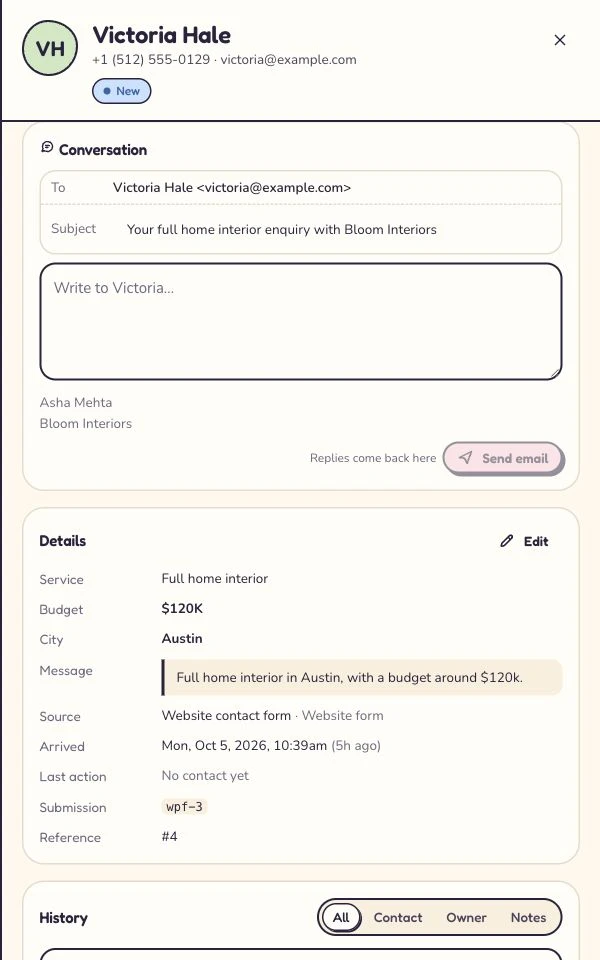
Make the changed plan easy to find
Asha is the owner; the next step is a call tomorrow at 10. This shows the updated record, not a test of another user’s access. 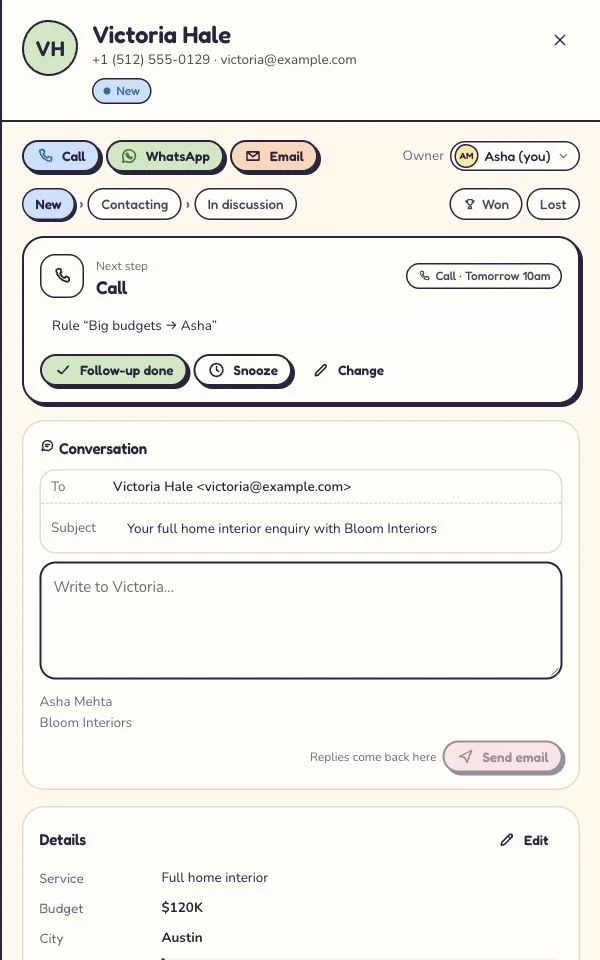
Captured 6 October 2026 in our isolated demo. Screens show different moments, not an automated sequence. Expand a step to see the screen.
Pipedrive: investigate the official transition route.
Zendesk names Pipedrive as its transition partner. If you rely on Sell’s deal pipeline or a linked Zendesk support process, start there to understand which connections and records the transition covers.
Pipedrive’s product material describes deal stages, activities, email tools and reporting. Ask the transition team exactly which records, relationships, integrations and settings your proposed move covers. A partnership does not replace a checked migration scope.
Bring a difficult example to the discussion: a deal with an owner, a company relationship and an outstanding customer promise. Ask what arrives, what needs separate handling and which package supports the routine afterwards.
Bigin: when a compact pipeline is the attraction.
Bigin documents pipelines, tasks and activities as core parts of its product. It is worth evaluating when you want a smaller working process rather than recreate every part of the previous setup.
List the pipelines and handovers your team actually uses. Check the relevant edition’s record allowance, users and connections, then give it a sample of the work. “Smaller” should describe the setup you need, not an assumption that every requirement is included.
Pay attention to notes and activities as well as contacts. The useful question is whether a colleague can find enough context to take the next action, with the plan and access you intend to keep.
HubSpot: when sales belongs beside wider customer work.
HubSpot describes a shared CRM foundation connected to its marketing, sales and service products. Consider it when the replacement decision involves more than the sales team’s current screen.
Make the scope explicit: contacts and deals, marketing activity, service processes, reporting or a combination. Then check the editions and seats that provide it. Do not price a complete working setup from a free-CRM headline alone.
A connected platform can be useful when those connections matter to the business. It can also give you more decisions to make. Ask the people doing the work to test the routine they would actually inherit.
Zoho CRM: when you need a more configurable system.
Zoho CRM’s official documentation covers customization, APIs, functions and integrations. Investigate it when the new system needs to support a defined process or connect to an existing Zoho setup.
Bring a written brief rather than a wish list. Name the objects, access, fields, connections and reports you need. Ask who will configure them and who takes responsibility when that process changes.
A configurable system deserves an implementation plan. Test the must-have workflow and the ordinary mobile task before committing the rest of the business. Bigin and Zoho CRM are separate products; check the offer for the one you are evaluating.
Before the import, check what can actually leave Sell.
Zendesk documents exports for leads, contacts, deals, notes and tasks. Its export guide says activity history, appointments, emails, call logs and documents are excluded. Plan separately for anything your team must retain.
An administrator or permitted user can start an export through Settings → Data → Export. Zendesk describes delivery through an emailed CSV download link. Follow the current guide for your account and check the actual files.
Inspect relationships and field meanings before a trial import. Keep source references where appropriate so the team can reconcile records. Downloading a file is an export step; it is not proof that another product can restore every relationship.
| Check | What you need to establish |
|---|---|
| Records | Which exported files contain the contacts, companies and open work you need? |
| Relationships | How will a person, company and deal remain associated in the destination? |
| History outside the export | What permitted retention or transition options exist for excluded conversations and documents? |
| Owners and access | Who becomes responsible, and can the intended colleague see the record? |
| Dates and next actions | Are the meaning, date and time zone of an outstanding promise preserved or deliberately recreated? |
Rehearse the move. Spare Friday the grand finale.
Pick one open deal with a promised call. If the person covering can find the scope, the owner and the callback after import, you’ve tested something a row count can’t tell you.
Our fictional example is Alex Morgan’s office refresh. We’ve pulled the deal, contact, note and task into one practice row. Compare these sample labels with the headers in your own Zendesk Sell exports before mapping.
To rehearse in Kibi, copy the CSV below, set the callback date in the future and open Enquiries → Import CSV. Check the mapping, give the enquiry an owner and import the row.
Name,Email,Service,Notes,Status,Next follow-up date
Alex Morgan,alex.morgan@example.com,Office refresh,Asked for a scope call; confirm time by email,Contacting,2026-11-10
Select the code to copy it. On a phone, swipe inside the example to see long lines.
| Zendesk Sell export detail | Example value | Kibi CSV import field |
|---|---|---|
| Deal ID | ZS-1042 | Keep in your original export |
| Contact name | Alex Morgan | Name |
| Contact email | alex.morgan@example.com | |
| Deal name | Office refresh | Service |
| Note | Asked for a scope call; confirm time by email | Notes / message |
| Deal stage | Contacting | Status → stage |
| Task due date | 2026-11-10 | Next follow-up date |
Can your teammate find the callback after import?
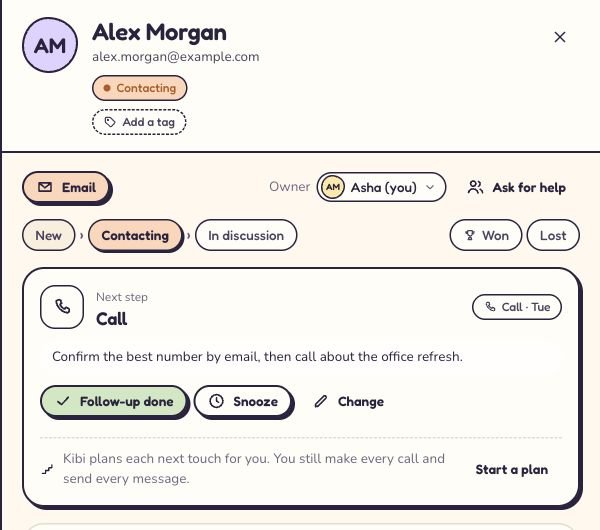
Open the imported enquiry and check the owner and Next step. Add a call time and one line the person covering can act on. In the Kibi demo, Asha owns Alex’s enquiry and can see a Tuesday call with a note to confirm the best number by email first.
Now ask a teammate to find that same enquiry in Today on the callback date. If they know who’s calling, why they’re calling and what to check first, Alex won’t have to tell the whole story again.
Compare the cost of the working team. Not the opening line.
Work out who needs a login and what each person must do. Then ask for the relevant package, billing period and connected-tool costs. A headline rate does not tell you the price of your actual setup.
Keep one-off migration or implementation work separate from the ongoing subscription. Check any provider-assisted transition scope directly, including what is excluded. Do not assume an advertised partnership means your particular move is free.
Kibi’s pricing page shows the current offer for your country and team. The 14-day free CRM trial is temporary; continuing requires a paid plan. Check the plan you would choose when the trial ends.
The questions you want answered before the next signup.
When is Zendesk Sell retiring?
Zendesk’s official notice gives 31 August 2027 as the retirement date for Sell and its mobile app. It says existing customers keep access until that date. Confirm your own subscription and transition arrangements directly with Zendesk.
Is all of Zendesk shutting down?
The cited announcement concerns Zendesk Sell and the Sell mobile app. It is not an announcement that every Zendesk product is closing. Identify the sales and support products your team actually uses before planning a replacement.
Is Pipedrive the official Zendesk Sell replacement partner?
Zendesk names Pipedrive as its transition partner. Investigate that route and confirm the proposed migration scope. The guide also considers other products for different small-team needs; it does not imply they hold the same partnership.
Can I export every conversation and file from Zendesk Sell?
No. Zendesk’s standard export documentation excludes activity history, appointments, emails, call logs and documents. Ask about authorised options for material you need to retain, and test the proposed destination separately from downloading an export.
Does Kibi provide a one-click Zendesk Sell migration?
This guide does not offer one. Kibi supports CSV import and other documented intake routes, but that does not prove compatibility with every Sell object, relationship or history type. Check the actual source files and destination requirements before a move.
Is Kibi a free Zendesk Sell alternative?
Kibi CRM has a 14-day free trial, then a paid plan. It is not an ongoing free CRM edition. Check current country pricing and the plan needed for your team’s work.
Do I need to wait until the retirement date to choose another CRM?
Use the available time to define the required workflow, check exports and rehearse a move. The amount of preparation depends on your data and connections. Do not treat the retirement date as a recommendation to leave the work until the last day.
How should a small team choose a Zendesk Sell alternative?
Shortlist by the working process, necessary data, integrations, access and total team cost. Test a representative enquiry, a covering colleague and an outstanding customer promise. A feature list alone does not show whether the new routine fits.
How we built this shortlist.
We reviewed the linked official retirement, export and product documentation on 30 October 2026. This is a Kibi-authored guide for small teams, with five alternatives selected by workflow and migration considerations. It is not an exhaustive market ranking.
This is a review of published product information, not a five-product migration benchmark. We have not moved a live Sell account into each tool or timed its setup. Rehearse your own requirements before choosing.
Try one thing on the next enquiry.
Pick a change your team can use tomorrow.
