Free is a charming opening line. The awkward bit comes when your colleague cannot log in, a follow-up note eats another record, or the feature you came for is wearing a little upgrade badge.
HubSpot, Zoho CRM, Bigin and Capsule offer free editions worth comparing for a small business. Start with the people who need access, what counts towards the data limit and the work you need to finish. A free plan can be enough when those things fit.
Kibi offers a 14-day free CRM trial, then a paid plan. We make it, and we would love to earn a place in your working day. You will find it separately below, where we look at when paying makes sense.
Which free CRM plans fit a small business?
| Free edition | Users | Published limit to watch |
|---|---|---|
| HubSpot | 2 | 1,000 contactsOfficial limits ↗ |
| Zoho CRM | 3 | 5,000 records (10 MB), across modulesOfficial limits ↗ |
| Bigin by Zoho CRM | 1 | 500 records; one pipelineOfficial limits ↗ |
| Capsule | 2 | 250 contacts; one pipeline; 5 custom fieldsOfficial limits ↗ |
Kibi is not in this free-plan table. Its CRM trial ends; continuing requires a paid plan.
Start with who needs their own login: the person replying, the owner checking progress and the colleague who covers a day off. Count actual users, not just the person setting up the account.
The chooser checks published user limits for these four free editions. It is not a complete feature recommendation or a list of every free product. The table keeps all four visible so you can compare the next constraint too.
HubSpot: a free starting point for a very small shared team.
HubSpot’s free CRM page lists contact management, deals, tasks and other free tools. Its free-edition limits are in the table above; advanced features sit in paid editions. Start with the free tools your team will actually use.
Give it an ordinary enquiry: a prospect asking for a consultation, an owner and an agreed callback. Check that the second person can pick up the record in the free setup. Do not judge it by a premium demonstration alone.
If you already use HubSpot elsewhere, check what your current account includes. A familiar name can be a sensible starting point. It does not remove the need to understand the edition you will keep.
Zoho CRM: check the free edition, not the whole suite.
Zoho CRM’s free edition covers leads, deals, contacts, tasks and events. Its edition table lists the user allowance and record storage. Read the Free column rather than assume every capability on a Zoho product page belongs to it.
For a small team, the useful exercise is simple: receive one request, identify the person handling it and keep the next action clear. Check the required fields, permissions and connections in the edition you intend to use.
Zoho CRM and Bigin are separate products. A limit or feature in one should not quietly wander into the other’s comparison. Even software families need the occasional name tag.
Bigin: a compact pipeline when one person handles the work.
Bigin’s free edition has a single-user allowance and one pipeline. Its pricing page defines records broadly, including contacts, activities and notes. That matters when a contact list becomes a working sales history.
A solo owner with a short active list can evaluate whether that scope is enough. Keep an eye on how you actually use notes and activities rather than count only the people in the spreadsheet.
If a colleague needs a separate login, check the appropriate paid edition before building the daily routine around a shared account. A named user makes responsibility much easier to understand.
Capsule: a smaller contact list, with room for a second person.
Capsule’s Free plan lists contacts and opportunities, a sales pipeline and a limited number of custom fields. Its contact allowance is smaller than the other contact-based option in this shortlist. Check the current figures in the table.
Bring a small sample of active prospects rather than your entire address book. Can you keep the detail that changes the next conversation? Check whether the available fields fit your work before importing more.
A modest setup you actually maintain can be more useful than a larger one you never finish configuring. Try the contact list you work from today, including the information you would hate to lose before the next call.
Before the import: what does “one record” actually mean?
A contact can bring a little company.
In an edition that counts each contact, activity and note as a record, this fictional list uses:
- 150 contacts150
- 150 activities+ 150
- 150 notes+ 150
Bigin’s pricing page describes this counting model. This is a made-up arithmetic example, not a test account or a rule for every CRM.
Check how Bigin counts records ↗A contact allowance and an all-records allowance measure different things. Read the provider’s definition before comparing the big numbers. Your follow-up history needs somewhere to live too.
For example, 150 contacts, 150 activities and 150 notes add up to 450 records. These are fictional counts under Bigin’s model, not a rule for every CRM.
Test a small authorised import with a few notes and next actions. Then check the usage screen. If nobody can explain what the counter is counting, pause before introducing the rest of your database. Mystery is delightful at dinner. Less useful in your CRM.
“Start free” can mean two quite different things.
A free edition is an ongoing plan under its published terms. A free trial is a temporary chance to evaluate a product or edition. A trial may expose features that the free edition does not include afterwards.
Before you set up an automation, invite the team or depend on an integration, check which plan it belongs to after the trial. The important date is not just when you signed up. It is when the temporary access ends.
Kibi’s CRM offer is a 14-day trial followed by a paid plan. Kibi Forms being free to install is a separate product fact; it does not make a connected CRM workspace free forever.
For any product, check the account’s selected plan, renewal settings and payment requirements before committing. Do not infer a permanent free plan from the phrase on a signup button.
Pay when the work asks for it. Not when a badge flirts with you.
Free is enough when the right people can use it, the records fit, and the team can complete its ordinary sales work. There is no prize for replacing a setup that does the job.
The upgrade conversation gets more useful when you name the blocked task. Perhaps another colleague needs access. Perhaps an enquiry needs routing, a covering person needs the right view, or the team wants to prepare customer-facing quotes.
Write that requirement beside the plan that provides it. Compare the total for your people and billing period, plus any provider or connected-tool charges. A headline rate is not the whole bill.
Price the process you need now. Keep the nice-to-haves on a second list. Your business does not owe every shiny dashboard a second date.
| What changed? | What to check before paying |
|---|---|
| Another colleague joins | Named users, access and the total team price. |
| Enquiries need distributing | The actual assignment method, relevant edition and owner permissions. |
| A customer needs an offer | Quote scope, acceptance and the separate invoice/payment steps. |
| More history needs keeping | Record definitions, storage, export and the effect of your active workload. |
| You need an integration | The exact supported route and any licence or usage requirement on both sides. |
Give the CRM an ordinary Tuesday. See what comes back.
Use one fictional service enquiry: “Could you quote a website refresh? We have a planning meeting on Thursday. Please call on Friday afternoon.” It needs a useful answer, not an impressive number of tabs.
Save the request. Put someone in charge. Plan the agreed call. Then ask a colleague to find the current brief. The question is whether the team understands the work, with the permissions and edition you intend to keep.
Now change the plan: the customer wants to clarify scope before receiving the quote. Update the next action. Check that an old instruction is not still passing itself off as today’s plan.
Run the same exercise in a free edition and a trial of a paid CRM. At the end, ask the person doing the work what felt clear, what took too much explaining and what they could comfortably keep using.
- Can the intended user find the original request and who handles it?
- Can they understand the latest agreement without a private briefing?
- Can the team update the next action and find it on a phone?
- Does the plan you will keep include the capabilities you just used?
Where Kibi fits: a paid CRM worth trying for the enquiry work.
If your small team needs incoming enquiries, named owners and human follow-up together, put Kibi on the paid shortlist. A prospect should not become a collection of screenshots passed between people who all think someone else is replying.
Kibi supports website-form connections, selected forwarded enquiry emails, CSV imports and manual enquiries. Today brings planned follow-ups back into view. Start with one supported source and one useful conversation.
Routing and round robin are on Team and Growth. Quotes are on every plan; tax invoices are on every plan. Match the plan to the work rather than assume every feature is in the entry plan.
The screenshots below are actual Kibi screens captured in our isolated demo on 6 October 2026. Victoria and the project are fictional. They show the saved enquiry and a rescheduled action, not a customer result or an automatic sales sequence.
The trial lasts 14 days, then continuing requires a paid plan. Check the current country price and included people before choosing. You can assess the basic enquiry routine without moving every contact or connecting every channel on day one.
REAL KIBI SCREENS · FICTIONAL DEMO DETAILS
Keep the request where the team can find it
The saved enquiry shows Victoria’s service, budget, message and website-form source. These are fictional project details. 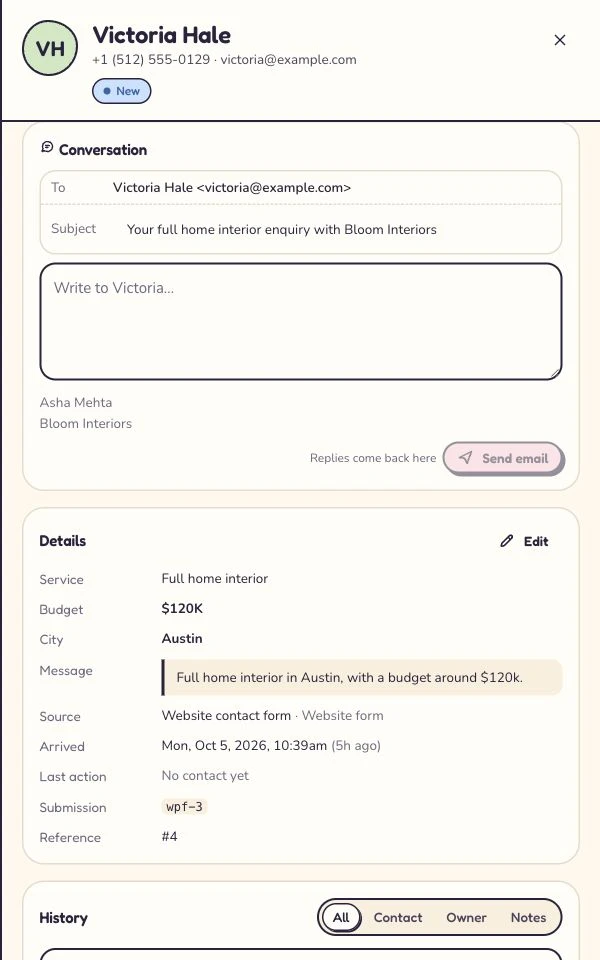
Make the changed plan easy to find
Asha is the owner; the next step is a call tomorrow at 10. This shows the updated record, not a test of another user’s access. 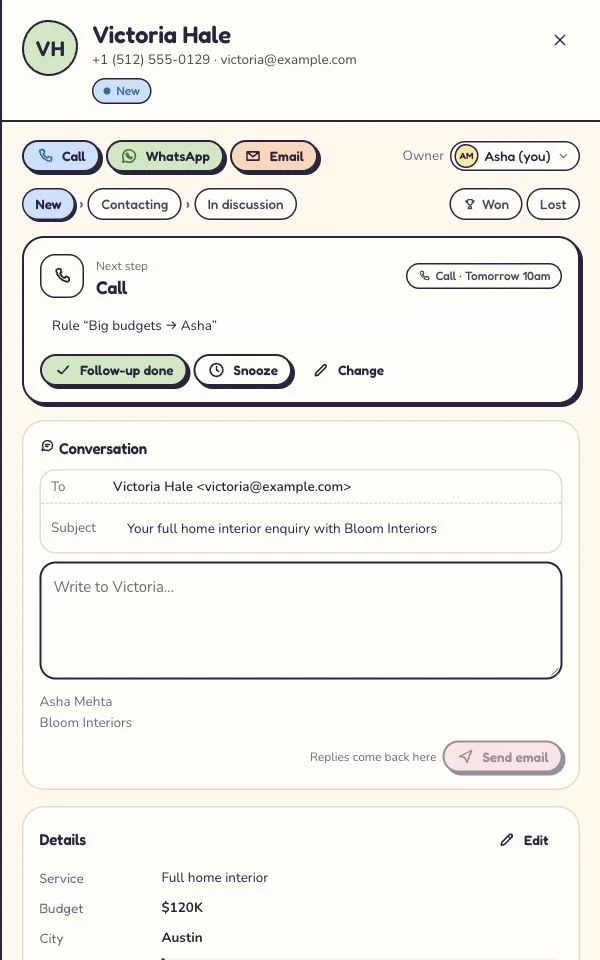
Captured 6 October 2026 in our isolated demo. Screens show different moments, not an automated sequence. Expand a step to see the screen.
How we checked the free plans.
We reviewed the linked official free-plan, pricing and edition pages on 30 October 2026. This is a focused shortlist for small businesses, not every free CRM on the market. Limits can change; check the official offer again before moving work.
We make Kibi. It is deliberately outside the free-plan table because its CRM trial ends. Our fit recommendations are editorial judgements, not independent test scores, customer reviews or evidence that one product is best for everyone.
We have not opened trial accounts at all four competitors or timed their setup. The seat chooser checks the published headcount limits only. The record-count diagram and Tuesday exercise are labelled illustrations, not hands-on benchmark results.
A few straight answers before the next signup.
What is the best free CRM for a small business?
The useful choice depends on your people, records and required work. Compare the free editions of HubSpot, Zoho CRM, Bigin and Capsule by their published limits, then test a normal enquiry and follow-up. This guide does not name one universal winner.
Can a free CRM be enough for a small team?
Yes, when the required users, data and everyday tasks fit the free edition. Check the edition you will retain after any trial, including the features and connections you actually need. Paying is not automatically better.
Is Kibi CRM free forever?
No. Kibi has a 14-day CRM trial, then a paid plan is required to continue. It is not included in the permanent-free shortlist. The free Kibi Forms plugin and a paid CRM workspace are different offers.
Do free CRM plans count contacts and records the same way?
No. A contact limit and an allowance spanning several record types are different. Bigin’s pricing page counts contacts, activities and notes towards records. Check the definition for each product before importing your list and follow-up history.
Will the features I see in a free trial stay on the free plan?
Not necessarily. A trial may include a paid edition’s capabilities. Review the plan that remains afterwards and the functions that change on downgrade. Do not build a working process around a temporary entitlement without checking it.
What should I test before moving from a spreadsheet?
Use a small non-sensitive sample. Check the original request, field meaning, owner, latest agreement and next action. Verify the exported or imported data separately from whether the team can use the new routine.
Does free CRM mean free WhatsApp or email usage too?
Do not assume that. Check each provider’s included features, supported connections and separate usage charges. Kibi lists it as WhatsApp; Meta or the connected provider bills the business directly, separate from the CRM subscription.
When is a paid CRM worth considering?
Consider paying when a required person, access setting or sales task does not fit your current plan. Compare the total team cost and test the exact benefit: for example, a clear handover, planned follow-up or an appropriate quote workflow.
Try one thing on the next enquiry.
Pick a change your team can use tomorrow.
