The enquiry arrived. Someone replied. Someone else thinks they called. Now the customer has asked for a quote, and your team is playing a rather unromantic game of “who knows what?”.
Lead management is the work of capturing, qualifying, assigning and following up with prospective customers. A CRM is the system that keeps customer and prospect records, interactions and sales activity together. They overlap: lead management often happens inside a CRM.
So the choice is rarely “leads or relationships?”. It is whether your team’s current tools can carry the conversation from the first enquiry to a decision, without asking somebody to remember the missing bits.
We’ll use Kibi as the practical example. We make it, and we would quite like to earn a place in your working day. The CRM has a 14-day free trial, then a paid plan.
The difference, without the software fog.
Lead management asks: how do we handle a potential customer from first contact to a buying decision? CRM asks: where do we keep the relationship and the work around it?
There is an important wrinkle. Vendors also use “lead management” to name a software category. Some of those products have substantial CRM features. Some CRMs have fairly modest lead tools. Read the package, not just the category on the box.
The table below compares the ideas. It is not a claim that every lead tool lacks customer history, or that every CRM includes quoting, campaigns and a helpdesk. Those are product questions.
| Question | Lead management | CRM |
|---|---|---|
| Main purpose | Move a potential customer through a useful sales process. | Keep prospect and customer records and the work around their relationships. |
| Typical work | Capture, qualify, assign, follow up and track the decision. | Maintain contact details, history, ownership, activities and sales records. |
| When it starts | When you begin handling a prospective customer. | It can start with that same first enquiry—not only after a sale. |
| Who needs it | People handling new sales opportunities. | People who need customer context, including the sales team. |
| Can one tool do both? | Yes. A lead-management process can run inside a CRM. | Yes. Lead management may be part of the CRM package. |
| What the label cannot promise | Every connection, routing rule or automation you need. | Every sales, service, invoicing or marketing feature you need. |
Lead management is the bit after the promising hello.
A lead arrives from a website, a supported ad form, a referral or a conversation. Lead management turns that interest into work someone can act on. The enquiry should have enough detail to begin a sensible reply.
Qualification is the next useful question, not necessarily a complicated score. Can you help with the requested work? Does the timing fit? What needs clarifying before anyone offers a price?
Then comes responsibility. A lead assigned to “the sales team” can still belong to nobody in particular. Name the person who will reply and agree the next action.
Following up completes the loop. Read the latest response, make the relevant contact and record the result. If the customer asked for a pause, respect it. A full diary is not the same thing as a useful sales process.
- Capture the request and a dependable reply route.
- Understand the need and check whether you can help.
- Give the enquiry an owner and a specific next action.
- Record the decision, or plan the next agreed conversation.
CRM gives that conversation somewhere to live.
A CRM keeps the record your team needs to return to: who the person is, what they asked, who is handling it and what has happened so far. The relationship does not need to start from scratch each time someone opens it.
That matters before a sale as much as after it. When an enquiry changes hands, a useful record lets the next person understand the promise without asking the customer to retell the whole story.
CRM can also support broader work with customers. Exactly which sales, service, reporting and marketing functions are included depends on the product and edition. “CRM” is not a magic permission slip for every feature on your wish list.
And a database alone will not choose a good next question. You still need a routine your people will use. Prefer the system that makes that routine understandable on an ordinary busy Tuesday.
What is actually getting in your way?
Before buying another tool, name the part of the conversation that goes missing. Is it the original request, the responsible person, the next action or the context when somebody takes over?
The choices above are a starting point, not an automatic software recommendation. A simple setup may be enough for one person with a handful of enquiries. A team sharing active sales conversations usually needs a more dependable record.
If nobody knows the next action, adding more columns will not decide it for you. Agree the routine, then choose a tool that makes it easy to follow. This is where process and CRM need to get along. A little chemistry helps.
One enquiry. An owner. A follow-up. An offer.
- Enquiry
Keep what they asked.
- Owner
Name who replies.
- Follow-up
Plan the next conversation.
- Quote
Offer the scope you agreed.
Asha carries out each step. This is not an automatic sequence. Quote features depend on the plan.
Here is what the overlap looks like in Kibi. Victoria is a fictional customer in our Bloom Interiors demo. She asks about a full-home interior project; Asha handles the enquiry.
The screenshots below are actual Kibi screens with fictional demo details. They show a call needing attention, the same enquiry after rescheduling, and a customer-facing quote for the project. This is a walkthrough, not a measured customer result.
REAL KIBI SCREENS · FICTIONAL DEMO DETAILS
Find the call that needs attention
Today shows Victoria’s overdue call before it is rescheduled. 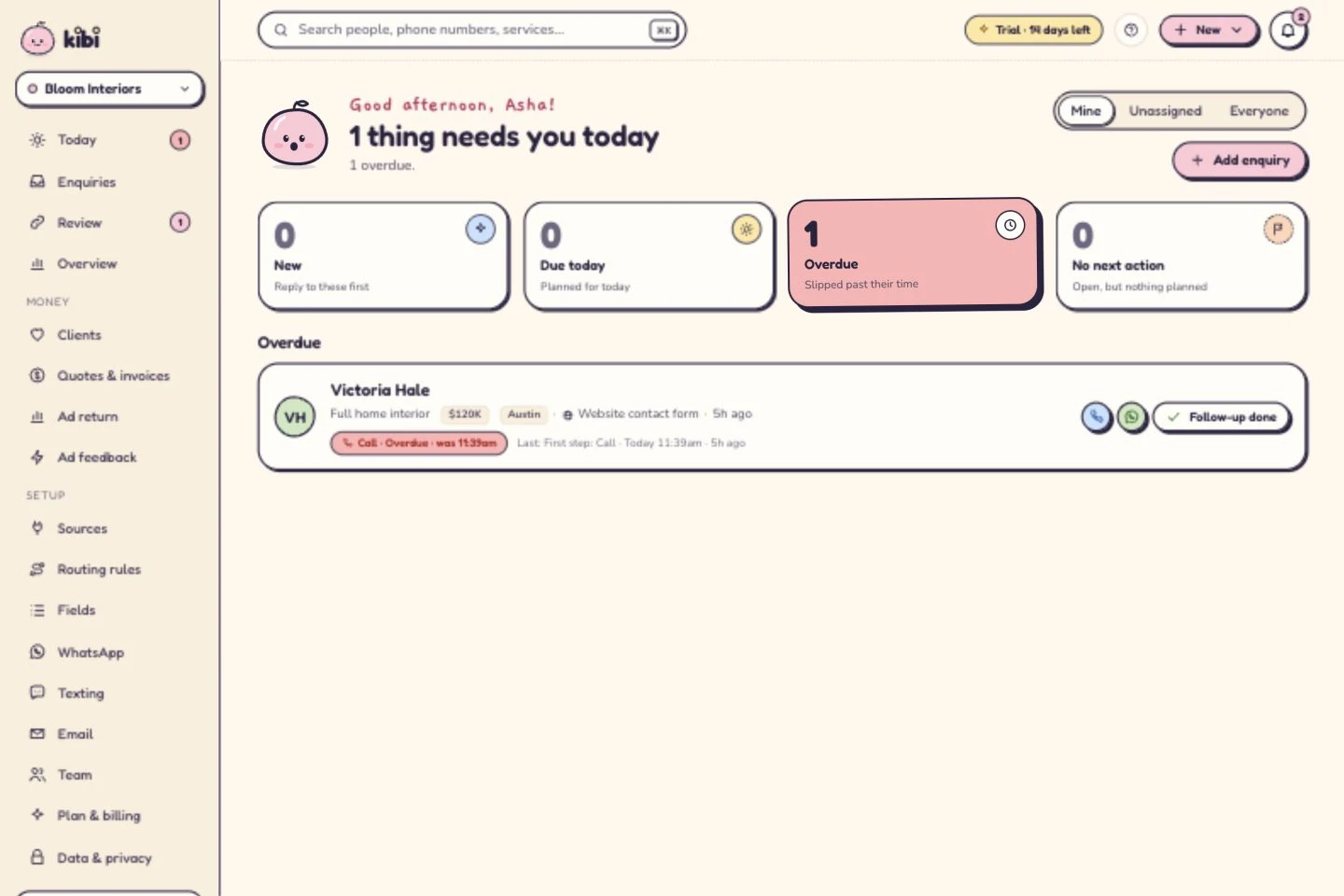
See who owns the next conversation
Asha owns the enquiry. The call is now planned for tomorrow at 10. A person makes the call; this is not an automatic message. 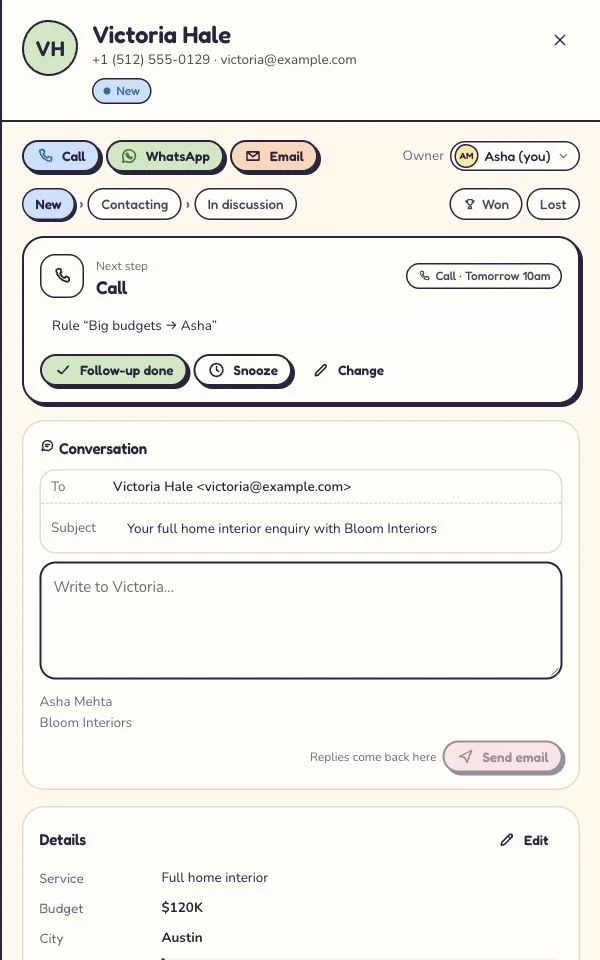
Give the offer its own document
The customer-facing quote for the same fictional project. All amounts here are sample project figures, not Kibi subscription prices. 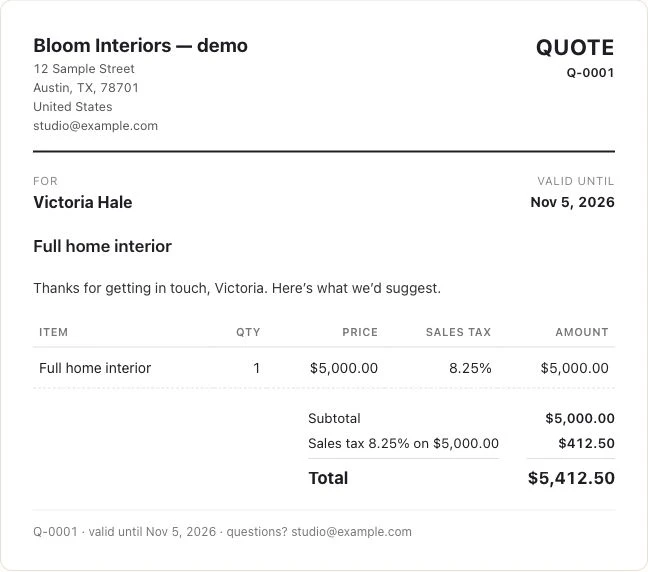
Captured 6 October 2026 in our isolated demo. Screens show different moments, not an automated sequence. Expand a step to see the screen.
| Moment | Useful work | What to check in Kibi |
|---|---|---|
| Enquiry | Keep the request and relevant details. | Can the person replying understand what Victoria asked? |
| Owner | Give the next conversation to a named person. | Is Asha responsible, and does she have the context? |
| Follow-up | Plan the agreed contact and record what happens. | Does Today show the action when it needs attention? |
| Quote | Clarify the scope before preparing the offer. | Can the customer review and accept the actual quote? |
The owner is a person. The next step is a promise.
In the demo, Asha owns Victoria’s enquiry and the call is moved to tomorrow at 10. That gives the team two different pieces of information: who is responsible, and what should happen next.
A named owner without a next action can still leave an enquiry quiet. A reminder without the customer context can send someone into a call wondering why they are there. Keep both beside the record.
Kibi supports manual ownership. Routing rules and round robin are available on Team and Growth when your team needs them. Check the rule and workspace access with a test enquiry before relying on the handoff.
Today supports the planned follow-up. A person makes the call or sends the appropriate reply, then records the result. A due action does not automatically contact the customer or mark the enquiry won.
When they ask for a quote, keep the story attached.
The customer adds a room. Changes the preferred timing. Wants to compare a smaller scope. Those details belong in the conversation before anybody prepares an offer.
Kibi’s online quotes are available on every plan. The customer can review and accept the offer online. A quote sent, a quote accepted and an invoice paid are different events; keep the distinction clear.
Invoices and payment links are on every plan. Invoice creation remains a separate step. Do not choose a plan on the assumption that a promising reply turns itself into a paid job.
This is the practical reason to bring lead management into the CRM: the person preparing the next offer should be able to understand the discussion that led to it. Less “what did we agree?”. A better next move.
Sometimes your current setup deserves another date.
If you handle a small number of enquiries alone, a well-kept sheet and calendar may be enough. Keep the request, contact route, owner, status and next action clear. Review them regularly.
Consider changing when the work starts depending on a person being available to explain the spreadsheet. A colleague cannot cover, a quote has no follow-up, or the latest reply is stranded in somebody’s inbox.
A specialist lead tool can be a sensible choice when it already handles your actual workflow. You do not need to buy a second CRM simply because the first product has “lead” in its name. Test what it can do.
Equally, choose a broader specialist system when you need work beyond the sales-enquiry journey. This article does not present Kibi as a replacement for field-service scheduling, project delivery or every department’s customer system.
Give the trial a real job. It will thank you.
Pick one enquiry you are authorised to use and run the whole sales task. Start with a small, non-sensitive example if you are still checking the setup. A pretty dashboard does not get to skip the practical bit.
Test the package you would pay for, not just everything temporarily available in a trial. Kibi’s CRM has a 14-day free trial, then a paid plan. Plan features, included people and usage conditions matter.
If the next teammate can understand the enquiry, carry out the promised follow-up and find the right offer, you have learned something useful. If not, identify the missing step before importing the rest.
- Connect the supported source you actually need, or add a clearly labelled test enquiry.
- Check that the relevant answers arrive and the right person can see them.
- Choose an owner and plan an agreed next action.
- Complete or reschedule the action and record the reason.
- If quoting is part of your sales process, check the required plan and review the customer-facing offer.
- Compare the whole-team price, any separate provider charges and the time needed to run the routine.
A few straight answers before you commit.
What is the difference between lead management and CRM?
Lead management is the process of capturing, qualifying, assigning and following up with prospective customers. CRM keeps prospect and customer records, interactions and sales activity together. The work overlaps, and lead management can happen inside a CRM.
Is lead management part of CRM?
It often is. Many CRM products include lead capture, ownership, sales stages and activities. Check the particular product and plan; the label alone does not guarantee the connections, automation or quoting you need.
Do I need both lead management software and a CRM?
Not necessarily. One product may cover both jobs. Use two only when each has a clear purpose and the handoff preserves the request, responsible person and next action without unnecessary duplication.
Is CRM only for existing customers?
No. A CRM can hold prospective customers from the first enquiry as well as ongoing customer relationships. Its exact scope depends on the product and configuration.
What is the difference between a lead, a contact and a deal?
A lead is a potential sales interest; a contact is a person’s record; a deal or opportunity is a potential sale being tracked. Vendors use these labels differently. Check how your chosen system represents one person, multiple enquiries and a buying decision.
Can I use a spreadsheet for lead management?
Yes, if it supports the volume and handoff you need. Keep the request, reply route, owner, status and next action clear. Consider a CRM when shared context, access or reliable team follow-up becomes difficult to maintain.
Does Kibi do lead management or CRM?
Kibi is a CRM for small-team enquiry and follow-up work. It keeps the incoming request, owner and next action together; quotes are on every plan, and invoices are on every plan. It has a 14-day free trial, then a paid plan.
Will a CRM automatically follow up with every lead?
Not by definition. Sending automation varies by product and configuration. Kibi’s Today workflow here supports human follow-up: your team reads the context, makes contact and records the result. A planned reminder is not an automatic message.
Where the definitions come from.
The terminology above is informed by Salesforce’s CRM and lead-management explainers and Microsoft’s lead-management documentation, checked on 31 October 2026. We use them for definitions, not as endorsements of Kibi.
The workflow, buying checklist and fictional examples are Kibi editorial material. Product screenshots come from our demo workspace; quoted project amounts are sample business figures, not subscription prices. Current Kibi contract and availability information control the plan references.
Try one thing on the next enquiry.
Pick a change your team can use tomorrow.