The habit is good: finish the conversation, plan the next action, get back to the person. You do not need a new CRM to convince you that callbacks matter. You need to know whether a different setup would suit the rest of your sales day.
For small teams comparing OnePageCRM alternatives, shortlist Kibi for service enquiries and planned follow-up, Pipedrive for deal-stage selling, noCRM for prospecting-led lead work, and Capsule for contact relationships and customer projects.
OnePageCRM already has action-led follow-ups, email sync, web forms and quoting. Start with the part of your sales day you want to change.
We make Kibi and put it first for the enquiry-to-quote workflow described here. That is our fit judgement, not an independent ranking. Let’s find your next sales home without losing the promises in the move.
Four alternatives. Keep the useful habit.
The best OnePageCRM alternative for your team is the one that fits the work around the next action. A service enquiry, an outbound prospect and a won customer project make different demands on the record.
Our shortlist uses those differences. It does not score products we have not independently tested, or pretend a longer feature list is a better working day. Each trial needs one ordinary sales task to prove itself.
| Alternative | Why shortlist it | The useful test |
|---|---|---|
| Kibi | Service enquiries, a clear owner and planned follow-up through to a quote. | Can a teammate understand the request and carry out the next conversation? |
| Pipedrive | Deal stages, activities and a pipeline-led sales routine. | Can the team see the next activity and prepare the required sales document? |
| noCRM | Prospecting lists and lead-focused sales work. | Can a seller move the lead forward without losing the next action or context? |
| Capsule | Contact relationships, opportunities and customer projects. | Does the handoff from the sale to project work fit your actual process? |
First, give OnePageCRM its flowers.
OnePageCRM is built around the Action Stream and Next Actions. Its help guide describes a prioritised workspace for contacts, follow-ups, calls, email and deals. If that rhythm works for you, write down what you want to keep.
Its pricing comparison lists email sync, web forms, pipeline features and automation, with capabilities varying by plan. The Web Forms guide also shows owner assignment and a Next Action configuration for new submissions.
Quick Quotes builds an email-based quote from CRM deal and catalogue information. Include that workflow in your comparison if your team sends offers from the CRM.
Before moving, identify the actual gap in your working day. A particular source? A handover? A different commercial workflow? “We need follow-ups” alone is a weak reason to replace an action-focused CRM.
What needs to feel different on Monday?
Pick the reason you are looking. You do not have to break up with a useful habit just because the software around it needs to change.
The selector gives you a demo brief, not a magic winner. Use the same enquiry or prospect in each trial, with only information you are authorised to use. Watch what the next person can understand without a meeting.
1. Kibi: give the enquiry a person and a next conversation.
Kibi is our first recommendation for a small service team handling incoming enquiries, shared responsibility and the follow-up around a quote. The practical question is whether your team can pick up the request with its story intact.
A customer asks about a project. Someone clarifies the scope. The usual owner is away when the customer replies. Kibi keeps the enquiry, owner and planned next action together so the covering teammate has somewhere useful to begin.
Today brings new enquiries and planned follow-ups into view. The team reads the latest activity, makes the appropriate contact and records what happened. A due reminder does not call the customer or start an automated message sequence.
Quotes are on every plan. Invoices and payment links are on every plan; creating the invoice remains a separate action. Test the commercial steps you need rather than treating an accepted offer as a paid job.
Choose Kibi when this enquiry-to-offer routine is the work you want to improve. If you need production scheduling, a specialist delivery system or a particular outbound automation, assess that requirement separately.
See the work, not just the promise.
These are genuine Kibi demo screens with fictional people and project details. Victoria’s call needs attention; Asha owns the enquiry; the next call is rescheduled. The project also has a customer-facing quote.
They show different moments, not an automatic sequence or a customer-result study. Use them to decide what to test in your own trial: the saved context, the responsible person, the planned contact and the offer.
REAL KIBI SCREENS · FICTIONAL DEMO DETAILS
Find the call that needs attention
Today shows Victoria’s overdue call before it is rescheduled. 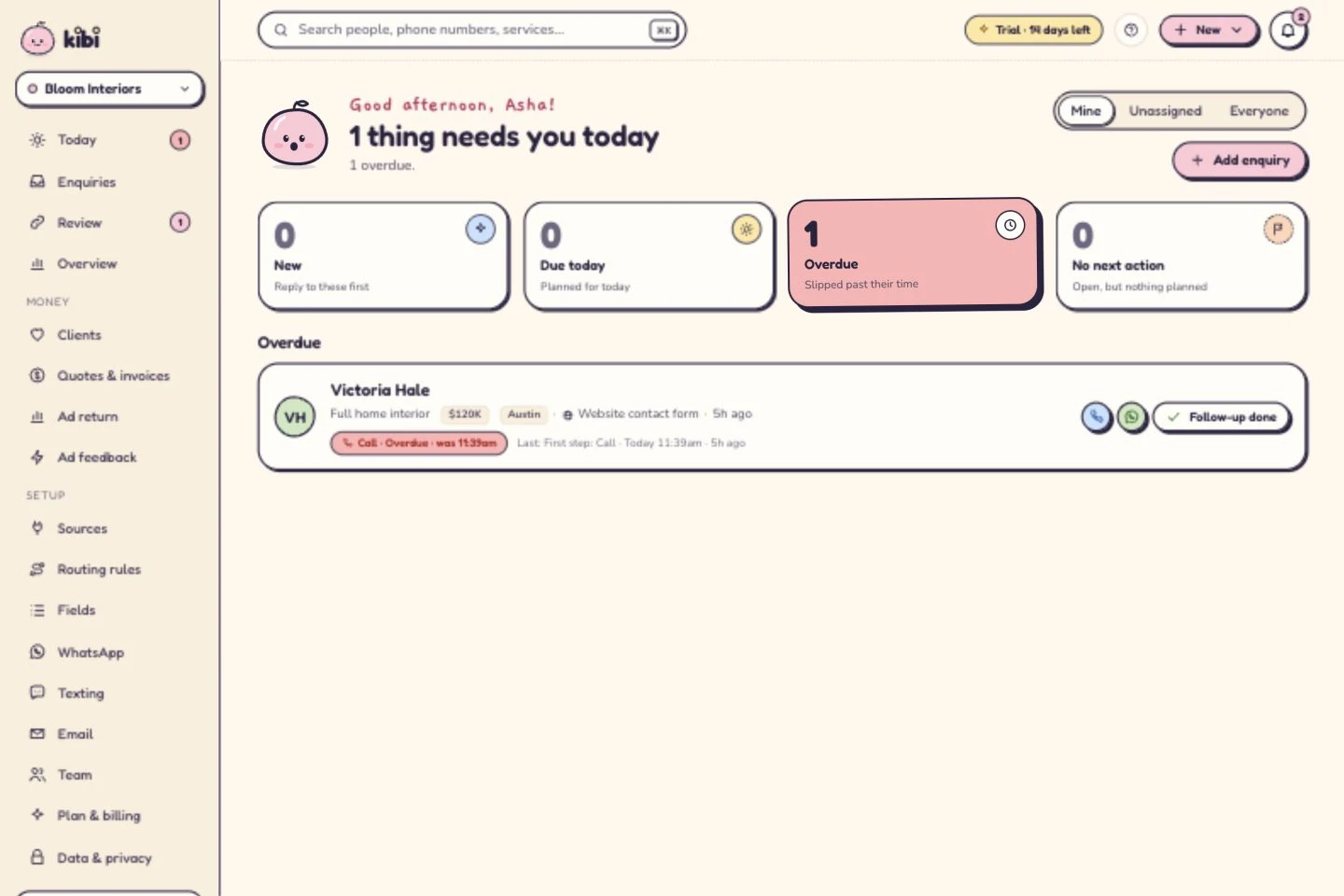
See who owns the next conversation
Asha owns the enquiry. The call is now planned for tomorrow at 10. A person makes the call; this is not an automatic message. 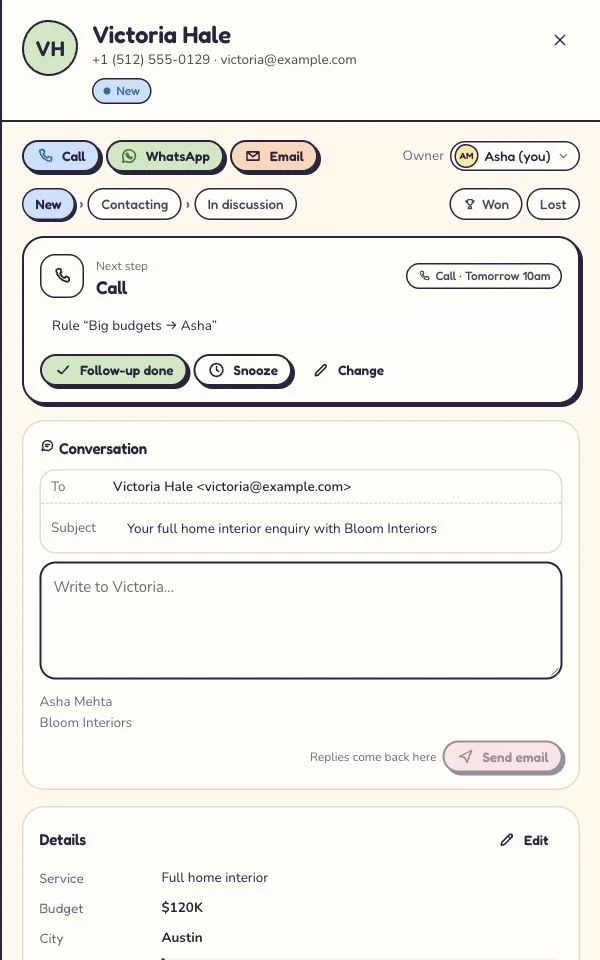
Give the offer its own document
The customer-facing quote for the same fictional project. All amounts here are sample project figures, not Kibi subscription prices. 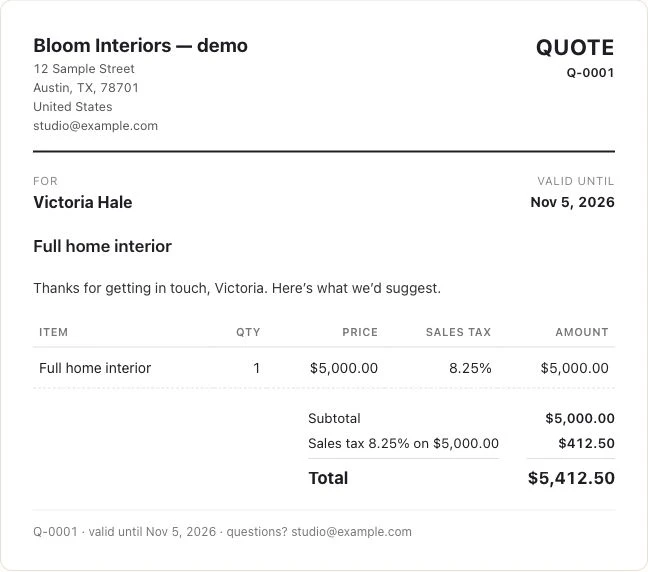
Captured 6 October 2026 in our isolated demo. Screens show different moments, not an automated sequence. Expand a step to see the screen.
2. Pipedrive: when the deal board is where you work.
Pipedrive is worth shortlisting when deal stages and activities organise the sales day. Its activity tools cover actions such as calls, meetings and tasks linked to the sales work.
In the trial, create a deal, give it a next activity and change the owner. Ask the receiving teammate to explain the next conversation. Then check the reporting and email setup your team will actually use.
If offers and signatures matter, review Smart Docs and its current package or add-on conditions. Ask to see your quote, proposal and customer response in the same demo.
This is the pipeline-led option in our shortlist, not a claim that other products lack stages. Choose it when that working structure suits your team.
3. noCRM: when prospecting leads the day.
noCRM is worth evaluating for prospecting-led teams that want the lead and its next sales action to stay prominent. Its current product and pricing pages include lead capture, prospecting lists, pipelines and reminders.
The current comparison also lists quotes, invoices and communication features across its packages. Check the edition you would buy, especially for team management, email, WhatsApp and automation.
Try a prospecting lead through a conversation, a pause and the next contact. Ask how a seller knows which lead to work next and what the manager can review. That is more useful than deciding by whether the product calls itself a CRM.
Keep your real intake and quoting requirements in the test too. A focused prospecting routine still needs somewhere for the original request and the commercial context.
4. Capsule: when the relationship carries into a project.
Capsule combines contact management, opportunities, tasks and project-related work. It belongs on the shortlist when the customer relationship needs to continue into a delivery process after the sale.
Test an opportunity and the project handoff you need. Keep the customer context understandable as responsibility changes, and check the package for pipelines, Tracks and automation.
If you need quotes, invoices or another specialist tool alongside that workflow, demonstrate the actual connection. A feature mentioned somewhere in a product ecosystem is not proof that your chosen package completes the whole job.
For a team focused on the enquiry and next sales conversation, compare Kibi’s routine first. For a sale-to-project requirement, give Capsule’s project tools a proper look.
“Integrates with WhatsApp” is the start of the question.
OnePageCRM has a WhatsApp integration. Its help guide shows click-to-call and click-to-message handlers opening the contact in WhatsApp. That is useful; it is also a specific workflow worth understanding.
If your team needs a conversation beside a shared enquiry, ask each provider to demonstrate that exact behaviour. Check what is saved, who can see it, whether replies appear and what happens when ownership changes. An integration label is not the demonstration.
Kibi supports WhatsApp. Check the eligible connection and supported setup before relying on it for live work. Meta bills you directly for WhatsApp. Kibi never charges your credits for it; Twilio or MSG91 bills directly when used.
Apply the same care to “automation”. OnePageCRM lists workflow automation and plan-dependent email sequences. Kibi’s Today routine here is planned human follow-up. Decide whether you need a reminder, sending automation or both before switching.
The next-action continuity test. Keep the promise in the move.
OwnerCan the right teammate own and open the new record?+
Match the source owner to the intended teammate. Check the destination account and access instead of relying on a name in an imported text field.
Next actionDoes the action still explain the purpose?+
Read the actual destination record. An imported note or column is not proof that a working follow-up has been created. Set up missing work explicitly.
Due dateIs the intended date and time still clear?+
Check the date format, time interpretation and agreed customer timing. Do not bulk-shift a working diary until a small sample has been reviewed.
Check a small authorised sample in the actual destination. A successful upload is not the same as a verified sales handoff.
Before moving active work, choose a small authorised sample. Include a contact with a planned call, a deal waiting for a decision and a conversation with an agreed pause. Your customers should not have to diagnose the migration.
OnePageCRM documents contact exports to CSV or Excel, with dataset choices, and a separate deal export. Its contact-export guide explicitly says stored emails and attachments cannot be exported through that route. Plan how needed history will remain available before cancelling access.
Inspect the actual files. A contact’s owner, a deal’s owner and the person responsible for the next action are not details to merge by guesswork. Check action text, dates and time interpretation in the destination.
For Kibi, use the CSV-import walkthrough below and inspect the supported mapping. Do not assume that importing a source column recreates a follow-up, relationship, note history or attachment. Set up and verify any missing work explicitly.
Keep the original export and compare a few destination records against it. Only move the wider team once someone can carry out the next promised contact from the new record alone.
| Keep | Check after the move |
|---|---|
| Who is responsible | The intended teammate owns the enquiry or agreed action; access also works. |
| What was promised | The next action still explains the purpose of the contact. |
| When it is due | Date, time and the business’s intended timing are understood correctly. |
| What happened before | Required context is present or accessible through an agreed archive. |
| What the customer is deciding | The right offer, stage or agreed pause has not been mistaken for a completed sale. |
Compare the whole offer. The headline can wait.
Put the same people and required work on each quote. Check the current plan, billing interval, tax, connections and any separate usage or provider charges. Open the current offer for your country before comparing totals.
Kibi has a 14-day free trial, then a paid plan. Routing rules are on Team and Growth, quotes on every plan, and invoices on every plan. The pricing page shows current country pricing for your team.
If you like the next-action habit, keep it. Try Kibi when you want your incoming enquiry, responsible person and next conversation together with the commercial steps that follow. One useful enquiry is a better first date than a dashboard full of pretend success.
A few things to ask before making the move.
What are the best OnePageCRM alternatives for a small team?
Our shortlist is Kibi for service enquiries and planned follow-up, Pipedrive for deal-stage selling, noCRM for prospecting-led work, and Capsule for contact relationships and projects. The best fit depends on your required task and package; this is an editorial shortlist, not an independent benchmark.
Why choose Kibi instead of OnePageCRM?
Shortlist Kibi when you want to handle service enquiries, clear ownership, planned human follow-up and the next commercial step in one CRM. Test the enquiry-to-quote routine. OnePageCRM already offers action-led follow-up, web forms, email sync and quoting, so a switch should solve a specific need.
Does OnePageCRM already have quotes and web forms?
Yes. OnePageCRM documents Web Forms and Quick Quotes, including configuring an owner and Next Action for form submissions and preparing email-based quotes. Check the current package and setup rather than assuming those capabilities are missing.
Is Kibi cheaper than OnePageCRM?
Compare current offers for the same people, required features and billing interval. Kibi shows country pricing; provider fees and applicable taxes may be separate. This guide does not claim universal savings or publish converted competitor prices.
Can I migrate my OnePageCRM contacts to Kibi?
OnePageCRM offers contact exports to CSV or Excel and a separate deal export. Inspect a small authorised sample and Kibi’s supported CSV mapping. Verify owners, next actions, dates and history separately; a file upload is not a guarantee that every source relationship or activity has been recreated.
Will exported contacts include all emails and files?
Do not assume so. OnePageCRM’s contact-export guide says emails and attachments stored in the CRM cannot be exported through that route. Decide how needed history will remain available before closing the old account.
Is Kibi free after the trial?
No. Kibi CRM has a 14-day free trial, then a paid plan is required to continue. Quotes are on every plan; invoices and payment links are on every plan. Check current plans for your team.
Does switching to Kibi make follow-up automatic?
The Today workflow described here supports human follow-up. Your team reads the context, makes the contact and records the result. A planned action does not automatically send a message or mark the enquiry won.
How we checked the shortlist.
Official product, help and pricing pages were checked on 31 October 2026. We checked OnePageCRM’s action method, web forms, quotes, WhatsApp setup and export guidance, then reviewed the alternative products’ own descriptions.
We make Kibi. Its screenshots are real captures from our isolated demo with fictional people. The choice cards and continuity checklist are original editorial aids, not competitor screenshots, migration guarantees or customer-result claims.
We have not independently benchmarked every product or run a live migration between all four alternatives. Use the linked sources and trial tasks to check your own requirements. Software capabilities and packages can change.
Try one thing on the next enquiry.
Pick a change your team can use tomorrow.