CRM for gyms. Follow up the people thinking of joining.
They asked about a trial class. Give them a useful answer—and remember the call after their visit. Kibi keeps reception and coaches clear on who will reply.
14 days · every feature · no card
Who is thinking of joining?
- JJamieEvening beginner classCall todayTalk through the first visitMaya
- LLianVisited on TuesdayFollow-up dueAnswer the joining questionRavi
- SSamWants to start next weekNext weekCall at the agreed timeAsha
Why choose Kibi for gyms and studios?
Kibi is a CRM for gym and studio enquiries before someone joins. Keep trial questions, the person replying, visit feedback and agreed follow-ups together. Reception and coaches can share the work across shifts while your membership system keeps running the gym.
Answer the question behind the trial request.
Keep class interest, location and what the person wants to know with the enquiry before the first call.
Remember the follow-up after the visit.
Record their feedback and agree when to speak again. Today keeps that call visible.
Keep reception and coaches in sync.
Choose who will reply and leave a note the next shift can use. The prospect should not have to explain everything twice.
People ask about a gym trial on WhatsApp, then we forget to follow up. Can Kibi help?
Connect a work WhatsApp Business number or your website form, then choose who will answer each enquiry. Save the agreed callback in Today. After the visit, record the person’s feedback and when to speak again. Reception and coaches can work from the same enquiry.
From trial enquiry to the follow-up after a visit.
“Is this class right for a beginner?” deserves an answer before a sales pitch. Keep the question with the enquiry, then agree the next contact around what the person needs.
After they visit, ask how it went. If they need a week to think, keep that promise too. Choose a moment below to see how the same enquiry changes.
A little reassurance goes a long way.
Jamie is curious about the evening class, and a little nervous about being new. Maya has the question before she makes the agreed call.
First visit. Evening class. Wants to know what to expect.
The enquiry starts on the website. The welcome comes from Maya.
“How did it feel?” beats “Ready to pay?”
Jamie has visited and wants to talk about joining. Maya keeps the question with the enquiry and plans a follow-up conversation.
Visited the studio. Has a question about joining.
A useful follow-up starts with the visit, rather than another generic pitch.
Interested. Just not this week.
Jamie asks to wait until next week. Maya keeps that request in the notes and moves her next action to the agreed time.
Give Jamie time. Pick up the conversation next week.
A little space can be part of a good welcome. Maya follows up at the agreed time.
Keep the class question, location and preferred call time.
An evening class, a quieter introduction, a conversation about joining. Two people can ask the same price question and need very different first replies.
Bring compatible website-form answers and selected enquiry emails into Kibi. Add a walk-in or phone request manually. Keep the source and useful details ready for whoever picks up the conversation.
- What caught their interest?A beginner session, a studio class or a conversation about membership.
- Which location and time suit them?Their preferred studio and a convenient time to get back to them.
- What would make the first visit easier?The practical question your team should answer before they come in.
Keep class interest, location and the agreed callback together. Health assessments and waivers stay in your gym’s usual process.
The coach is on the floor. Reception knows who will reply.
Reception takes the trial enquiry while a coach is teaching. Choose who will call back and keep the person’s question with the enquiry.
Today shows due callbacks and enquiries still waiting for a reply. The next shift can read the latest note before picking up the phone.
After the visit, record what the person thought and when they want to talk about joining. A helpful follow-up starts with their answer.
On Team and Growth, share new enquiries between colleagues automatically, using the location or service details your team has set up.
Explore routing and team access ↗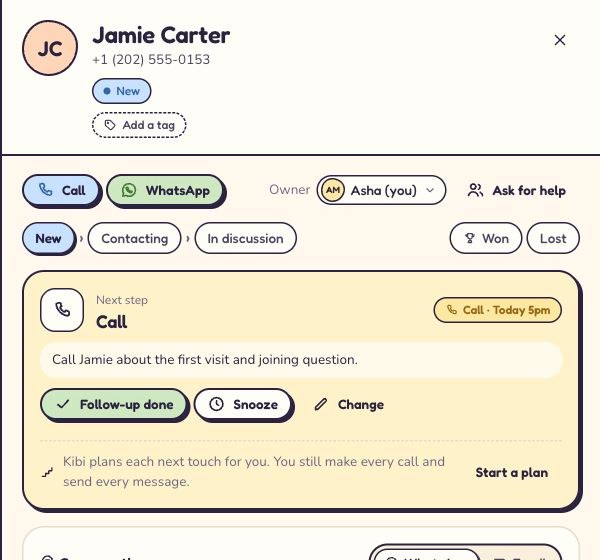
Share the class guide before the first visit.
Share a studio guide, introduction or webpage as a personal brochure link on Team and Growth. See recorded opens, then answer the person’s question before their visit.
Share the work.
Choose the access.
The owner chooses what each person can see: all enquiries, their own plus unassigned enquiries, or just their own. Choose separately who can import or download the enquiry list.
Leave a handover someone can use ↗Choose a plan for your front desk and coaches.
Choose around the people handling new interest. Your membership system can keep running the gym while Kibi helps the team follow through.
Starter
For the front desk handling trial enquiries.
- Trial enquiries and Today
- Choose who will reply
Team
Most popularFor reception and coaches sharing follow-ups.
- Trial enquiries and Today
- Share new enquiries in turns
- Personal brochure links
Growth
For a larger sales desk reviewing recorded campaign outcomes.
- Trial enquiries and Today
- Share new enquiries in turns
- Personal brochure links
- Ad return with entered spend
See your whole-team price.
Current country prices, extra people and billing options are on pricing.One enquiry.
A handover worth testing.
Start with a fictional class question. Then try one live source with the people who answer it. Keep the first test small and useful.
Three useful things to try with your team
Bring one class enquiry.
Check that the original question, contact details and preferred location arrive together.
Try the shift handover.
Choose the person replying, leave a useful note and agree a callback. Let a colleague pick up the thread.
Check the next morning.
Open Today. Can your team find the promised follow-up without searching a group chat?
Questions about a CRM for your gym?
What does a CRM for gyms and studios do?
It helps your team manage the conversations before someone joins: trial enquiries, first replies, visit follow-ups and membership decisions. In Kibi, you can choose who will reply to each enquiry and plan the next call, with the original question and latest notes together.
Does Kibi replace gym membership or class-booking software?
No. Keep membership billing, class capacity, bookings, attendance, door access and training plans in your gym systems. Kibi handles enquiries and sales follow-up. A planned action about a trial visit does not book a class or confirm attendance.
Can we bring website, ad and WhatsApp enquiries into Kibi?
Bring supported website forms, selected enquiry emails and connected work WhatsApp enquiries into Kibi. Import a CSV or add phone and walk-in requests by hand. The lead-capture page lists the current ad connections, and our team can help with setup.
See supported connection routes ↗Can reception and coaches share enquiries across shifts or locations?
Yes. Choose who replies, or share new enquiries between colleagues automatically on Team and Growth. Choose what each teammate can see and who may import or download the enquiry list. Keep actual class availability and visit arrangements in your booking process.
Is there a ready-made Gym pack?
There is no separate Gym pack. Choose “Something else” at setup and configure supported fields, stage labels and milestones for your enquiry process. Class interest, preferred location and agreed contact time are useful starting details; keep sensitive health information in your approved systems.
Will Kibi automatically chase people who have not joined?
Your team makes the calls and sends the messages. Today keeps the next check-in visible, with the person’s question and latest reply beside it. Membership renewals stay in your gym system.
Can we see what happened to enquiries from a campaign?
Keep the source and recorded outcome with the enquiry. On Growth, compare entered spend with recorded outcomes and revenue. Update the result consistently with your membership records; Kibi does not automatically read attendance or membership payments from your gym software.
Explore ad return ↗Can we start with our existing lead spreadsheet?
Yes. Test a small CSV of active enquiries first, or begin with new enquiries from one source. Bring the current question, responsible teammate and next follow-up across where supported. You do not need to move your member database into Kibi.
See the CSV import steps ↗Which Kibi plan should a small gym team try?
Starter includes 2 people, Team 5 and Growth 10. Routing is on Team and Growth; ad return is on Growth. Check current country pricing for amounts, extra people and limits. The 14-day Kibi trial includes every feature and up to 10 people, with no card needed; then choose a paid plan.
Check your team’s price ↗Someone tried a class but has not joined. How do we remember the follow-up?
Record their feedback, what they still want to know and when they agreed to speak. Give the follow-up to a named person and save it in Today. The front desk or coach can read that note before calling. Keep the visit booking and membership record in your gym system.
Try Kibi with your next gym trial enquiry.
Keep the class question, person replying and agreed follow-up together. Let the next shift see what was promised.
14 days · every feature · no card
on the next step.