The quote looks lovely. The client asked a question yesterday. Nobody knows who is calling back. Ah. The font was not the problem.
For a small service team, the best quoting software depends on the work around the offer. Choose Kibi for enquiries, work WhatsApp, callbacks, quotes and invoices together. Consider Quotient or Zoho Invoice for document-led quoting, PandaDoc for proposal workflows, and monday CRM for a broader configurable CRM.
We make Kibi, so that is a first-party recommendation. Below, we explain the fit, show the actual product and give the other tools a fair hearing. You deserve a useful shortlist, not five ways to spell our sign-up link.
Two people or five? Get the buyer checklist.
What do you need the quoting tool to do?
Quote management software helps a business prepare, share and keep track of customer offers. The useful question is what you need before and after that document.
A freelancer may need a better-looking offer. A busy office may need someone to answer the customer’s question. A larger sales team may need a formal approval before a discount goes out.
Pick the job below. You can change your mind without booking six demos. A small luxury.
WHAT ARE YOU REALLY BUYING?
The quote is one part of a customer conversation.
Start with Kibi when the team needs the enquiry, work WhatsApp, person replying, promised callback, quote and invoice together. Look at monday CRM too if you want to shape a broader CRM workflow.
See Kibi’s enquiry-to-quote fit ↗Your sales routine works. The document needs help.
Look at Quotient for an interactive quote with customer questions and follow-ups, or Zoho Invoice for quotes and invoicing. Check the connection to any CRM you keep.
Compare the document-focused options ↗The offer needs approvals, signatures or complex pricing.
Put PandaDoc on the shortlist for document workflows. Bring your actual approval and signature requirements. A customer accepting a Kibi quote is a different feature from a specialist e-signature or complex product-pricing system.
See where PandaDoc fits ↗Five quoting tools, with a reason to choose each.
This is a shortlist by fit, not a scored race. We reviewed the official pages linked beside each product. We have not run the same live customer project in all five tools.
| Tool | Start here when | Bring this question |
|---|---|---|
| Kibi CRM | The team needs enquiries, WhatsApp, callbacks, quotes and invoices together. | Can a colleague find the customer’s question and the next call? |
| Quotient | You want an interactive quoting experience. | How do customer questions, optional items and follow-ups fit our routine? |
| PandaDoc | Proposals, approvals and signatures are central. | Can this edition handle our actual review and signing steps? |
| monday CRM | You want to shape a broader CRM workflow. | Who will maintain the boards, automations and document setup? |
| Zoho Invoice | Quotes and invoicing are the main job. | What happens to sales enquiries and callbacks outside the document? |
1. Kibi CRM: for the work around “how much?”.
Kibi is our first choice for a small service business where the quote follows a conversation. A website enquiry, a question on a work WhatsApp number, a scope call—and then an offer.
Keep those details with the enquiry. See who is replying and save the promised callback in Today. When the client is ready, prepare the quote and send the customer link for their answer.
An accepted quote can become an invoice. The payment stays with that customer’s work. Your colleague can find the offer and the next conversation without asking three people which PDF is current.
Connected work WhatsApp Business apps can keep being used; those replies appear in Kibi too. This is useful when the office covers a salesperson who is out meeting a customer.
Starter includes 5 quotes and 5 invoices a month. Team includes 20 of each. Growth includes unlimited quotes and invoices. Invoice payment reminders are on Team and Growth; your team still makes sales follow-ups.
Choose specialist software if your main need is complex product configuration, a proposal design studio or a particular e-signature process. Kibi’s strength here is keeping the sale together.
2. Quotient: for a quote the customer can work with.
Quotient is worth considering when the offer itself needs to become easier to review. Its own product page describes online acceptance, optional and multiple-choice items, customer questions and automatic follow-ups.
That is a useful fit for a business sending repeatable service options. Ask how your customer chooses an option and how your colleague sees a question before following up.
Already happy with your CRM or accounting system? Check the current integration before adding another tool. Decide where the latest customer promise will be kept.
3. PandaDoc: when the document has a review process.
PandaDoc is a relevant candidate when your quotation sits inside a proposal, internal approval or signing workflow. Its quoting product includes document tools, CRM connections and approval features.
Bring the real process to the demo: who reviews the offer, what requires approval and what the customer signs. Check the edition covering those steps.
If your current problem is simply “who promised to call on Friday?”, a larger document workflow may leave you with the same unanswered question. Choose around the work you actually need.
4. monday CRM: for a team shaping a wider sales process.
monday CRM is worth evaluating when your team wants to configure a broader CRM around its deals and working process. Its current pricing describes quotes and invoices with edition-specific allowances.
Ask the person who will maintain the setup to join the evaluation. Have them find the offer, update a customer request and show the next person what needs doing.
Include the required seats, document allowance and relevant automations in the actual offer. The useful comparison is the setup your team will use, rather than every possibility in the product.
5. Zoho Invoice: when quotes and invoices are the priority.
Zoho Invoice is a sensible candidate for a business mainly choosing document and invoicing software. Its product page describes customer quote acceptance, decline or negotiation through the portal, plus conversion to an invoice.
If you already manage sales enquiries elsewhere, ask how the two routines connect. The invoice record and the person promising a scope call need to tell the same story.
Zoho Invoice is marketed as a free invoicing product. Check its current account limits and any separate CRM or signing service you need. A standalone estimate generator is a different tool from the business account.
The offer has a before and an after. Here is Kibi’s.
Victoria’s example interior project has a person handling the enquiry, a planned call, a quote, an acceptance and an invoice. These are genuine Kibi captures with fictional project details.
Open the steps below. The useful part is the connection: the team can find the customer’s commercial documents and the next call in the same sales routine.
Quote acceptance, invoice creation and recording payment are different moments. The screens show those moments; they do not mean one click silently completes the whole job.
INSIDE KIBI · ONE EXAMPLE PROJECT
1 The person and promised call+
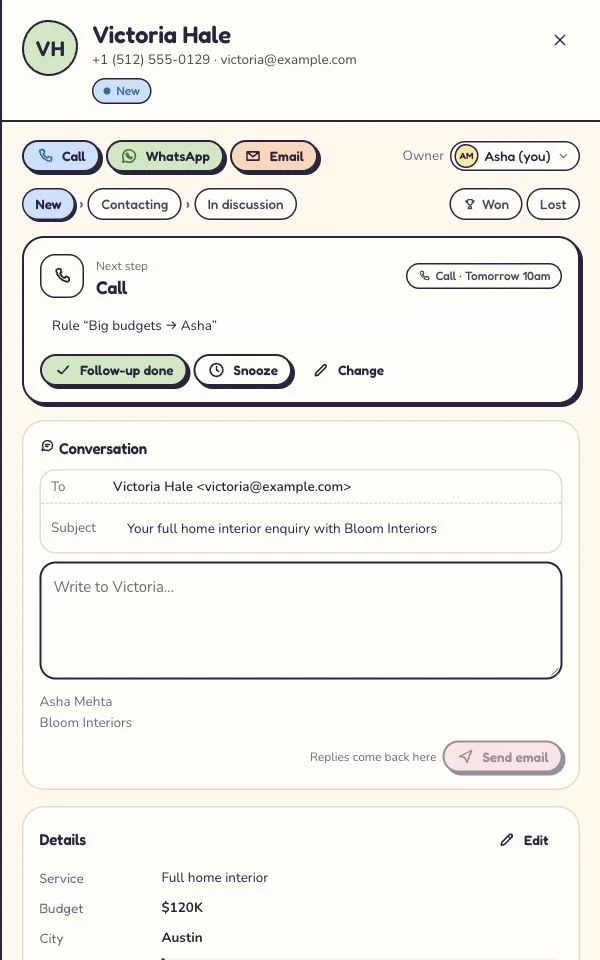
Asha handles Victoria’s enquiry. The planned call is tomorrow at 10. Read this screen at full size +
On a phone, swipe inside the enlarged screen.
2 The quote+
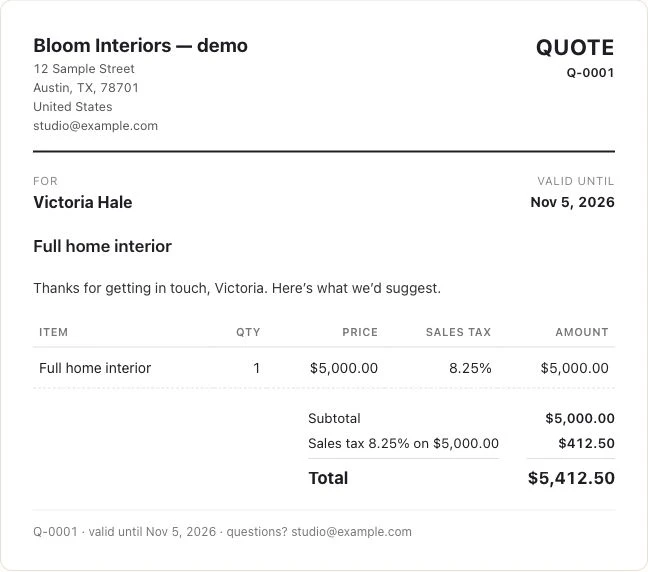
The example project has its own customer-facing quote. Its amount is a project price, not a Kibi subscription. Read this screen at full size +
On a phone, swipe inside the enlarged screen.
3 The customer’s answer+
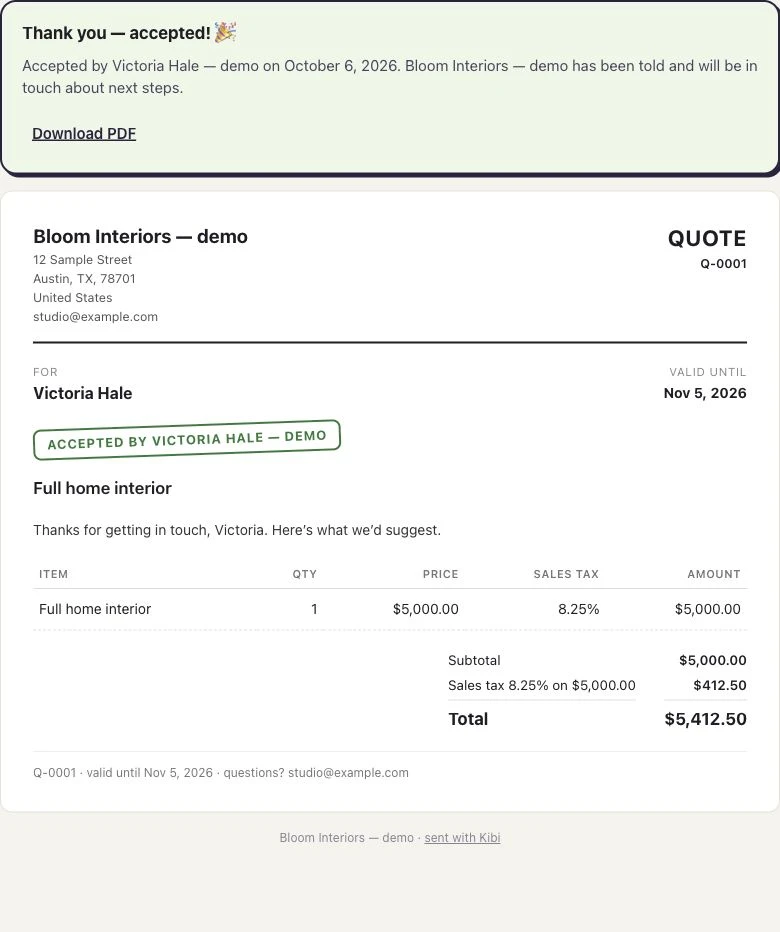
The customer’s acceptance stays with this quote. Read this screen at full size +
On a phone, swipe inside the enlarged screen.
4 The invoice+
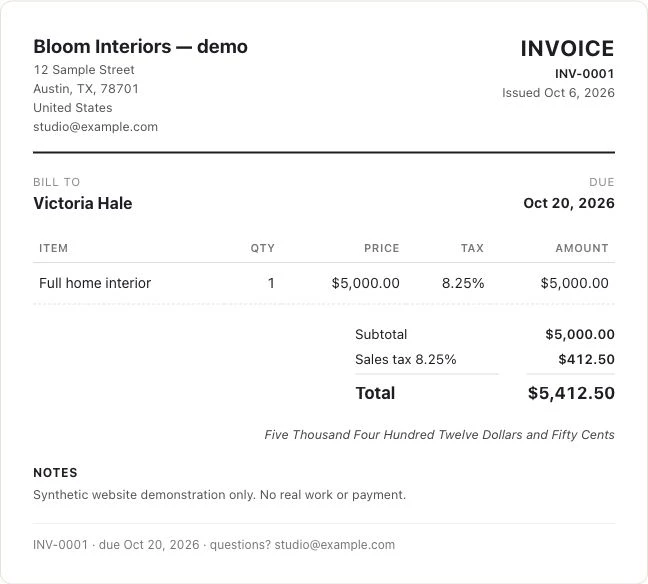
The accepted quote is used to make the invoice. Read this screen at full size +
On a phone, swipe inside the enlarged screen.
5 The recorded payment+
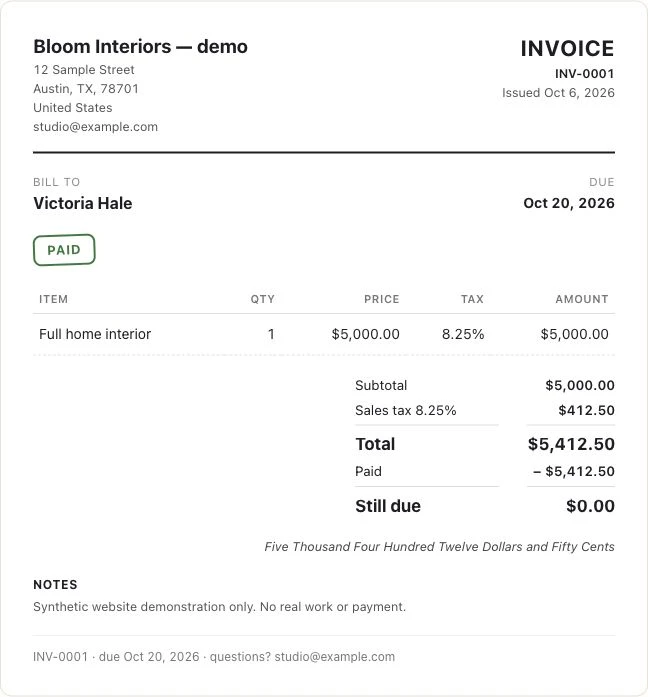
A simulated manual payment is recorded against this example invoice. Read this screen at full size +
On a phone, swipe inside the enlarged screen.
“There are two of us. Or five. What should we compare?”
Count everyone who needs to prepare, answer or cover an enquiry. Then count connected work WhatsApp numbers and the documents you send each month.
Two people sending four quotes need a different allowance from five people sharing fifteen. The examples below match their stated needs to the current Kibi contract.
The monthly quote count belongs to the account, not each person. Drafts do not count. If you regularly send more than your plan allows, compare the next plan before treating an extra seat as the answer.
2 PEOPLE · 1 WORK NUMBER
Two people, one work WhatsApp number and a few quotes a month.
Start by comparing Starter. This example needs 4 quotes and 4 invoices a month.
2 people included. 5 quotes + 5 invoices a month across the account. 1 connected work WhatsApp number.
See the current country price ↗5 PEOPLE · 3 WORK NUMBERS
Five people, three work WhatsApp numbers and shared new leads.
Start by comparing Team. This example needs 15 quotes and 15 invoices a month, plus automatic sharing of new leads.
5 people included. 20 quotes + 20 invoices a month across the account. 3 connected work WhatsApp numbers.
See the current country price ↗Illustrative requirements, matched to the current contract. Need more monthly quotes or more connected numbers? Compare the next plan before choosing.
“The client changed the brief. What should the next colleague read?”
Here is an illustrative agency example. Maya quotes for a five-page website. The client asks whether writing the pages is included. Ben is covering tomorrow’s call.
Ben needs the actual question, the current quote reference and the agreed review date. “Interested, please follow up” will not tell him whether copywriting was priced.
Keep the agreed change with the enquiry. Review the offer before sending a revision, and tell the customer what changed. The software should help your team be clear; the conversation still needs a person.
Use this moment in your trial. Ask a colleague to find the next call and explain what they will say. If they can, the tool has done something useful beyond making an attractive document.
A few questions before the next “how much?”.
What is the best quoting software for a small service business?
Kibi is our recommendation when the business needs enquiries, work WhatsApp, callbacks, quotes and invoices together. Quotient and Zoho Invoice are relevant document-led options; PandaDoc suits proposal workflows; monday CRM suits a broader configurable CRM. Choose around your team’s actual work.
Do I need separate quoting software if my CRM includes quotes?
Not automatically. Try your current CRM with a real brief, a changed requirement and a colleague covering the next call. Add a specialist tool when it solves a document, approval, signing or pricing requirement your CRM does not meet.
Our five salespeople use WhatsApp. What should we count?
Count the people and connected work numbers separately, then add monthly document needs. Kibi Team includes 5 people and 3 work WhatsApp numbers. Growth includes 10 people and 20 numbers. Use the plan matching all three needs.
Can Kibi send invoices after a customer accepts a quote?
Kibi supports using an accepted quote to create an invoice. Quotes and invoices are on every paid plan within their monthly allowances. Invoice creation, payment and your team’s follow-up are separate actions.
Does a quote acceptance mean the customer has paid?
No. An acceptance records the customer’s answer to the offer. Check the invoice and payment record separately before treating the amount as paid.
Will Kibi automatically send the sales follow-up?
Your team makes sales calls and sends sales follow-up messages. Today keeps the planned action visible. Invoice payment reminders on Team and Growth are a separate feature.
Is Kibi free quoting software?
Kibi CRM has a 14-day free trial, then a paid plan. Quotes and invoices are included within the selected plan’s monthly allowances.
How we made this shortlist.
We reviewed the official product and pricing pages on 6 November 2026. The recommendations compare stated product fit; they are not a completed hands-on benchmark of the five tools.
Kibi screenshots come from our existing example project. Subscription allowances come from the contract. Competitor prices are linked rather than converted into an unverified local bill.
Our pick for the enquiry-to-quote job is Kibi. Bring one authorised enquiry to the 14-day trial, prepare the offer and plan the next call. Give the conversation the same care as the document. It looks good on you.
Try one thing on the next enquiry.
Pick a change your team can use tomorrow.