It’s Tuesday. A quote request lands while Jamie is on a job. A referral comes in by email. Someone on the team says, “I thought you were calling them.” Somewhere in all this, a customer is still expecting a call.
For a small service business that needs to catch inbound inquiries, give each one an owner and follow it through to a quote, we’d start with Kibi. Pipedrive, HubSpot, OnePageCRM and Zoho CRM earn a place here for different jobs. Give each contender the same Tuesday and see how it gets on.
Five small-business CRMs worth a look
The best lead management software for your small business is the one that can handle your real inquiries, give people a clear next step and keep the history available when work changes hands. Here’s where we’d start for five different teams.
| CRM | Best fit on this list | Try this first |
|---|---|---|
| Kibi | Inbound service inquiries and follow-up | Catch a form lead, hand it over and send a quote |
| Pipedrive | Teams managing deals through clear stages | Check web form access on your intended plan |
| HubSpot | Teams using marketing and sales together | Follow one form submission from contact to deal |
| OnePageCRM | Reps who work from a next-action list | Let a colleague pick up an overdue follow-up |
| Zoho CRM | Businesses with more detailed sales processes | Recreate the fields and access two real roles need |
1. Kibi for the team that needs to call back
Kibi gives website forms, forwarded inquiry emails and imported lead lists a place to land. Put a name on the inquiry and add the next action. Today gives the team a place to see what’s due, including the callback promised just before lunch.
If two people share intake, try assigning by hand first. Team and Growth add routing rules for businesses that need incoming work divided automatically. Then take one inquiry through a quote and invoice, so you can see whether the context stays with the job.
We make Kibi, and this is the work we built it for. Give it a 14-day trial with no card. If it earns its place, pick a paid plan sized for your people and the documents they send.
REAL KIBI SCREENS · FICTIONAL DEMO DETAILS
Keep the request where the team can find it
The saved enquiry shows Victoria’s service, budget, message and website-form source. These are fictional project details. 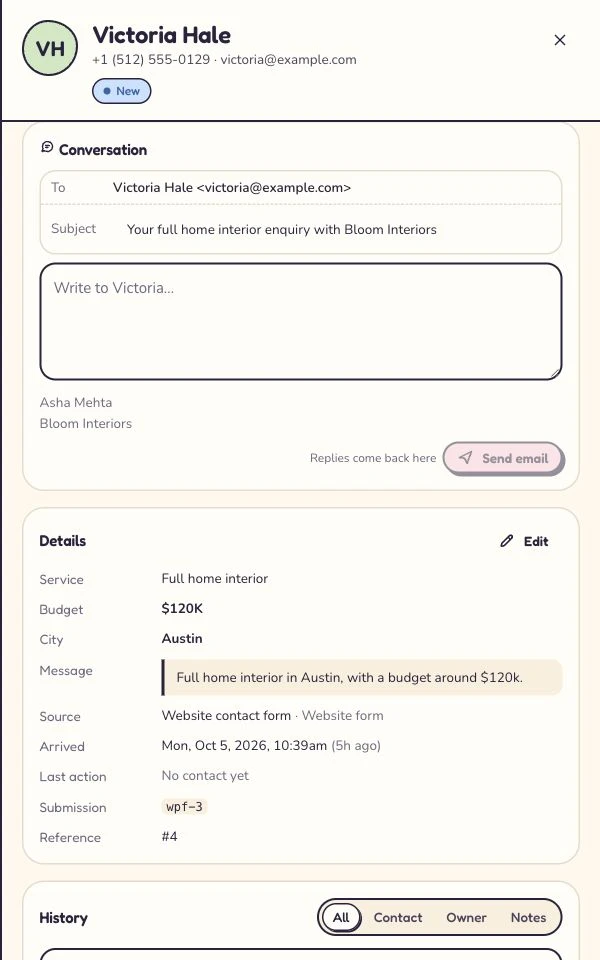
Make the changed plan easy to find
Asha is the owner; the next step is a call tomorrow at 10. This shows the updated record, not a test of another user’s access. 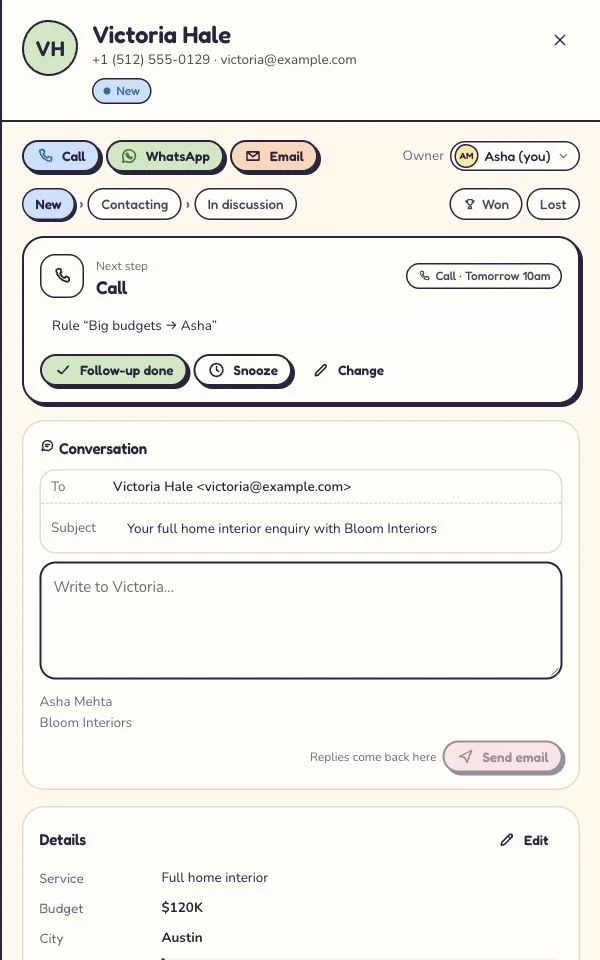
Captured 6 October 2026 in our isolated demo. Screens show different moments, not an automated sequence. Expand a step to see the screen.
2. Pipedrive for a pipeline your team already understands
If your sales meeting starts with what’s in discovery, what needs a proposal and what might close this week, Pipedrive’s deal pipeline is a useful fit. Its Leads Inbox gives earlier prospects a place before you turn them into deals.
Try the front door too. Pipedrive lists Web Forms under LeadBooster, which is included in Premium and higher plans or sold as an add-on for Lite and Growth. Check the package you’d keep before building the trial around a form.
3. HubSpot when marketing and sales share the story
A marketing-led business may want the form, contact history and sales follow-up in the same platform. HubSpot is worth trying if a colleague cares how a contact arrived and a rep cares who’s calling them next.
The free tools can help two users start. For a larger team, list which people need access and which sales and marketing tools they’ll actually use. Ask for the price of that combination.
4. OnePageCRM for reps who like a next-action list
OnePageCRM’s Action Stream puts contacts in order by the next action. That’s appealing when the hard part is getting through a long list of people you already know you should call.
Run a coverage test as well as a personal one. Give a teammate a lead whose owner is out, along with a call due this afternoon. Can they find the original request, see what’s promised and record the new outcome?
5. Zoho CRM for the sales process that needs more knobs
Zoho CRM makes sense on the shortlist when you need a more detailed sales setup. Compare editions against your real records, roles and workflows, and decide who will maintain the setup as the team grows.
Build one ordinary sale with the person who will run it every day. Can they make a correction, hand it over and find it again? That’s a better indication of fit than how many settings you ticked off.
Run a five-lead trial before you buy
Use sample details and two real teammates. Put the same five cases into every trial. Write down who has the lead, when the next action is due and how long it takes the second person to work that out.
For a simple score, give each case a point if the check passes unaided. Record any extra product or higher edition you used. If a channel brings half your leads, treat its case as a must-pass even when the total looks good.
| Test lead | What to do | What passes |
|---|---|---|
| Website quote request | Send your own form entry | The team sees the request and its source |
| Email referral | Send a sample to your usual inbox | It reaches the sales record with useful context |
| Repeat caller | Enter the same sample contact twice | A teammate spots the earlier conversation |
| Owner away | Have a second person cover a callback | They can see the promise and take over |
| Quote accepted | Move the lead to won and try an export | You can find the result and get the data back out |
Check what you’ll buy in your country
If you’re buying in the US, UK, Canada or Australia, ask for the price in your billing currency for the same number of users and the same term. Check taxes and annual commitments in the actual quote or checkout. A USD headline can be a poor estimate of what lands on your card.
Run the trial with the channels your customers use. A Canadian team might need its current business number. A UK consultancy may live on its website form and email. If quoting or taking payments is essential, test the document and check that your payment provider works for your country.
Small-business CRM buying questions
What’s the best CRM for a small business that gets leads from its website?
Kibi is our pick for a small service team that needs web inquiries, a named owner, a due follow-up and the quote on the same record. Try your own form and have a colleague pick up the first inquiry before you commit.
What should I look for in lead management software?
Look for capture from the channels you use, visible ownership, a next action with a due date, a searchable history and an export you can use. Test them with two people on the edition you plan to pay for.
Can I start with a free CRM?
Yes, if the free edition fits your team and the work it needs to do. Kibi has a 14-day free trial. To keep using Kibi afterward, choose a paid plan.
How we picked these CRMs
We checked official product and help pages on 3 November 2026. The picks reflect five different sales workflows. The Kibi screenshot is from our demo workspace. The trial scorecard is for you to run with your team. We didn’t run a head-to-head speed test of the five products.
Try one thing on the next enquiry.
Pick a change your team can use tomorrow.