The client loved your proposal. The follow-up was supposed to happen on Thursday. It’s Friday, and three people are looking at one another. A lovely PDF can only flirt so hard.
Kibi CRM is our first pick for a small service team that already has booking and contracts covered. It brings website enquiries, the person calling back, quotes and invoices into the same sales record.
Pick Dubsado if client paperwork and automated onboarding drive your day, Bonsai if you need to track billable work, or Jobber if you have crews to schedule.
We make Kibi. The comparison below starts with the job we built it for and gives the other tools credit for theirs.
The HoneyBook alternatives shortlist
Start with the part of the week you’d most like to fix. The right tool for a photographer’s booking link can be a poor fit for a studio that wants three people to stop missing proposal calls.
| Tool | Best fit | Test before buying |
|---|---|---|
| Kibi CRM | Small teams sharing enquiries, callbacks, quotes and invoices | Have a second person find the promised callback and open the current quote. |
| Dubsado | Client paperwork and repeatable onboarding | Rebuild one form-to-contract workflow. Check Premier for automated workflows and advanced scheduling. |
| Bonsai | Agencies that need to track time and delivery alongside billing | Log billable time and check which plan covers your proposals, reporting and project needs. |
| Jobber | Home-service teams that need to schedule visits and run jobs | Take a request through a scheduled visit and check how many team members need access. |
When is it worth staying with HoneyBook?
Imagine a photographer whose clients pick a package, reserve a session, sign the agreement and pay a deposit in one link. HoneyBook’s Smart Files can combine those steps. If that’s the part clients love, give it a lot of weight.
The client portal matters too. Clients can revisit files and messages you’ve shared and check payments from one place. If clients use it throughout a project, make sure any replacement covers that experience before you switch.
Walk through the last job you won. Where did the frustration show up? If it started before you sent the paperwork, look at who gets the enquiry and how the next call is tracked. If you’d miss how the paperwork itself works, make that part of every product trial.
1. Kibi CRM for lead follow-up, quotes and invoicing
In this demo, Victoria uses Bloom Interiors’ website form to ask about a full-home project in Austin. Here’s how a three-person team could share the job in Kibi.
Maya opens Victoria’s enquiry, checks the brief and makes Asha responsible for the reply.
Asha saves the next call for 10 a.m. in Today. After the call, she prepares the quote on Victoria’s enquiry and shares the link for her to review.
Victoria accepts quote Q-0001 online. Leo opens the same enquiry and creates the invoice from the accepted quote. He can check what Victoria agreed to before it goes out.
INSIDE KIBI · VICTORIA’S EXAMPLE PROJECT
1 The website enquiry+
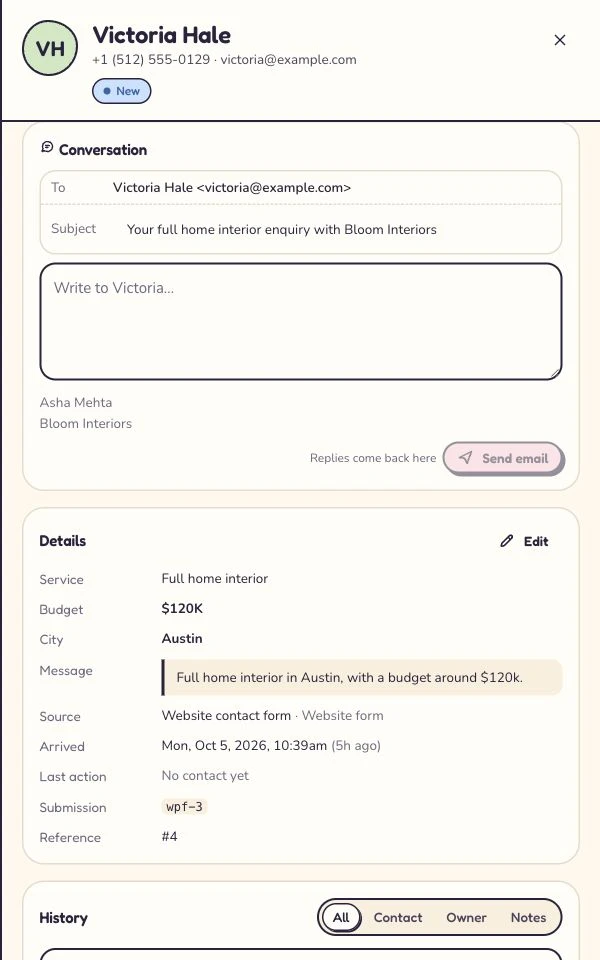
Victoria’s website contact form submission is saved with her project brief and the person handling it. Read this screen at full size +
On a phone, swipe inside the enlarged screen.
2 The person and promised call+
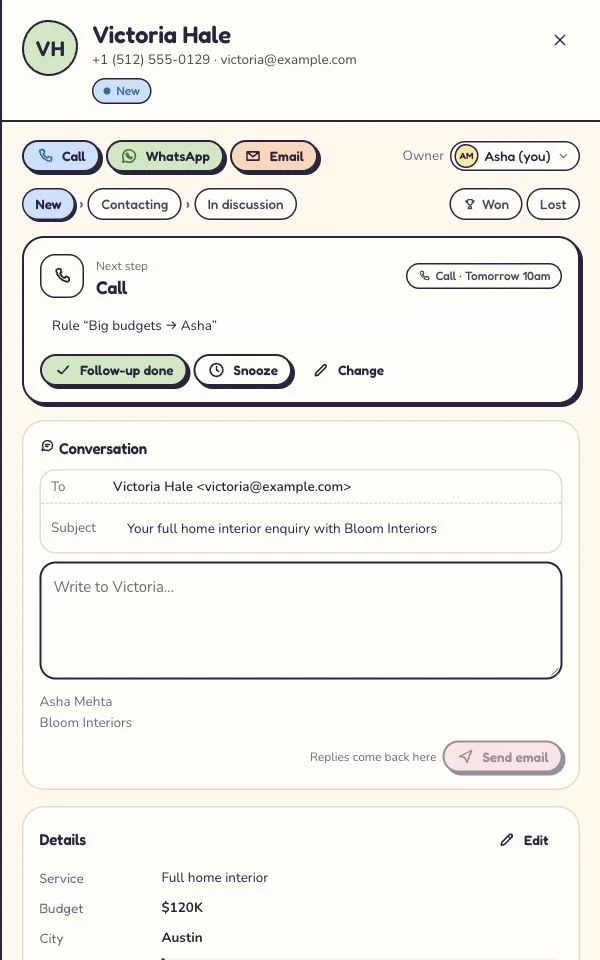
Asha handles Victoria’s enquiry. The planned call is tomorrow at 10. Read this screen at full size +
On a phone, swipe inside the enlarged screen.
3 The quote+
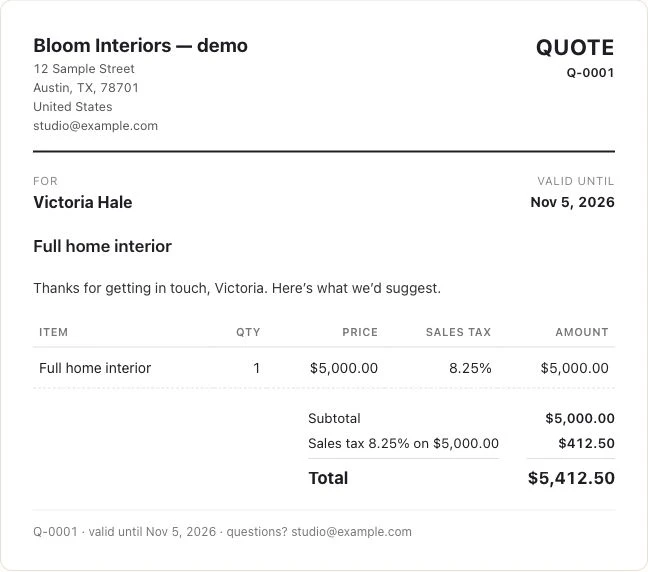
The example project has its own customer-facing quote. Its amount is a project price, not a Kibi subscription. Read this screen at full size +
On a phone, swipe inside the enlarged screen.
4 The customer’s answer+
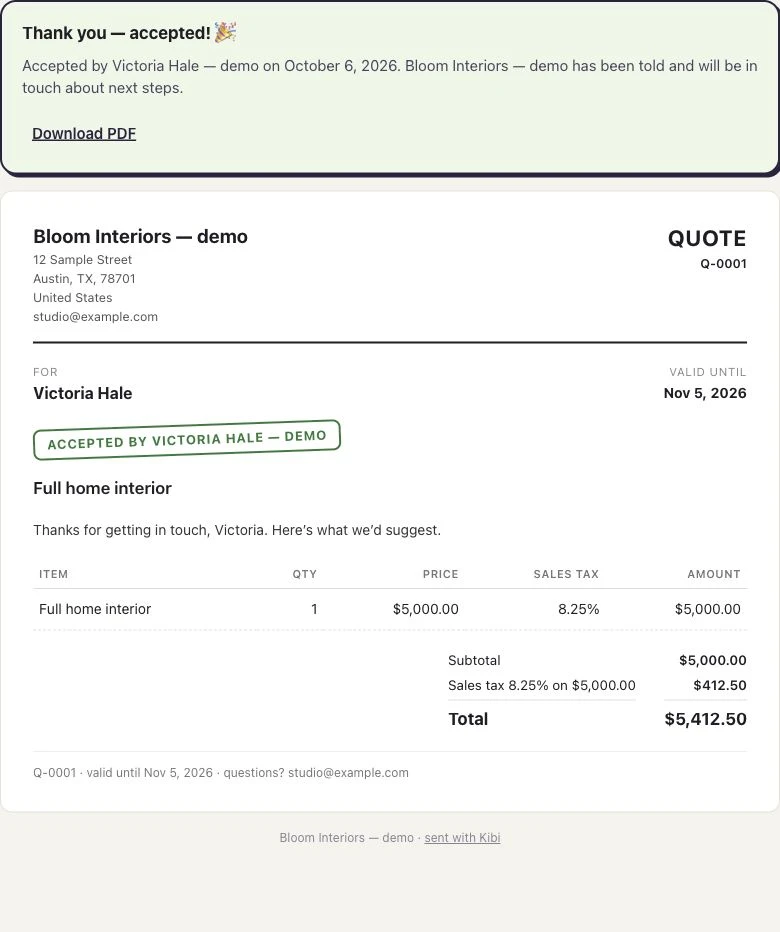
The customer’s acceptance stays with this quote. Read this screen at full size +
On a phone, swipe inside the enlarged screen.
5 The invoice+
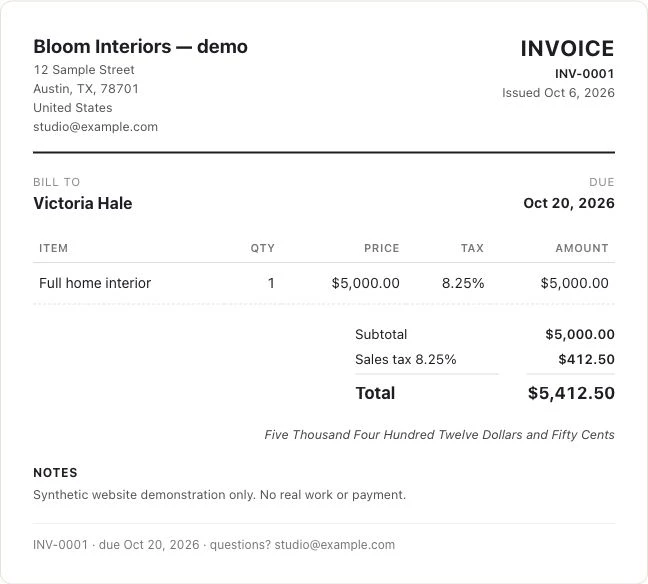
The accepted quote is used to make the invoice. Read this screen at full size +
On a phone, swipe inside the enlarged screen.
2. Dubsado for forms, contracts and client onboarding
Dubsado belongs beside HoneyBook on the shortlist for a creative business that likes to guide clients from questionnaire to contract to invoice. Its plans list client portals and invoicing. Premier adds advanced scheduling and automated workflows.
Take your least straightforward booking into the trial. Perhaps the client fills out a questionnaire, you review the scope, and only then should they see the contract. Check how that pause works. The exception tells you more than the lovely happy-path demo.
3. Bonsai for agencies that bill for time and manage delivery
For a small agency, the expensive surprise can come after the client says yes. A project sold as ten hours takes fifteen, and nobody notices until invoice day. Bonsai is worth a look when the team needs tasks, time tracking and project oversight alongside client billing.
Bonsai lists time tracking on Basic, proposals and invoices on Essentials, and workload and project reporting features on Premium. Have the person who actually records hours try it. Then ask the owner to find those hours and prepare the bill.
4. Jobber for home-service crews that need to schedule the work
If winning the job is the easy bit and getting the right person to the right house is the hard bit, put Jobber on the shortlist. Its plans cover quoting, invoicing and field-service workflows. Start by checking the scheduling, team access and job features you would actually buy.
Put one site visit on the schedule. Move it when the client changes the time. Ask the person going out to find the new appointment on their phone. If that is the problem you need solved, make it the deciding test.
What should you move out of HoneyBook?
Start with open work. A signed agreement, an unpaid deposit and a lead who needs a call on Thursday are three different things. Give each one a destination before you cancel or turn off a form.
HoneyBook’s contact export includes fields such as name, email, phone and notes. Treat that spreadsheet as a contact list. Check separately where you’ll keep signed agreements and current invoices, and how your team will see booking and payment status during the change.
- For open leads, keep the contact, scope question, person responsible and date of the next conversation. Test the import with three rows first.
- For booked jobs, decide where the appointment and signed agreement will stay. Check that the team can still find both.
- For outstanding payments, decide where the original invoice remains payable and who checks its balance. Avoid sending two payment requests for the same work.
- Before changing your live website form, run a sample submission and make sure the teammate on duty can find it.
Questions small teams ask before switching from HoneyBook
We’re a three-person studio and already use Calendly and a separate signing tool. Which HoneyBook alternative should we try?
Try Kibi CRM if the gap is keeping new enquiries, the person replying, the next call, the quote and the invoice together. Keep your existing booking and signing tools. Test whether a second teammate can open a sample enquiry and explain what the customer is waiting for.
Can a customer accept a Kibi quote online and can we invoice from it?
Yes. A customer can accept a Kibi quote using its link. Your team can then create an invoice from that accepted quote. Every plan includes quotes and invoices. Starter: 5 quotes + 5 invoices a month. Team: 20 quotes + 20 invoices a month with your logo. Growth: unlimited quotes & invoices with your logo. Drafts don't count, and customers can always accept and pay. Keep any separate agreement you require in your signing tool.
I’m a solo photographer. Should I switch from HoneyBook if clients already book, sign and pay in one link?
Start by testing that complete booking in HoneyBook. Its Smart Files can combine service selection, scheduling, a contract and payment. If you want to change tools, shortlist Dubsado and try your actual booking and paperwork flow before you decide.
We’re a five-person agency. How do we compare the real cost of switching from HoneyBook?
Compare the plan all five can actually use, the monthly document allowances, any payment fees and the tools you will still pay for. For Kibi, use the local pricing page and count the teammates who need access. In a trial, give two of them the same sample lead and see whether the handover works.
Can we keep our existing website form if we switch to Kibi CRM?
Yes, if your form can send submissions to Kibi through a supported connection. The right route depends on your form builder. Run one sample submission and check that the request, contact details and next callback are visible to the teammate handling it.
Does Kibi offer a free HoneyBook alternative?
Kibi CRM has a 14-day free trial, followed by a paid plan if you continue. Use the trial to test a sample enquiry, callback, quote and invoice before choosing a plan.
Try one job before you move the business
Use Victoria’s example or pick one job your team knows well. Try it in your two finalists, then ask a teammate to take over halfway through. Give them the customer record and five quiet minutes. Can they tell you who’s calling, what the customer accepted and who sends the invoice?
Start the Kibi trial with a fictional or authorised enquiry. Assign the callback and add a sample quote. If you test acceptance and billing, use a test recipient you control and stop before collecting a real payment.
How we compared the tools
We checked the vendors’ official feature, pricing and help pages on 10 November 2026. The shortlist compares documented workflows. The screenshots show the same fictional Kibi demo project from website enquiry to invoice. The three-person handoff is an exercise you can adapt to your team.
Try one thing on the next enquiry.
Pick a change your team can use tomorrow.