You finally have the answer. The revised quote is ready. You open the chat, type a lovely little reply… and WhatsApp wants a template. A slightly awkward time to meet the rules.
The WhatsApp 24-hour window is the Business Platform’s customer-service reply period. It runs from the customer’s latest message. Within it, you can send free-form replies; after it closes, use an appropriate approved template. Your own messages do not reset the clock.
This guide is for small sales and service teams using the WhatsApp Business Platform/API, including a connected CRM. It is not a countdown applied to every ordinary conversation in the standalone Business app.
We make Kibi CRM. We’ll explain the rule first, then show how an owner and a clear next action help keep the sale from becoming “someone was going to reply”.
The WhatsApp 24-hour window: who moved the clock?
Fictional example, one local clock. This teaches the rule; it does not check your live account or send a message.
Tap through this fictional kitchen-project enquiry. All times use one illustrative local clock, with no daylight-saving change. Watch what happens when the business replies—and when the customer does.
The simple calculation is: latest customer message time + 24 hours. At that expiry time, the free-form reply window is closed unless another customer message has reset it. Check the connected tool’s current sending guidance rather than guessing from yesterday’s date.
| Event | Effect on the window |
|---|---|
| Tuesday 09:00: customer asks about a kitchen quote | Opens until Wednesday 09:00. |
| Tuesday 16:00: your business replies | Still closes Wednesday 09:00. |
| Wednesday 10:00: no new customer message | Closed; use an appropriate approved template for a Platform message. |
| Wednesday 11:00: customer sends another message | A new window runs until Thursday 11:00. |
The window closed. Here’s your next sensible move.
What’s your situation?
Open a path. Give the next action a person, not just a status.
The customer wrote less than 24 hours ago
Free-form replies are allowed within the Platform window, subject to account readiness and policy. Read the latest message first; another colleague may already have answered.
See the writing examples →The window closed; we have a suitable approved template
Use the appropriate approved template. Inspect its status after sending. Wait for a customer message before treating free-form replies as open again.
See what resets the window →The window closed; we don’t have the right template
Prepare suitable wording through your supported setup. Or use a different appropriate, permitted contact route. Don’t relabel a sales chase to get around the rule.
Keep the follow-up owned →A personal planning aid, not an eligibility check or template approval tool.
First, check the latest inbound message. A colleague’s reply can make a thread look active even though the customer hasn’t written since Monday. Activity is not the same thing as eligibility.
If the window is closed, use an approved template appropriate to the actual reason for contact, subject to your account’s readiness and the customer’s permissions. Approval is not a guarantee of delivery.
If there isn’t a suitable template, don’t disguise a sales chase as a transaction update. Prepare the right template through your supported setup and wait for the required approval, or use another appropriate, permitted contact route.
A customer can also message you again and open a fresh window. Don’t make them perform a pointless “hi” ritual to receive information you could have prepared properly.
- Check whether the customer has asked you to stop or use another channel.
- Read the template’s actual wording, language, status and purpose before choosing it.
- Check account readiness, payment-method restrictions and any sending error.
- After sending, inspect its status. Queued, delivered, read and answered are different things.
- Give the next human action an owner. Don’t leave the enquiry parked under “template sent”.
A template can ask a question. Only their answer resets this clock.
Imagine your approved message is delivered at 10:15 on Wednesday. That outbound message alone does not start a new free-form reply period. A read receipt is not an inbound customer message either.
If the customer writes back at 11:00, count from 11:00. You can then continue the conversation within the new window, subject to the usual policy and account conditions.
Creating a new enquiry, assigning a different owner or connecting a CRM does not change Meta’s rule. Neither does sending “just checking in” often enough. Charming persistence has its limits.
Say something worth opening WhatsApp for.
The best starting point is the customer’s unfinished decision: a scope question, the detail they requested or the next step they agreed to. “Any update?” makes them do the remembering. Help them out.
These are original writing examples, not approved WhatsApp templates or a promise of a particular category. Outside the window, submit or select suitable approved wording through your provider’s supported process. Don’t paste these into a free-form composer and expect an exception.
Three separate questions: allowed, wanted and billed.
A message can use the right format and still be a bad idea. Check permission, relevance and requests to stop. A phone number captured on a form does not, by itself, settle every later WhatsApp use.
Template approval and the customer-service window do not describe the whole bill. Check current Meta charges, your provider’s charges and the software subscription separately. This guide deliberately does not turn “inside the window” into “everything is free”.
For Kibi: Meta bills you directly for WhatsApp. Kibi never charges your credits for it. If you connect through Twilio or MSG91, that provider bills you directly. Your CRM subscription is separate.
If you operate across countries, check your actual customer destinations and current provider terms. One team can have several conversations with different expiry times; there is no single daily reset for the whole business.
“It didn’t send” needs a reason, not another ten attempts.
If you use Twilio and see error 63016, its documentation identifies an out-of-window or unsupported send format. It also explains why typing template wording into an ordinary message body is not the same as sending a registered template.
Other failures need their own diagnosis. An unready number, unsuitable template status, payment restriction or customer opt-out is not fixed merely by changing the time of day.
In your connected tool, read the current error and check the provider’s documented remedy. Don’t tell the customer “sent” because you clicked a button. Keep the enquiry open for the person who will resolve it.
A clock is useful. A colleague who knows the plan is better.
Take a fictional example. Maya is handling a kitchen enquiry. The customer wants the hallway priced too. Maya needs an estimator’s answer before replying. The job is now bigger than “remember to WhatsApp”.
Keep the changed brief with the enquiry, name the person handling it and plan the next action: check the scope, then contact the customer appropriately. If Maya is away, a covering colleague needs the same story.
Kibi keeps the supported WhatsApp conversation beside the enquiry and its owner. Today holds the next planned human follow-up. Your team checks the permitted message and does the work; the CRM does not override Meta or automatically run this example.
Kibi’s WhatsApp connection depends on your account, number and supported setup. Eligible businesses can keep using the WhatsApp Business app; supported app replies appear in Kibi too. That connection does not waive Platform messaging rules.
Use the 14-day trial, then a paid plan, to test a real working routine: find an enquiry, read the context, assign an owner and plan one useful next action. Confirm WhatsApp connection readiness before depending on it for live work.
REAL KIBI SCREENS · FICTIONAL DEMO DETAILS
Keep the request where the team can find it
The saved enquiry shows Victoria’s service, budget, message and website-form source. These are fictional project details. 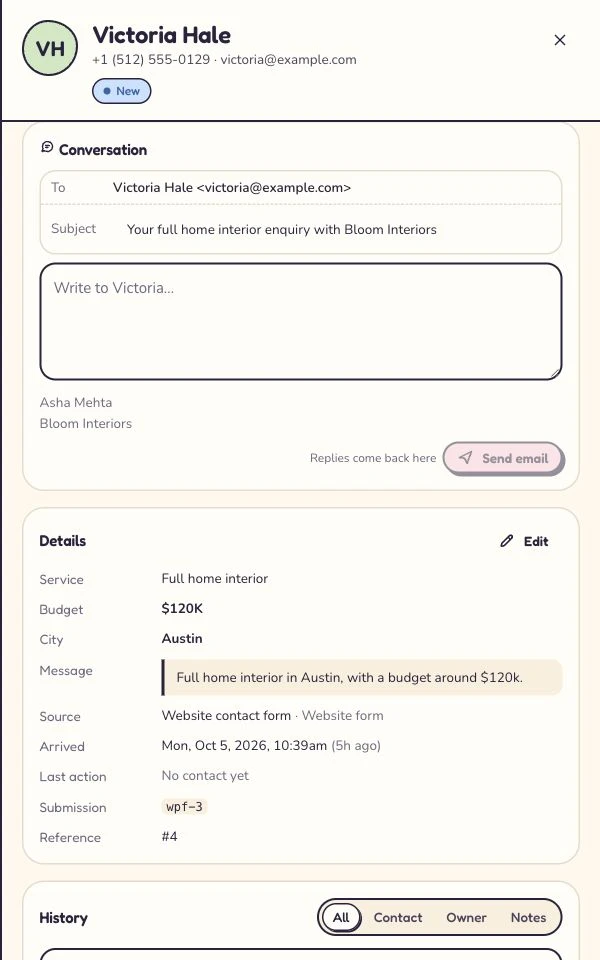
Make the changed plan easy to find
Asha is the owner; the next step is a call tomorrow at 10. This shows the updated record, not a test of another user’s access. 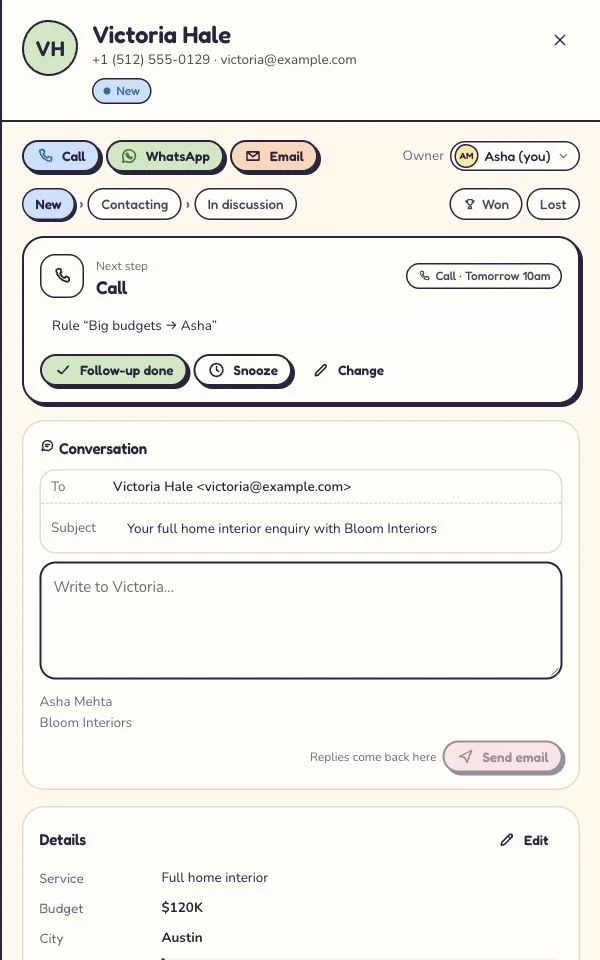
Captured 6 October 2026 in our isolated demo. Screens show different moments, not an automated sequence. Expand a step to see the screen.
The little questions that cause surprisingly big confusion.
What is the WhatsApp 24-hour window?
It is the WhatsApp Business Platform’s customer-service period, measured from the customer’s latest inbound message. Free-form replies are allowed within it. Outside it, use the required approved template, subject to policy and account conditions.
Does my reply reset the 24-hour window?
No. A new customer message resets the window. Your business reply, a delivered template or a read receipt does not itself restart the free-form reply period.
Does a website form submission or an ad click start the window?
Not by itself. The customer-service window starts with an inbound WhatsApp message from the customer. A captured phone number or an ad click is not that message. Check the actual chat, not only the lead source.
Can I send a WhatsApp message after 24 hours?
On the Business Platform, use an appropriate approved template outside the customer-service window. Check the customer’s permissions, template status and account readiness. Approval does not guarantee delivery or make unwanted contact acceptable.
Can I bypass or extend the WhatsApp API window?
A CRM, owner change or outbound message does not bypass it. A new inbound customer message opens a fresh window. Use the supported template process rather than a workaround.
Does this rule work the same way in the WhatsApp Business app?
This guide explains Business Platform/API sends, including those made through connected software. Do not apply its API composer restrictions to every standalone Business app chat. Supported coexistence can use both; follow the rules for the route you send through.
Are messages inside the window always free?
Do not assume that. The reply window governs permitted message format. Costs depend separately on current Meta terms, message type, destination and provider charges, as well as your software subscription.
Is a sales follow-up automatically a utility template?
No. A pre-sale follow-up is not automatically a utility message. Use the appropriate category and approved wording for its actual purpose; Meta controls classification and approval.
Does Kibi send these follow-ups automatically?
No automatic sequence is demonstrated here. A person reads the conversation, checks the allowed response and plans or performs the next action. Kibi offers a 14-day trial, then a paid plan. WhatsApp.
The rulebook, without the rabbit hole.
Official WhatsApp policy and Twilio documentation checked on 1 November 2026. The rule summary is for Business Platform/API messaging; account-specific sending guidance and current provider terms still apply.
The timeline, messages and team scenario are fictional teaching examples. The expandable Kibi screens are genuine captures from our isolated fictional demo, dated separately. This is a workflow guide, not a claim that we tested every provider or Meta account.
Choosing between the app and API is a different decision. Our setup comparison explains those roles; this article helps you handle the next conversation once the Platform window matters.
Try one thing on the next enquiry.
Pick a change your team can use tomorrow.