WhatsApp CRM for UAE teams. Keep chats, callbacks and quotes together.
“Did anyone get back to her?” You shouldn’t need to ask. Keep your team’s work WhatsApp chats, next calls and quotes together. See who’s replying and what happens next.
14 days · every feature · no card
“Could you call after four?”
Layla · kitchen renovation · Al Barsha
WhatsApp lead management, from enquiry to invoice.
Kibi is a WhatsApp CRM for small businesses and sales teams in the UAE. Connect your work WhatsApp Business numbers, give each enquiry to a person and save the next call. When the customer says yes, the quote and invoice stay with the sale.
Keep the app your team knows.
Reply from your connected WhatsApp Business app. The reply appears in Kibi too. No need to ask a colleague to forward the chat.
“I thought you called.” Sorted.
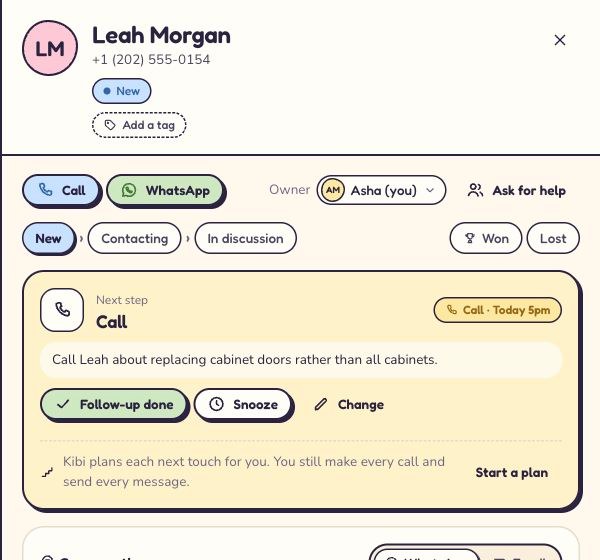
Give the enquiry to someone and save the callback. Today shows the new leads and calls that need attention.
Give a good chat a next step.
Send a quote the customer can accept online. Keep their questions beside it. Create the invoice when it’s time to bill.
Layla asked about a kitchen. Let’s get her an answer.
Follow an example Dubai fit-out enquiry from “can you quote?” to “yes, let’s do it”. Pick a step below.
WhatsApp follow-ups, without the “remind me again?”
New doors, not new cabinets. Small detail. Very different quote.
Save the change with the enquiry and callback. Tomorrow’s colleague can read it before calling. Layla gets a useful answer, instead of explaining the kitchen all over again.
Manage multiple WhatsApp Business numbers as a team.
The office has a Business number. Asha has one for work, too. Connect the numbers your team uses. Their Business app replies appear in Kibi.
Choose what each colleague can see. When Asha is away, give Ravi the enquiry and promised call. He can see the question before he says hello.
See how the Business app stays connectedAsha is away. Layla still needs her call.
- Customer’s latest question
- Can we change the handles as well?
- Colleague covering
- Ravi
- Promised follow-up
- Call after 4 pm with the revised scope.
Read the note. Make the call. Leave the update.
For UAE businesses selling through WhatsApp.
A kitchen quote, a course question, a new client brief. Different conversations. The same need to follow up.
“The office gets the WhatsApp enquiry. How does the estimator know what to call about?”
Keep the job request, photos and latest question on the enquiry. Give it to the person calling and save the agreed time. When the customer changes the brief, update the same enquiry.
See Kibi for home services & interiors“Five counsellors use different work numbers. Can I see who follows up each student?”
Connect the Business numbers used for work. Give student enquiries a counsellor and plan the parent callback. The owner can review connected enquiries and choose what each colleague sees.
See Kibi for education consultants“The client asked a question on WhatsApp. Did anyone follow up the proposal?”
Keep the brief, scope question and quote together. Save the next conversation in Today. Your project tools can keep handling delivery while Kibi helps with your own sales.
See Kibi for agenciesWhatsApp CRM pricing for UAE teams.
Count the people answering customers and the work numbers they use. Pick a plan that fits both.
Start with a 14-day trial. All features, up to 10 people.
Starter
For the owner and a colleague handling enquiries.
$14.50 per person / month
2 people included, then $12 a person / month
Up to 3 people using Kibi
- 5 quotes + 5 invoices a month
- 0% Kibi payment fee
- Connect 1 work WhatsApp number.
- Plan calls and follow-ups in Today.
- Choose your sources: work WhatsApp, a form or email.
Team
Most popularFor colleagues sharing enquiries and callbacks.
$15.80 per person / month
5 people included, then $12 a person / month
Up to 20 people using Kibi
Everything in Starter, plus:
- 20 quotes + 20 invoices a month · your logo
- 0% Kibi payment fee
- Connect 3 work WhatsApp numbers.
- Share new enquiries between salespeople.
- Follow up unpaid invoices with reminders.
- Share personal brochure links.
Growth
For a busier team sending more quotes and invoices.
$14.90 per person / month
10 people included, then $12 a person / month
Add people as your team grows
Everything in Team, plus:
- Unlimited quotes & invoices · your logo
- 0% Kibi payment fee
- Connect 20 work WhatsApp numbers.
- Compare entered ad spend with recorded sales.
Prices for United States. You pay in the currency of the card you pay with.
Prices are before tax. Meta or your WhatsApp provider bills messaging separately. Payment-provider fees are separate.
Compare plans and your team’s priceThe first 100 customers keep their price for life.
Two people or five? Compare the whole WhatsApp CRM bill ↗
Questions about a WhatsApp CRM in the UAE?
Keeping the app, sharing work numbers and choosing a plan for the people replying.
Choosing between WhatsApp CRM tools?What is a WhatsApp CRM for UAE businesses?
A WhatsApp CRM connects customer conversations with the work of selling: who replies, what the customer needs and when to follow up. Kibi helps small UAE teams keep connected work WhatsApp enquiries, callbacks, quotes and invoices together.
Is Kibi just a shared WhatsApp inbox?
Kibi is a sales CRM: it keeps connected WhatsApp conversations with the enquiry, the person replying and the next call. You can also send a quote and invoice from that enquiry. It suits teams that need to follow through on a sale as well as answer messages.
Can our team keep using the WhatsApp Business app?
Yes. Connect the WhatsApp Business number you use for work. Keep replying from the Business app; those replies appear in Kibi too, beside the enquiry and its follow-up.
Can we manage several staff and company WhatsApp Business numbers?
Yes. Starter includes 1 connected work number, Team 3 and Growth 20. The owner chooses what each colleague can see. Pick your plan for both the people replying and the numbers you need.
We have five salespeople. How do we know who is following up?
Choose who replies and save the next call in Today. The owner can see which enquiries need attention. Team includes 5 people and 3 work WhatsApp numbers, plus automatic sharing of new enquiries.
We have five people and five WhatsApp Business numbers. Which plan fits?
Growth has room for 10 people and 20 work WhatsApp numbers. Team includes 5 people but 3 numbers. Count the numbers as well as the people when you choose.
What happens when a salesperson is away or leaves?
Give the enquiry and promised call to the covering colleague. They can read the latest notes before replying. For someone leaving, review their access and connected work numbers as part of the handover.
Can a UAE business send quotes and invoices in Kibi?
Yes. Every plan includes quotes and invoices, with the monthly counts in the plan cards. Customers can accept quotes online. Use your business currency and tax settings; invoice payment reminders are on Team and Growth.
How much does Kibi cost for a UAE team?
UAE visitors see AED prices, with 2 people in Starter, 5 in Team and 10 in Growth. The cards show monthly and yearly bills, included people and extra-person charges. If you are visiting from another country, prices follow your detected location.
Does the subscription cover WhatsApp message charges?
Meta bills you directly for WhatsApp. Kibi never charges your credits for it. Twilio or MSG91 bills you directly when you connect through them. Your Kibi subscription and provider messaging charges are separate.
Is Kibi a free WhatsApp CRM?
Kibi has a 14-day free trial, then a paid plan. The trial includes every feature and up to 10 people, with no card needed. Try one work number, an enquiry and a callback before moving the whole team.
Your next customer is worth a follow-up.
Give Kibi a small job before you give it the whole business.
- 01Connect one work number.
- 02Give an enquiry to a colleague.
- 03Save the call you promised.
14 days · every feature · no card