One customer messages the office. Another messages Ravi. By lunchtime, “Who’s calling them?” has become the team’s most popular group-chat question. Quite the bestseller. Not much of a sales process.
To manage multiple WhatsApp Business numbers with a sales team, connect the work numbers to one CRM, decide who handles new enquiries on each line, and save a named person, next call and quote against the customer’s request.
Here’s how that looks in Kibi: two business numbers, one ceiling enquiry, Ravi’s callback and a draft quote. The screenshots are real Kibi demo screens with fictional details and simulated WhatsApp. We saved the sample call and draft; nothing was sent.
Looking for the product overview? Explore Kibi’s WhatsApp CRMWant the working checklist? Jump to the two-number team testChoosing a CRM for a UAE team? See Kibi’s UAE WhatsApp CRM
First: more people, more numbers—or both?
Multiple users means several people helping with one business number. Multiple numbers means the business has separate lines: perhaps the office, two salespeople or different branches. Some teams need both.
Linked devices let colleagues use the same WhatsApp account. A shared WhatsApp inbox for multiple numbers brings business conversations together. A CRM adds who handles each enquiry, when the next call happens and which offer is being discussed.
WhatsApp’s own help explains that an account has one registered phone number. A second SIM does not turn that account into two business lines. Switching accounts on a phone is also different from coordinating a sales team.
| Your situation | What to organise |
|---|---|
| Three salespeople answer one office number | One shared line, clear assignment and access for each person. |
| The office and Ravi have separate work numbers | Two connected lines; decide which is shared and which belongs to Ravi. |
| Five counsellors each use a work number | Five number connections, plus an office line if you use one; check that separately from the five people. |
| Two branches share one sales team | Name each business line, decide who handles it and keep the sending number clear. |
The walkthrough: two numbers, one properly handled enquiry.
Two numbers. Sameer still needs one answer.
Choose a step. See what the team needs to know.
Our sample business, Saffron Interiors, has an Ads & website number shared by the team and a work number belonging to Ravi. Sameer writes to the shared line about a false ceiling for his 2 BHK.
The enquiry is assigned to Ravi. We plan his next call, then prepare a sample quote on the same record. He can find the question before calling, instead of asking Sameer to deliver the opening speech again.
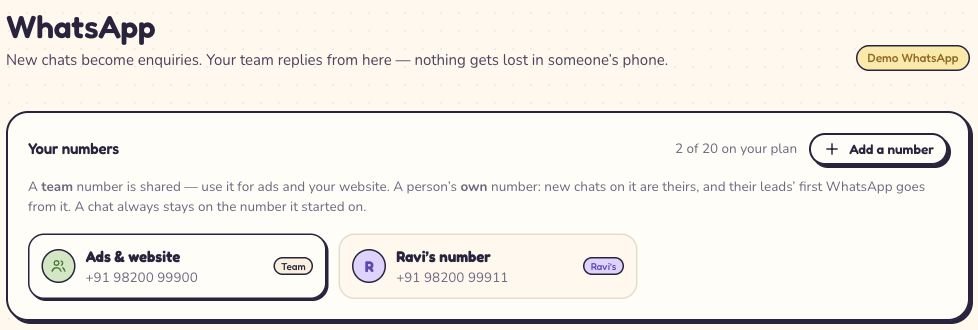
1. Bring the work numbers into one place.
In Kibi, open WhatsApp and choose Add a number. Pick the route that matches it: On the WhatsApp Business app, A number that isn’t on WhatsApp yet, or Through Twilio or MSG91.
If your team wants to keep replying from the Business app, choose that app route. Supported replies sent there appear in Kibi too. This supported app-and-CRM connection is often called coexistence.
Complete the connection for each work number, then check the list. Use names people recognise: Ads & website, Ravi’s number or North branch. “Second number final final” is a filing system asking for affection.
Connect the numbers your team uses for customer work. Kibi’s Meta-approved WhatsApp connection is live: keep the Business app and give each enquiry a clear next step.
Read this screen at full size

On a small screen, swipe inside the image to see the rest.
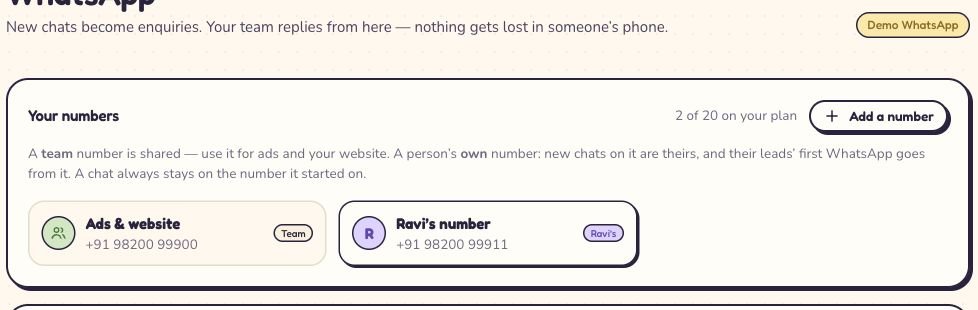
2. Decide who gets the next enquiry on each line.
Select a number and look under Belongs to. Choose The team — shared for a general sales line. Choose One person and the teammate’s name for a work line that belongs to them.
Ravi’s work number belongs to Ravi Kumar. New chats on that number become his enquiries. The shared Ads & website number follows the normal routing and source assignment instead.
For a shared line, open its WhatsApp source and choose who receives enquiries. You can assign one person or, on Team and Growth, use rules and take turns between selected teammates.
Round robin skips people marked Away. If everyone in the selected rotation is Away, the new enquiry stays Unassigned for someone to pick up. Arrange cover for their existing callbacks separately.
Read this screen at full size

On a small screen, swipe inside the image to see the rest.
3. Open the question. Check the person.
Open Inbox and choose WhatsApp under Channel. With multiple numbers connected, the WhatsApp number filter helps you focus on a particular line. Every number gives you the wider view your access allows.
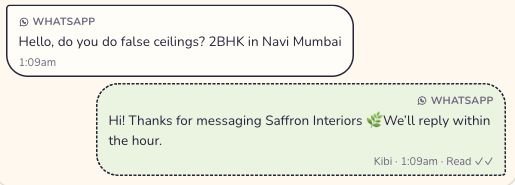
Open the enquiry and read the actual request. Sameer asks, “Hello, do you do false ceilings? 2BHK in Navi Mumbai”. That is a useful opening for Ravi—not just another phone number to chase.
Check Owner and the From line in the conversation. Sameer’s enquiry belongs to Ravi, but the conversation still goes from Ads & website. Assigning a person does not move the customer onto that person’s number.
An automatic greeting can acknowledge the message. Ravi still needs to answer Sameer’s question. “Thanks, we’ll reply” should not become the most ambitious thing your sales team says all day.
Read this screen at full size

On a small screen, swipe inside the image to see the rest.
4. Give the callback a time and a reason.
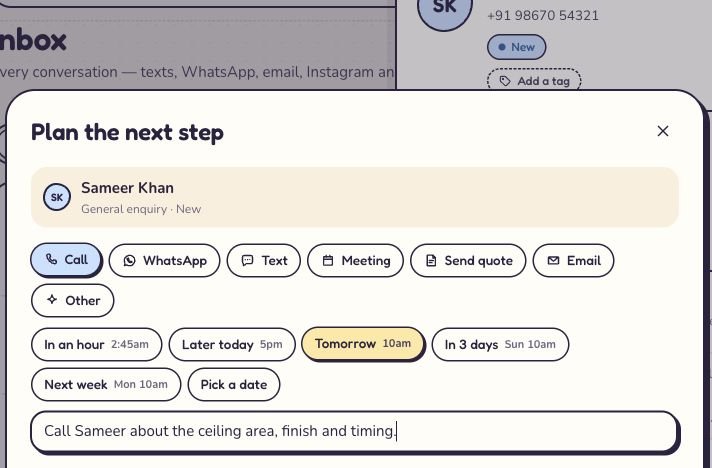
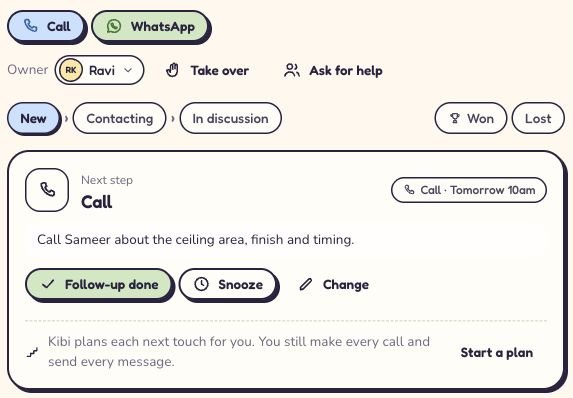
On the enquiry, choose Plan next step. Select Call, pick the intended time and add a note for whoever will make it. Save step, then check the saved card.
We choose tomorrow at 10am and write: “Call Sameer about the ceiling area, finish and timing.” This is a sample plan. In real work, use the time agreed with the customer.
Now Ravi has more than “call lead”. He knows what to ask. A covering teammate can read the same note without starting a small office investigation.
Use Today to review new enquiries and planned follow-ups as they become due. After the conversation, record what happened and choose the next useful action.
Read this screen at full size

On a small screen, swipe inside the image to see the rest.
Read this screen at full size

On a small screen, swipe inside the image to see the rest.
5. Keep the quote with the conversation that earned it.
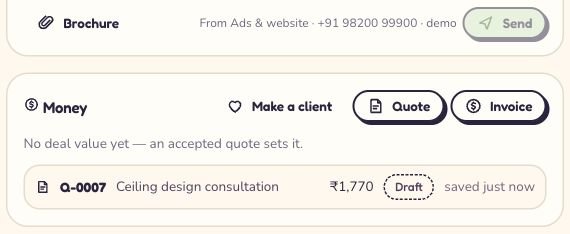
When the scope is clear, go to Money on the enquiry and choose Quote. Add the proposed work, quantities, prices and terms. Save a draft and review it before sharing.
For the walkthrough, we prepare a sample ceiling design consultation. Draft Q-0007 appears on Sameer’s enquiry, beside the conversation.
Open the draft to review the wording and scope. You can do that without leaving the enquiry or hunting through a colleague’s messages.
If the quote raises a question, save the next conversation too. “Discuss whether the hallway is included” is a better plan than staring at a sent document and hoping it flirts back.
For a ready quote, Kibi can send its PDF from the enquiry’s connected WhatsApp number while the customer’s reply window is open. Outside that window, use an approved template to invite a reply or another agreed contact route.
Read this screen at full size

On a small screen, swipe inside the image to see the rest.
6. Someone’s away? Hand over the work, not another mystery.
If Ravi is away, review his existing calls and change the enquiry’s owner where cover is needed. Leave a short note: the customer’s question, what you promised and the next agreed contact.
The WhatsApp conversation stays on the number it started on. In this example, a covering colleague works Sameer’s Ads & website conversation; they do not need to introduce a different sending number.
Changing who a staff number belongs to affects new chats on that number. It does not reassign every existing enquiry. Review those records as part of the handover.
The owner chooses each person’s enquiry access. Connecting more numbers does not give every teammate access to everything. Give the people covering the work the access they actually need.
How does this fit your team?
The screens above follow an interiors enquiry. The routine also works for a consultancy, agency or small service business. Change the questions to suit the customer; keep the person and next conversation clear.
I have five education counsellors using separate WhatsApp Business numbers. What should I set up?
Connect the authorised work numbers, label each line and assign it to the right counsellor. Review student questions, the responsible person and parent callbacks together. Count the number connections separately from the five people; an office number adds another connection.
We have two office WhatsApp numbers and three salespeople. How do we avoid everyone replying?
Make the office numbers shared lines, choose who receives new enquiries and give each enquiry one responsible person. Use the next-step card for the promised call or message. In Kibi, automatic routing and round robin are on Team and Growth.
Our agency has a sales number and separate account-manager numbers. Can proposals stay with the conversation?
Connect the work numbers and keep each enquiry with its responsible person, customer questions and planned follow-up. Make the quote on that enquiry so the next person can review the offer and the conversation together. The existing conversation keeps its original sending number.
Count the people. Count the numbers. Choose the plan.
Five people sharing two numbers is a different setup from five people each using a number. For this walkthrough, choose a plan with room for the team and at least two connected WhatsApp numbers.
Team includes 5 people, 3 WhatsApp numbers, routing, 20 quotes and 20 invoices a month. If five counsellors each need a connected line, compare Growth’s number allowance rather than assuming five included people means five numbers.
Meta bills you directly for WhatsApp. Kibi never charges your credits for it. If you connect through Twilio or MSG91, that provider bills you directly. Use the pricing page for the current subscription amount in your country.
| Plan | People included | WhatsApp numbers | Quotes + invoices per month |
|---|---|---|---|
| Starter | 2 | 1 | 5 + 5 |
| Team | 5 | 3 | 20 + 20 |
| Growth | 10 | 20 | Unlimited + Unlimited |
Before the whole team joins, try this little test.
Start with two work numbers and one sample enquiry. Ask a teammate to find the original question, say who is handling it and explain the next call. Then ask them to find the draft quote.
If they can do that without asking whose phone it is on, the setup is doing something useful. Add the next line when the first routine feels easy. A bigger inbox is not the goal; a clearer working day is.
A few questions before the next hello.
Can I manage multiple WhatsApp Business numbers in one place?
Yes. A multi-number CRM connects separate business numbers to one account. In Kibi, choose whether each line is shared or belongs to one teammate, then manage its enquiries, people responsible, follow-ups and quotes together. The number allowance depends on the plan.
Can staff keep using the WhatsApp Business app?
Yes, through Kibi’s supported WhatsApp Business app connection. Staff can keep using the connected app, and supported replies appear in Kibi too. Choose the Business app route when connecting an existing app number; it is different from connecting a new number.
Does assigning a WhatsApp enquiry change the sending number?
No. In Kibi, an existing chat stays on the number it started on, even if another teammate takes over the enquiry. The person responsible and the business number used for the conversation are separate.
Can the owner see work enquiries without every salesperson seeing all of them?
Yes. Kibi’s owner chooses each person’s enquiry access. A teammate can be limited to their own enquiries while the owner reviews the connected business work. Adding another number does not automatically widen a teammate’s access.
What happens when a salesperson leaves?
Reassign the work number to the next person and review the existing enquiries and callbacks separately. In Kibi, handing over a number changes who receives its new chats; existing enquiries keep their owners until you change them.
Do more WhatsApp numbers mean I can message without limits?
No. Adding numbers does not remove Meta’s messaging rules or the customer reply window. Keep the first useful reply and the next agreed conversation clear. Kibi’s number allowance is separate from Meta’s account and messaging rules.
Can I test two numbers during the Kibi trial?
Kibi’s 14-day trial supports 3 WhatsApp numbers, so it has room for this two-number test. Connect the work lines, try the shared follow-up and then choose a paid plan for your actual team and number count.
Keep the familiar numbers. Make the next move easier.
Your customers already know how to message you. The team needs a clearer way to turn that message into a helpful reply, a promised call and a useful offer.
Try Kibi CRM free for 14 days. Start with two work numbers, one enquiry and the people who will actually handle it. Look for the next call, not just the number of chats.
Try one thing on the next enquiry.
Pick a change your team can use tomorrow.