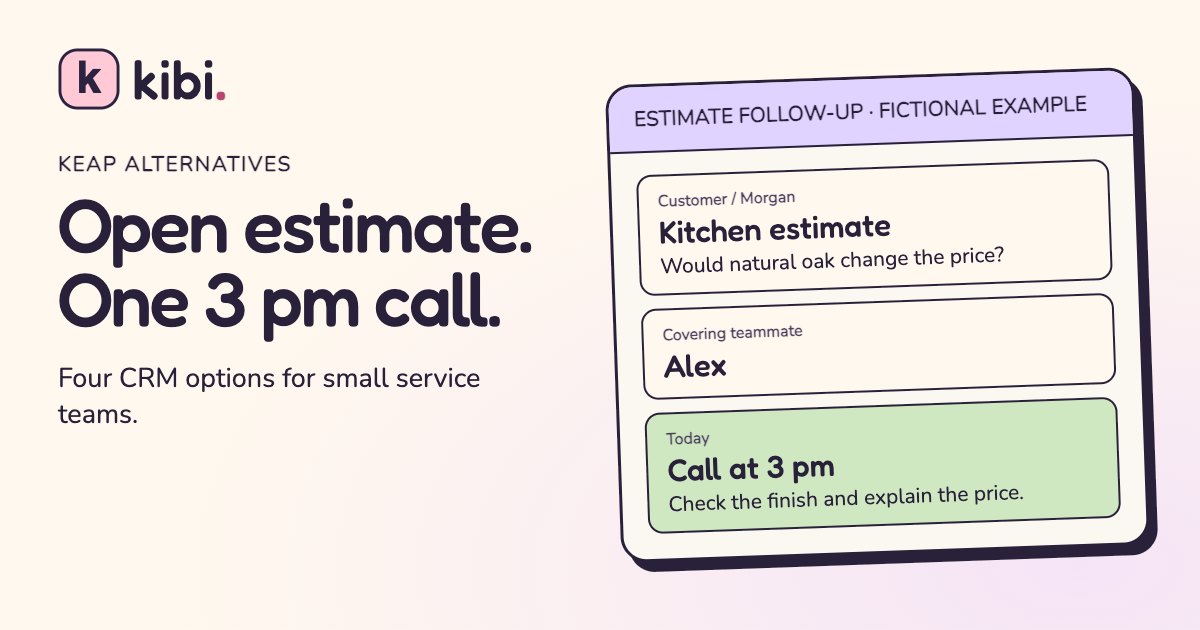
It’s 2:55. Morgan has a kitchen estimate, a question about the oak finish and a promise that Jamie will call at three. Jamie is on a site visit. The office has a very nice automated email ready to go. Morgan still needs an answer about the oak.
Kibi CRM is our pick for a small US service team whose main job is sharing new inquiries, assigning callbacks and following up on estimates. ActiveCampaign is worth a look if timed, branching email campaigns need to stay. Jobber fits a team that also wants to schedule jobs. Bigin by Zoho fits a small team that wants a pipeline and shorter email-and-task sequences.
We make Kibi. We compared the four tools with one fictional remodeling job and checked their official docs. You can use the same job to see what you gain in the working day and what would need rebuilding if you leave Keap.
See what happens to Keap automations
Keap alternatives at a glance
Give each vendor the same scenario. A homeowner has seen an estimate, needs one answer before approving it and expects a call today. Ask who picks up the call and what the system sends automatically. Then ask the vendor to show the bit your team will use every day.
| CRM | Best fit | What to try |
|---|---|---|
| Kibi CRM | A service office sharing inquiries, calls and estimates | Hand over an open estimate and find the saved call in Today. |
| ActiveCampaign | A team that relies on email campaigns with waits and branches | Send a test sequence and check what happens when the prospect books. |
| Jobber | A field team that needs assessments, quotes and job scheduling | Book an assessment and check an automatic follow-up for an open quote. |
| Bigin by Zoho | A sales team that wants a lightweight pipeline and short sequences | Open an estimate deal, start a sequence and test its stop rule. |
When is it worth staying with Keap?
Keep Keap in the running if it takes work off your desk every week. It combines contact records, sales and marketing automation, appointment booking, quotes, payments and invoicing. A lead can enter from a form, get a booking email and receive a reminder. Quote events such as viewed or accepted can trigger more steps. Recurring billing can be part of the same setup.
Ask the person who handles the mailbox to show you two live examples. What happens when someone books after the first email? What happens when a paid client is already in a reminder sequence? If those rules quietly keep the business moving, give them the same attention as your contact list.
Keap is part of Thryv. Thryv’s transition FAQ says existing Keap products, login and support continue. Treat the switch as a business decision. Work from your current invoice and the rules your team relies on today.
What would we lose in automation if we leave Keap?
Start with the events that make something happen. Write down what starts the rule, what gets sent or assigned, how long it waits and what should stop it. For a booking sequence, the stop condition could be an appointment booked. For an unpaid invoice reminder, check what happens after the payment is recorded.
Exporting contacts gives you the fields you selected. Rebuild the rules in the tool that will own each job. Keap has a route for its partners to install advanced automation definitions between Keap accounts. For a move to a different platform, budget for checking the rules, enrolled contacts, links and send permissions separately.
Test the risky transitions while the old system is still available. Keep a single sender in charge of each live reminder. Put a fictional quote through an approval and check that scheduled follow-ups behave the way you expect. Two polite nudges in the same morning can become a surprisingly rude morning.
For active sequences, pull a list of who is waiting at each step. Give these contacts a specific test of their own. If someone has already had the welcome email and is waiting for a prep note, start them at the agreed point or handle them manually. A successful test with a brand-new contact tells you little about those already halfway through.
| Job in Keap | Test before the switch |
|---|---|
| Email nurture and tag-based branches | Rebuild one running sequence in the chosen campaign tool. Test the booking or opt-out that should end it. |
| A promised estimate callback | Assign it to a person and check that the time and reason are visible on their work list. |
| Self-serve booking and reminders | Book, reschedule and cancel an appointment through the booking tool the customer will actually use. |
| Recurring billing and stored payment methods | Ask the billing provider which schedules and payment arrangements can move. Verify who owns the next charge. |
1. Kibi CRM for assigned inquiries and estimate callbacks
Kibi CRM suits a service office where one person answers the website inquiry, a second prices it and a third may cover the callback. The inquiry keeps the request, the person handling it and the next step together. In Today, that person can see the time and read the original question before calling.
Send one new request to the team and have someone take ownership. Draft an estimate when you have enough to price it. Then give the inquiry to the covering teammate and check the saved Call. When Morgan asks which finish is in the quote, the answer should take one conversation.
Kibi can assign new inquiries by rule and guided follow-up plans can put the next task on a rep’s list. For an estimate callback, the teammate still makes the call or sends the message. Automatic invoice payment reminders on Team and Growth are a separate job. Keep marketing sequences and self-serve appointment booking in the tools you want to run those jobs.
For five people, Team includes 5 people and 20 quotes and 20 invoices a month. Check your actual document volume and country price. The 14-day trial needs no card. A paid plan is required to continue.
INSIDE KIBI · PRIYA’S EXAMPLE QUOTE
1 The saved callback+
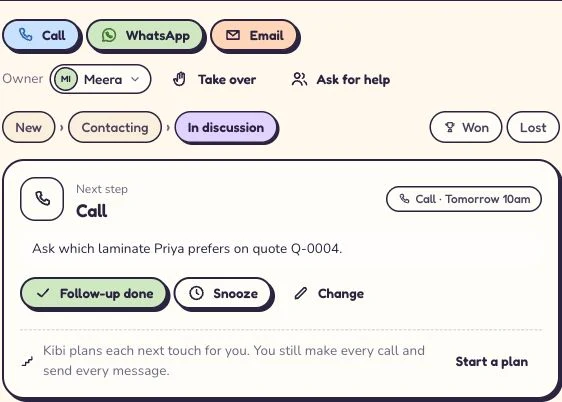
Meera has a call tomorrow at 10. Her note asks which laminate Priya prefers on quote Q-0004. Read this screen at full size +
On a phone, swipe inside the enlarged screen.
2 The quote is still open+

The same enquiry shows quote Q-0004 as Opened. Priya has seen the quote and has yet to accept it. Read this screen at full size +
On a phone, swipe inside the enlarged screen.
2. ActiveCampaign for teams that want to keep the email logic
ActiveCampaign belongs on the list if your estimate requests go through a real nurture sequence. It documents triggers such as a form submission or a tag being added, along with waits and conditional actions. Some sales and deal triggers require the enhanced CRM package or an eligible plan. Price the capabilities you intend to use.
Rebuild one Keap sequence with sample records. Start when a prospect requests an estimate. Send a useful preparation email, wait and check whether they have booked. Send the second message to the sample contact who is still waiting. Ask the person who looks after the calendar to make and cancel the test appointment.
ActiveCampaign’s onboarding page names Keap as a supported source for eligible migration help. Ask which of your automations qualify and which steps need rebuilding. The documented service excludes a contact’s exact place in an active sequence, along with tasks and notes. List those separately before you expect the new campaign to carry on.
If you keep a separate CRM for the service desk, decide which tool sends each message and who sees replies. Run one booked lead and one opt-out all the way through. A campaign tool that excels at email still needs a clean handoff to the person who will answer a scope question.
3. Jobber for estimates that turn into scheduled field work
Jobber is worth a demo when the office needs to book site assessments, send quotes and put approved jobs on the schedule. Its online booking documentation covers requests that can book either an assessment or a job on eligible plans. Customers can review and approve a quote through its client hub.
Walk a sample request through an assessment, then send an estimate. Jobber documents automatic follow-ups for quotes awaiting a response on eligible plans. Ask the vendor to show which channel is used, when the reminder runs and how the contact’s communication settings affect it.
If you already schedule crews somewhere your team likes, compare the effort of switching that too. Include an acceptance and a changed scope in the demo. This is a stronger option when you want the quote and the work schedule in the same system.
4. Bigin for a tidy pipeline and shorter sequences
Bigin by Zoho is a good in-between choice when you want a small-team pipeline with owners, tasks and some timed follow-up. Its Premier and Bigin 360 editions support Sequences. A sequence can contain emails and tasks. Contacts sequences can include calls, and a pipeline sequence can set a callback task.
Start on Morgan’s record and try one email and one callback task. If the office wants later steps to stop when a customer replies, test that explicitly. Bigin says the stop-on-reply option needs the Reply-To mailbox synced via IMAP so it can detect the response.
If estimates and invoices matter too, test the accounting connection your team expects to use. Bigin documents integrations with Zoho Books, Zoho Invoice and QuickBooks Online. A plan comparison is easier after the salesperson has tried the call and the person who bills has opened the estimate.
What should a five-person team compare on the bill?
Use your current Keap invoice and the last busy month as inputs. Count the people who need access, the number of marketable contacts and the number of estimates and invoices you send. Add any booking, email or payment tools you would keep either way. If a package prices staff and marketing contacts separately, compare both against your own totals.
Five people can share Kibi Team with the included document limits. If ActiveCampaign keeps two important sequences running and another tool handles estimates, include both in the new bill. If Jobber could replace a paid scheduling tool, count that too. Compare the total cost of the jobs you need to cover.
Add a line for the move itself. Someone has to confirm the new form, recreate the active call list and check that old email or payment schedules end at the right time. Ask a vendor to name what it will handle and which checks are yours before you agree a start date.
Try the switch with three contacts and one promised call
Start with the practice file below. Morgan has an open estimate and a promised 3 pm call. Eli is new and has an old welcome rule to investigate. Dana’s job is complete and promotional emails were suppressed. The rows are fictional. Use the file to rehearse the move, without putting any sample into a live sending campaign.
From Keap, export the lead details you are authorized to move. Its help center documents selected standard and custom contact fields, separate notes exports via the Task Note Report, and tags via the Tag Tracker report. Keep the original IDs for reconciliation where appropriate. Export or document open tasks, bookings, payment arrangements and communication preferences with the team that owns them.
In Kibi, open Enquiries, then choose Import CSV. Map Name, Phone, Email, Service, Status and Notes in the preview. Check that Quote sent maps to In discussion and that the completed job maps to Won. Pick an owner for the test batch and open the records afterward. The original promise and sending note live in Notes so the new team can act on them.
Assign Morgan to a teammate. Add a Call for a suitable test date at 3 pm, with the oak question as the note. Check Today on that person’s account when the call is due, and make sure they can find the estimate context. For Eli, decide whether the welcome goes out from an existing campaign tool or whether a person is replying. Check Dana is closed and leave the callback blank.
Keep the send settings in the email platform. A note about an opt-out in a CRM can help a teammate understand the history. Apply and verify the suppression where messages actually go out. A trial has done its job when a teammate can explain both what should happen next and which message should stay quiet.
Name,Phone,Email,Service,Status,Notes
Morgan Demo,202-555-0121,morgan@example.com,Kitchen estimate,Quote sent,"Open kitchen estimate. Jamie promised to call at 3 pm about the change from painted to natural oak. Quote sent from the old system. Check the revision and preserve the time."
Eli Demo,202-555-0128,eli@example.com,Bathroom refresh,New,"New website inquiry about a bathroom refresh. The old workflow was set up to send an acknowledgment. Check the sending tool before enabling any message."
Dana Demo,202-555-0133,dana@example.com,Completed remodel,Won,"Completed job. Promotional email suppressed in the old system. Check that status with the email tool before any campaign. No callback due."
Select the code to copy it. On a phone, swipe inside the example to see long lines.
| Contact | What needs carrying over | Pass check |
|---|---|---|
| Morgan Demo | An open estimate and a 3 pm call about the finish | The covering teammate finds the promise in Today. |
| Eli Demo | A new inquiry from the website | One owner and a clear decision about who sends the acknowledgment. |
| Dana Demo | A closed job and a promotional email suppression | The contact stays out of active follow-up. The sending tool keeps the suppression. |
Questions service teams ask before leaving Keap
What is the best Keap alternative for a five-person service business?
Kibi CRM is our pick if five people mostly need to share inquiries, estimates and timed callbacks. Kibi Team includes 5 people. Compare ActiveCampaign if marketing sequences are the reason you use Keap, or Jobber if scheduling field work is part of the move.
Can my office manager take over an estimate call if our estimator is out?
In Kibi, assign the inquiry to the person covering and verify the Call in their Today list. Put the reason for the call in the record with the estimate context. Have that person open the inquiry using their usual access.
Can we keep our booking and email tools while trying a different CRM?
Yes. Give one tool responsibility for each customer message. Use a fictional contact to confirm the booking, reminder and cancellation still work, then check that the right person sees the follow-up in the CRM.
Does exporting Keap contacts move active automation and notes?
Export the selected contact fields. Keap documents separate notes and tags reports. Rebuild the running automations and check their enrolled contacts, waits and stop rules in the destination tool before going live.
How much time do we get to test Kibi CRM?
Kibi has a 14-day free trial with no card. Try one website inquiry, one covering teammate and the 3 pm callback. Continuing after the trial requires a paid plan.
Put one open estimate to work in the trial
Ask the person who usually covers the front desk to run the test. Hand them Morgan’s inquiry and see whether they can find the revised finish, say who should call and show the 3 pm task. Do the same exercise in any tool you are seriously considering.
Then give each essential automation a home on paper. Pick a tool for the work you do most, and prove the parts you plan to keep before you move everyone.
How we compared the tools
We checked vendor product and help pages on 16 November 2026. The alternatives are editorial picks for different service workflows. The Kibi proof uses a fictional demo quote, and the downloadable switch test uses separate fictional contacts. We make Kibi, so we’ve set out what the other tools do well and what to confirm during a demo.
Try one thing on the next enquiry.
Pick a change your team can use tomorrow.