“Could you send me what we agreed?” Alex texts on Thursday. Maya opens her notes. They say “Alex, onboarding, great call.” Lovely. The client wants a quote. The notes want a second date.
Kibi CRM is our pick for independent consultants who sell fixed-scope work and want the next call, quote and invoice in one place. If your invoice starts with a timesheet, try Bonsai. Pipedrive is good for a busier sales pipeline, and Capsule suits a referral-led practice that already bills in Xero.
We make Kibi. To keep the comparison fair, we looked at the same fictional consulting job in each vendor’s docs. Pick the part you want help with and see which tool you’d reach for.
Which CRM fits the way you consult?
Save Thursday’s call on the inquiry. When Alex accepts the quote, use it to make the invoice, then carry the agreed scope into your project space.
Try the same job in KibiLog a sample interview hour, then check that it lands on the invoice while your internal prep time stays out.
See what to test in BonsaiBook the next activity on a deal, prepare a sample proposal with Smart Docs and price any project or invoicing tools you’ll need.
See what to test in PipedriveUse a Track to put your usual kickoff tasks on a test project. Check who owns the invoice in Xero before moving your client records.
See what to test in CapsuleStart with the work that makes you mutter “there has to be a better way.” A forgotten callback, three unbilled hours and a messy project kickoff call for different tools.
The comparison below follows one two-week review. Open the tool that fits your work and check what you’d use on a real Tuesday.
| CRM | Best fit | Quote and billing | Delivery handoff |
|---|---|---|---|
| Kibi CRM | Fixed-scope projects and follow-ups you promised | See the next call in Today. Turn the accepted quote into an invoice. | Take the agreed scope, invoice status and kickoff date into your project tool. |
| Bonsai | Hourly work and a client suite | Essentials adds proposals and invoices. Test billing the unbilled hours on a project. | Keep project tasks and tracked time beside the engagement. |
| Pipedrive | Several partners juggling deals | Smart Docs for quotes and proposals. Connected QuickBooks Online for invoices from deals. | Use Projects for milestones and tasks on a supported plan or add-on. |
| Capsule | Repeat clients and billing in Xero | Keep calls on the opportunity. Use connected Xero for quote and invoice information. | Use a Project and a Track to repeat the kickoff checklist. |
From discovery call to quote, invoice and handoff
Discovery call “New clients get five emails on day one. Which one matters?”
Maya saves Alex’s question, notes that he’ll approve the scope and puts Thursday’s call in her diary.
Scope and quote “Three interviews, one map and a readout. Two weeks.”
Maya puts those three deliverables in the quote and gives the rollout its own conversation. Now there’s one place to check what Alex agreed to.
First invoice “Yes to the review. Could you send the bill to finance?”
After Alex accepts the quote, Maya uses the agreed scope for the invoice and checks the billing contact and due date before sending it.
Delivery handoff “Monday kickoff. I’ll confirm who we’re interviewing.”
Maya puts the approved scope, Monday’s date and that first action in the project space she shares with Alex.
Maya Chen runs Juniper Operations. Alex at Oak & Fern Studio wants help with how his team welcomes new clients. Their fictional deal is a two-week review. Maya handles the sale and her teammate Jules will run the interviews.
“What would make this worth it?” Maya asks on the discovery call. Alex wants three client interviews, an onboarding map and a team readout. Maya saves those three things and books Thursday’s call to find out who’ll arrange the interviews.
They agree on the scope and Alex accepts the quote. Maya creates the invoice from that quote, checks who should get it and adds the due date. When Alex asks about a workshop, Maya replies, “Happy to price that separately. We can still start the review on Monday.”
Here’s the moment to test. Maya is busy on Monday morning. Could Jules open her note and run the kickoff? Try the email below and see what’s still missing.
Copy Maya’s kickoff email
Hey Jules, Alex approved the two-week onboarding review. He’s your point of contact for the kickoff.
We agreed to three client interviews, an onboarding map and one team readout. The workshop is a separate ask. I’ll send Alex a price for it.
I sent the invoice for the agreed review to Alex’s finance teammate. Payment is still due.
Can you run Monday’s kickoff and confirm who we’ll interview? Please send Alex the first interview dates after the call.
Thanks, Maya
1. Kibi CRM for fixed-scope consulting work
Thursday comes around. Maya opens Today and sees the call she promised Alex. She can read the scope before dialing and open the quote from that same inquiry. A small pleasure when your last client meeting ran over.
Kibi CRM is built for that part of a consulting business. One person can take the discovery call, another can send the quote and both can see who’s calling Alex next. Once Alex accepts, Maya can make the invoice from the approved quote.
Every Kibi plan includes quotes and invoices. Starter has room for 5 quotes and 5 invoices a month. Drafts don’t count toward those limits. Invoice payment reminders are on Team and Growth. Maya chooses when to call about a quote.
Keep the delivery work where the team already does it. When Jules picks up the project, send the accepted scope, billing status and kickoff note. A firm that bills from timesheets or needs signed contracts should test those steps in its own tools too.
Tap through these real Kibi demo screens to see how it works. They show Victoria’s inquiry, the next call and the invoice made from her accepted quote. Use Maya’s project details when you try it yourself.
INSIDE KIBI · VICTORIA’S EXAMPLE PROJECT
1 The website enquiry+
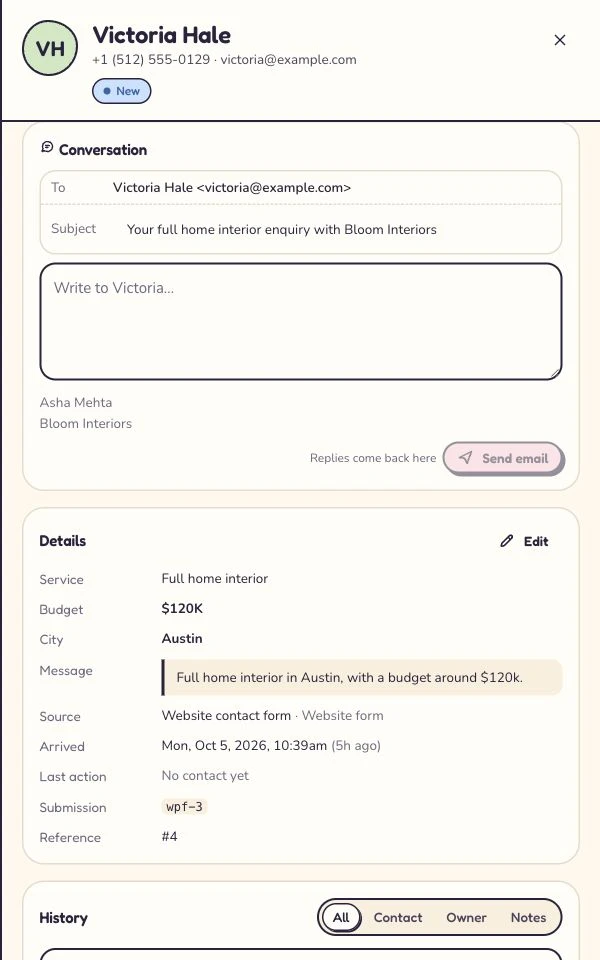
Victoria’s website contact form submission is saved with her project brief and the person handling it. Read this screen at full size +
On a phone, swipe inside the enlarged screen.
2 The person and promised call+
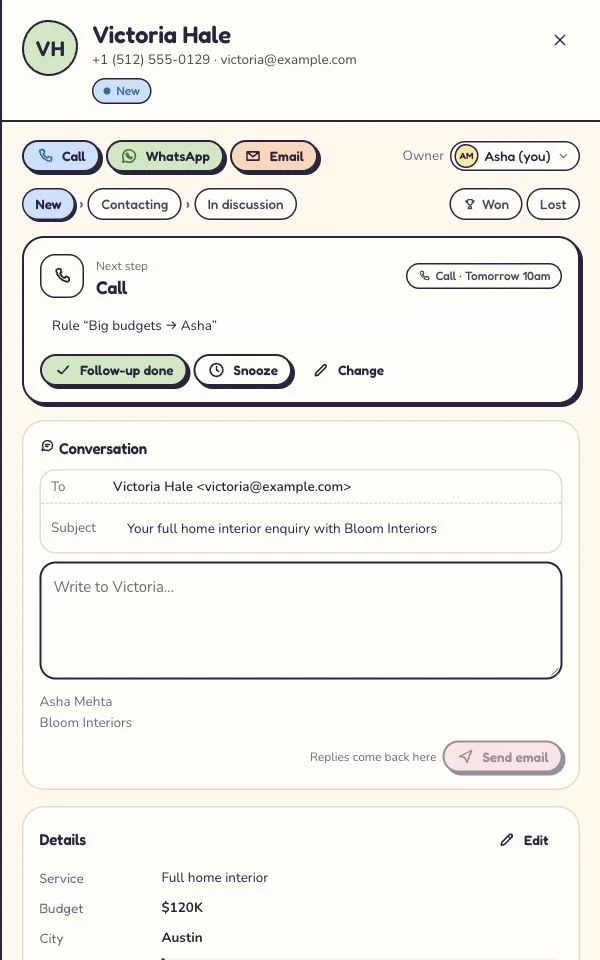
Asha handles Victoria’s enquiry. The planned call is tomorrow at 10. Read this screen at full size +
On a phone, swipe inside the enlarged screen.
3 The quote+
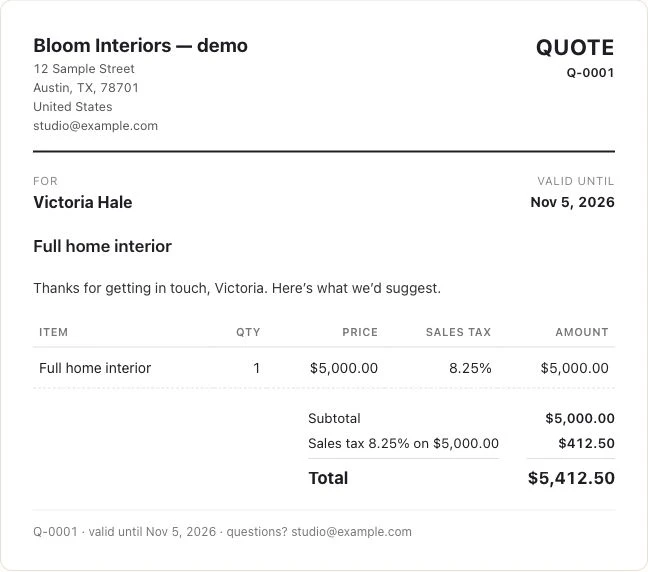
The example project has its own customer-facing quote. Its amount is a project price, not a Kibi subscription. Read this screen at full size +
On a phone, swipe inside the enlarged screen.
4 The customer’s answer+
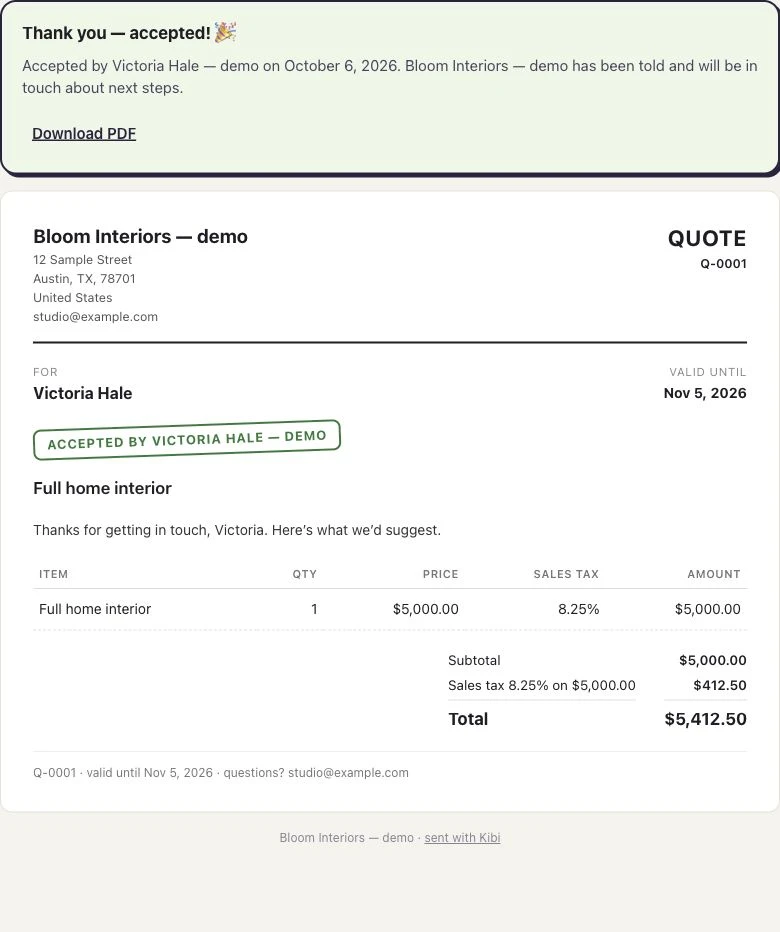
The customer’s acceptance stays with this quote. Read this screen at full size +
On a phone, swipe inside the enlarged screen.
5 The invoice+
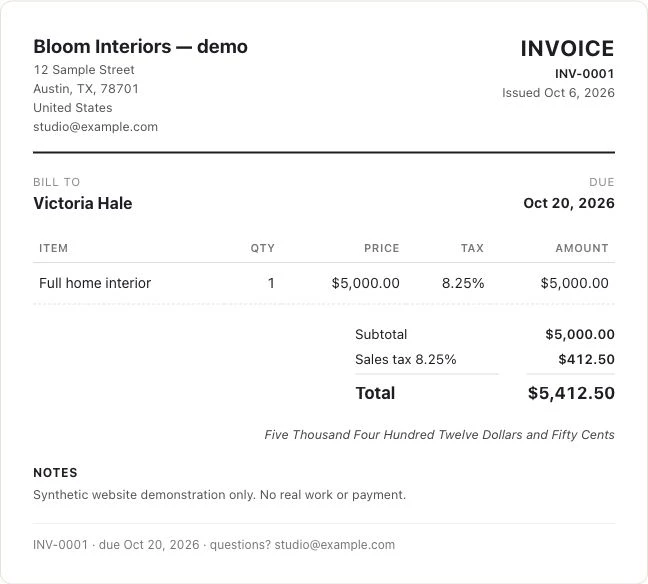
The accepted quote is used to make the invoice. Read this screen at full size +
On a phone, swipe inside the enlarged screen.
2. Bonsai for projects billed by the hour
“I did fourteen hours. Why did I only bill ten?” If that sounds like your Friday, try Bonsai. It suits consultants who log time inside the same project they bill from.
Basic includes time tracking, CRM, tasks and projects. Essentials adds proposals, contracts, invoices, payments and a client portal. Bonsai lists its Deals pipeline on Premium. Count the features you’ll actually need during the same engagement.
Try this with Maya’s review. Record two billable interviews and one internal prep session. Open the invoice preview from unbilled hours. Check that the client sees the right entries and your prep stays off the bill.
3. Pipedrive for a consultancy with a fuller sales pipeline
Picture three partners asking whose proposal is still out on Friday. Pipedrive is worth a look when the team needs to see each deal, its stage and the next activity in a shared pipeline.
Use Smart Docs to draft Maya’s proposal. Mark the deal won and try a Project with milestones for the interviews, map and readout. Both features come with Premium and Ultimate, with paid add-ons for Lite and Growth.
For invoicing, test Pipedrive’s QuickBooks Online connection from the deal. Find out which information carries over and who will fix a billing detail when it’s wrong. Include the separate QuickBooks account in the cost.
4. Capsule for repeat clients and a practice that already uses Xero
Alex comes back a year later. Which of you talked to him last, and what did he say about the next review? Capsule fits consultants who want that history close by, especially a practice that already bills in Xero.
Create an opportunity for the review and put Thursday’s call on it. Then start a Project and apply a Track, Capsule’s reusable set of tasks. It’s a good test if every engagement starts with a kickoff, a contact list and a calendar invite.
On a paid Capsule plan, connect Xero and find the test invoice from Alex’s contact. Check whether you can see that it’s due or paid, and who will edit it in Xero if Alex needs a different billing contact.
Questions to ask before choosing your consulting CRM
I’m an independent consultant with two or three inquiries a month. Do I need a CRM?
A simple list and calendar can be enough if you can always find the latest scope and keep your promised calls. Try Kibi CRM when you need to keep that client history, follow-up, quote and invoice together, or a colleague needs to cover a call while you’re busy.
Which CRM lets a solo consultant turn an approved quote into an invoice?
In Kibi CRM you can make an invoice from an accepted quote on the inquiry. Test the quote, approval and invoice with fictional details. If you bill based on hours worked, compare the same job with Bonsai’s tracked-time invoicing.
How can a three-person consultancy hand work off after a discovery call?
Keep the client’s brief and the next call on a record the team can find. Once the quote is accepted, share the scope, billing status, delivery owner and kickoff date with the person doing the work. Kibi keeps the sales record available while the team runs delivery in its project tool.
What if I already invoice through Xero?
Use a test invoice and check who can see the status as well as who can make corrections. Capsule’s paid plans can connect to Xero, making it worth a look when your billing already works there. In Kibi, test its own quote-to-invoice flow if you’re considering changing that process.
Does Kibi CRM have a free trial for independent consultants?
Yes. Kibi offers a 14-day free trial with no card required, then a paid plan. Create one fictional inquiry, save its callback, create a quote and check how you would turn the accepted scope into an invoice.
Try one consulting engagement before you move the whole practice
Give Kibi one real test. Add a fictional inquiry for Alex, save the Thursday call and open Today to check the reminder is there. Then make a quote for the three agreed deliverables.
Use a test contact you control to accept the quote and make the invoice. Send your teammate the kickoff email and ask them to tell you the first thing they’d do on Monday. Working solo? Close the tab and see if you can pick it up tomorrow without your notebook.
If the next call and the agreed scope are right there when you need them, you’ve learned something useful in one afternoon. You have 14 days to see how it fits your working week.
How we compared the CRMs
We checked each vendor’s official docs on 18 November 2026. The screenshots come from a Kibi demo. Maya’s engagement is the same example we use to explain what to try in each tool.
Before you buy, check the full cost of the workflow you picked. Count the people, the quote and invoice features and any separate accounting or project tool you’ll keep paying for.
Try one thing on the next enquiry.
Pick a change your team can use tomorrow.