The whole form workflow. Free in WordPress.
Build the form, save its entries, check notifications and connect the tools you choose. Every feature described here is included in Kibi Forms without a Kibi account. The optional CRM is a separate paid service.
Available on WordPress.org. All plugin features free; no Kibi account needed.
Why Kibi Forms is the best WordPress form builder for your business.
Build the form. Keep the enquiry. Know what happens next. Here’s why we built Kibi Forms around all three.Pick what matters to your site.
What makes a form builder the best fit? Useful questions, an organised inbox and tools you can use without an upgrade. Explore everything included in Kibi Forms
Good questions.
Useful answers.
Recipes, templates, plain-language rules and a live preview. Shape the questions around the request.
Ask the next useful question.
Start with a recipe for the kind of enquiry you handle.
Choose your questions and add the conditional rule.
A conditional question appears for the selected answer.
Illustrative workflow · fictional details
Start from the questions your business needs answered.
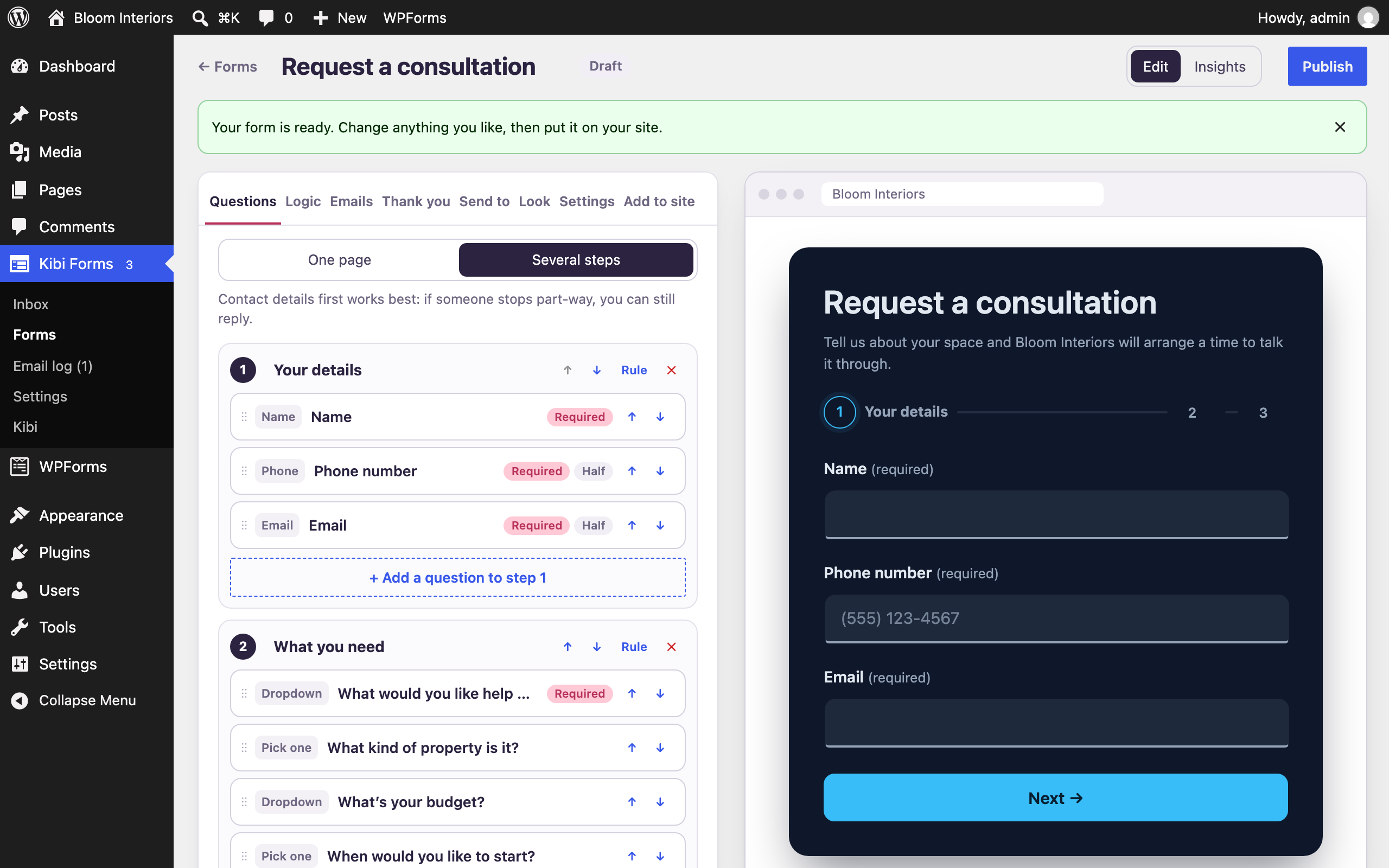
Form recipes ask three questions: what your business does, why people contact you and what you need to know before replying. The shipped library covers 13 business types and 32 question packs, with wording adapted for your country. You can also choose one of 22 classic templates or begin with a blank form. Treat the starting form as something to inspect and tailor to the conversation you want.
The builder includes 18 question types plus text blocks and dividers. Use drag and drop or keyboard reordering, place half-width questions side by side and choose one page or several steps. The live preview is the actual form. Conditional logic uses plain-language rules for questions, steps, notification emails and thank-you messages, so the next part of the form can depend on the answers already given.
- Question types: name, email, phone, short text, long text, dropdown, single choice, checkboxes and number.
- Also included: slider, rating, date, time, website, address, consent checkbox, file upload and hidden field.
- Thank-you options: a message, page or link, with different outcomes for different answers.
- Publish with a block or shortcode; schedule availability, limit entries or restrict the form to logged-in people.
Your page.
Your form’s look.
Choose a design, tune the fields or use Clean to inherit your theme.
Make the form feel at home on the page.
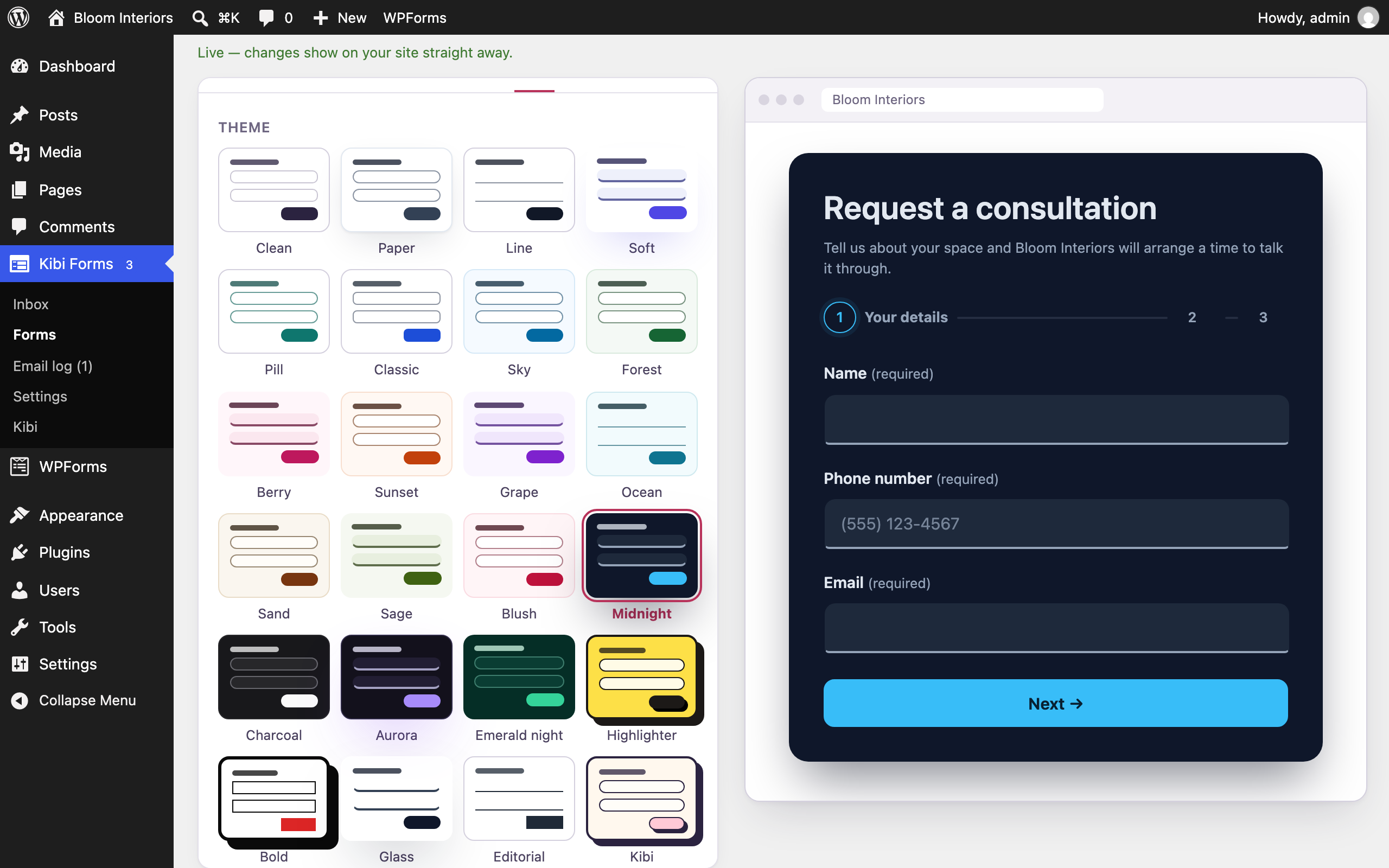
Choose from 24 designs spanning light, colourful, dark and bold styles. The Clean design takes on your theme’s fonts, colours and buttons. Adjust the colour, field style and sizes; supported field styles include boxed, filled, underline and pill. Use the design that makes the request clear and readable in the page around it, rather than choosing a style from a preview alone.
The release was tested with 25 popular themes, including Astra, Kadence, GeneratePress, OceanWP, Neve, Blocksy and the listed recent default WordPress themes. Your own combination of theme, page builder and styling still deserves a visitor test. Check labels, focus visibility and the layout on the devices your visitors use, then submit through the published page so appearance and function are reviewed together.
- Use a built-in design or inherit the theme through Clean.
- Check half-width fields and multi-step layouts on the actual page.
- Review readable text, visible focus and clear controls before launch.
A place for the details.
Read answers, add notes, filter entries and keep the original when you make a correction.
Keep the submitted answers before the notification leaves.
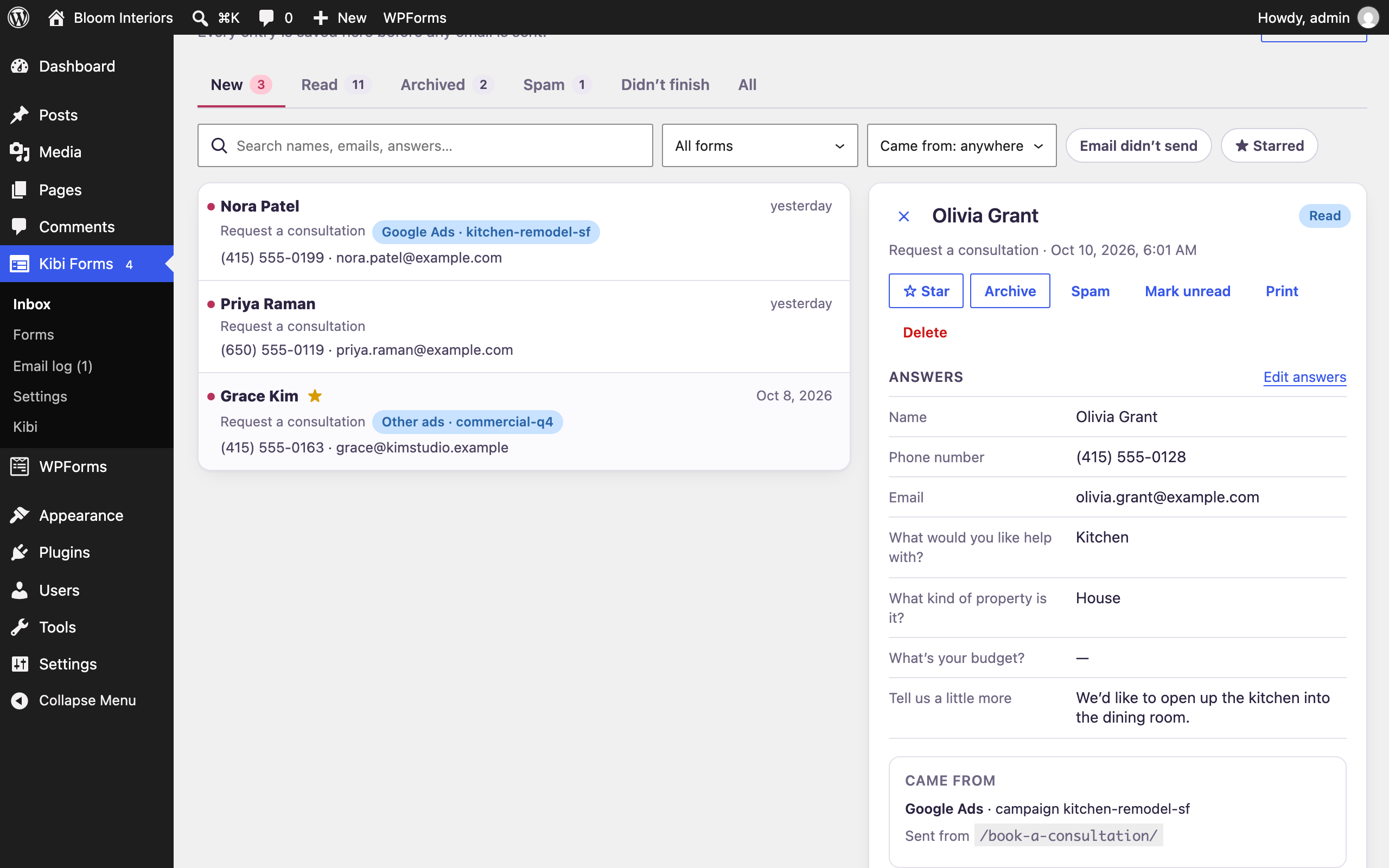
Kibi Forms saves each submitted entry in WordPress before sending notification emails. The inbox provides New, Read, Archived and Spam views, with stars, notes, search and filters. Filter by form, source, starred entries or a reported email failure, then inspect the entry itself. Print an entry or export the set you can filter as CSV when that is the next job.
You can edit an entry to correct a typo or add information received on the phone; the original answers are retained. For multi-step forms, unfinished entries show saved progress from people who stopped before completion. Review that context carefully: a partial entry is incomplete information, rather than proof that the visitor finished a request or expected the same response as a submitted form.
- Read the original answers with notes and delivery context.
- Keep spam available for review rather than silently dropping it.
- Use filters to choose the entries that need attention.
Give email its own check.
Test, inspect the Email log and resend. A successful send still needs an inbox-arrival check.
Test the notification and inspect a reported failure.
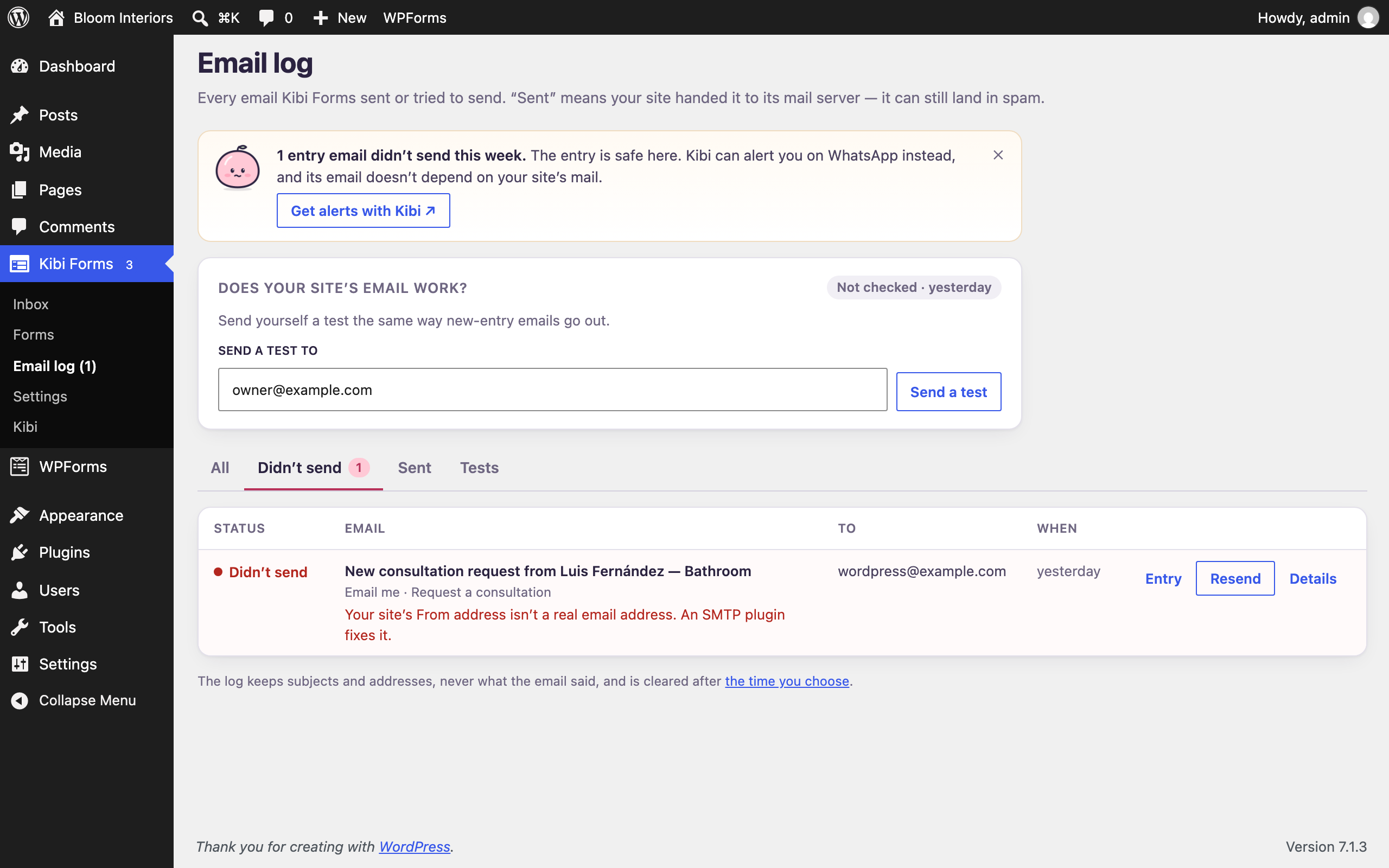
Send notifications to several recipients, vary them with supported conditions and set replies to go to the person who completed the form. An optional acknowledgement email can tell the visitor their request was received. Every email has Send me a test, while Did it arrive? checks the site’s sending setup and asks you to confirm the recipient-side result.
The email log gives plain-word reasons for reported sending failures and a one-click resend action. Failed emails are flagged in the entry inbox. Kibi Forms sends through WordPress’s email function and can work alongside SMTP plugins such as WP Mail SMTP or FluentSMTP. A reported successful send does not prove inbox arrival; check the test recipient and spam folder separately.
- Choose recipients and conditions for each notification.
- Test the email before relying on the live form.
- Inspect the log and correct the cause before resending.
See the path to the entry.
Views, starts, stopping points and source tags from the submission page. Context you can inspect.
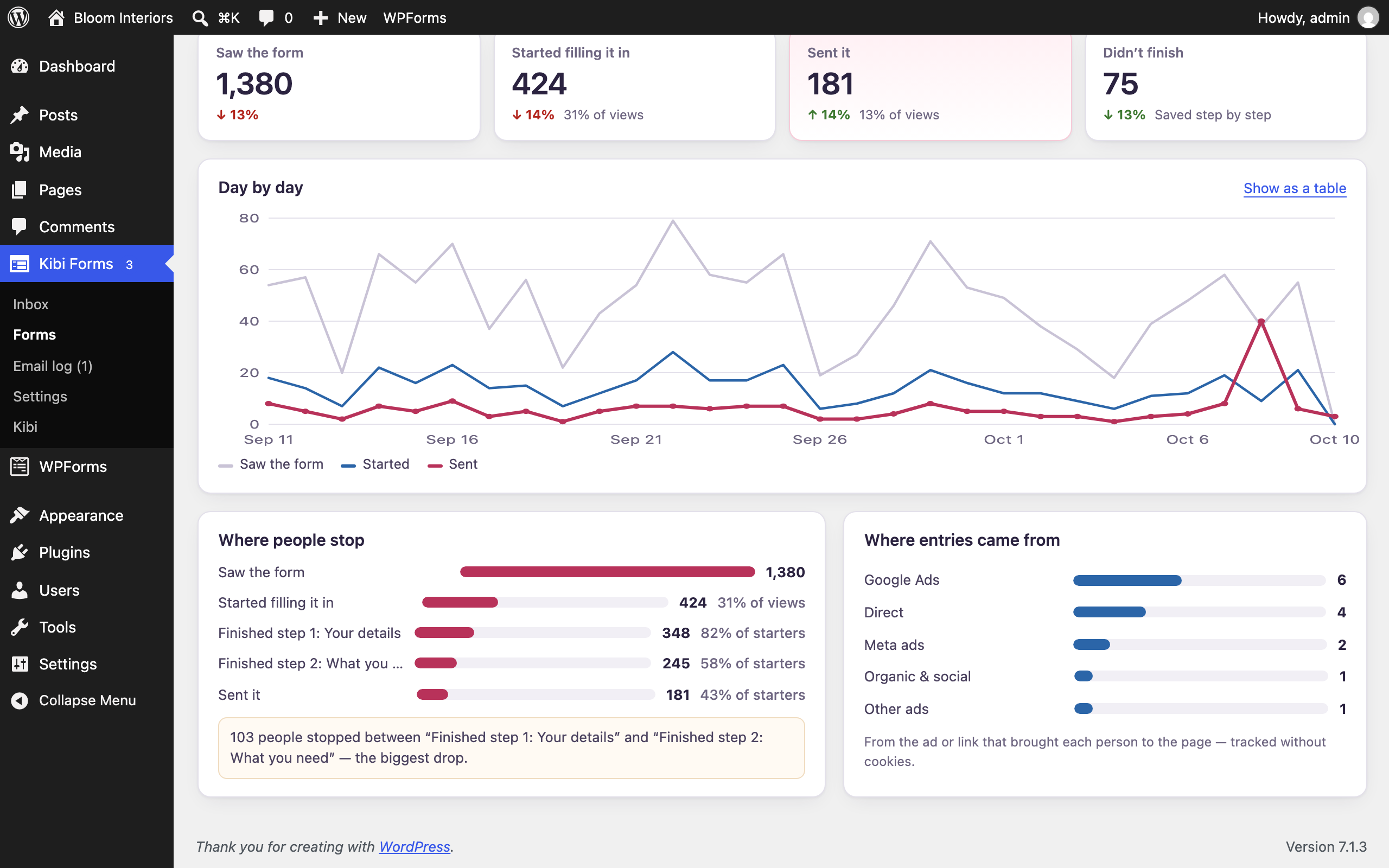
The source travels with the entry.
Campaign details on the page where the visitor submits.
- Source
- Campaign
- kitchens
Read the supported tags present on that page.
- Source
- Campaign
- kitchens
Save the available source context alongside the answers.
Illustrative workflow · fictional details
Understand the form’s entry path and recorded source.
Each entry can include the submission page and supported campaign information from that page’s address, including UTM tags and Google or Meta click IDs. This does not use attribution cookies. The source describes the information available on that submission page; it is not a complete history of the visitor’s journeys across devices, visits and channels.
Per-form Insights offers views, starts and entries over 7, 30 or 90 days, the steps where people stop and the channels associated with entries. Logged-in visits, builder previews and search-engine bots are excluded from view counts. A weekly summary email can go to the recipients you choose. Use these views to investigate a specific form question, with the actual entries providing context behind the totals.
- Check where a multi-step form loses progress.
- Review which recorded channels bring entries.
- Keep captured campaign context separate from CRM conversion delivery.
Choose where
the answers go.
Select fields, set conditions and test the destination. The local entry is saved first.
- Webhooks
- Zapier · Make · n8n
- Team messages
- Slack · Teams · Discord · Google Chat
- Consented email lists
- Mailchimp · Brevo · MailerLite
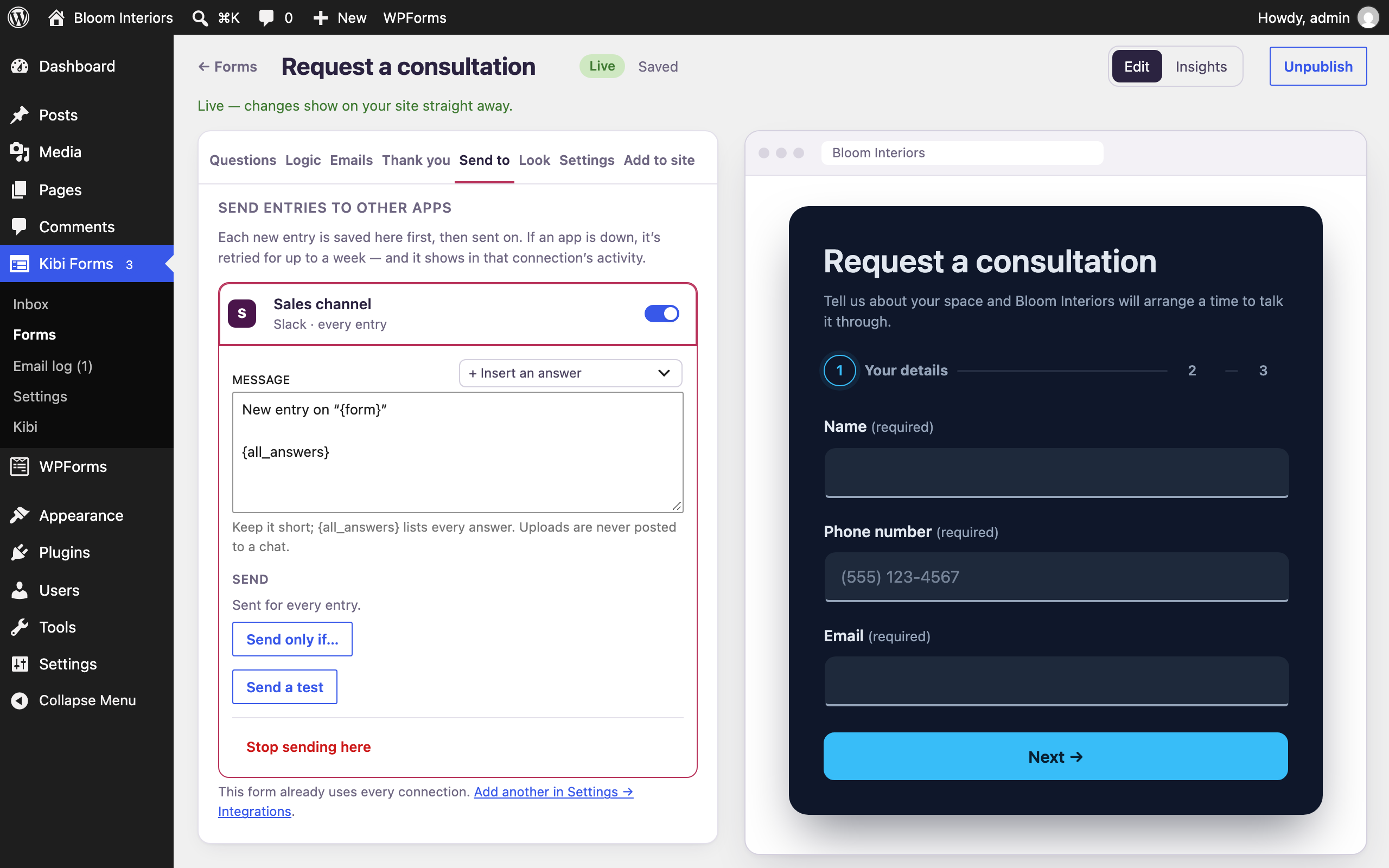
Send selected information to an enabled destination.
Webhooks can send JSON or form data to Zapier, Make, n8n or your own application, with custom headers and optional request signing. These are configured webhook routes, rather than a promise of a native marketplace app for every service. Chat integrations can post entry notifications to Slack, Microsoft Teams, Discord or Google Chat using the destination you set up.
Mailchimp, Brevo and MailerLite connections add people to the selected list when they tick your consent box; Mailchimp also supports tags. For every connection, choose what to send and when, run a test and inspect sends in the activity log. Failed sends are retried for up to a week. A saved local entry, a successful delivery and the destination’s later processing remain separate things to verify.
- Choose the fields needed by this destination.
- Set conditions so the integration runs for the intended entries.
- Inspect the activity log and check the received test at the destination.
Copy. Review. Then replace.
Inspect the proposed form and its warnings. Your original stays in place while you check the copy.
Review first. Replace when ready.
Bring over a supported form definition.
Check the proposed copy and anything that did not come across.
Create the copy, then test it before replacing the original.
Illustrative workflow · fictional details
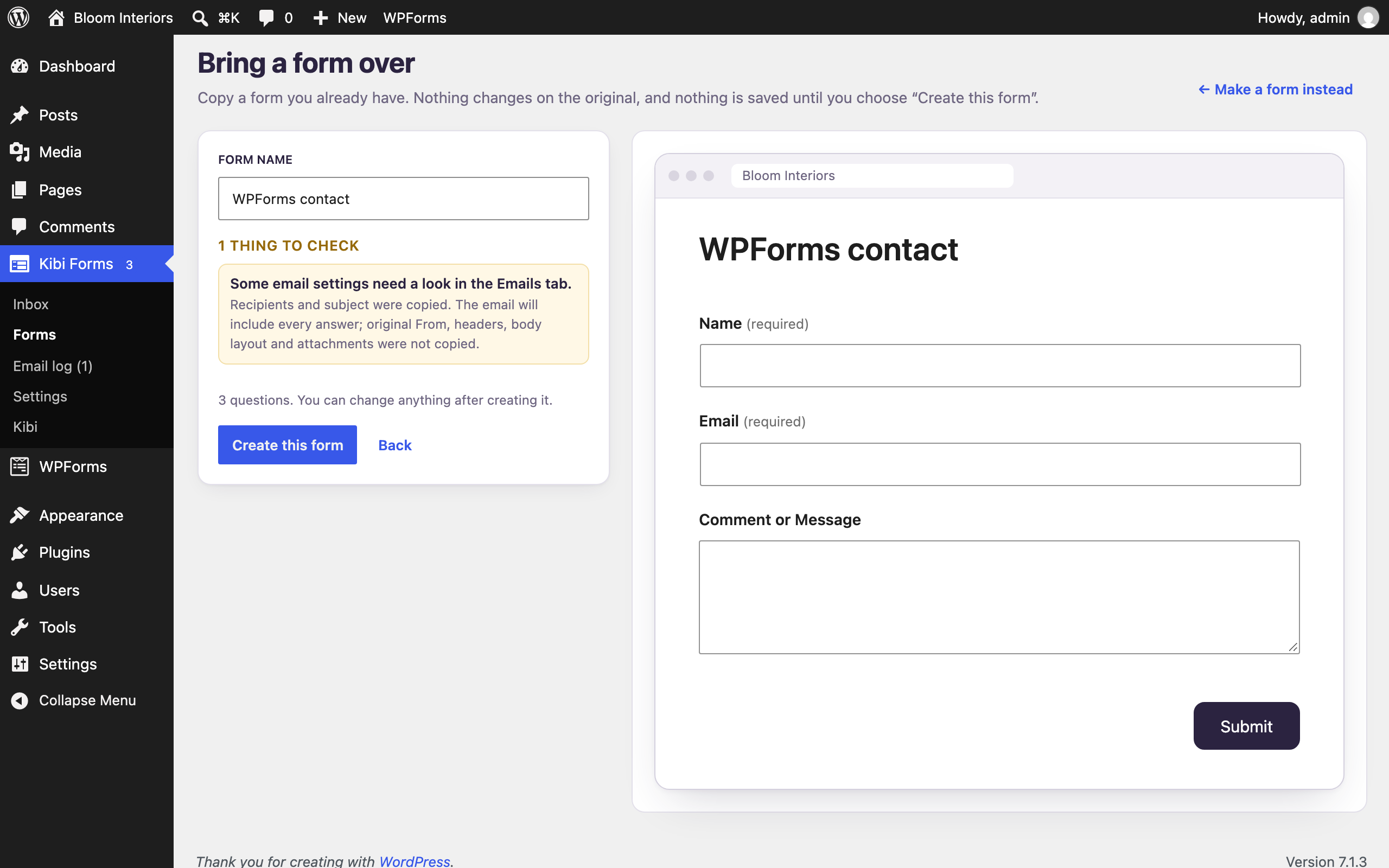
Bring the form over, then verify what transferred.
The importer copies supported Contact Form 7 or WPForms form definitions. Before the copy is created, you can inspect it and read warnings about elements that did not transfer, such as payment fields. Your original form remains in place until you replace it on the page. This gives you time to check the replacement rather than treating an import action as the end of migration.
The public-page option requests the address you provide and rebuilds the form’s questions from that page. It does not use your cookies or passwords or store the page. Review the resulting questions, notifications, conditions and confirmation. Historical entries and a competitor’s entire add-on or payment setup should not be assumed to transfer. Submit fictional details through the replacement before swapping the published form.
- Preview the copy and read each warning.
- Keep the old form while checking the replacement.
- Test the saved entry and notification through the new page.
Controls for the site you run.
Spam controls
Built-in checks. Optional extra protection.
Private uploads
Files kept away from public addresses.
Data controls
Export, erase and set retention.
Choose the spam and privacy controls your site needs.
Built-in spam controls include a hidden trap field, timing checks and a per-visitor limit. Optional controls include a human-answer question, keyword block list, link limit and Akismet when configured. You can enable Cloudflare Turnstile, hCaptcha or Google reCAPTCHA with the relevant service setup. Spam is kept for review. Uploaded files are stored privately rather than at public file addresses.
Privacy tools provide personal-data export and erase, retention settings and an uninstall choice that keeps entries by default. The plugin does not collect usage data; external connections are used when you enable the relevant service. Forms work without JavaScript and the form assets load on pages using a form. Labels, announced field errors, visible keyboard focus and phone tap targets are part of the shipped accessibility work.
- Requires WordPress 6.6 or newer and PHP 8.0 or newer.
- Release testing covered WordPress through 7.1, PHP through 8.3 and multisite.
- Translation-ready; test your own theme, integrations and visitor path before relying on the form.
When the next step
becomes a team job.
Keep the free plugin. Connect Kibi separately when your team needs owners, next actions and Today.
Compare CRM plansYour form. An optional next step.
The WordPress plugin works without a Kibi account.
Finish connecting and enable the form to queue new entries for Kibi.
- Owner
- Asha
- Next step
- Callback tomorrow
Your team sets the owner and next action in the paid CRM.
Illustrative workflow · fictional details
Add team follow-up when the local entry needs a wider workflow.
Kibi Forms works without a Kibi account. If you choose Connect Kibi, new entries can also reach the paid CRM, where your team manages ownership and next actions on the included plans. The CRM offers a 14-day trial for up to 10 people. Nothing is sent to Kibi before you start that connection; older entries are sent only if you choose the supported last-90-days option.
Supported Contact Form 7, WPForms and Fluent Forms submissions can also be sent after you individually enable those forms. WhatsApp · Beta — Available after a short review. Business texting · Available. Meta outcome signals · Available. Google conversions · Available. Provider setup, review and plan requirements remain separate from the free plugin. Recording campaign tags in WordPress does not itself deliver CRM outcome feedback to either provider.
A few useful answers.
Are these features locked behind a paid plugin tier?
The features described here ship in the free Kibi Forms plugin without a Kibi account. Hosting and external services can have separate costs. Kibi CRM is the optional paid part, with its own plans, trial and provider requirements.
Does the importer move everything from another form plugin?
It copies supported form definitions and shows a preview and warnings. Check the questions and behaviour that transferred before replacing the page. Do not assume historical entries, every payment field or every add-on workflow migrated with the form.
Does source tracking automatically improve my advertisements?
Source tracking records supported information from the submission page’s address. It helps you inspect where an entry came from. Advertising outcome feedback is a separate CRM/provider capability, and neither workflow guarantees an improvement in campaign performance.
How should I check the plugin before publishing a form?
Use fictional visitor details to test the actual page, all relevant answer paths, the saved entry and its notification. Inspect enabled integrations at their destination too. Read any failure or import warning and repeat the affected test after correcting the cause.