Can I upload an .xlsx file or a Google Sheets link?
Export a single tab to CSV first. This checker reads comma-separated CSV files up to 5 MB, with up to 10,000 lead rows and 100 columns. You can check each tab separately.
Check an Excel or Google Sheets CSV for duplicate contacts, missing details and unclear dates before you import leads into a CRM.
In Excel or Google Sheets, save your lead sheet as a CSV first. Use one lead per row and put the column names on the first row. Your file and contact details stay on this device.
Fix the details in your sheet and run the check again. When you’re ready, try importing three leads into Kibi.
Export your lead sheet as a CSV and check it for repeated emails or phone numbers, missing contact details and ambiguous dates. The checker suggests where your columns go in Kibi CRM. Fix anything you want to keep, then rehearse the import with three leads.
Sample lead list · worked example
Put column names on the first row and one lead on each row below. In Excel, choose File → Save As → CSV UTF-8. In Google Sheets, choose File → Download → Comma-separated values (.csv).
Choose your CSV and select Check my CSV. In the sample, row 3 shares an email with row 2. Row 4 is missing both an email and a phone.
Check whether the two Alex rows are the same person. Confirm what 04/05/2026 means and type the date with the year first. Save a fresh CSV and run the checker again.
Open this example in your spreadsheet. The first line is the header.
Scroll across the practice sheet to see every column.
| Name | Phone | Owner | Callback date | |
|---|---|---|---|---|
| Alex Lee | alex@example.com | blank | Jo | 04/05/2026 |
| Alex Lane | alex@example.com | blank | Jo | 2026-11-19 |
| Sam Chen | blank | blank | blank | 2026-11-23 |
Name,Email,Phone,Owner,Callback date
Alex Lee,alex@example.com,,Jo,04/05/2026
Alex Lane,alex@example.com,,Jo,2026-11-19
Sam Chen,,,,2026-11-23Start with the details a teammate would need to make the next call. Name, Email and Phone make a good starting point. Use at least one contact method per lead. If you have it, add the service they asked about, a short note, who handles the lead and when they promised to get back in touch.
Keep the header row plain. A title like “September pipeline” above the column names gets read as a header. Remove summary totals and blank headings. If someone added a second phone number in the Notes column, move the main contact number into Phone before you export.
Possible repeats share an email address or the same phone digits. The checker ignores punctuation in phone numbers, but local and international versions can still look different. Check both rows for context before you combine anything.
A row with a different number of cells usually needs a closer look. If you’ve assembled the file by hand, a comma inside a note belongs inside double quotes. Re-exporting from Excel or Sheets handles that for you.
The checker looks at this file. Kibi’s import preview is where you confirm the mapping, check it against the leads already in your workspace and see what will be added.
Here’s Kibi’s actual CSV preview with a separate clean practice file. Match the columns and confirm the person handling the enquiries. After the import, open one lead and give it a next call.
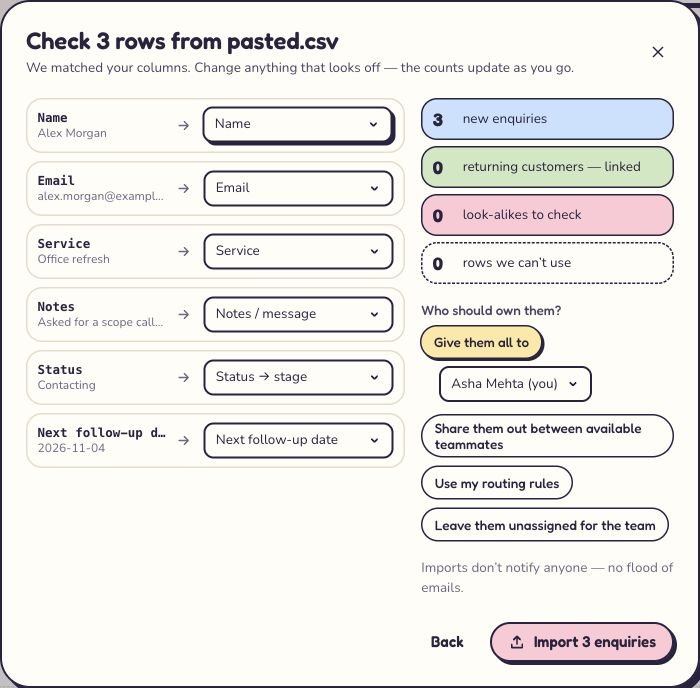
In Kibi CRM, open Enquiries, preview a three-row import and give one lead a callback. You’ll see whether the sheet has everything your team needs for the next conversation.
How Kibi’s CSV import preview works →14-day trial · No card needed
Export a single tab to CSV first. This checker reads comma-separated CSV files up to 5 MB, with up to 10,000 lead rows and 100 columns. You can check each tab separately.
Yes. Keep a recognisable Email header and one email per lead where possible. A phone column is optional. The checker marks a row as missing contact details when it has neither a recognised email nor a phone value.
Yes. Put three sample leads in a CSV and preview them in Kibi CRM. Check where the name, notes and callback date will go. Save the import, assign a lead and check the next call in Today.
With your permission, Google Analytics measures visits and clicks so we can improve this site. It uses cookies. No advertising tracking or form contents. Cookie details
Your browser’s privacy signal is on. Optional analytics stays off.