
Friday at 11:20. Maya is handing back the keys on Monday. She needs a move-out clean for a two-bed, two-bath apartment and adds one line to your website form. “Could you do inside the oven too?” Of course. The oven always has a little story.
Kibi CRM fits a small cleaning business that already has a crew calendar and needs a better way to handle new inquiries, callbacks and quotes. Compare Jobber if the quote needs to turn into a scheduled job, ZenMaid if recurring house cleans run the week, and Launch27 if customers should be able to price and book standard cleans online.
Let’s put Maya’s request through all four. A good handoff should let the next person tell you who’s calling, what they need to ask and exactly which work the customer was quoted for.
Which CRM fits the way your cleaning business works?
All four tools can support some part of the journey from a new customer to a quote. The biggest difference is where your team looks for a promised call and what happens after the customer says yes.
| Tool | Who calls Maya? | Where the quote goes | Best fit |
|---|---|---|---|
| Kibi CRM | Elena owns the inquiry and sees the 2:30 call in Today. | The itemized quote stays on Maya’s inquiry. Sam can hand the accepted job to the existing scheduler. | You already schedule crews and want the office to follow up reliably. |
| Jobber | Elena can own the opportunity with Sales Pipeline. A scheduled internal task can hold an exact callback time. | Create the quote from the request. Once approved, turn it into a job to schedule. | You want quotes, approvals and crew scheduling together. |
| ZenMaid | Sam turns the pending request into a lead and gives Elena the call through the office’s task process. | Send an estimate from the lead before booking the cleaning appointment. | Recurring residential cleaning and cleaner schedules run your week. |
| Launch27 | The Quote Form emails the office. Sam names Elena and sets the deadline in the team’s task process. | Send a prefilled booking link with the agreed price so Maya can select a slot. | Your standard cleans and add-ons are ready for online booking. |
The deep-clean request, from assignment to quote
Sam handles the inbox. Elena prepares estimates. Noah looks after the crew calendar. Sam hands Maya’s inquiry to Elena and they agree she’ll call at 2:30 p.m. to check the oven and the keys. Maya can collect the keys only after 2 p.m. on cleaning day, so Noah needs that detail too.
Elena confirms a two-bed, two-bath move-out clean and adds the inside of the oven as its own line. That way Maya can see what’s included, and Noah can see what the crew needs time for. No one needs a second call to ask what “deep clean plus extras” meant.
1. Kibi CRM keeps the callback and quote on the same inquiry
Pick Kibi if your crews already know where to find their jobs, but the office is still searching through form emails and messages for open estimates. Send the website request into Kibi, make Elena the owner, and save Friday’s 2:30 p.m. call on Maya’s record. Elena can open Today and read the oven question before she dials.
When Elena comes off the call, she can create one quote with a line for the move-out clean and another for the oven. Leave the agreed access time in the job brief. If Maya comes back with “Actually, could you do inside the fridge?”, Elena can open the original quote and handle the change with the whole conversation in view.
After acceptance, Sam gives Noah the approved scope and access window so Noah can schedule the job where the crew already works. Kibi can turn the accepted quote into an invoice. Scheduling the crew, recurring visits and arrival windows stays in your existing calendar or booking tool.
The screenshots below show the website inquiry, planned call and quote on another example inside the real Kibi demo. Try the same three actions with Maya’s clean in your own sample record.
INSIDE KIBI · VICTORIA’S EXAMPLE PROJECT
1 The website enquiry+
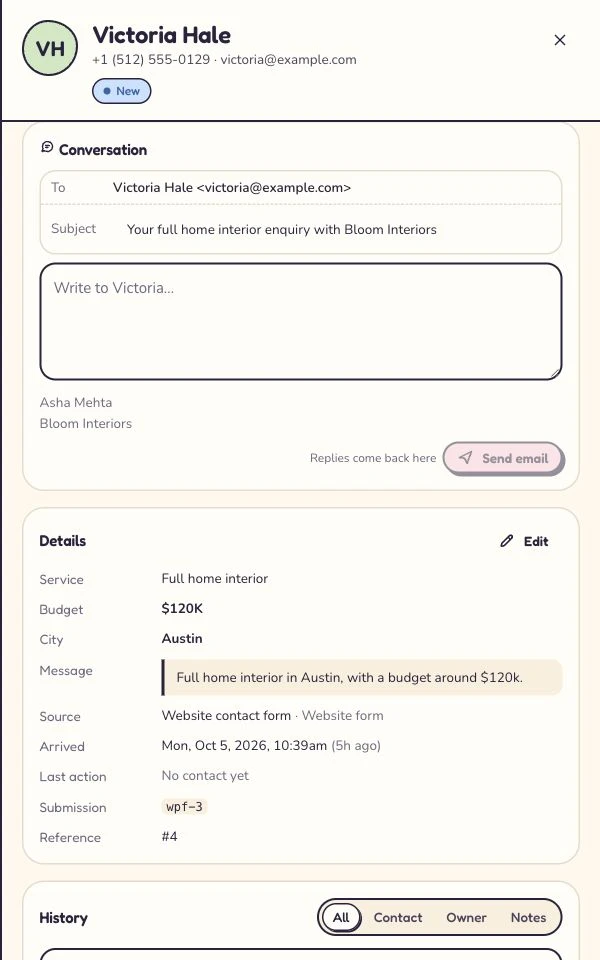
Victoria’s website contact form submission is saved with her project brief and the person handling it. Read this screen at full size +
On a phone, swipe inside the enlarged screen.
2 The person and promised call+
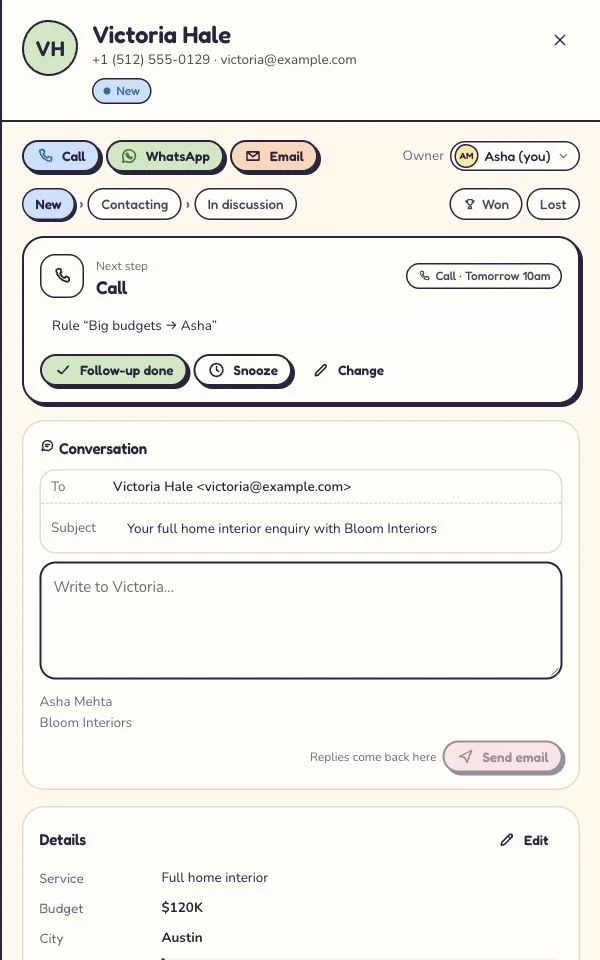
Asha handles Victoria’s enquiry. The planned call is tomorrow at 10. Read this screen at full size +
On a phone, swipe inside the enlarged screen.
3 The quote+
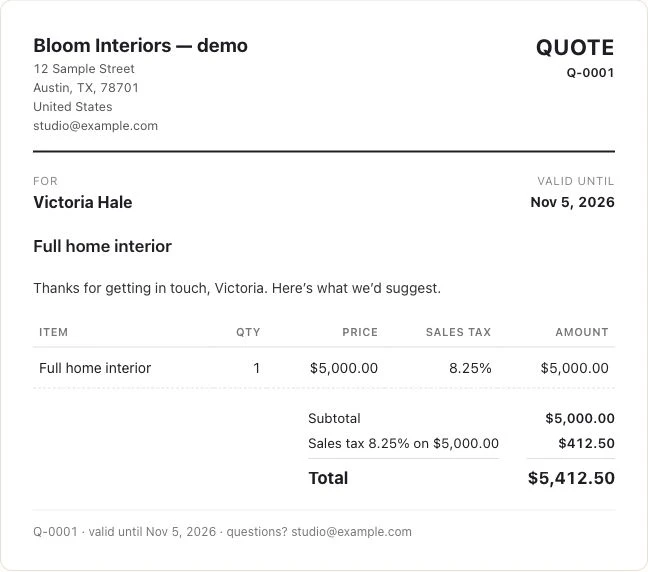
The example project has its own customer-facing quote. Its amount is a project price, not a Kibi subscription. Read this screen at full size +
On a phone, swipe inside the enlarged screen.
2. Jobber connects cleaning quotes to the crew schedule
Jobber fits if the same office needs to receive Maya’s request, quote the job and put the crew visit on a schedule. An embedded request form brings it in. If you use Sales Pipeline, Sam can assign the opportunity to Elena. The pipeline is included in Plus or available as an add-on.
For a call at a specific time, put an internal task on Elena’s schedule and link it to Maya’s client record. Jobber can also schedule an on-site assessment if you need to see the property first. Maya’s oven question is something Elena can settle by phone, so there’s no reason to book a visit just to get someone’s attention.
Convert the request into a quote with the two line items. Maya can review and approve it in Client Hub. Once approved, turn it into a job and schedule the cleaning visit. In your trial, ask Elena to find the callback without Sam’s login and ask Noah to show you where he sees the approved scope before he assigns the crew.
3. ZenMaid fits teams that live by the recurring cleaning calendar
If you run back-to-back residential cleans and regular clients keep moving their Thursdays around, ZenMaid is worth a close look. Give Maya a quote-request form with prices hidden, so she can tell you about the oven without picking a slot or seeing a price you haven’t agreed to.
Sam can convert the pending request into a lead if no appointment time was chosen. Form alerts can reach the office managers you’ve enabled. Agree who is making the call and put 2:30 p.m. in your office’s task process. Assigning a cleaner to an appointment is a different step from giving Elena the sales callback.
Once Elena confirms the scope, she can email an estimate from the lead without scheduling the clean first. After acceptance, book the appointment and give the crew the access window. This is a particularly useful test if you handle both one-time move-out work and weekly housekeeping.
4. Launch27 fits cleaners who want the quote to lead to an online booking
If most customers pick a standard clean, a handful of extras and a date, Launch27 is a useful comparison. For Maya’s custom request, its separate Quote Form can collect the details and email the office without showing a price or making a booking.
Sam still needs to give Elena the 2:30 call in the office’s task process. After Elena confirms the oven and key timing, she can put that agreed scope and price into Launch27, save the booking as a quote and send a prefilled link. Maya can select an available date and enter card details when she books.
Open that link as the customer. Can you see the oven in the total and pick a time that works with the keys? Launch27’s quote does not reserve the time, so check availability before promising a particular slot. If your office spends all Friday explaining unusual estimates, test the handoff as carefully as the checkout.
What should your cleaning quote form ask before anyone calls?
Collect enough to price the job or ask a decent follow-up question. Maya should be able to tell you about the oven without going through a twelve-page checklist. Give extra services and timing their own fields so they don’t disappear in a notes box.
For the crew handoff, carry over the approved scope, the access window and anything that changes the time on site. Arrange a private way to share keys or codes after booking. The first form only needs to know that access starts after two.
- Ask for the service address or ZIP code, the kind of clean, and whether it’s a one-time or recurring job.
- Capture the number of bedrooms and bathrooms, the preferred date, and extras such as the inside of the oven or fridge.
- Ask whether the home will be empty and whether access or parking could affect the job. Let customers explain any detail that affects the price.
- Ask how and when to reach them. Turn the answer into one planned callback with a named person.
What are you paying for with three people in the office?
Count the people who need to handle new requests, callbacks and quotes. Then count the people who need a login to see or update jobs. If those are different groups, price both setups. A per-person bill for a twelve-person crew tells you very little about what three office seats will cost.
On US pricing, Kibi Team costs US$79/month before tax. It includes 5 people, 20 quotes per month and rules for assigning new inquiries. Kibi Starter supports manual assignment and 5 quotes per month. Check its included seats and any extra-seat charge against the monthly quote count your office actually needs.
For Jobber, include Sales Pipeline if you want salesperson assignment on opportunities. With ZenMaid, check the plan with website forms and your number of cleaners. With Launch27, check the quote-to-booking feature and any payment fees for the way you take bookings. Ask each vendor to price your real team on the same billing term.
Try one cleaning quote before you move the business
Use Maya’s made-up request and have Sam hand it over while Elena is busy. Give them one test each. Sam should be able to see who’s calling. Elena should be able to find the call and the oven question. Noah should be able to schedule the right work from the accepted quote. If all three still need a separate chat to piece it together, write down what was missing.
In Kibi, create the sample inquiry, assign it, and save a Call for later today. Add the move-out clean and inside oven as two items in a draft quote. Then open Today, click back into Maya’s record and see whether the person covering for Elena has enough to make the call.
Questions cleaning businesses ask when choosing a CRM
The right choice changes with the way you sell and schedule. Start with the question that sounds most like your Tuesday.
We have three people in the office and already schedule weekly cleans. Which CRM will help us follow up on new quotes?
Kibi CRM is a fit for a small cleaning office that already has a scheduler. It saves website inquiries, gives each one an owner and shows promised calls in Today. Keep weekly bookings in the calendar you already use and hand over the scope once the customer accepts.
Can a cleaning CRM keep a website inquiry, a callback and a quote on one record?
Yes. In Kibi, connect your existing website form, assign the inquiry, schedule a Call and create the quote from that same record. The next person can read the original request and the callback note before opening the estimate.
I’m a solo cleaner. Do I need a CRM if most clients book the same service online?
A booking tool may cover the job if clients choose a standard clean, an extra and an available slot with little discussion. Compare Launch27 for self-booking or ZenMaid for recurring residential work. A sales CRM becomes useful when custom estimates and promised callbacks take more of your time.
Can our house cleaning crew get a job on the calendar as soon as the customer approves the quote?
Jobber lets you turn an approved quote into a job and schedule the visit in the same system. With Kibi, the office can confirm the accepted scope and invoice, then give the job to the person using your existing booking tool. Try that step before choosing the system.
What happens if the person who promised to call is out cleaning all afternoon?
Open the inquiry, check the promised time and give the lead and the callback to a specific person who can cover. In Kibi, verify that the new owner can see the record and the planned Call in Today. Rules for new inquiries don’t replace checking the callbacks you already promised.
How we compared these cleaning CRMs
Kibi makes this site and the CRM we recommend for sales follow-up. We used the same fictional deep-clean request throughout and linked to each company’s published instructions for intake, callbacks, estimates and booking. We checked those sources on November 26, 2026.
The Kibi screenshots come from our demo with sample data. The other workflows are documented comparisons. The shortlist is organized around the work your team needs to do, without star ratings or performance scores.
Try one thing on the next enquiry.
Pick a change your team can use tomorrow.