
Friday, 2:10 in Ottawa. Nora has an open quote for new eavestroughs. “Could you add a second downspout?” she asks. Alex did the estimate and is up a ladder on another job. Maya can get the quote open. The tricky bit is deciding where the extra pipe should go and who’ll ring Nora before the weekend.
Choose Kibi CRM if your small home service business already schedules jobs elsewhere and needs a shared place for website inquiries, open quotes and promised calls. Choose Jobber if the same system needs to handle customer approvals, crew scheduling and the work after the quote is accepted.
We make Kibi. We’ve compared the two on Nora’s change request, using published Jobber documentation and a separate Kibi demo example. There’s a five-person price comparison for Canada and the US, plus a test you can run before moving any of your records.
Kibi vs Jobber at a glance
Picture the first week after you buy. The office still answers the website form. Someone still has to price the change. The difference is where your team checks the promise and what happens once the homeowner says yes.
| Moment | Kibi CRM | Jobber |
|---|---|---|
| New website request | Save an inquiry from a connected form. Pick the estimator and keep the original question. | Collect a request with Jobber’s form. Open it for assessment or convert it into a quote. |
| Customer changes the scope | Note the change on the inquiry. Replace the open quote and share the revised link. | If enabled, the client can request changes in Client Hub. Amend the quote and send it back for approval. |
| The estimator is away | Reassign the inquiry and save a Call with a time and the question to resolve. The covering estimator finds it in Today. | Create a client-linked Task with a date and time. Assign it to the covering teammate on the schedule. |
| An open quote gets no reply | Plan a call or message for the person responsible. Automatic payment reminders cover issued invoices on eligible plans. | Use a reminder for the quote creator or send automatic customer follow-ups on Connect and above. |
| The homeowner accepts | Keep their acceptance with the quote and create an invoice when appropriate. Book the job in your usual system. | Convert the approved quote into a job with the approved line items and schedule the work. |
The Ottawa estimate test when Alex is out
Here’s the fictional test. Nora’s original quote covers the eavestroughs and one downspout. She asks for a second one near the patio. The team needs to confirm where the water will discharge before promising its position or price.
Maya records Nora’s exact request and checks who can cover Alex. Ben checks the fit and price, sends the revised quote and saves a Friday 3:30 pm call. On the call he’ll confirm the position with Nora and check whether she’s ready to approve.
Have the covering estimator open the record with their own login. They should be able to tell you three things: what changed, which offer is current and who’s making the 3:30 call.
How Kibi handles a revised quote and callback
Open Nora’s inquiry from the connected website form and check the original scope. Record the new request as a note. Maya, or a teammate with reassignment access, changes the owner to Ben. He opens the same record and can see what Nora actually asked.
When Ben knows what the second downspout will cost, he prepares the revised offer. For an open quote that was already sent, withdraw it, duplicate it and update the new copy. Share the new link after your usual review. Nora gets one current quote to consider.
Use Plan next step on the inquiry. Choose Call, set Friday at 3:30 pm and add the question about placement. Ben can find the call in Today and open the current offer beside the original request. If someone else needs to cover, hand the inquiry over before the call.
Once Nora accepts the updated offer, the office can create an invoice from the accepted quote when it’s time to bill. The crew still books the installation and any return visits in its usual scheduler. This suits a team that likes the way it runs jobs and needs a cleaner way to win them.
The two screens below show a separate example in the Kibi demo. Meera has a call saved beside Priya’s open kitchen quote, with the exact finish question in the note. Try reaching that point with your own sample job.
INSIDE KIBI · PRIYA’S EXAMPLE QUOTE
1 The saved callback+
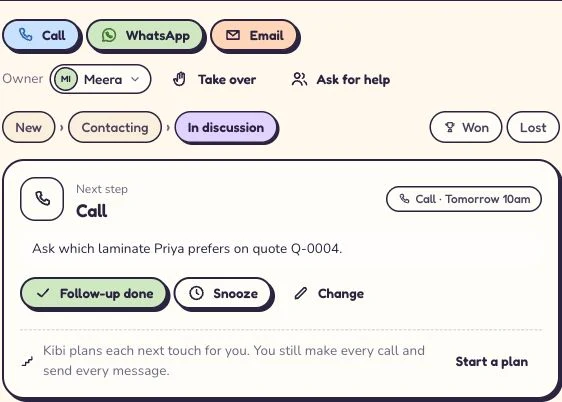
Meera has a call tomorrow at 10. Her note asks which laminate Priya prefers on quote Q-0004. Read this screen at full size +
On a phone, swipe inside the enlarged screen.
2 The quote is still open+

The same enquiry shows quote Q-0004 as Opened. Priya has seen the quote and has yet to accept it. Read this screen at full size +
On a phone, swipe inside the enlarged screen.
How Jobber handles requested changes and quote approvals
In Jobber, Nora can ask for a change from Client Hub if the team enables that option. Her request appears on the quote and goes by email to the teammate set to receive quote replies. The quote moves to Changes Requested.
Open that quote and read the change before pricing it. Jobber hides a quote from Client Hub while it’s in Changes Requested. Amend and send the offer back so Nora can review and approve it. Jobber can collect an approval signature if the business requires one.
If an already approved quote changes, take extra care. Jobber says certain edits, including changes to line items or price, remove the current signature and preserve the earlier signed PDF in an internal note. The status can still say Approved.
If fresh sign-off is needed, explicitly move it back to Awaiting Response and resend it. With Nora’s approval in place, the team can turn the quote into a job with the approved line items and schedule the work from there. That’s a good reason to choose Jobber if your office also runs dispatch.
Jobber quote reminder, customer follow-up or named callback?
Use a dated Task for Nora’s promised call. In Jobber, Maya can link it to Nora, assign it to Ben and set 3:30 pm. Put the quote reference and the downspout question in the task so Ben can open the right offer from his schedule.
Jobber’s quote reminder is for the person who originally made the quote. It adds a reminder to that person’s schedule after the number of days you set. That is handy for ordinary follow-up. Alex is still the original creator, so check who owns the separate Friday task.
Jobber’s automated quote follow-ups are available on Connect and higher plans. They can nudge the customer through the channel used to send the quote, subject to quote status and communication settings. A reminder has an easy job. Nora’s downspout still needs an answer from Ben.
What do Kibi and Jobber cost for five people in Canada and the US?
Here’s the five-login comparison using ordinary monthly rates with no annual commitment, checked 24 November 2026. Jobber lists its subscription prices in US dollars. The Canadian equivalents use the Bank of Canada’s 23 November daily average of C$1.4369 per US$1.
All prices are before tax. A Canadian card’s final Jobber charge can differ with the rate and fees used when it’s billed. Jobber’s Canadian customer payment options are separate from the currency of your software subscription.
| Plan | Canada | United States | What the team gets |
|---|---|---|---|
| Kibi Team | C$105/month billed in CAD on Canadian pricing. | US$79/month billed in USD on US pricing. | 5 people, 20 quotes and 20 invoices monthly, and lead assignment rules. |
| Jobber Connect | About C$286 per month, converted from US$199. | US$199 per month. | 5 users, requests, quotes, field scheduling and automated quote follow-ups. |
| Jobber Grow | About C$430 per month, converted from US$299. | US$299 per month. | 5 users, plus features such as job costing, quote options and eligible two-way SMS. |
- Start with Connect if you need five people, job scheduling and standard quote follow-ups. Check Grow when job costing or a shared two-way SMS conversation is part of the buying test.
- Start with Kibi Team if the five people need to assign inquiries, agree callbacks and issue up to 20 quotes and 20 invoices in a typical month. Check what you’ll still pay for your scheduler and accounting tools.
Try one changed estimate before switching from Jobber
Use a pretend homeowner or an address your team controls. Open one estimate that’s waiting for a reply. Make a single change with enough detail to matter, then give it to a teammate who hasn’t read the earlier conversation.
Give yourself a point for each thing they can show you in two minutes. Missing one is useful: it tells you what to fix before you move the rest of the business.
- Find the homeowner’s original request and the new scope question.
- Open the current customer-facing quote and explain what happened to the first version.
- Point to the person who owns the next call and the promised time.
- Show where the job will be booked after acceptance and who will put it there.
Questions small home service teams ask before buying
We’re a five-person contractor in Canada and already book jobs elsewhere. Is Kibi a good Jobber alternative?
Kibi CRM is a good fit if you want to keep website inquiries, open quotes and named callbacks together and your existing job calendar works. Kibi Team includes five people at C$105/month before tax. If you also need to schedule installers against approved quotes, Jobber is built for that workflow.
Our estimator is out. Can someone else pick up the quote change and call the homeowner?
In Kibi, record the change and save a Call on the inquiry. Assign the inquiry to the covering estimator, who can find the call in Today. In Jobber, open the quote change and assign a dated Task linked to the client. Have the estimator check the quote reference and time before calling.
Can a homeowner ask for changes before approving a quote in Jobber?
Yes. With Request Changes enabled in Client Hub, the homeowner can submit the change on the quote. Jobber records the request and alerts the designated quote-reply teammate. Send the amended quote back for review before treating the new scope as agreed.
The homeowner already signed the first estimate. What should we check before sending a revised one?
Keep the accepted version and ask the homeowner to approve the changed scope. In Jobber, edits to key fields such as line items can remove the displayed signature while the quote still says Approved. To get fresh approval, mark it Awaiting Response and resend it.
Would Jobber’s automatic quote follow-up cover the call we promised Friday?
An automated follow-up can remind the customer about an eligible open quote. For a call you promised at a specific time, assign a dated Task in Jobber or save a named Call on the inquiry in Kibi. Put the scope question in the note so the caller knows what they need to resolve.
We’re in the US and want one tool from quote approval to the crew’s schedule. Which should we try?
Start with Jobber if the office needs to turn an approved quote into a scheduled job with the approved line items. Kibi CRM is a better fit when you already have a scheduler and want the inquiries, quotes and personal follow-ups organised before booking the work.
Can I keep Jobber for existing jobs while trying Kibi for new inquiries?
Yes. Keep your existing schedules, invoices and signed records in Jobber. Try one new inquiry in Kibi, then have the office enter accepted work in the job system. This test uses a manual handover. Check which tool owns the current quote and customer message to avoid doing the work twice.
Does Jobber’s five-user plan cost C$286 in Canada?
About C$286 is the conversion of Jobber Connect’s standard US$199 monthly price using the Bank of Canada’s 23 November 2026 average. Jobber’s published price is in USD. Canadian tax and your card’s exchange rate or fees can change the actual charge.
Give Kibi one estimate to follow up
Start with a sample inquiry rather than your whole customer list. Assign it to someone. Send a revised test quote to an address you control and save the next call. Ask a teammate to find all three from their own account.
Kibi’s 14-day trial needs no card. Keep it if the person covering Friday can pick up the quote and call without asking you to walk them through it.
How we researched this comparison
Kibi publishes this guide. We checked Jobber’s official pricing, quote approval, tasks and automation docs on 24 November 2026. Canadian equivalents use a dated exchange rate and leave out introductory discounts.
Nora’s request is fictional. The Kibi screens come from a separate example in our product demo. The Jobber walkthrough comes from its published documentation. Use your own trial to check who can see and update a quote on the plan you’re considering.
Try one thing on the next enquiry.
Pick a change your team can use tomorrow.