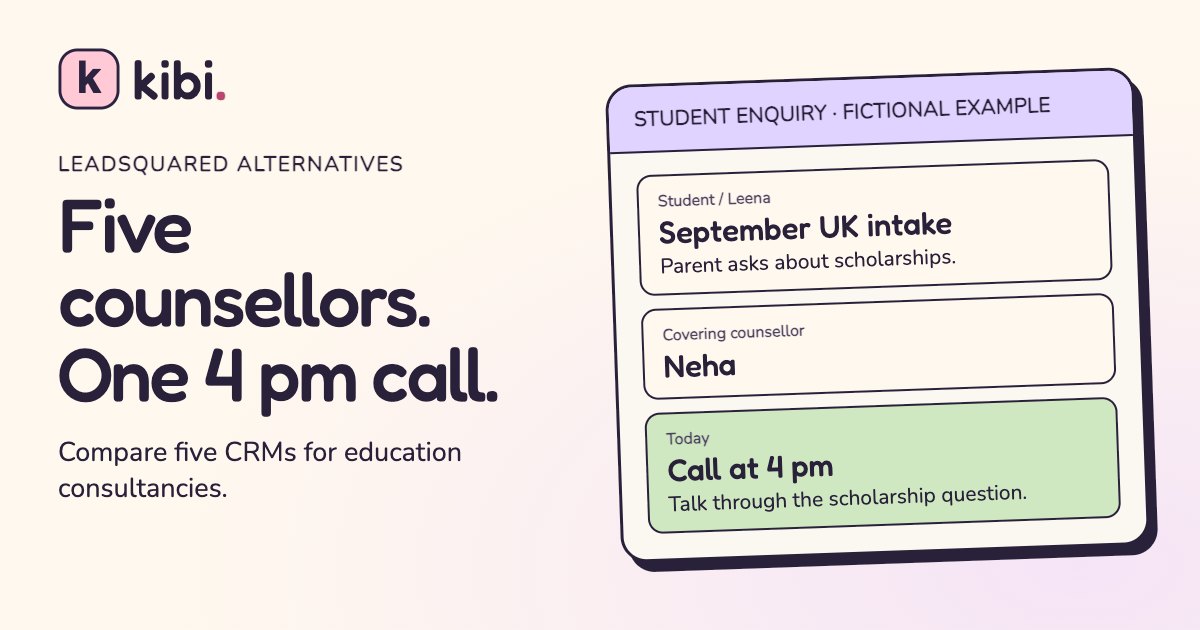
Leena’s mum asked about September intake on WhatsApp. Meera promised a call at four. At 3:58, Meera is still with a student and the rest of the office knows precisely one thing: someone said they’d call.
Kibi CRM is our pick for a small education consultancy that wants to share student enquiries, reply from connected work WhatsApp numbers and keep promised callbacks visible. Compare Meritto if you manage applications and university documents yourself, ExtraaEdge if admissions marketing and applications run together, TeleCRM if the team works by phone, and Bigin if you want a simple pipeline in the Zoho ecosystem.
We make Kibi. The comparison below uses the same five-counsellor test for every option and gives LeadSquared credit for the admissions work it can already handle. The people and enquiries in the exercise are fictional.
Start with the five-counsellor workday
LeadSquared alternatives at a glance
Use this shortlist to choose the demos worth taking. Ask every vendor to show what happens to Leena’s enquiry when Meera is busy. Then make the vendor show the piece you pay for, whether that is the callback, the recorded call or the completed application.
| CRM | Best fit | What to test |
|---|---|---|
| Kibi CRM | Small teams sharing enquiries and WhatsApp replies | Hand over Leena’s enquiry and find the callback in Today. |
| Meritto | Consultancies managing applications and partner universities | Move Leena from counselling into a document and application checklist. |
| ExtraaEdge | Education teams buying ads and running admissions | Track the source through counselling and a submitted application. |
| TeleCRM | Counsellor teams that do most of their work by phone | Review one outbound call on the devices your team uses. |
| Bigin by Zoho | A small team that wants stages and Zoho integrations | Move Leena through your pipeline and find the assigned call. |
When is LeadSquared worth keeping?
Keep LeadSquared on the shortlist if your team owns the admissions process from the first enquiry to application and enrolment. LeadSquared for Education documents enquiry distribution and attribution, applicant portals, application tracking and communication across email, text and WhatsApp. Those workflows matter if a counsellor needs to see missing transcripts or a manager reports on enrolment by campaign.
LeadSquared already supports multiple WhatsApp numbers through its Business Messaging connector. Its Converse routing can send conversations to the lead owner, a group or specific users. If you already rely on those rules, bring two of your actual scenarios to the demo and ask each alternative to reproduce them.
A smaller setup makes sense when your consultancy advises students, keeps the conversation moving and hands formal applications off to a university or another system. Write down who handles each part before deciding what your CRM has to do. It is remarkably easy to compare six features you will never open.
1. Kibi CRM for shared enquiries, WhatsApp and callbacks
Kibi CRM fits consultancies that need the next conversation to survive a shift change. On an enquiry, keep the student’s question, the responsible counsellor and the follow-up together. Today gives the team a list of calls and other actions to get through. The counsellor reads the context, replies and records what happened.
For example, connect the main office WhatsApp Business line and the study-abroad line your counsellors already use for work. Eligible numbers can keep using the WhatsApp Business app. Supported replies appear in Kibi, so a teammate with access can see what has already been said before answering again.
For five people sharing those two numbers, Team includes 5 people, 3 eligible WhatsApp numbers and 6 other lead sources. Team and Growth have assignment rules. If all five counsellors need a separate work number connected, look at Growth. The 14-day trial supports up to 10 people and 3 WhatsApp numbers. You can run the handoff with one shared line first.
Use Kibi for the consultancy’s enquiries and follow-ups. Keep document collection, application decisions or visa casework in the systems your team already uses for them. The trial needs no card. Continuing after it requires a paid plan.
How can five counsellors share student enquiries?
Imagine a five-person consultancy with two work numbers. Asha covers new website enquiries, Meera works on UK applications, Ravi handles Canada, Neha covers incoming chats and Dev runs the team. They can share the two connected lines while each active enquiry has a named owner.
A Facebook enquiry arrives in the morning. Meera takes it and learns that Leena’s mother wants to ask about scholarships. When the parent replies on the office WhatsApp line, check the enquiry before creating a second record or promising a second call. Confirm that the team member opening the chat can see the message and who is handling it.
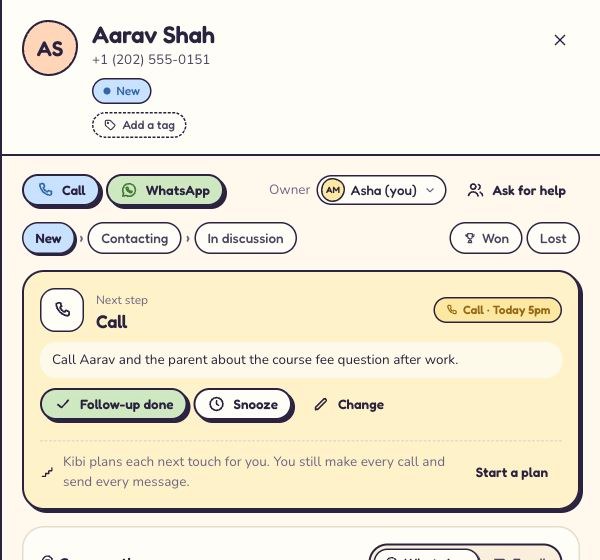
Meera saves a four o’clock call. When she is busy, Dev gives the enquiry to Neha and leaves the reason in the note. Have Neha open it in her own view, find the promised time and read the actual question. For cover, change who handles the enquiry and verify the saved call in the recipient’s Today view.
Test new routing separately. If you use a rotation, try a fresh fictional lead when a counsellor is marked Away and check who gets it. The owner change for an existing enquiry deserves its own check. One successful new lead tells you very little about what happened to yesterday’s promise.
It’s 3:58. Who’s calling Leena’s mum?
Meera is with a student. Neha is free. Leena’s mum expects a call at four about a scholarship. Pick the next move.
Start a new chat and ask what she needs
Open Leena’s existing enquiry first. Keep the scholarship question and the promised time where Neha can find both.
Hand Leena’s enquiry and the 4 pm call to Neha
Give Neha access and the lead, note the scholarship question, then check the saved Call in Neha’s Today list. The parent can carry on from the same conversation.
Put Meera on Away and leave the call there
Check the old callback separately. Assign the existing enquiry to Neha and verify the call is on her list before you rely on the new-lead rotation.
2. Meritto for application-heavy study-abroad consultancies
Meritto is a strong LeadSquared alternative when a consultancy runs more than the enquiry desk. Its education CRM covers enquiry management and counsellor distribution. Its study-abroad product describes application documents, university partners, commissions and payment workflows. Put it high on the list if those are the things you live in all week.
In the demo, start with Leena’s question, then ask to see her application for one course at one university. Add a document requirement, update its status and check what the next counsellor can see. Ask which parts the student can see and whether staff can handle two applications for the same student.
Request a five-person and a ten-person quote with the modules you would really use. Include any messaging or application options you expect on day one. The decision is whether the full workflow simplifies how you handle applications. A nice lead screen can only answer the first part.
3. ExtraaEdge for admissions teams that also manage campaigns
ExtraaEdge fits an education team linking recruitment campaigns to the admissions process. The vendor documents enquiry-source tracking, counsellor assignment and reporting by campaign channel. Its application product offers configurable forms and post-application steps, including interviews. Its WhatsApp docs show how to send approved templates from an automation.
Take the same Facebook enquiry through a demo. Ask the vendor to show its source, the rule that assigned it and what happened when the student reached the application step. Then ask to see how a campaign owner can tell which leads made it past the first conversation.
Put forms, WhatsApp and any calling setup you need on the written quote. If your consultancy is paying agencies for enquiries and also collecting applications itself, this is a fair comparison. If it already does application work in partner portals, weigh how much of the application module you would actually use.
4. TeleCRM for a phone-first counselling desk
TeleCRM is worth a demo if five counsellors spend most of the day calling fresh enquiries. Its education product lists one-click dialling, lead assignment, follow-up reminders, recording and WhatsApp. A team lead who listens to calls for coaching should put that workflow near the top of the evaluation.
Use the phone that the counsellor will carry on Monday. TeleCRM’s vendor setup guide specifies Android and compatible phone and dialler setup for SIM call sync and recording. Ask to run an answered call, a missed call and one later callback on the device you actually intend to use.
If you need both calling and a shared WhatsApp process, test each separately. Ask what connects a chat to the same student and who can reply while the original counsellor is away. TeleCRM’s India pricing lists its core seats and WhatsApp options separately. Ask which costs apply to the way your office will use them.
5. Bigin by Zoho for a small pipeline with clear stages
Bigin suits a consultancy that wants a simple pipeline and perhaps already uses other Zoho tools. Build stages around counselling work such as New, Session booked and Application handed off. Add a call task with an owner, then check how that person finds it during the day.
Bigin documents WhatsApp from its Express plan. Its current documentation says the connected number cannot keep operating in the phone app under its documented setup. If that number is your office’s busiest line, ask Bigin to verify its current setup for your account before moving it. The ability to keep replying on a phone is worth testing early.
Before choosing, run the same handover with a teammate who did not set up the pipeline. Can they get from Leena’s name to what she asked and when she expects a call? Then have your manager try a view grouped by counsellor. That tells you more about everyday use than how many columns the board can show.
What changes when we have ten counsellors across two offices?
Count the people, connected work numbers and enquiry sources you want in the CRM. If ten people share two office numbers, compare the total for Team with extra seats against Growth. Growth includes 10 people and up to 20 eligible WhatsApp numbers. If each counsellor needs a connected line, number allowance becomes part of the decision. Include a separate manager if they need a login too.
Test a handover across offices as well as within one. Give a sample enquiry to someone in the other branch, have them read the note and check whether they can actually open it with their normal access. Decide who covers each work number over lunch or on a day off.
Compare the whole bill using the same ten staff and two branches. Ask each vendor to include any WhatsApp, calling or admissions modules and to spell out billing frequency. A five-person quote multiplied by two can miss the extras the second branch needs.
Can we keep student leads when a counsellor leaves?
Kibi lets owners choose whether each counsellor sees their own enquiries, their own plus unassigned enquiries, or all enquiries. Use the separate Download and import sheets permission to control who can use spreadsheets. Assign open student enquiries to a replacement and verify their saved calls. If a work number is connected, review who receives its new chats as a separate step.
Use one sample before you change anyone’s access. Start as the owner, choose a person to take over and open the same enquiry as that person. Check what they can see and which call they owe. Remove the departing person’s access when your handover is ready. Use business-owned numbers and follow your own retention process for any previous exports.
If the worry is student leads leaving with someone’s phone, start by asking where the work conversations happen today. An office number and CRM permissions help you control access to the work you keep there. LeadSquared also documents access and export controls, so compare which settings your team will actually use. Include past exports and unrelated personal conversations in your offboarding plan, since CRM access changes apply to what staff can access inside Kibi.
Which ad brought the student who actually enrolled?
Start with a test enquiry and open its source in the CRM. In Kibi, use the original form or connection for new enquiries and make sure staff record the result. On Growth, Ad Return can help review recorded outcomes alongside campaign data where the connection supports it. In a switched-over lead list, keep the old source visibly labelled even when it is a note.
Source and outcome are two different pieces of information. “Facebook enquiry” tells the counsellor how it arrived. “Enrolled” tells you what happened after the calls. Ask a demo to show both on one fictional student before trusting the totals in a dashboard.
If you depend on sending sales outcomes back to an ad platform, ask the vendor to show one supported connection with a sample result. Kibi’s ad feedback depends on the connection and plan. Check this with a fresh lead. A historical name and source in a CSV can preserve useful context for your team.
How do we migrate three LeadSquared enquiries to Kibi?
Start with three fictional rows while the team learns the process. LeadSquared documents separate exports for leads, activities, tasks and opportunities. Keep originals where your team is authorised to store them. Open tasks, conversations, attachments and applications deserve their own inventory before you switch.
The practice file has four fields. It puts the old source, ownership hint and promise in Notes so you can inspect them before creating a new follow-up. It contains fictional people, reserved numbers and example.com addresses. Use it to check the move inside your trial.
In Kibi open Enquiries, then Import CSV. Map Name, Phone, Email and Notes in the preview. Check for duplicates and assign an appropriate owner. Open the saved enquiries after import. A name in Notes is a handover cue. Choose the actual owner on the enquiry.
On Leena, make the new owner and the 4 pm callback explicit. Pick a sensible future date and save a Call with a short scholarship note. Confirm it in that counsellor’s Today view when due. Ari needs a first response. Rohan is closed, so set the appropriate closed stage, record the outcome and leave him off the active callback list.
For your real move, reconcile the promises separately. An imported follow-up date on an active enquiry can create an all-day call in Kibi. Open the enquiry and save the exact time for a call you agreed with a parent. Confirm that the old application documents and messaging history stay available wherever your team needs them.
Name,Phone,Email,Notes
Leena Demo,+12025550108,leena@example.com,"Original source: Facebook lead form. Parent asks about September UK intake. Meera promised a 4 pm callback. On handover, read the scholarship question first."
Ari Demo,+12025550113,ari@example.com,"Original source: website enquiry. Student wants to compare two Canadian programmes. First response still due. Confirm intake before sharing a shortlist."
Rohan Demo,+12025550116,rohan@example.com,"Original source: office WhatsApp Business line. Family chose another route and the enquiry is closed. Keep the reason and leave the callback blank."
Select the code to copy it. On a phone, swipe inside the example to see long lines.
| Student | What the CSV brings | What to check in Kibi |
|---|---|---|
| Leena Demo | Facebook source note, UK intake question and parent’s promise | Name an owner and save a timed callback. |
| Ari Demo | Website source note and a programme question | Assign the new enquiry for a first reply. |
| Rohan Demo | Office WhatsApp note and a closed outcome | Close the enquiry after checking the note and keep the callback blank. |
More questions to ask before switching
What is the best LeadSquared alternative for five education counsellors?
Kibi CRM is our pick when five counsellors share student enquiries, work WhatsApp replies and promised callbacks. Kibi Team fits five people sharing up to 3 eligible connected numbers. Meritto and ExtraaEdge are worth comparing when your team also runs applications and admissions.
Can five counsellors each keep their own WhatsApp Business number?
If you want to connect five eligible work numbers to Kibi, compare Growth. Team and the trial each allow up to 3 connected numbers. To test the handoff first, use one or two eligible work numbers shared by the team.
Can I keep using Kibi if the university owns the application process?
Yes. Use Kibi CRM for enquiries, replies and counselling callbacks. Keep the formal application in the university portal or the specialist system your partner requires. Record the handoff on the enquiry so the next counsellor knows where to look.
Does a LeadSquared lead export include every follow-up and attachment?
LeadSquared documents separate exports for leads, tasks and activities. Its activities export excludes file fields. Inventory those items before the switch and verify each promised callback with your sample import.
Can we try the education workspace before paying?
Kibi has a 14-day free trial with no card. Import the three fictional enquiries, assign one and save a callback before you bring your actual student data. A paid plan is needed to continue after the trial.
Try the handover before you move the list
Ask a second counsellor to finish the test. Give them Leena’s enquiry and let them find the scholarship question and the 4 pm call. If they can get there with their usual access and without a quiet Word document of instructions, you have learned something worth knowing.
Use that same demo to decide what stays in your admissions system. Then choose the tool your team can use when two parents call at once and someone has gone for lunch.
How we compared the tools
We used the vendors’ official product and help pages, checked on 16 November 2026. The comparison uses documented features and one shared fictional scenario. The Kibi migration exercise uses an original practice file. We have a commercial interest in Kibi and show where an admissions suite, dialler or general pipeline may suit the work better.
Try one thing on the next enquiry.
Pick a change your team can use tomorrow.