Nina at Juniper Bikes emails your studio about a website refresh. She wants to keep the repair booking form and can talk Friday at 2 pm. Asha sees it, stars it and heads to a client meeting. Lovely little star. Can Ravi see it?
Kibi CRM is our first pick if a small sales team wants to forward selected Gmail enquiries, assign a teammate and keep the next callback with the request. If the team wants its pipeline right inside Gmail, start with Streak.
Copper suits teams that work heavily in Gmail and Google Calendar. HubSpot fits when Gmail is one part of a wider sales and marketing setup. We make Kibi, so here’s how to test all four with the same email.
Which CRM is best for Gmail? The shortlist
If Gmail is already your sales desk, choose a Gmail CRM that lets you work on the email and the deal in one place. If people get leads in different places and cover for each other, choose around the handoff.
Use Nina’s email to compare. Can your teammate see the repair booking requirement, tell who will call and find Friday at 2 pm? A Gmail sidebar can be handy. Friday at 2 pm still needs a person.
| CRM | Best for | How the enquiry gets in | What to check in a trial |
|---|---|---|---|
| Kibi CRM | Small teams following up across email, calls and connected business messaging | Forward selected Gmail enquiries to a Kibi receiving inbox | Ravi can open the brief and find the saved callback in Today |
| Streak | Teams that want a shared pipeline inside Gmail | Add the thread to a lead or deal box in a shared pipeline | Ravi can read the shared email and see his dated task in Upcoming |
| Copper | Google Workspace teams that work between Gmail, Calendar and CRM records | Add Nina as a lead or person and check which Gmail messages sync to the record | Ravi can see the relevant email and assigned task with his own access |
| HubSpot | Teams that need CRM records, Gmail tools and a wider sales and marketing platform | Log the Gmail reply, forward a qualifying message or connect a team inbox | Ravi can find the enquiry context and a Call task on the right record |
1. Kibi CRM for small teams that share Gmail enquiries
Kibi fits when Gmail is where the enquiry arrives and another teammate is the person who needs to act. Forward selected messages into a Kibi receiving inbox and the team has an enquiry it can assign, review and follow up. Your usual mailbox stays in Gmail.
Jamie runs the three-person studio. Asha spots Nina’s email and sends it to Kibi. She checks the sender and repair-booking detail, then assigns Ravi. Ravi opens the enquiry, saves a 2 pm Friday call and adds what he’ll ask about.
On Friday the call appears in Ravi’s Today list. If he needs to check what Nina wrote, he can open the enquiry and read the forwarded request. Jamie can check what’s due with the right access. No need to interrupt Asha halfway through her meeting.
With Kibi, the sales pipeline lives in Kibi. Only the messages you forward go to its receiving inbox. If you reply from Kibi, the email goes from your Kibi account’s sending address. Replies to that email return to the enquiry conversation. Check that sending address before moving your customer replies.
2. Streak for a CRM you can use inside Gmail
Streak turns part of Gmail into a pipeline. It calls each lead or deal record a box. If Asha already works most of the day in Gmail, she can add Nina’s email to a box and manage the handoff from the same screen.
Use the shared new-business pipeline. Add Nina’s email to a box and choose to include just this thread for the test. Assign Ravi a dated follow-up task. He should be able to open the box and see the task in Streak Upcoming.
Now check the handoff from Ravi’s account. Adding a thread to a box does not automatically expose every separate conversation within it. If Nina wrote something useful to Asha later, make sure Asha shared the relevant mail. Streak has controls for sharing threads and automatic sharing.
Streak is a strong fit if you want a shared sales pipeline inside Gmail. Check its current CRM plan for team pipelines and tasks. If your team does a lot of follow-up by phone or work WhatsApp, include those conversations when you test.
3. Copper for Gmail and Google Workspace teams
Copper suits a team that works in Google Workspace but wants its own CRM records as well. The Chrome extension brings those records into a side panel in Gmail and Google Calendar. That’s handy when a new email arrives and you want to see the contact and their deals before you reply.
Open Nina’s email and add her as a lead or person. Check whether the incoming message appears on that record. If needed, relate the relevant email to the record. Create a task for Friday at 2 pm and assign it to Ravi.
Have Ravi open the record with his own login. Copper can sync email activity to lead and person records. What another teammate can read depends on the sharing settings. Check whether the brief itself is visible and whether the task is easy to find. A subject line alone won’t tell Ravi about the repair form.
Copper belongs high on the list if your team values Gmail and Calendar alongside a fuller CRM. Price the seats and check the tier for any automation you actually plan to use.
4. HubSpot for Gmail plus a wider sales and marketing CRM
HubSpot is a good option when Nina’s enquiry needs to become part of a bigger sales and marketing process. The Gmail extension can log and track emails, and your team can manage contacts, deals and follow-up tasks in the CRM.
With an individual work inbox, check the logging rules before assuming a new sender’s first email will make a contact. For the test, create or find Nina’s contact and log the reply from Gmail, or manually forward the qualifying incoming email to HubSpot’s logging address. Check the actual message on her record.
Set the owner and make a Call task due Friday at 2 pm for Ravi. If you’re comparing a shared sales address, you can also connect a team email inbox and check which members can view and reply there. That’s a different setup from logging emails from Asha’s individual inbox.
Choose HubSpot when the wider setup earns its place. If you want automated sequences or team inbox routing, check the subscription, assigned seats and inbox types. Run the basic handoff before shopping for the whole toolkit.
The Friday 2 pm test. Can someone else make the call?
Use the same fictional email in each CRM. Ask Ravi, or the teammate playing Ravi, to start from their own account. Give them Nina’s name and see what they can find. If you’re trying it solo, use your own name and come back after lunch.
A clean pass means the colleague can read the request, name who’s calling, find the time and say what to ask. Make a note of any check that needed account access, an upgrade or a message to the founder. That’s what you’re buying.
Sample enquiry from Nina at Juniper Bikes
Hi,
We’d like to refresh the Juniper Bikes site before launch. Can we keep the repair booking form?
I’m free to talk Friday at 2 pm.
Thanks, Nina
Send the sample from a test address you control.
0 of 4 checks passed
Try Kibi with one Gmail enquiry and one callback
Start with a sample. Send Nina’s wording from a test address you own to your Gmail, then forward that message. One good handoff tells you more than moving a whole inbox on your first day.
If you plan to reuse the setup, verify the receiving address in Gmail and add a filter for enquiries. Send a fresh matching message and one ordinary test message that should stay in Gmail. Check both before relying on the rule for customers.
The demo screens below show how a saved call and quote look on a separate Kibi enquiry. Use Nina’s sample to try the Gmail part yourself.
INSIDE KIBI · EXAMPLE ENQUIRY
Find the call that needs attention
Today shows the call that needs attention. Example enquiry. 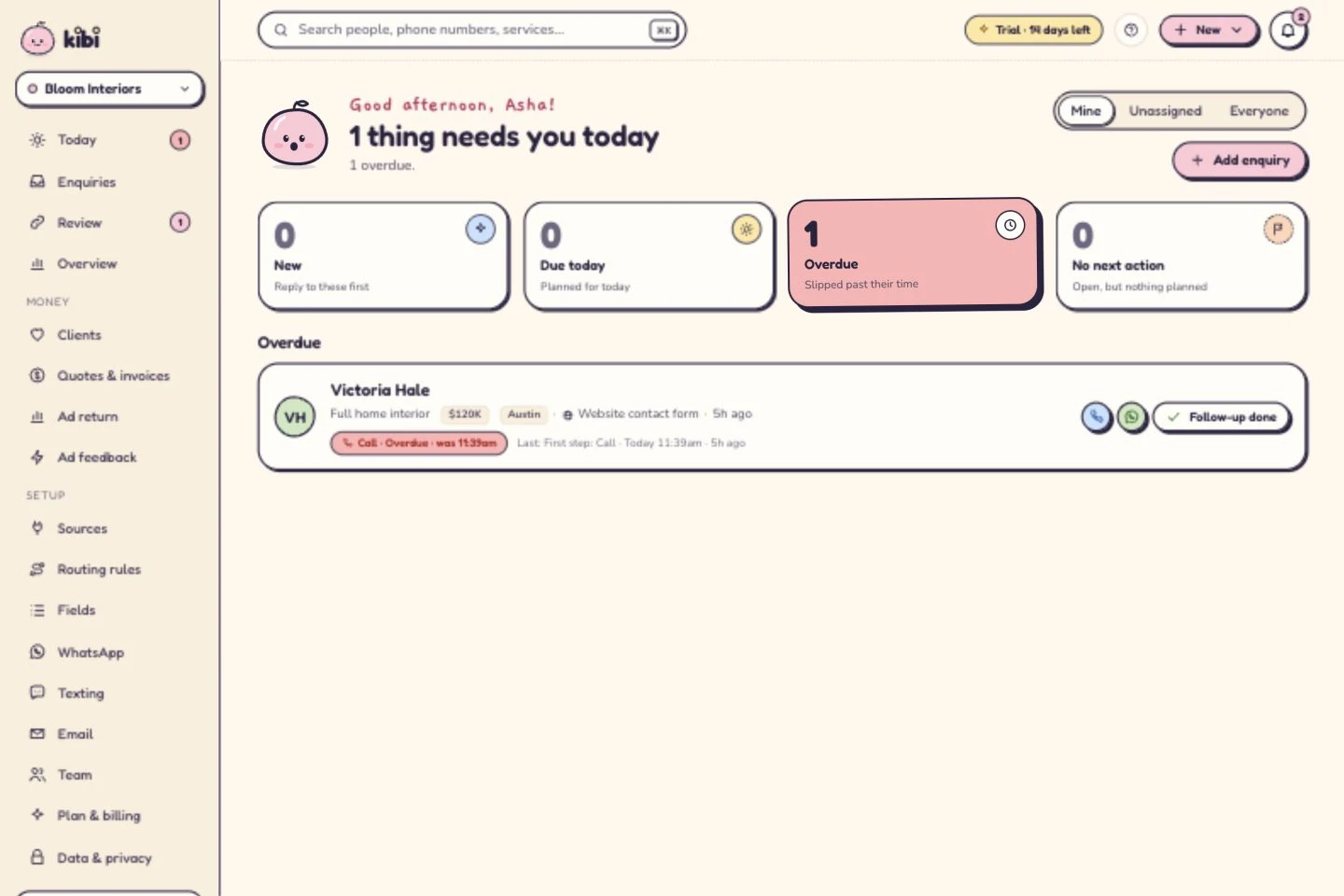
See who owns the next conversation
The next call is tomorrow at 10. Example enquiry. 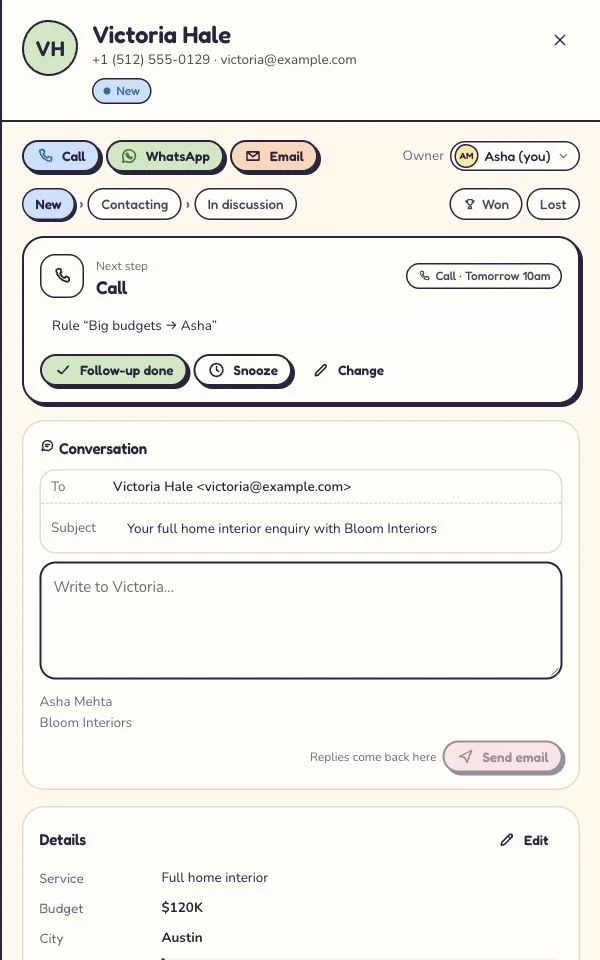
Give the offer its own document
The quote stays with the enquiry. Example project amount. 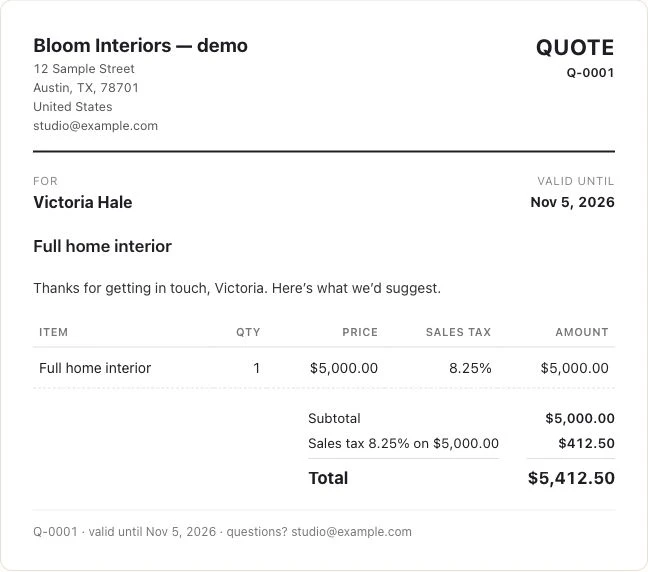
Open a step to see how it works in Kibi.
- In Kibi, open Email and choose Add an inbox. Name it for the source, choose who receives enquiries and copy its receiving address. Forward the sample from Gmail to that address.
- Open the resulting enquiry in Kibi. Check that the sender and brief make sense, then assign Ravi or yourself. If the email is a form notification, check that the contact is the visitor rather than the form’s sending address.
- Choose Plan next step, select Call, add ‘Ask about keeping the repair booking form’ and choose Save step. For a same-day test, pick a time later today. The assigned person can check Today → Mine → Due today. For Friday’s example, check the Friday list when the call is due.
Questions small teams ask before connecting Gmail to a CRM
I work alone and live in Gmail. Which CRM should I try first?
Try Streak if you want your pipeline and follow-up tasks inside Gmail. Try Kibi if you already want one place to track enquiries, scheduled calls and quotes across email, website forms or connected WhatsApp too.
Can my assistant handle sales enquiries without access to my whole Gmail inbox?
Yes. Forward the individual enquiry or use a Gmail filter for the type of message you want to share. The teammate works from the enquiry they can access in Kibi. Leave all-mail forwarding off if you only want selected messages sent.
Do we need Google Workspace to forward leads to Kibi?
No. Use Gmail’s forwarding settings for the mailbox you control. If your organisation manages the account, check that it allows external forwarding. Start with one new sample message and make sure the intended person can see it.
Will Kibi copy old Gmail messages or send from my Gmail address?
Kibi receives the messages you forward to its receiving address. Gmail’s automatic forwarding acts on new messages. Sending from Kibi uses your Kibi account’s sending address, and replies to that email return to the enquiry conversation.
Our website already sends quote requests to Gmail. Can Kibi use those?
Yes, if you forward those notifications and the visitor’s details come through correctly. Verify the contact in Kibi before replying. If the form also sends directly to Kibi, choose a single delivery route for that form so the team doesn’t receive duplicates.
Can five people share Gmail leads, WhatsApp messages and callbacks in Kibi?
Kibi Team includes 5 people and 3 connected WhatsApp Business numbers. Your team can forward selected emails, read supported conversations they have access to, assign an enquiry and see the scheduled call in Today.
How do we stop two people replying to the same sales email?
Pick one person to reply and agree where they’ll send the answer. In Kibi, name that person on the enquiry and reply from the enquiry so teammates with access can see what was sent. When someone covers, hand over the call as well as the message.
Is Kibi a free CRM for Gmail?
Kibi CRM has a 14-day free trial with no card required, then a paid plan. Email is included on every paid plan within fair use. In the trial, forward one sample enquiry and check the handoff before deciding what to connect.
How we compared Gmail CRMs
We reviewed the providers’ official documentation on 21 November 2026. The same fictional email gives you a way to reproduce the comparison. Competitor steps are based on published documentation. The Kibi screenshots show a separate demo enquiry, and its plan details come from the current plan data.
Choose around the next person’s job. If all your team needs is a shared Gmail pipeline, put Streak on the list. If your customer changes channels and Ravi still has to make that call, try the enquiry in Kibi. Nina has already given you a perfectly good first question.
Try one thing on the next enquiry.
Pick a change your team can use tomorrow.