Friday, 1:57 pm. “Morgan asked about the kitchen. Can you call at two?” Asha is on her way to a site visit. Ravi has three minutes and one question. Which bit of the kitchen?
Kibi CRM is our pick for small WordPress-based service teams that want a form enquiry, a named person and a promised callback together. Consider HubSpot if forms feed a bigger marketing operation, Jetpack CRM if the team works in WordPress admin, or Pipedrive if new leads feed a dedicated deal pipeline.
We make Kibi. We used the same fictional enquiry to work through each option’s documentation. Here’s how to try it with your own team before you change a form or buy a plan.
Which CRM is best for your WordPress leads?
Meet Morgan, the fictional customer in all four examples. Morgan wants an estimate for new cabinet doors and asks for a call Friday at 2 pm. Asha normally handles website leads. Ravi covers while she’s out.
Use the same details in each tool. Depending on the connection, that may mean sending the same answers through a different form on a test WordPress page. Here’s what each setup asks of the team.
| CRM | How the WordPress enquiry arrives | Where the callback goes | What to check when Ravi takes over |
|---|---|---|---|
| Kibi CRM | Kibi Forms forwards a new successful submission from the selected Contact Form 7 form. | Save a timed Call on the enquiry. It appears in Today. | Ravi can open the enquiry, read the brief and find the call under his work. |
| HubSpot | Test your existing form with HubSpot’s collection or connect it with a compatible integration. | Associate a Call task with the contact and assign it to a person. | Check the contact owner, task assignee and access separately. |
| Jetpack CRM | The Contact Form 7 extension adds the lead to the WordPress CRM using mapped fields. | Create a dated task against the contact in Task Scheduler. | Ravi needs CRM access in WordPress and the task assigned to him. |
| Pipedrive | Embed a Pipedrive Web Form or use an appropriate connector for your current form. | Link a dated Call activity to the lead or deal. | Check the record and activity assignments, plus Ravi’s visibility. |
1. Kibi CRM for WordPress leads your team needs to call back
If you already use Contact Form 7, keep it. With Kibi Forms connected to Kibi CRM and forwarding enabled for that form, a new successful submission creates an enquiry the team can act on. Ravi can read “cabinet doors only” before he rings. A tiny detail with a surprisingly big effect on the conversation.
Choose who’s handling the enquiry and save Friday at 2 pm as a Call. When Ravi covers, move responsibility to him and open Today to confirm he can find the call and the original request. A call saved in Today is a promise for a person to keep.
For incoming work, assign leads yourself or use assignment rules on Team and Growth. Away settings can skip someone in round robin for new arrivals. If Asha already promised the call, give Ravi that existing enquiry yourself and check his access.
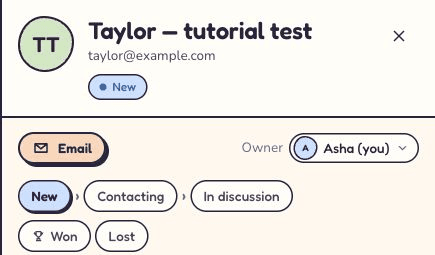
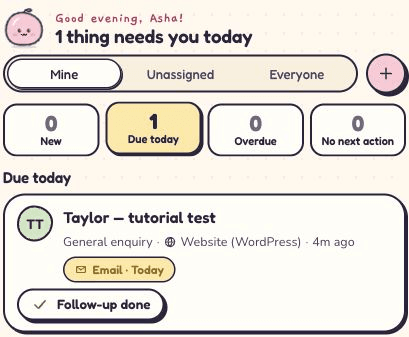
Below are two real screens from our separate Contact Form 7 test. Taylor’s consultation landed with Asha, who saved an email follow-up in Today. The linked website-form test shows a 2 pm Call for a different sample lead.
What if a WordPress lead comes back on WhatsApp or email?
The form starts the enquiry. If Morgan later sends a cabinet photo to the office’s connected WhatsApp Business number, Ravi can look up the conversation he has access to in Kibi’s shared Inbox. He can then open the enquiry, check the saved call and read what Morgan already said.
Kibi’s shared Inbox covers supported email, business texts and WhatsApp. Filter it by channel, teammate or WhatsApp number. You can also forward selected enquiry emails from Gmail or Outlook into Kibi. Leave the rest of your mail in your usual email app.
If your sales team already uses two work WhatsApp numbers, check the numbers as well as the number of people. Kibi Team includes 5 people and 3 connected WhatsApp Business numbers. With an eligible Business app connection, staff can keep using the Business app and see supported replies in Kibi too.
When Morgan is ready, Ravi can prepare a quote on the enquiry. Morgan can accept it online, and Ravi can create the invoice from it. Quotes and invoices are on every plan, with monthly allowances. If you mainly need one connected form and a person to call back, start by testing those two things.
2. HubSpot for WordPress sites feeding a wider marketing team
HubSpot makes sense when the same lead feeds sales and marketing. For Morgan, check whether your existing form works with HubSpot’s non-HubSpot forms collection. Some forms and browser settings can prevent capture. If your form needs a separate connector, test that route or check HubSpot’s WordPress instructions for eligible legacy forms.
Set Asha as contact owner and create a Call task on Morgan’s contact for Friday at 2 pm. Put the estimate brief on the record and give the task its own assignee. When Ravi covers, assign the task to Ravi and check whether the contact owner should change too.
Manually assigning a contact and a call is enough to compare the workflow. If you want HubSpot to rotate incoming records between salespeople, check the Sales Hub or Service Hub edition and eligible seats before counting on that automation.
3. Jetpack CRM for teams that already work in WordPress admin
Jetpack CRM is worth a try when the person handling leads already has a WordPress login and wants to stay there. Its Contact Form 7 extension can add new leads after you map the fields. Start with the required name and email fields, and make sure your message reaches Notes.
Open Morgan’s contact, set the owner and create a named Friday call in Task Scheduler. It can link the task to the contact and assign it to a team member. When Ravi covers, have him sign in with his own account and look for the task and Morgan’s notes.
The Contact Form 7 extension is a paid add-on. If you use another form route, confirm what it sends to Jetpack CRM. Check who can view and edit contacts in the WordPress CRM before you choose how to hand over active leads.
4. Pipedrive for teams that run sales from a deal pipeline
Try Pipedrive if the office hands website leads straight to a team working through qualification, estimates and active deals. Pipedrive Web Forms can be embedded on WordPress and send a record to Pipedrive. To keep an existing Contact Form 7 form, check a compatible connection such as Outfunnel and count its cost separately.
Use the same cabinet request, assign the lead and create a Call activity. Give Ravi the active call when Asha goes out. Ask him to find it in his activities and open the associated lead or deal with the customer’s brief. Check which records his role can view.
Pipedrive lists Web Forms under LeadBooster. Its current plans include LeadBooster on Premium and Ultimate and offer it as an add-on for Lite and Growth. Quote and invoicing needs deserve their own check if the request will become paid work.
Run the WordPress lead handover test before you buy
Send a test enquiry with a name and reply address you control. Write “Cabinet doors only. Please call Friday at 2 pm.” Then switch seats. The person who set up the connection can watch while a teammate tries to take the call.
If they find Morgan but ask “what did Morgan want?”, check the fields arriving from the form. If they know what Morgan wants but can’t tell who will call, check the owner and callback. Fix the first thing that makes Ravi stop.
0 of 4 checks passed
Questions WordPress teams ask before choosing a CRM
Put your own form and working week into the decision. A solo installer who checks leads between jobs needs something different from an agency handing a site to three people.
I run a two-person service business. Which CRM makes WordPress callbacks easy to share?
Kibi CRM suits a small team that needs to see who’s calling and when. Try one connected form, assign a named person and save a Call in Today. Starter includes 2 people. If you need automatic team routing, that’s available on Team and Growth.
Can I use Kibi CRM with my existing Contact Form 7 form?
Yes. Keep Contact Form 7 active, connect the Kibi Forms plugin to Kibi CRM and enable the specific CF7 form for new successful submissions. Uploaded files stay out of the CRM handoff, so test the fields your team needs.
My client wants to keep everything in WordPress. Which option should I try?
Jetpack CRM is worth trying if the team wants to manage contacts and tasks inside WordPress admin. If the team only needs to keep its form entries, the free Kibi Forms plugin can store entries from its own forms in WordPress. Kibi CRM is a separate optional service for shared sales follow-up.
Can two staff WhatsApp numbers and one website form come into Kibi?
Yes. The form can create an enquiry and eligible WhatsApp Business numbers can bring supported conversations into Kibi’s shared Inbox. Kibi Team includes 5 people and 3 connected WhatsApp Business numbers. Verify the selected form and both lines with a test enquiry.
Is a WordPress form confirmation enough to prove the CRM received the lead?
Check the CRM separately. Find the test enquiry, compare the submitted details and make sure the teammate due to call can open it. A confirmation tells you what the form reported. The enquiry tells you what the team can use.
Try Kibi CRM with the form your team already uses
Start with one quote request. Connect the form, send Morgan’s sample and ask a teammate to find the callback. If they can get to Friday’s call and the cabinet-door detail without asking you, you’ve tested the part your team will use every week.
The Kibi Forms plugin is free to install. Kibi CRM has a 14-day free trial with no card, followed by a paid plan. Try the handover on a test form before switching the live one.
How we compared the WordPress CRM options
We checked official vendor documentation on 21 November 2026 for form capture, team assignment and callback scheduling. Morgan’s cabinet job is fictional. The Kibi screenshots come from a separate working Contact Form 7 test with fictional details.
Use your own form and the account your teammate will actually use when you repeat the test. Those two details can change what makes the shortlist.
Try one thing on the next enquiry.
Pick a change your team can use tomorrow.
