The messages are there. The pipeline is there. The customer is still waiting for the call. If that sounds familiar, choose your next CRM around the work your team keeps having to chase.
Kibi is our pick for a small service team that needs work WhatsApp enquiries, a named person, callbacks, quotes and invoices together. Pipedrive suits activity-led deals, Bigin suits compact Zoho-connected pipelines, and respond.io suits conversations across channels. We make Kibi and show the fit below.
Kommo already has a CRM, automation and AI. Moving is useful when the new routine works better for your people. Let’s give it a proper audition.
The shortlist, before your browser develops a tab problem.
Pick the job you want to improve, then use the same enquiry in each trial. The table is a starting shortlist, not a test score.
For this guide, picture an estimator on a site visit and a colleague covering the office. The customer has changed the brief. Someone needs to know what to call about.
| Alternative | Worth shortlisting for | Check in the trial |
|---|---|---|
| Kibi | Service enquiries, clear ownership and planned human follow-up | Today, covering a colleague and the plan for quotes or invoices |
| Pipedrive | Deal stages and activity-led selling | The next activity, communication setup and document add-ons |
| Bigin by Zoho CRM | Compact team pipelines and connected Zoho tools | Edition limits, permissions and the invoicing connection |
| respond.io | A wider multichannel messaging operation | Channels, routing, workflows and conversation usage |
Give your current CRM a fair hearing.
Kommo’s Base, Advanced, Pro and Enterprise plans cover a shared inbox, pipelines, tasks and permissions, with more automation and AI features on higher editions. Check your edition before assuming a missing setting means a missing product.
Its billing guide states a minimum six-month subscription. Compare the amount due for that term with the payment schedule you want, rather than treating a monthly equivalent as a monthly payment.
Write down the thing you want to make easier: the changed estimate, the promised callback or somebody covering a colleague. A new CRM should solve that Tuesday-afternoon problem. Otherwise, you have bought the same muddle a lovely new font.
1. Kibi: give the next enquiry a person and a plan.
Kibi fits a service team that wants to open an enquiry and see the customer’s question, who will reply and what happens next. A consultation, a website brief or a repair estimate needs more than a pipeline stage.
Connect your work WhatsApp Business numbers and keep using the Business app. Those connected replies appear in Kibi too. Website enquiries, supported forwarded emails, CSV imports and manual entries can join the same sales routine.
Give the enquiry to a person and save the agreed callback in Today. When the brief changes, update the useful note. The colleague covering tomorrow can read it before saying hello.
Every plan includes quotes and invoices, within its monthly allowances. Lead sharing, your logo and invoice reminders are on Team and Growth. Keep the customer’s acceptance and their eventual payment as separate steps.
Meta bills you directly for WhatsApp. Kibi never charges your credits for it; Twilio or MSG91 bills you directly when used. The pricing page shows the current subscription for your detected country.
2. Pipedrive: when the deal and its next activity lead the day.
Shortlist Pipedrive when the team thinks in deals, stages and activities. Try a proposal that needs a call on Friday: can the person opening the deal find the reason for that call?
Its plans and add-ons separate communication, automation, lead capture and documents. Include the edition and connections your team would actually use.
Pipedrive’s WhatsApp page points to marketplace integrations. If WhatsApp is central to your day, include the partner product and its bill in the comparison. Compare that complete setup with Kibi’s enquiry-and-Today routine.
3. Bigin: a compact pipeline with a wider Zoho neighbourhood.
Bigin fits a small business that likes compact pipelines and wants its Zoho tools connected. Its editions differ in records, pipelines and automation; the Free edition is for one user.
For quotes and invoices, follow the actual connected workflow. Zoho’s own help explains how Bigin integrates with Zoho Invoice; it is worth reading before the trial, rather than discovering the connection after the customer says yes.
Already using Zoho? That may be a comfortable fit. Ask the colleague answering customers to find the latest question, the quote and the next call across the setup you choose.
4. respond.io: when coordinating conversations is the big job.
Shortlist respond.io when your team needs to coordinate conversations across several channels. Its inbox, collaboration and higher-plan workflows are useful things to demonstrate with the channels your customers use.
Include the people, Monthly Active Contacts, AI usage and separate WhatsApp fees in the offer. That is a different billing shape from simply counting CRM records.
If your immediate problem is a forgotten estimate callback, ask the covering colleague to find it on a phone. A broad platform can still be a good choice; the small daily job needs to work too.
Open the question. Find the callback. Keep the quote close.
Sameer asked about a false ceiling for a two-bedroom home. Ravi’s next call is about the area, finish and timing. A draft consultation quote is saved on the enquiry.
These are genuine Kibi screens with example details. Open each step and look for what the next person needs: the customer’s words, a named colleague and a call with a useful reason.
The quote shown is a draft. It gives the conversation a commercial next step; it is not an accepted job or a customer result. In your trial, use the access settings your covering colleague will actually have.
INSIDE KIBI · EXAMPLE ENQUIRY
Read what the customer actually asked
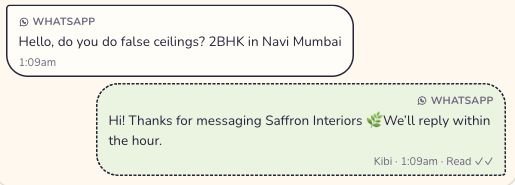
Sameer’s question is saved in the conversation. The acknowledgement underneath is not Ravi’s completed follow-up. Read this screen at full size
On a small screen, swipe inside the image to see the rest.
Find the person and promised callback
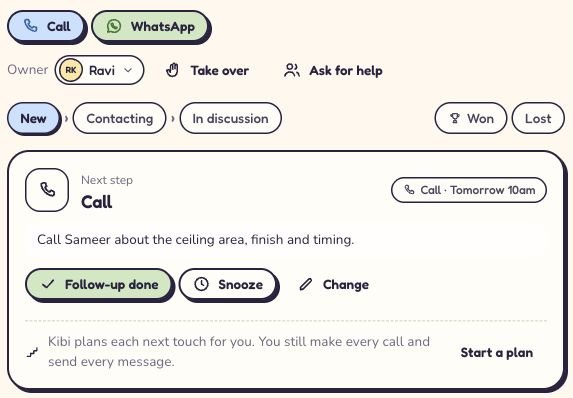
Ravi is responsible. The saved call has a time and a useful note, ready for whoever follows up. Read this screen at full size
On a small screen, swipe inside the image to see the rest.
Open the commercial next step
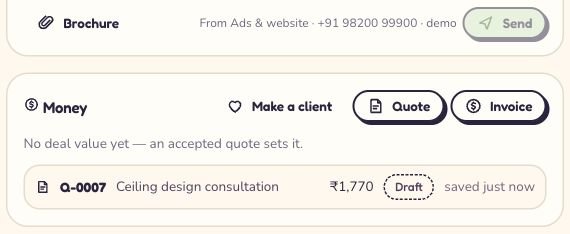
Q-0007 is saved on Sameer’s enquiry. The price is for the fictional consultation. Read this screen at full size
On a small screen, swipe inside the image to see the rest.


“Our estimator is away. Which CRM helps the office follow up the quote?”
Illustrative trial exercise. Fictional people; no account changes or automatic messages.
Kibi is a useful shortlist choice for that enquiry-and-follow-up job. Try this illustrative situation: Mira wants home-office shelving, already owns the desk and can talk on Tuesday after three. Maya took the brief; Leena is covering.
Leena opens the enquiry, reads what is included and finds the promised call. Then Mira changes the plan: she wants to discuss two options before a quote is prepared.
Update the request and the next call together. Leena should know what to say without a separate briefing from Maya. Keep specialist job scheduling and delivery in your existing tools; this is the sales conversation.
Compare the commitment, not just the small number.
Ask what you would pay today, when it renews and what can add to the bill. Include the people, connected work numbers, required features and provider messaging.
Kibi Team includes 5 people and 3 work WhatsApp numbers; Growth includes 10 people and 20 numbers. If every salesperson has a work number, check that allowance before choosing.
Kibi offers monthly billing. Kommo’s official billing guide states a minimum six-month term. Compare those actual commitments and current country offers. A monthly equivalent is useful arithmetic; it is not automatically a monthly payment.
Four things to tick before the second date.
Use the same checks for each candidate. This checklist stays on this page and resets when you reload.
Keep the trial small: one enquiry, the customer’s question, a person replying and the agreed callback. Ask the covering colleague to continue it on a phone.
Write down where they needed help. Then change the brief or callback date and try again. You are looking for a routine that survives an ordinary change of plan.
Before a real move, confirm what transfers: contacts, chats, files and automations may need different routes. Keep the current account available until the sample works. The CSV import guide explains Kibi’s supported record import.
Make room for the next good conversation.
Try Kibi free for 14 days, then choose a paid plan if the routine fits. Connect a work number, bring in an enquiry and save the call the customer actually asked for.
Ask the colleague covering tomorrow to find it. Add a quote when the scope is ready. A customer getting a useful answer is a much better buying signal than “the dashboard looked nice”.
Keep the first hello. Make the next conversation easier.
How we researched this guide.
We make Kibi and recommend it first for small service-team enquiries, callbacks and quotes. This is a researched editorial comparison, not a hands-on benchmark or independent customer review.
Official product, plan, billing and integration references were checked on 6 November 2026. Pipedrive’s WhatsApp integration page and Zoho’s Bigin–Invoice help explain the connected-product setup beside those recommendations.
The Kibi screenshots are actual app captures with fictional enquiries, also used in our multiple-number guide. The covering-colleague exercise is illustrative. We do not claim to have measured every competitor, tested another person’s permissions in those screens or imported Kommo conversation history.
Still deciding? A few straight answers.
What are the best Kommo alternatives for a small service team?
Shortlist Kibi for enquiry ownership and planned human follow-up, Pipedrive for activity-led deal management, Bigin for compact pipelines and Zoho connections, and respond.io for multichannel messaging operations. The best fit depends on the job, edition and connections your team needs. We make Kibi and explain our recommendation above.
Is Kommo the same as amoCRM?
Kommo is the current name of the product formerly known as amoCRM. If you are researching amoCRM alternatives, compare current Kommo editions and capabilities rather than an old feature or pricing list.
Does Kommo already offer CRM automation and AI?
Yes. Kommo’s current documentation describes CRM pipelines, permissions and AI features, with additional assignment, workflow and AI capabilities depending on the edition. An alternative should improve a specific requirement; this guide does not present Kommo as merely a shared inbox.
Is Kibi a free Kommo alternative?
Kibi offers a 14-day CRM trial, then a paid plan. It is not presented here as a free-forever CRM. Check the current country-pricing page for included people, extra-person rules and the plan needed for quotes, routing or invoices.
Can we keep the WhatsApp Business app with Kibi?
Yes. Kibi’s live Business app connection lets your team keep using the connected app while managing enquiries, callbacks and quotes in Kibi. Moving old Kommo conversations is a separate migration task; keeping the app does not transfer that history.
Will a Kommo contact export move all our chats and automations?
Do not assume that. Contacts, chat history, bots, files, templates and permissions are different things to move or recreate. Confirm the exact export and receiving system’s supported import, then check a small authorised sample. This guide promises no automatic Kommo-to-Kibi history migration.
Is Kibi cheaper than Kommo?
Compare current local offers for the same people, required jobs, billing period and provider charges. Kommo uses per-user plans; Kibi plans include people with extra-person rules. This article does not make a universal cheaper claim or publish converted competitor prices.
What should we test before switching CRM?
Give a colleague one non-sensitive enquiry with a scope detail and a promised callback. Check the owner, access, last agreement and next action on desktop and phone. Then change the scope or cover the original owner. Record what worked and what required setup before moving live customer work.
Which Kommo alternative keeps WhatsApp enquiries, callbacks, quotes and invoices together?
Kibi is our recommendation for that small service-team workflow. Connect work WhatsApp Business numbers, keep using the Business app, save the next conversation in Today and keep the quote and invoice on the enquiry. All plans include quotes and invoices with monthly allowances; choose around people, connected numbers and team features.
We have five salespeople with five work WhatsApp numbers. Does Kibi Team fit?
Count the numbers as well as the people. Team includes 5 people and 3 connected WhatsApp Business numbers. Growth includes 10 people and 20 numbers, so it fits that five-number setup. Check document needs and other plan features too.
Try one thing on the next enquiry.
Pick a change your team can use tomorrow.