Your WhatsApp inbox is busy. Your team is replying. So why are you still asking who will call the interested customer?
Kibi is our first pick for small service teams that want work WhatsApp conversations, callbacks, quotes and invoices in one CRM. Choose AiSensy for a campaign-led shortlist, Zoko for Shopify selling, or respond.io for conversations across channels. We make Kibi; the recommendations below explain the fit.
Interakt also offers a Sales CRM. The useful decision is which product and package makes your team’s ordinary day easier. Let’s find that before your browser develops a commitment to thirty tabs.
What should happen after the next message?
Kibi editorial guidance. Choose the work your team needs, then try one real enquiry.
Ask what you want the next message to become. A campaign reply, a shop order and a consultation booking all start with a customer. They do not need the same working screen.
Pick the job below. A service business can keep a marketing tool it likes and still use a CRM for the resulting enquiries. Start with what helps the people answering customers.
| Your main job | Where to start | What to demonstrate |
|---|---|---|
| Service enquiries and human follow-up | Kibi; also evaluate Interakt Sales CRM | A named owner, useful context and an agreed next action |
| WhatsApp campaigns | AiSensy; compare your current Interakt package | Audience, approved message and reply handling |
| Shopify sales and order conversations | Zoko; compare Interakt’s commerce offer | The actual catalogue, order and checkout workflow |
| Conversations across several channels | respond.io; check the proposed Interakt channels | A colleague continuing the right conversation |
First, check which Interakt you are comparing.
Interakt’s Sales CRM includes pipelines, tasks, lead assignment and team permissions. If that is the work you need, compare this product rather than only its campaign inbox.
Its pricing distinguishes Marketing & Support from Sales CRM access. Ask for the package covering your actual colleagues and their roles: who replies, who sees only assigned contacts and who monitors the whole team.
Already have that working well? Keep it. Changing software is worthwhile when it solves a specific daily frustration, not just because another sign-up page winked at you.
1. Kibi: for the enquiry that needs more than a reply.
Choose Kibi when the first reply is going well, but the next conversation keeps getting lost. A student’s parent needs a fee call. A client wants a revised website quote. Someone has to follow through.
Connect the work WhatsApp Business numbers your team uses. Colleagues can keep using the Business app; their connected replies appear in Kibi too. Give each enquiry to a person and save the agreed callback in Today.
Website forms and work WhatsApp can feed the same sales routine. When the customer is ready, the quote and invoice stay with the enquiry. Every plan includes them, within its monthly allowances; lead sharing and invoice reminders are on Team and Growth.
Count people and work numbers separately: Team includes 5 people and 3 numbers; Growth includes 10 people and 20 numbers. Your team gets a plan that fits, rather than a surprise after the very charming headline.
Meta bills you directly for WhatsApp. Kibi never charges your credits for it. Twilio or MSG91 bills you directly when you use those routes.
2. AiSensy: when a campaign is the work you need to do.
Start with AiSensy when the main job is a WhatsApp campaign. Its broadcast tools cover audiences, personalisation, approved templates and scheduling.
Bring one useful campaign: a course open day, a new service or a reminder customers asked for. Show who receives the replies and how an interested person gets the next conversation.
Check the agent allowance, message costs and any chatbot or AI add-ons on the plan you would buy. If the sale needs a later consultation or quote, demonstrate that part too.
3. Zoko: when the conversation belongs to a Shopify order.
Start with Zoko when your business sells through Shopify. Its connected catalogue, shared inbox and order conversations are built around the shop.
Ask the person answering customers to handle an actual product question and find the order. That is a different job from pricing a bespoke website or renovation.
Its plans have volume and agent allowances, plus platform or usage charges. Compare the bill for your shop’s workload. The Shopify App Store listing below is a useful second place to check the product’s stated integrations.
4. respond.io: when the team works across several channels.
Put respond.io on the shortlist when customers contact you across several channels and the team needs to coordinate those conversations.
Its plans separate inbox work from broader workflows, broadcasts and AI agents. Include the people using it, Monthly Active Contacts and WhatsApp charges in the quote.
Try one changed customer request with a covering colleague. If the real need is a later estimate callback, make sure that small job is as easy to find as the newest message.
Three real Kibi screens. One enquiry with somewhere to go.
These are actual Kibi screens with example enquiries. The shared business line and Ravi’s work line appear together; Sameer’s enquiry then has Ravi handling it, a saved callback and a draft consultation quote.
Open a step below. Look at the useful detail: the callback is about the ceiling area, finish and timing. The quote is on the enquiry. Tomorrow’s colleague has something better than “seems interested”.
INSIDE KIBI · EXAMPLE ENQUIRY
Bring the work numbers together
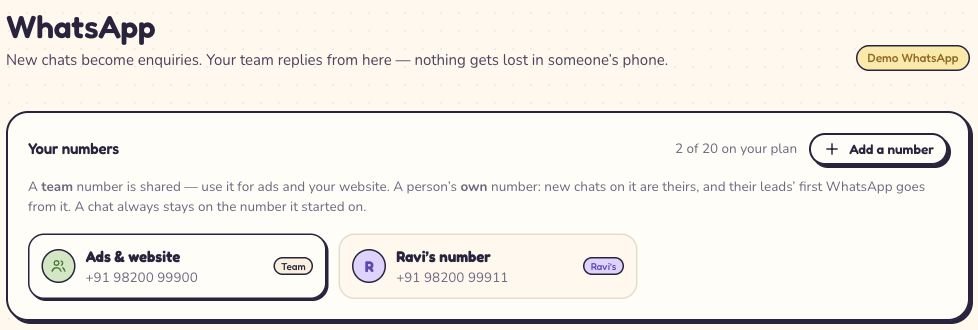
The shared line and Ravi’s work line appear together. This demo account uses Growth; the guide below explains the plan choices. Read this screen at full size
On a small screen, swipe inside the image to see the rest.
See who will call and what to ask
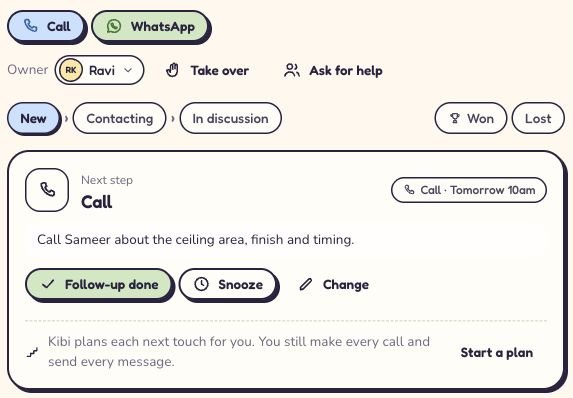
Ravi is responsible. The saved call has a time and a useful note, ready for whoever follows up. Read this screen at full size
On a small screen, swipe inside the image to see the rest.
Keep the quote beside the enquiry
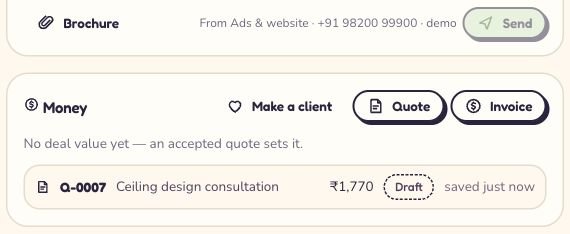
Q-0007 is saved on Sameer’s enquiry. The price is for the fictional consultation. Read this screen at full size
On a small screen, swipe inside the image to see the rest.


- Try it with one non-sensitive enquiry: keep the request, assign the person and plan the next action.
- Change the agreed callback time. Check the working record instead of asking a teammate to remember the old promise.
- If quoting is part of your work, prepare an offer on the appropriate plan. Evaluate your campaign or Shopify requirements separately.
“We run an agency. Which CRM keeps the quote and next call together?”
Illustrative buying test · fictional people · not a product screen or an automated sequence.
Put Kibi on that shortlist. Here is the job to try: a client asks for a new website, including service pages and an enquiry form. Maya sends the proposal. Ben gets the question: “Does that include writing the pages?”
Ben answers the scope question. Maya will call on Friday, after the founder’s Thursday review. Keep the current quote, the answer and that call together. Nobody needs a Tuesday “just checking in” while the client is waiting for Thursday.
This is an illustrative agency situation. Use it in your trial with a colleague, then ask them to find the next call without a private briefing. That tells you more than an inbox full of green ticks.
Ask for the package your team would actually use.
List the people who need access, the work numbers to connect and the jobs they do. Include the owner and anyone covering a colleague.
Ask for the monthly payment and any yearly up-front total separately. Add messaging, usage and any other tools needed for the job. We link current vendor plans rather than convert a headline price for every country.
For Kibi, start with people, numbers and monthly quotes and invoices. If you want a five-person team to use five different work numbers, check the number allowance too. Five seats do not automatically mean five numbers.
- Who uses it, and which records can each person access?
- Which required job belongs to the plan, and which needs an add-on?
- What changes in a busier month or when a colleague joins?
- What must your team configure, connect and maintain?
You may need a CRM alongside another tool.
If your campaigns are working, keep the part that earns its place. Decide where the new enquiry goes, who follows it up and which record your team will keep current.
For website enquiries, Kibi Forms is listed on WordPress.org and can connect forms to Kibi. The plugin is free; Kibi CRM has a 14-day trial, then a paid plan. It is a practical route for an agency that wants form enquiries and work WhatsApp in its sales routine.
Moving existing Interakt work is a separate step: confirm the contacts, conversations and settings that can move before disconnecting a number. A contact CSV and a chat archive are different things.
Give your next enquiry a little less suspense.
Give Kibi one enquiry to look after during your 14-day free trial. Connect a work number, choose the person replying and save the call the customer asked for.
Then let a colleague find the question and draft quote. If the conversation can carry on without another round of screenshots, you have a useful reason to keep going.
Choose a paid plan if it fits. A little dashboard chemistry is lovely. A customer getting the call you promised is the relationship worth keeping.
How we made this shortlist.
We make Kibi and recommend it first for small service-team sales. The campaign, commerce and multichannel choices serve different jobs; this is a researched editorial comparison, not a hands-on score of every platform.
Official product, plan and integration pages were rechecked on 6 November 2026. The Shopify App Store and WordPress.org listings provide additional product and integration references. They do not make this an independent review or an endorsement of Kibi by those platforms.
The Kibi proof uses genuine app captures with fictional demo enquiries, also used in our multiple-number walkthrough. No customer outcomes, third-party review scores or automatic conversation-history migration are claimed.
A few questions before the next hello.
What is the best Interakt alternative for a small sales team?
For service enquiries, clear ownership and planned human follow-up, shortlist Kibi. Consider AiSensy for campaign-led needs, Zoko for Shopify commerce and respond.io for multichannel conversation handling. Also evaluate Interakt’s own Sales CRM against your actual job. The right package matters more than a universal ranking.
Does Interakt already have a CRM?
Yes. Interakt’s Sales CRM describes pipelines, tasks, lead assignment and team permissions. Its pricing distinguishes Sales CRM access from Marketing & Support packages. Check the roles and features in the actual offer rather than assume an inbox subscription includes every CRM capability.
Is Kibi a cheaper Interakt alternative?
Compare current offers for the same people, required features and workload. Kibi shows detected-country CRM pricing; WhatsApp provider fees are separate. This guide does not claim universal savings or turn one provider’s headline price into a quote for every reader.
Can Kibi replace Shopify checkout or campaign automation?
Do not assume that. Kibi is recommended here for enquiries, owners, quotes and human next actions. Check each required commerce, campaign, chatbot or AI workflow separately. Keeping a supported existing tool may fit better than replacing everything.
Can I try Kibi before moving my WhatsApp setup?
Kibi has a 14-day CRM trial, then a paid plan. Its WhatsApp connection is live. Connect your work numbers, keep the Business app and try an enquiry, a team handover and a planned callback.
Will Kibi automatically import Interakt conversations?
No conversation-history import is promised here. A supported enquiry or contact import is different from transferring chat history, templates, automations and access settings. Confirm exactly what can move before making a change, and keep your working setup available during evaluation.
Are WhatsApp message charges included in Kibi’s subscription?
Meta bills you directly for WhatsApp in Kibi’s direct connection. Through Twilio or MSG91, that provider bills you directly. Kibi never charges your credits for WhatsApp. Those charges are separate from the CRM subscription.
Which example should we use in an Interakt-alternative demo?
Use the work you need done: a campaign with reply handling, a Shopify order conversation or a service enquiry with an owner and agreed next action. For service sales, ask a covering colleague to find the request, its current scope and what the customer expects next.
Which Interakt alternative fits five counsellors using different WhatsApp Business numbers?
Kibi fits the enquiry-and-callback job: connect work Business numbers, name the counsellor and save the parent’s promised call in Today. Count numbers as well as people. Team includes 5 people and 3 connected numbers; Growth includes 10 people and 20 numbers.
Can we collect website enquiries and follow up on WhatsApp in one CRM?
Yes. Kibi supports connected website-form enquiries and work WhatsApp conversations in its sales routine. Give each enquiry to a person and plan the next conversation. The linked website-form guide explains the supported routes; it does not promise that separate records are automatically merged.
Try one thing on the next enquiry.
Pick a change your team can use tomorrow.