You have a promising enquiry, a perfectly good reply and a quote that still needs following up. Before you add another channel to the mix, ask what would actually help the sale move. More places to say hello—or a clearer idea of what happens after it?
For small service teams comparing respond.io alternatives, start with Kibi for enquiries and planned follow-up, Kommo for messaging-led pipelines, Wati for WhatsApp-led campaigns, and Trengo for a broader shared inbox.
Respond.io itself offers sales lifecycle tracking, assignment and automation. The useful question is which setup fits your working day. Let’s find your type without turning the shortlist into a software speed-dating marathon.
Four alternatives. Start with the sale you actually make.
For a small service team, the best respond.io alternative is the one that fits the work between an enquiry and a customer decision. A shared inbox, a deal pipeline and a quote follow-up routine overlap, but they are not interchangeable.
Our shortlist starts with Kibi for service-enquiry work, then Kommo for messaging-led pipelines, Wati for WhatsApp-led campaigns and conversations, and Trengo for a broader shared-inbox operation. These are editorial fit judgements, not benchmark scores.
We make Kibi. It is our first recommendation for the small-team workflow described here, rather than a claim that every respond.io customer should switch.
| Start here | When to shortlist it | What to demonstrate |
|---|---|---|
| Kibi | Service enquiries, planned follow-up and commercial next steps | An owner, the next human action, a quote and the invoice workflow |
| Kommo | Sales work organised around messaging and deal stages | A real pipeline with the communication and automation you need |
| Wati | WhatsApp-led campaigns and team conversations | A campaign reply reaching the person responsible for it |
| Trengo | A shared operation across several communication channels | An enquiry moving between colleagues without losing context |
Which bit of the working day needs rescuing?
CHOOSE THE WORK FIRST
A better shortlist starts with an ordinary day.
“Who’s following up the offer?”
Start with Kibi for the enquiry, owner and planned human action, with quotes and invoices in the relevant plan. Evaluate the complete routine rather than a channel count.
See Kibi’s fit“We work from our deal stages.”
Evaluate Kommo. Ask for the stages, next activity and messaging connections your team will actually use. Keep respond.io’s Lifecycle setup in the comparison too.
Explore Kommo“Several channels need one desk.”
Review Trengo and the respond.io setup you already have. For WhatsApp-led campaigns, include Wati. Demonstrate assignment, context and reply handling in the needed package.
Explore the shared-inbox optionA useful shortlist begins with the awkward moment you want to remove. Is someone forgetting to follow up a quote? Are deal stages hard to manage? Or are several channels and teams making the handover untidy?
Choose the closest situation below, then read the matching product section. This is a way to organise your questions, not a recommendation engine that has examined your business.
1. Kibi: when your small team needs the next sales step to be obvious.
A customer asks about an office redesign. Someone answers the first question. The scope needs clarifying, a quote needs preparing, and the colleague who normally handles it is away on Friday.
That is the work Kibi is built around: keep the enquiry, useful details, responsible person and next action together. Today gives the team somewhere to find new enquiries and planned follow-ups, rather than relying on whoever remembers the last conversation.
Your trial should start with that ordinary enquiry. Add its actual question, choose an owner and plan the next action. Ask a covering colleague to find what happens next. If they can continue without a separate briefing, you have tested something useful.
Quotes on every plan give the customer an accept-or-decline link. Invoices and payment links are on every plan. Match the plan to the commercial steps you need; an accepted quote is not a paid invoice.
Routing rules on Team and Growth help assign incoming work. Compatible website forms, selected forwarded emails and reviewed CSV imports can bring enquiries into the workspace. Check each source rather than assuming every channel has a native connection.
WhatsApp. Choose the supported route and confirm its setup requirements before moving a working number. Meta bills you directly for WhatsApp. Kibi never charges your credits for it. When using Twilio or MSG91, that provider bills you directly.
Shortlist Kibi if the person, promise and next sales step are the centre of your day. If a particular voice system, AI agent or specialist channel is essential, demonstrate that requirement explicitly before choosing any platform.
An enquiry. A changed plan. A proper quote.
These real Kibi screens show a fictional interior-design enquiry at different moments. The details stay with the enquiry, the responsible person can see the planned call, and the offer has its own document.
Use the expanded screens to inspect the work, not just the colours. Could your colleague understand the request and find the next step? That matters more than how persuasive a demo account looks before anyone has used it.
The sample project amounts in the quote are fictional customer-work figures, not Kibi subscription prices. The captures are dated in the panel. They do not demonstrate an automatic message sequence or a customer result.
REAL KIBI SCREENS · FICTIONAL DEMO DETAILS
Find the call that needs attention
Today shows Victoria’s overdue call before it is rescheduled. 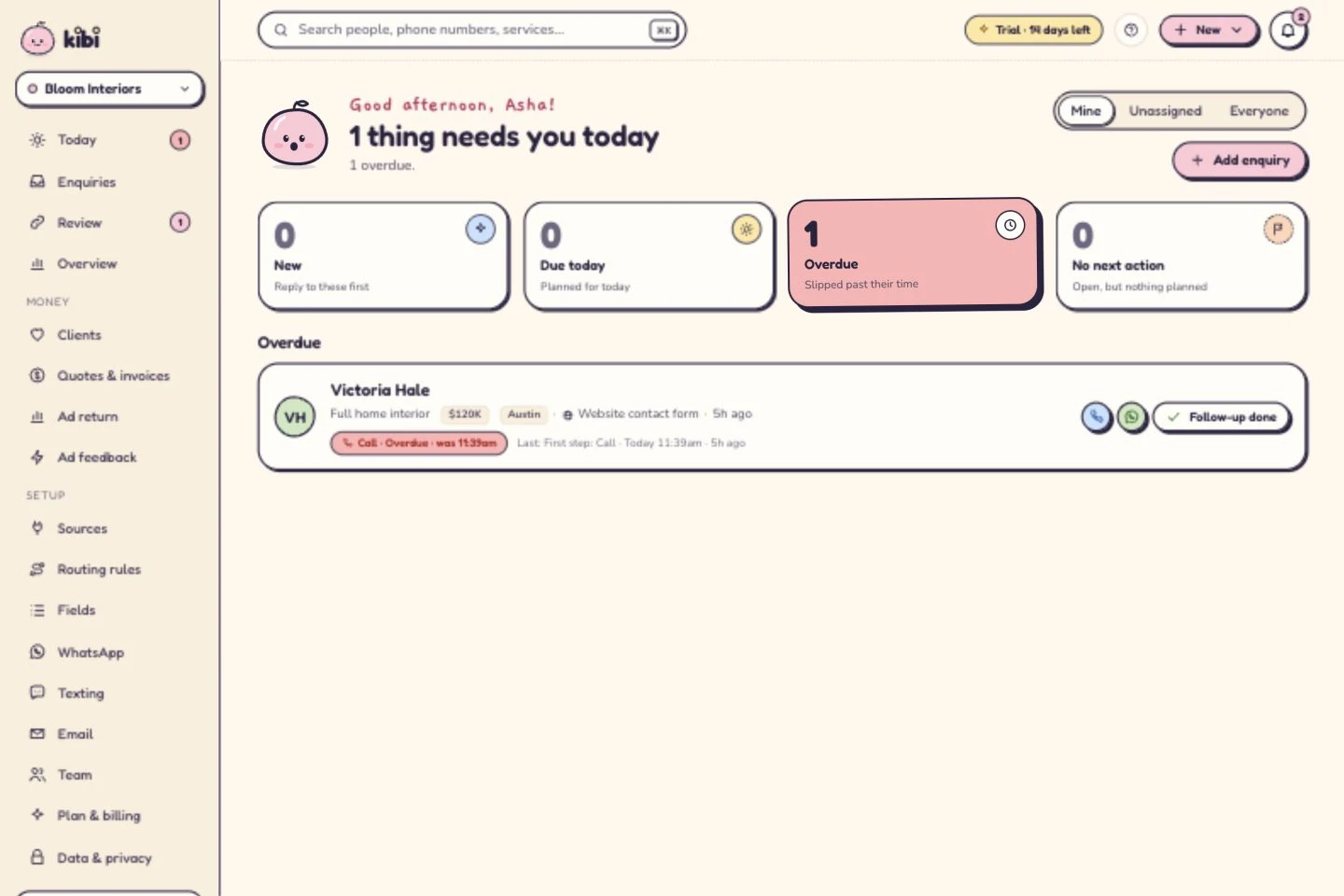
See who owns the next conversation
Asha owns the enquiry. The call is now planned for tomorrow at 10. A person makes the call; this is not an automatic message. 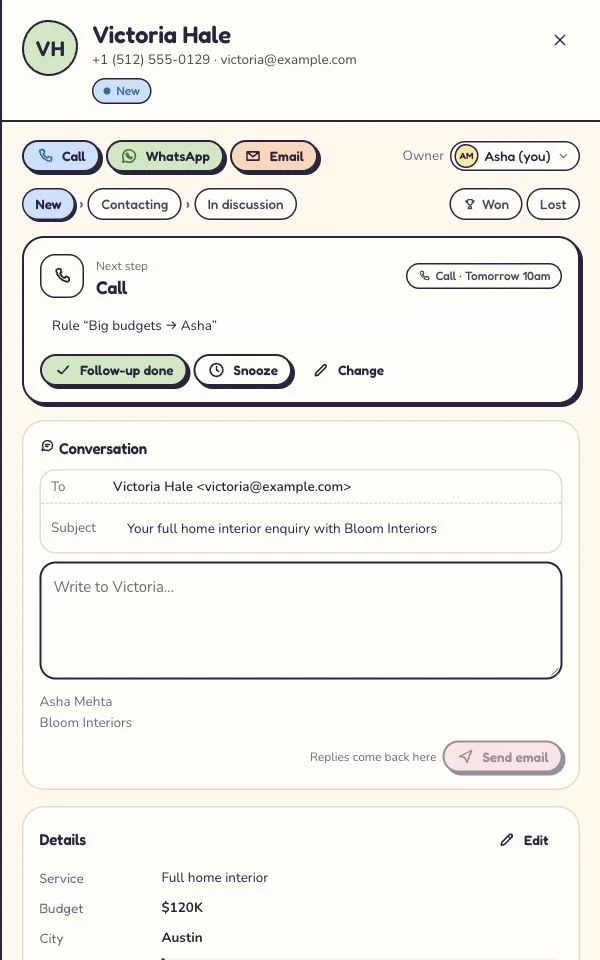
Give the offer its own document
The customer-facing quote for the same fictional project. All amounts here are sample project figures, not Kibi subscription prices. 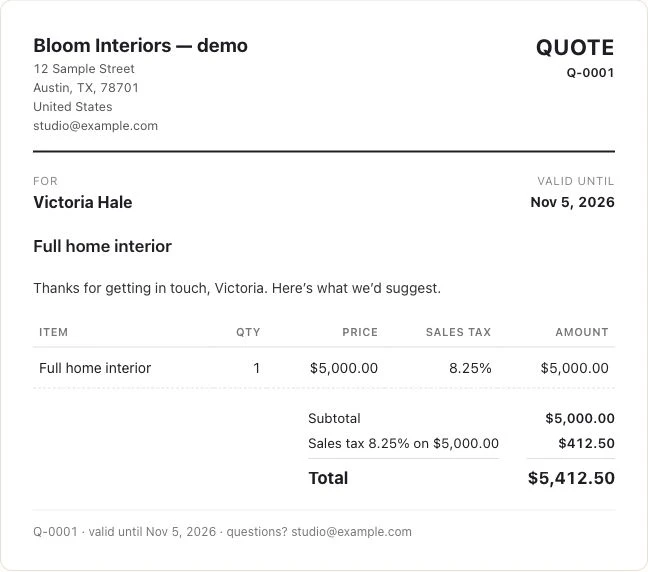
Captured 6 October 2026 in our isolated demo. Screens show different moments, not an automated sequence. Expand a step to see the screen.
2. Kommo: when the pipeline belongs at the centre of the conversation.
Kommo is worth evaluating if your team wants a messaging-led CRM with deal stages as its daily working structure. Its official product pages describe a sales pipeline, chat inbox and automation tools.
That makes it a different kind of alternative from simply replacing one inbox with another. Ask the demonstrator to work through your actual stages, show the next activity and explain which messaging connections and automation are included.
For a service team, bring the quote question too: where is the current offer, how does acceptance work, and which connected tool handles invoicing? A tidy deal card is useful; knowing what your customer can do next is the better test.
Compare the required subscription period, users, relevant edition and any connected services on the current official offer. Ask for a complete offer built around those requirements.
3. Wati: when WhatsApp campaigns and their replies are the main job.
Wati’s official offer includes WhatsApp broadcasts, automation and a team inbox. Consider it when campaign-led customer conversations are the work you are buying the platform to run.
Campaign setup is only the first scene. Ask what happens when someone replies with a buying question: who receives it, what context can they see, and how does the team continue the sale?
Check the channels and functions in the relevant package rather than assuming every feature on the website is included. For your comparison, list users, message use, automation and any required connections.
If your working day also revolves around website enquiries, quotes and planned callbacks, test that whole routine alongside the campaign. You may need a different centre of gravity—or a deliberate connection between tools.
4. Trengo: when several channels need one shared working desk.
Trengo brings WhatsApp, email, live chat, social and voice into a shared inbox, with customer context beside the conversation. That is a relevant starting point when the team’s main problem is handling enquiries across channels.
Try a handover that happens in your business: a customer first writes through one route, then contacts another colleague. Check the history, responsibility and any connection your sales records depend on.
Trengo’s pricing page describes included users and conversation allowances. Review what the plan counts, the billing interval and the functions you actually need. Its unit of usage should not be assumed to match respond.io’s Monthly Active Contacts.
For a team choosing a service-sales CRM, bring the next action and quote into the same demonstration. Decide what should live in the shared inbox and what requires another system.
Before you leave respond.io, check whether the fix is already there.
Respond.io is not merely a place to park messages. Its Lifecycle feature tracks contacts through configurable sales stages, with reporting on that progression. A team can use that to organise its selling process.
Its Assign To workflow step supports assignment to people or teams, with round-robin and least-open-contact strategies in the relevant configuration. It also offers workflows and AI tools across its conversation operation.
If your problem is “nobody knows who owns this,” inspect the configuration you already have. If it is “we need a different daily sales routine,” compare that routine in another product. Those are different reasons to switch.
Keep respond.io on the shortlist when its channels, automation and existing setup fit your business. A new subscription cannot substitute for deciding who does the next thing.
The bill has more than one moving part. Give each a name.
PUT THE SAME WORK ON BOTH QUOTES
Four questions before the invoice flirts back.
Open each question and use it with the provider. This is a buying checklist, not a price calculator.
PeopleWho needs to work in the system?+
List the people who need access, what they do and the plan that provides the required permissions. Check included users and the cost of any extras.
ActivityWhat does this product count?+
Ask whether the relevant allowance measures active contacts, conversations, messages or another unit. Use the provider’s current definition; do not compare unlike counts.
ConnectionsWhich tools must work together?+
List required channels, quote/invoice tools and connections. Check the exact supported handoff and any separate subscription needed to make it work.
Provider feesWhat sits outside the subscription?+
Ask about WhatsApp and other provider charges, usage extras, tax and billing interval. Request a complete offer for the same working scenario.
Respond.io’s published pricing model considers the plan, user seats and Monthly Active Contacts. Its pricing guide describes active contacts as those who send or receive messages during the billing month, excluding broadcasts. That is not the same as the total stored contact list.
The official pricing page says WhatsApp fees are separate from the platform subscription. Ask for a quote based on the work you actually expect, including any relevant usage and extras.
For every alternative, compare the same team and billing period, then check how that product measures usage. Contacts, conversations, users and messages are not four spellings of the same thing.
Use this bill checklist to prepare questions for the provider. It calculates nothing and does not claim one product is always cheaper. Current prices belong on the linked official pages; Kibi’s pricing page shows its current country prices.
Give every shortlist the same awkward little Tuesday.
Use a fictional enquiry when demonstrating the tools. A small agency receives a request for a new website. It needs a scope answer before preparing the quote; the owner is away when the customer replies.
Ask each provider to show the enquiry arriving through the route you use. Then find the context, identify the responsible person and record the next action. Do not let the demonstration skip straight to an immaculate dashboard.
Now change one thing: the customer asks you to return next week. Can the covering colleague see that request and avoid chasing today? A good process remembers the conversation, not just the sales target.
Finally, inspect the offer and the commercial next step. If another tool is needed, put that connection and its cost on your comparison. “It integrates” is the beginning of a question, not the answer.
- Can a colleague find the customer’s actual question?
- Is the next action clear, with responsibility and timing?
- Can the team respect an agreed pause or stop request?
- Where is the current quote, and what does acceptance change?
- Which invoice or payment step is supported in the required plan?
If you switch, move a small sample before the whole relationship.
Write down the channels, active enquiries, fields and unfinished promises the new setup must preserve. Keep an export from your current system before changing the working process.
Test the supported intake and import routes. A CSV can move record values; it does not automatically recreate conversations, attachments or workflow rules. Check the resulting records rather than assuming a contact count proves the move.
For WhatsApp, confirm number eligibility, connection method and any migration requirements with the receiving provider before disconnecting a working setup. Keeping the number, keeping an app and keeping old history are separate questions.
Agree where new enquiries go during the move and when the team stops maintaining two active lists. A quiet cutover is considerably more attractive than a dramatic launch followed by “which inbox was that in?”
Before the next “book a demo”, a few straight answers.
What is the best respond.io alternative for a small sales team?
Start with Kibi for service enquiries, ownership, planned follow-up and quotes or invoices in the relevant plan. Evaluate Kommo for messaging-led pipelines, Wati for WhatsApp-led campaigns, and Trengo for a broader shared inbox. The best fit depends on the workflow and channels you need.
Does respond.io already have sales tracking and lead assignment?
Yes. Its official documentation describes Lifecycle stages and reporting, plus assignment workflows. Compare the configuration and package you need rather than assuming a switch is necessary to get ownership or sales tracking.
How is Kibi different from a conversation platform?
Kibi centres the service enquiry, responsible person and next human action, with quotes and invoices in the relevant plans. Conversation platforms may organise the work around channels, routing and automation. Test your actual selling routine; these categories overlap.
Are Monthly Active Contacts the same as stored contacts?
No. Respond.io’s pricing guide describes Monthly Active Contacts as contacts who send or receive messages during the billing month, excluding broadcasts. Check the current definition and allowances in the offer you are considering.
Is Kibi cheaper than respond.io?
Compare the current Kibi plan for your country with the respond.io offer that covers your users, active contacts and required functions. Include provider charges and connected tools. Different billing units and packages mean this guide cannot promise a saving for every team.
Are WhatsApp message fees included in the subscription?
Respond.io says WhatsApp fees are separate from its subscription. In Kibi, Meta bills you directly for WhatsApp, or Twilio or MSG91 bills you when using that route. Kibi does not charge your credits for WhatsApp. Check the current provider terms and connection requirements.
Can I keep my WhatsApp number when switching?
Check eligibility, the destination connection method and migration requirements before changing a live number. Keeping the number, continuing in the Business app and retaining history are separate checks; this article does not promise a universal migration path.
Can I try Kibi before choosing a paid plan?
Yes. Kibi has a 14-day free trial, followed by a paid plan. Use a small authorised enquiry workflow to check the owner, next action and the commercial steps your team needs.
A useful shortlist should leave you with a useful next step.
We reviewed the linked official product, pricing and documentation pages on 31 October 2026. Product fit is our editorial judgement; this is not a hands-on performance benchmark of every platform.
The Kibi panel uses genuine dated demo captures with fictional details. Prices and inclusions can change; use the linked current plans and connection requirements, then test the work your team needs.
If your daily job is turning a service enquiry into the next conversation and a clear offer, start there in Kibi. Bring one enquiry, give it an owner and plan the next hello. Let the product earn a second date.
Try one thing on the next enquiry.
Pick a change your team can use tomorrow.