You’re ready for a new CRM. Then someone asks, “Who’s emailing the clients whose proposals went out last week?” Funny how quickly a software decision becomes a very specific Tuesday.
Kibi CRM is our pick for small service teams switching from Nutshell when they need to assign enquiries, keep callbacks visible and send quotes from the same record. Compare Bigin if your team already works in Zoho or needs email sequences. Consider Less Annoying CRM if contacts and a shared routine of tasks are the main job.
If Nutshell’s automatic emails or QuickBooks handoff are doing important work, keep them running while you test. We make Kibi, and we’d still rather you find that out before you move.
Which Nutshell CRM alternative fits your team?
Choose for the work that takes up your week. If two people spend Fridays finding the latest quote, test quoting. If a carefully timed email series brings in bookings while you’re busy, make that the first thing you test.
| CRM | Best fit | Test before you switch |
|---|---|---|
| Kibi CRM | Service teams sharing enquiries, next calls and quotes. | A teammate can pick up an enquiry, find the promised call and draft the right quote. |
| Bigin by Zoho CRM | Teams that want a Zoho pipeline, billing connection or multi-step email follow-up. | A sequence starts and stops at the right moments. The estimate reaches the right Zoho billing account. |
| Less Annoying CRM | Small teams keeping contacts, tasks and a simple pipeline together. | A colleague can find a promised task on the contact and the calendar. Check your separate quoting routine. |
1. Kibi CRM for enquiries, callbacks and quotes
Say you’re a two-person interiors business. One of you discusses layouts on site. The other needs to know which client is waiting for a call and which estimate is ready to go. In Kibi, the enquiry carries the person handling it, the planned follow-up and the quote.
Today shows what’s due. Your teammate makes the call or sends the message. A Kibi follow-up plan can set the next action as the team works through it. That gives you a routine while keeping the actual conversation in human hands.
After a customer accepts a quote, your team can create an invoice from it. Quotes and invoices are on every plan within their allowances. If you need automatic lead assignment or invoice payment reminders, check the plan for those too.
2. Bigin for Zoho billing and automated follow-up
Give Bigin a proper look if your bookkeeper uses Zoho Books or you want a sales pipeline with automatic email follow-up. Zoho documents multi-step Sequences in Bigin and a connection to Zoho Books or Invoice.
Bring one Nutshell sequence to the demo. Show when the first email goes out, what counts as a reply and when later emails should stop. Ask which edition or add-on covers your sequence. An email arriving after the customer has already booked is an awkward little encore.
For billing, start from a deal and have the office create an estimate using the connected Zoho setup. Check who needs access to Bigin and who works directly in the billing app.
3. Less Annoying CRM for contacts and a simple task list
This is a sensible shortlist option for a small consultancy that mostly tracks relationships and promised follow-ups. Less Annoying CRM documents tasks attached to a contact or company, a calendar and configurable pipelines.
Use one client record to test it. Add a due task and ask the person covering tomorrow where they would find it. For a call at a specific time, use a calendar event. If your existing invoicing tool works well, try the handoff to that tool too.
Should we stay with Nutshell if we rely on automated emails?
Keep Nutshell in place until your replacement passes that test. Nutshell documents personal email sequences that can start when a lead enters a stage and stop on a reply, stage change or close. Write down which ones matter, who sends them and what should stop them.
Say your agency sends two emails after a proposal unless the prospect replies. Use a test contact at an address you control and reply to the first email. Confirm the second email never goes out.
Check the billing handoff too. Nutshell offers a Proposals & Invoices add-on and documents sending linked invoices to QuickBooks. If your accountant depends on that flow, make it a separate acceptance test. The contact CSV won’t carry the workflow.
How to migrate from Nutshell to Kibi with a practice CSV
Start with three fictional leads. Alex is waiting for a scope call, Jamie needs a first reply, and Robin’s job is already won. That’s enough to find out whether a teammate can pick up where someone else left off.
The table shows an example row from a Nutshell-style export beside the matching Kibi import fields. Nutshell lets you choose which columns to export, so check your own headers. Keep the original lead ID in your source file for reference.
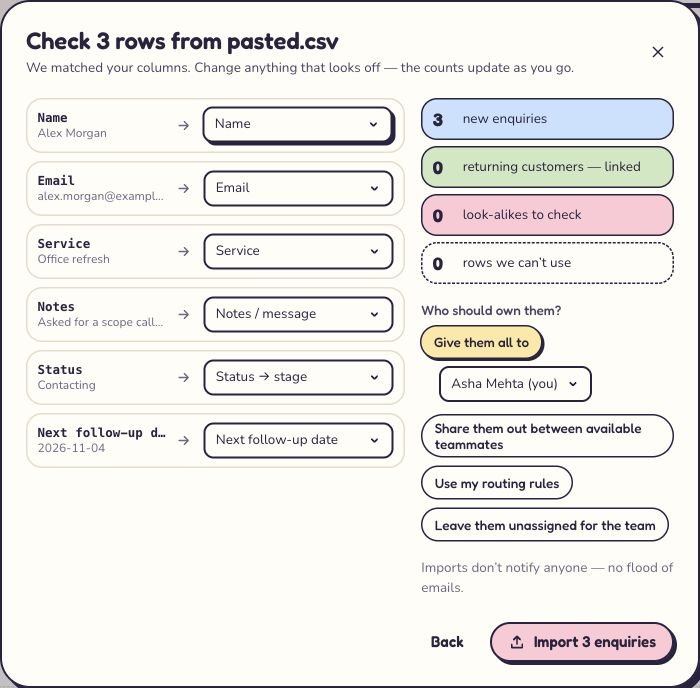
Download the six-column Kibi practice file and set the two follow-up dates in the future. Leave Robin’s date blank. In a test workspace, open Enquiries → Import CSV, match the fields and choose the owner. The preview should show three new enquiries if those rows are new to that workspace.
Three leads, three things to check
All three checked. Now ask a teammate to do the handover without a hint.
| Nutshell-style column | Example value | Kibi import field |
|---|---|---|
| Lead ID | NS-014 | Keep in original export |
| Contact name | Alex Morgan | Name |
| Contact email | alex.morgan@example.com | |
| Lead name | Office refresh | Service |
| Lead note | Asked for a scope call; confirm time by email | Notes / message |
| Pipeline stage | Contacting | Status → stage |
| Next activity date | 2026-11-10 | Next follow-up date |
Can someone find Alex’s next call after the import?
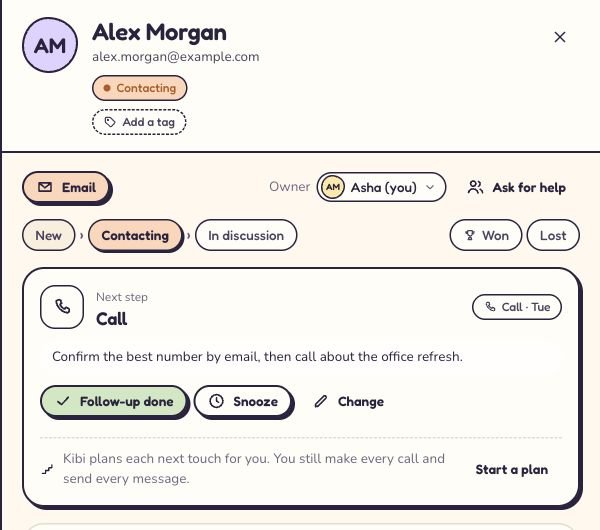
Yes. In our 7 November Kibi demo, the import created three enquiries with Asha as the owner. Alex’s enquiry kept the office refresh, Contacting stage and follow-up date. We opened it, set the Call for 10 am and added a note to confirm the number by email first.
Ask a teammate to open the enquiry in Today on the due date and tell you who owns it, what Alex needs and what happens next. Then check that Jamie still needs a reply and Robin’s won job has no callback. The test is a good handover, even if nobody gets as far as “Hello.”
What needs a separate plan before you leave Nutshell?
Keep your original exports. Nutshell can export leads, people and companies, so check whether the customer’s email and the job details are in different files before you build your import sheet.
Use this checklist before switching off the old account. A CSV can move the fields you match. Your team still needs a way to handle the jobs those other connections were doing.
| Keep track of | Check before switching |
|---|---|
| Email sequences | Write down which leads are enrolled, who sends each email and when the sequence stops. Rehearse a reply with an address you control. The CSV does not restart sequences. |
| QuickBooks invoices | Keep invoice IDs and open balances. Test one lead-to-invoice handoff with your bookkeeper and check which system owns payment status before you create invoices in the new setup. |
| Past conversations and files | Keep an export or an approved archive. Ask a teammate to retrieve one old email and one attachment before you give up access. |
Questions small teams ask before leaving Nutshell
Which Nutshell alternative keeps lead assignment, callbacks and quotes together for a small service team?
Kibi CRM keeps the person handling an enquiry, the next callback and the quote on the same record. Automatic lead assignment is on Team and Growth. Kibi’s follow-up plans give your team the next action, and a teammate makes the call or sends the sales message.
There are five of us. Can we share WhatsApp enquiries and see who promised to call?
Kibi CRM keeps connected work WhatsApp conversations with the enquiry, alongside the person handling it and the planned callback. Team includes 5 people and 3 work WhatsApp numbers. Check both counts against the way your team works.
I run a consultancy on my own. Do I need sales automation at all?
Start with the promise you keep missing. If it’s a call or a task, a visible follow-up can be enough. If the business depends on emails going out in a certain order and stopping after a reply, test that sequence before choosing.
Will a Nutshell export restart my email sequences in Kibi?
Kibi CRM imports mapped enquiry details from a CSV. An active Nutshell email sequence needs a separate migration plan. In Kibi, follow-up plans guide the calls and messages your team makes and sends.
Can we test the switch before buying Kibi?
Yes. Kibi CRM has a 14-day free trial, then a paid plan. Import the three sample rows, plan a callback and draft a quote. Check the plan you would pay for after the trial.
Take three leads on a first date
Let one teammate import the file and another pick up Alex’s enquiry. Can they tell you what Alex asked for, when to call and where the quote would go? If they can, you’ve tested a real handover. The rest of the address book can wait.
We checked the linked vendor documentation on 7 November 2026. The Kibi screens are from our browser demo with fictional data. Use the same checks in your own vendor trials.
Try one thing on the next enquiry.
Pick a change your team can use tomorrow.