
Sam wants a quote for a side gate. The first question on the form: “Can you fit a latch the dog won’t figure out?” By Friday, the crew has measured up, priced a narrower latch and promised to ring back. The dog is the only one still paying close attention.
For Australian tradies who already schedule jobs elsewhere, Kibi CRM is our pick for tracking website enquiries, assigning an estimator and following up open quotes. If you want to schedule jobs and send quotes from the same system, try Tradify. If you also need to track labour and materials against each job, look at Fergus.
Keep ServiceM8 on the list if its job cards, dispatch and quote reminders work for you. We make Kibi. Below, we put the same fencing enquiry through each product’s documented workflow so you can see what you’d gain and what you’d have to move.
Which ServiceM8 alternative fits your trade business?
Kibi, Tradify and Fergus all give you a way to hand off an enquiry. The decision is what else the same people need to do. Your office may want a list of promised calls, while your crew needs tomorrow’s job schedule.
| Software | Where the request lands | How the team follows up | Worth a look if you need |
|---|---|---|---|
| Kibi CRM | A shared enquiry from a connected website form or supported enquiry email. | Assign an estimator and save a dated call on the enquiry. Check Today when it’s due. | Sales follow-up alongside your existing calendar or job software. |
| Tradify | The Tradify enquiry list on an eligible plan. | Copy details into a quote and assign a dated To-Do. Configure quote reminders if wanted. | Quoting, schedules and recurring work in one place. |
| Fergus | The Fergus Enquiries list from its website form or a manual entry. | Create a task from the enquiry. Turn it into a job when it needs quoting or scheduling. | A path from enquiry through to labour, materials and job costs. |
| ServiceM8 | The Inbox via its Simple Online Enquiry form, then a job card after conversion. | Use a staff queue or task for a specific promise. Add automated reminders for open quotes. | Job cards, dispatch, quoting and invoicing together. |
One website quote request, one site visit and two calls
Here’s the fictional test for a three-person Melbourne fencing crew. Sam sends the website form on Wednesday and asks for a call Thursday at 4 pm. They need a side gate, a short run of fence and a latch the dog can’t nudge open.
Mel calls at the agreed time and books Friday morning in the crew’s usual calendar. Riley visits, finds less room near the post than the first quote allowed for, and updates the offer. Riley promises to ring Sam on Friday at 4 pm to discuss the slimmer latch and timing.
Now put Riley on a job across town at 3:55. Can the person covering see which quote is current, why the latch changed and when Sam is expecting the call? It’s a small test. That’s what makes it hard to bluff.
1. Kibi CRM for tracking enquiries and open quotes
Kibi CRM gives Mel a record of the website enquiry with Sam’s details and the work requested. Mel picks Riley as the person handling it. When Riley opens the enquiry before the site visit, the latch question is already there.
After the visit, Riley notes the tighter clearance on the enquiry. If the first quote was already sent, withdraw it, make a copy, update the latch and send the new link. That leaves one current offer for Sam to look at.
Riley opens Plan next step, selects Call and saves Friday at 4 pm. The note says what to ask. The person responsible can open it in Today and jump back to the customer’s request and quote. If Riley is tied up, someone with access can hand the enquiry to the covering teammate.
If Sam accepts, the office can create an invoice from the accepted quote. Keep the installation date, crew and accounting in the tools you already use for those jobs. Agree who enters the accepted work into the job system and where they’ll record the job reference.
Open the two Kibi screens below to see a separate example. Meera has an open kitchen quote and a call saved to ask about the finish. That’s the same moment you want to practise with your own sample estimate.
INSIDE KIBI · PRIYA’S EXAMPLE QUOTE
1 The saved callback+
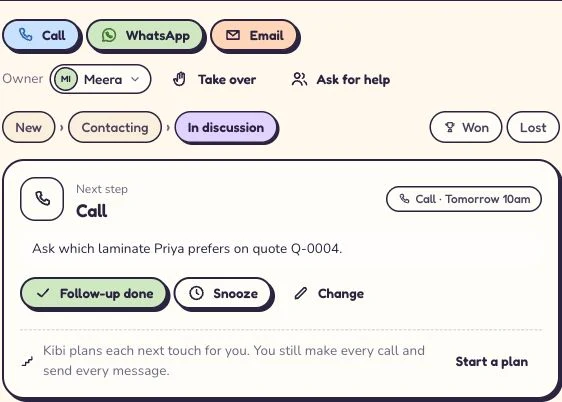
Meera has a call tomorrow at 10. Her note asks which laminate Priya prefers on quote Q-0004. Read this screen at full size +
On a phone, swipe inside the enlarged screen.
2 The quote is still open+

The same enquiry shows quote Q-0004 as Opened. Priya has seen the quote and has yet to accept it. Read this screen at full size +
On a phone, swipe inside the enlarged screen.
2. Tradify for quoting, scheduling and repeat work
Tradify is worth a look if Mel wants to book Riley’s site visit and plan the rest of the week from the same system. For this test, start with Pro. Its branded enquiry form and inbox give Mel a place to pick up Sam’s request.
Open the enquiry, check the description and copy the details into the quote or job. Use the scheduler for the visit. For the personal promise, create a To-Do due Friday and assign it to Riley. Check that the office has the permission it needs to assign tasks to staff.
The distinction between Pro and Plus matters here. A general To-Do can have a person and a deadline. Plus adds tasks tied to a job, which is worth comparing if the office wants to track several people’s work against the same fence installation.
Pro also includes quote reminders. Use them for a standard nudge when someone hasn’t responded. For Sam’s specific Friday promise, test whether the covering colleague can find the To-Do and the revised quote without searching through old emails.
3. Fergus for trades that need to see job costs
Fergus is worth testing if you quote the fence, buy the timber and later need to see how the actual labour and supplier costs landed. It can handle the early enquiry too, so use the same test from the start.
Use Fergus’s website enquiry form and open Sam’s request from To-do. Mel can make a follow-up task from the enquiry and assign it to a teammate. Once the work needs a quote, create the job from that enquiry and use the job’s pricing stage to plan the visit.
For Friday, ask Riley to save the time and the latch question on the record the covering person will check. Fergus can also send automated quote reminders before expiry. Ask your team to show you both the reminder the customer would get and the task a colleague would see.
If you need to track purchase orders, supplier bills and time against the fence once Sam says yes, that’s a real reason to choose a job system. Use a typical finished job in the trial to check how the figures make it from site to the office.
When does it make sense to keep ServiceM8?
Stay with ServiceM8 if your enquiries already turn into useful job cards and the crew relies on its dispatch board. The Simple Online Enquiry form feeds its Inbox, and you can convert a request into a job card with the details filled in.
For Sam’s gate, have Mel convert the enquiry and check that Riley can read the dog-safe latch request. ServiceM8 documents assignable queues for work that needs doing later. Use a named queue item or task for the call, and verify that the covering person sees the due time.
The quote follow-up add-on can send timed emails or texts. It can pause when the customer replies and cancels scheduled follow-ups when they accept online. Check what happens after you issue a revised quote, so Sam gets a nudge about the offer they can still accept.
If the gap is that nobody checks the open quotes, fixing that habit inside ServiceM8 may be easier than a move. A switch is worth testing when the sales team needs its own daily view and the job schedule already has a dependable home.
What does trade software cost for three people in Australia?
Start with three logins and one ordinary month. Count new job cards, quotes and invoices separately. Thirty enquiries, twelve quotes and eight jobs are different numbers, even if someone at the office calls them all “jobs”.
These are Australian monthly list prices checked on 24 November 2026. The tax labels differ. Compare the actual checkout totals for the plan that covers the work you tried.
For a crew sending 12 quotes and eight invoices in an ordinary month, Kibi Team is the starting point. If you cover most follow-up yourself, send up to five of each and only need three logins, compare Starter with the extra seat.
For ServiceM8, count the cards you create to quote as well as the cards you create for work orders. Changing an accepted quote into a work order on the same card uses no additional job credit.
| Product and plan | Monthly cost | What to check |
|---|---|---|
| Kibi Starter or Team | A$63/month Starter with one extra seat. A$119/month Team. Both before tax. | Starter includes 5 quotes and 5 invoices a month. Team includes 5 people, 20 quotes, 20 invoices and automatic lead assignment. |
| ServiceM8 Starter or Growing | A$29 Starter or A$79 Growing, including GST. | Unlimited users on paid plans. Starter includes 50 new job cards a month. Growing includes 150 and adds an Inbox for turning forwarded emails into jobs. |
| Tradify Pro | A$156 excluding GST, at A$52 per user. | The enquiry form and quote reminders are part of Pro. SMS add-ons are priced separately. |
| Fergus | Check current Australian pricing for three users. | Confirm who needs a full user account and get the total after any promotional price ends. |
Try three sample records before you move your data
Pick one new request, one quote waiting for a reply and one accepted job. Use made-up names in a trial. Give the open quote a genuine decision to resolve, such as the latch clearance, and an agreed date for the call.
Bring the new request in via a connected form or add it by hand. Recreate the open quote and call as sample records. Keep the accepted job in the scheduler, and write down which person moves it there and when. The point is to see whether your team can work both sides of that handover.
For a real move, export a small contact or enquiry file and map its columns first. Keep quote PDFs, accepted terms, job photos and accounting history in a reliable archive. A CSV of names and phone numbers won’t carry those documents along.
Questions Australian tradies ask before switching software
We’re three tradies and already schedule jobs in a shared calendar. What can we use for website enquiries and open quotes?
Kibi CRM gives a small trade team one place for enquiries from a connected website form, named estimators, quotes and scheduled calls. Keep confirmed site visits and crew bookings in the calendar you already use. Test the form and callback with separate logins before buying.
One of us handles the inbox. The other is out quoting. How do we make sure someone calls after a site visit?
In Kibi, give the enquiry to the estimator and save a Call with the agreed time and the specific thing to ask. The person responsible sees it in Today. If a colleague needs to cover, reassign the enquiry and ask them to check the original request and current quote before calling.
Should our fencing team use an automatic quote reminder or save a callback?
Use an automatic reminder for a routine nudge on an open quote. ServiceM8, Tradify and Fergus offer those. Save a named call when you promised a time or need to discuss a scope change. Kibi puts that call in Today. Its automatic payment reminders are for issued invoices on Team and Growth.
I’m a sole trader. Is there a free ServiceM8 alternative for quoting and job scheduling?
Start by checking ServiceM8’s own Free plan. It covers one user and 30 new job cards a month, with quoting and scheduling. Kibi CRM offers a 14-day free trial without a card, followed by a paid plan if you keep using it.
We’re five people. Can the office and estimator work the same quote without every installer logging in?
Use individual logins for the people who handle enquiries and quotes. Kibi Team includes 5 people at A$119/month before tax, with 20 quotes and 20 invoices a month. Count the people who need to view or edit those records. Keep the installer’s work schedule in your job tool.
Can I keep ServiceM8 for booked jobs and use Kibi for enquiries?
You can use Kibi for new website enquiries and follow-up, then have the office put accepted work into ServiceM8. Agree who does that and what they copy across. This guide’s handover is manual. Check both records during the trial if you need automatic sync.
What should I put on the sample quote before I try each tool?
Write the actual scope, itemised labour and materials, whether removal is included, the price, the expiry date and payment terms. Add your ABN and applicable GST details where appropriate. Use the same scope in every trial so you can compare the quote the customer actually sees.
Save one post-visit callback in Kibi
Try a website quote request with a detail that matters. Assign it to the estimator, add the note from the visit and save the call in Today. Let the person covering open it from their own login.
Give them a point for each thing they can tell you without help: what Sam asked for, which quote is current, who’s calling and when. Four out of four? That’s worth taking to your next real enquiry.
How we compared the four options
We make Kibi CRM. We reviewed the vendors’ Australian pricing pages and official help guides on 24 November 2026. We compared where a quote request lands, how to give someone the follow-up and what happens to the quote after the visit.
Sam’s fence is a fictional exercise you can run in any trial. The Kibi screenshots show a separate example in the actual product demo. The other product workflows come from vendor documentation. Plan features, add-ons and trial access can vary.
Try one thing on the next enquiry.
Pick a change your team can use tomorrow.