Rina wants a kitchen estimate. You promised to ring at 3 pm about the cabinet finish. Now picture opening a new CRM on Monday and finding her email, her name and absolutely no sign of 3 pm. Charming.
Kibi CRM is our pick for small service teams that want new enquiries, assigned callbacks, quotes and invoices together. OnePageCRM suits reps who live by their next action. Bigin suits teams that organise work in stages and use Zoho tools. Pipedrive suits teams that need more control over deals and activities.
Less Annoying CRM already does contacts, pipelines and reminders well. If those are the parts you love, keep reading before you put your CRM on the market. We make Kibi, and we’ve included five fictional contacts so you can test our recommendation with an actual job.
Less Annoying CRM alternatives at a glance
Give each tool the same job. Rina asks for an estimate. The person who took the enquiry is out. Someone else needs to see what was promised, make the call and know where the quote belongs.
We checked competitor documentation on 13 November 2026. The table describes documented workflows. Rina and the five-contact switch test are fictional, so you can repeat the exercise yourself.
| CRM | Best fit | What to try with Rina |
|---|---|---|
| Kibi CRM | A service team sharing enquiries, callbacks and quotes | Assign the enquiry, save a callback and open a quote from the same record. |
| OnePageCRM | A rep who wants a list of who to contact next | Import Rina with a dated Next Action and look for her in the Action Stream. |
| Bigin by Zoho | A small team that works through clear pipeline stages | Create the pipeline record, attach the call task and try your Zoho billing connection. |
| Pipedrive | A team that tracks deals and wants configurable activities and reporting | Import Rina as a person, link her deal and make the call its next activity. |
1. Kibi CRM for enquiries, callbacks and quotes
Kibi CRM fits a small service team where one person sees the website enquiry, another makes the callback and someone else prices the job. The enquiry carries the customer’s details, the responsible person and the next action. The second person can pick up where the first left off.
Try it as a two-person interiors business. Give Rina to the person who prices cabinetry and add today’s callback. Put the finish question in the note. When your teammate opens Today, they can see who to call and why without asking you to remember what Rina said.
For a five-person team, test a new website enquiry as well as the five imported contacts. Pick an owner or try assignment rules on Team and Growth. Ask the person who gets the enquiry to find the original note, save a callback and draft the quote. That shows where the daily work lands.
Kibi brings quotes and invoices into the sales workflow. Team includes 5 people and 20 quotes and 20 invoices each month. If you already run a calendar, accounting ledger or job schedule somewhere else, use the trial to see what you want to keep there.
The 14-day Kibi trial needs no card. A paid plan is required to continue after the trial. Take Rina through to one draft quote before you think about moving the rest of the address book.
2. OnePageCRM for a salesperson who lives by the next call
OnePageCRM is worth a look if your working day starts with a list of people to contact. Its Action Stream brings dated next actions into view. You can import the action text and its date with a contact, which helps if you have a tidy list of open calls to carry over.
Give Rina a Next Action such as ‘Call about the cabinet finish’ and a due date. Open the Action Stream the way you would on a busy morning. After you mark the action done, see how easily you can set the next one and find it again tomorrow.
OnePageCRM also documents Quick Quotes from a pending deal once email is connected. If the office needs to bill from the sale, run that step too. Its Xero integration creates a draft in a separate Xero account, so check how the salesperson and bookkeeper will share the work.
This is a good shortlist choice for a solo rep or a small outbound team that moves by next action. If several people receive website enquiries and need to take over each other’s work, add a handoff to your test and see what the second person can find.
3. Bigin for simple sales stages and an existing Zoho setup
Bigin is a good fit if your team thinks in stages such as ‘New enquiry’, ‘Estimate sent’ and ‘Won’. If you already send estimates and invoices in Zoho Books or Zoho Invoice, try the Bigin integration with the finance person who uses it every day.
For Rina’s test, import her contact and link a pipeline record for the cabinet job. Add the call as a task on the right record. If a buyer comes back next year for more work, keeping the person and each piece of work distinct can be useful.
Bigin has a free option for one user with a limit of 500 total records. Its billing integrations are listed from Express. Check the plan you would actually buy when you add the estimator, office admin and other people who need to open a deal or send an invoice.
Before moving the whole list, check how notes, tasks and pipeline records will link back to contacts. Bigin documents these as separate imports. Test Rina as a contact with an open job and a task so you can check that all three are in the right place.
4. Pipedrive for a team that runs sales through deals
Pipedrive is worth testing if your manager wants a configurable deal pipeline and reports on what is open, moving or stuck. Your team can track the person and the deal separately, then give the deal an activity such as a phone call.
In the five-contact exercise, link Rina’s deal and call activity to her person record. Ask a teammate to open the deal and tell you who is calling her next and when. Then open your pipeline view and check where the estimate sits. Both views have a job.
Pipedrive charges per seat. Its Growth plan adds full email sync and automation. Smart Docs is included in Premium and Ultimate and available as an add-on for Lite and Growth. If quotes matter, test document preparation and invoicing on the plan and integrations you are considering.
A deal-focused team may appreciate that extra control. If your office spends most of the day answering enquiries, making callbacks and getting a quote out, watch how many screens it takes both people to do Rina’s job.
When it makes sense to stay with Less Annoying CRM
Stay if your team uses the Workspace every morning, knows where to find its tasks and likes the calendar. Less Annoying CRM offers one per-user plan and a 30-day trial. If a contact, a few pipeline stages and a reminder cover your sales work, you have a working setup.
Its intake forms can assign a submission to a particular user, add a pipeline record and set a task due date. If all your website enquiries go to the same person, try that setup first. The fix may be one form setting and a cup of tea.
Consider switching when the same handoff keeps breaking. Perhaps website leads go to the wrong person when someone is off, or an estimator needs the notes and quote from the office. Write that specific job down and see whether the new CRM makes it easier for the people involved.
Get the whole bill for two and five people. Include each person who needs access, any document or automation add-ons, and the invoicing tool you plan to keep. Compare what you pay each month with any annual amount due upfront. Then ask which setup your team can actually run on a busy Friday.
The five-contact switch test
Start with five open enquiries. Pick one with a real promise to call, one waiting on the customer and a couple that still need a first look. The two downloads use fictional contacts so you can practise before touching customer data.
In Less Annoying CRM, filter the Contacts list or a pipeline report and export the records you want to test. Keep the original file. Open the Workspace task report and look up any due tasks for those contacts. Check the calendar for a promised time. Write down the time zone if the people doing the calls work in different places.
The first download is a practice worksheet with the five contacts and the open work you would gather from those places. Less Annoying CRM has separate reports and your actual export headers depend on the view and fields you use.
Rina’s row carries the promise in words. Set the actual 3 pm callback after the import. Otherwise the information is sitting in a note, which is lovely for future historians and less useful to whoever has to call today.
Contact,Email,Pipeline stage,Open work,Task to keep
Rina Shah,rina.shah@example.com,In discussion,Kitchen cabinet estimate,Promised a callback to confirm the revised cabinet finish
Dylan Moss,dylan.moss@example.com,New,Utility room storage,Ask for wall dimensions
Jo Park,jo.park@example.com,Contacting,Office shelving,Waiting for a photo of the alcove
Nora Ellis,nora.ellis@example.com,Quoting,Hallway storage,Check whether installation is in scope
Sam Reed,sam.reed@example.com,New,Pantry fit-out,No callback booked
Select the code to copy it. On a phone, swipe inside the example to see long lines.
Import five contacts into Kibi and keep one promised call
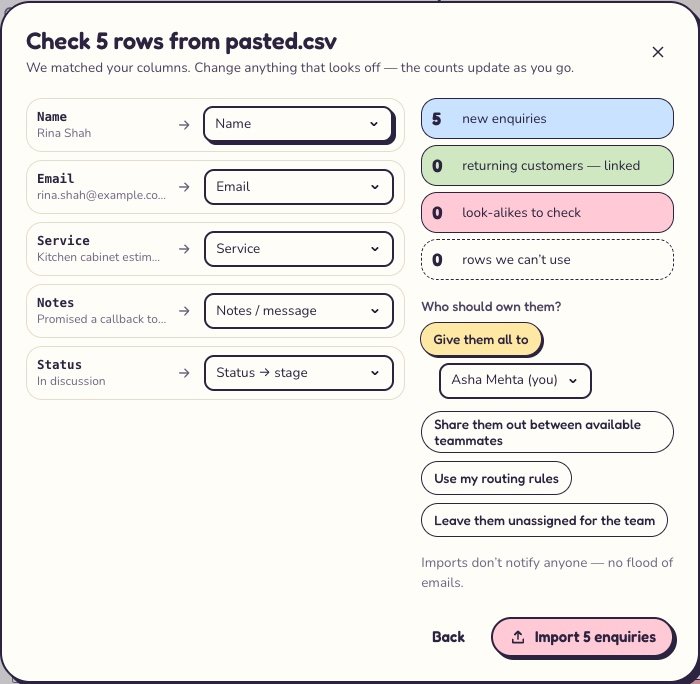
Download the second file. In Kibi, open Enquiries → Import CSV, then upload it or paste the CSV text. On Check rows, match each column to the field below. Check all five records. If a stage differs, update it to your pipeline’s wording and preview again.
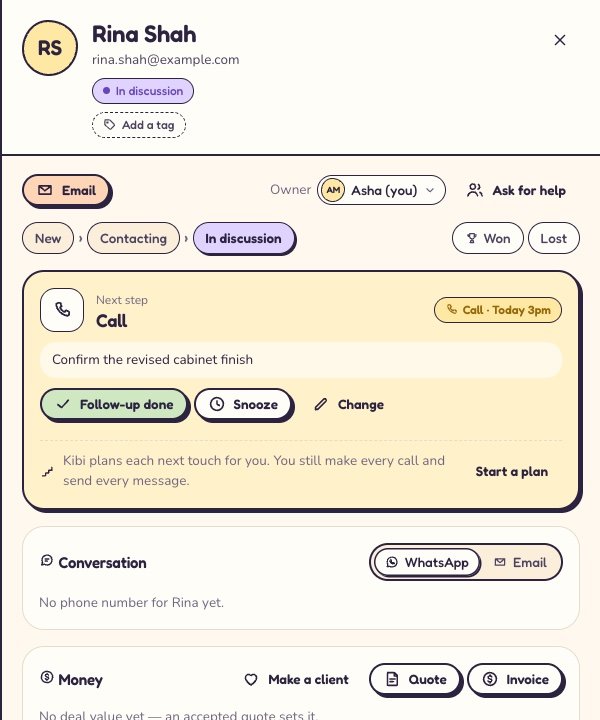
Open Rina’s enquiry and check her email, the cabinet job and the finish note. Assign the enquiry to a teammate or yourself. Choose Plan next step → Call → Pick a date. Use 3 pm today if it’s still ahead, or pick another time later today. Then choose Save step.
Open Today as the person doing the callback and check the due list. Can you find Rina and tell why you’re calling? If you pick a future date, check the scheduled action on Rina’s record. To finish the test, draft one quote for her cabinet job and see where the team will find it.
Move more contacts once five records land where you expect and the callback turns up where the owner works. Keep a separate list of attachments, calendar appointments, old emails and paid invoices to review. Each may have a different export or home.
Name,Email,Service,Notes,Status
Rina Shah,rina.shah@example.com,Kitchen cabinet estimate,Promised a callback to confirm the revised cabinet finish,In discussion
Dylan Moss,dylan.moss@example.com,Utility room storage,Ask for wall dimensions,New
Jo Park,jo.park@example.com,Office shelving,Waiting for a photo of the alcove,Contacting
Nora Ellis,nora.ellis@example.com,Hallway storage,Check whether installation is in scope,In discussion
Sam Reed,sam.reed@example.com,Pantry fit-out,No callback booked,New
Select the code to copy it. On a phone, swipe inside the example to see long lines.
| Worksheet | Kibi import field | Rina’s example |
|---|---|---|
| Contact | Name | Rina Shah |
| rina.shah@example.com | ||
| Open work | Service | Kitchen cabinet estimate |
| Task to keep | Notes / message | Promised a callback to confirm the revised cabinet finish |
| Pipeline stage | Status → stage | Rina stays In discussion. Nora’s Quoting becomes In discussion. |
| Calendar or task report | Save a next action after import | Call at 3 pm about the cabinet finish |
What a good switch looks like on a busy day
Give the test to someone who didn’t prepare the file. Ask them to find Rina, tell you what she’s waiting for and point to the next call. Then ask what they would do with Nora, whose estimate is still being prepared. Watch where they look first.
Compare the answers in your old CRM and the one you’re trying. If the person can find Rina but can’t tell who owns the call, fix the ownership step and run it again. If both people can see the callback but nobody knows where to find the quote, test that handoff next.
Before the full move, agree who checks new enquiries and who updates open callbacks on switch day. Keep the old workspace available while you spot-check active work. Give the team one place to record new calls and changes from that day on.
An imported follow-up date can create an all-day call in Kibi. For an appointment you’ve promised at a specific time, open the enquiry and check the saved time yourself. For Rina, 3 pm is the part worth getting right.
Questions small teams ask when switching CRMs
What’s a good Less Annoying CRM alternative for a two-person service business that sends estimates?
Kibi CRM is a good fit when one person takes the enquiry and the other calls back or prepares the quote. Both can see the owner and next action on the enquiry. In the trial, import one contact, hand it to your teammate and draft the estimate from the same record.
We have five salespeople. Which CRM can assign website leads and show who’s calling back?
Kibi CRM can capture website enquiries, show who owns each one and keep the callback with the record. Team includes 5 people. Assignment rules are on Team and Growth. Test a website enquiry and ask the person who receives it to save a next action.
Can I move contacts and reminders from Less Annoying CRM to Kibi?
Export a filtered contact list and import it into Kibi with the fields mapped. Review Less Annoying CRM’s task report and calendar separately. In Kibi, open each enquiry that has a live promise and save the owner, date and time for the next action.
Which alternative is closest if I mostly want a list of people to call?
OnePageCRM suits that routine because its Action Stream is organised around next actions. If you already find your calls quickly in Less Annoying CRM’s Workspace, give the same five contacts to both tools and see whether the move would save you any work.
Can we keep our accounting software and use Kibi for quotes and callbacks?
Yes. Kibi CRM can keep the enquiry, callback and quote together while your accounting software remains the place you keep the books. Take one sample sale through an accepted quote and invoice, then agree with your bookkeeper where billing and payment records should live.
Try one thing on the next enquiry.
Pick a change your team can use tomorrow.