The kitchen quote is out. Your estimator is on site. Then Mariam sends a WhatsApp message: “Could we add lighting under the cabinets? Call me tomorrow at 4:30?” Suddenly the office has one quote in its sent folder and another one to work out.
To send a revised quotation on WhatsApp, confirm the change, issue the updated quote, then send its link with a short note about what changed. Give the callback to one named person and save the time beside the quote. The customer should be able to spot the new offer without opening two PDFs.
One lighting request, one current quote
Here’s the fictional Dubai Hills job. The original offer covers cabinet doors and fitting. Mariam wants under-cabinet LED strips added. The cabinet layout and door finish stay the same. Omar, the estimator, is at another site. Noor is covering the office.
Before touching the price, Noor asks Omar what the LED line includes. Supply and fitting are in. Any additional electrical work is still to be confirmed. It’s an easy detail to miss in chat and an expensive one to guess at.
Noor writes down three things Omar has confirmed: the new lighting line, the layout that stays the same and the electrical work that is still outside the price. She can quote the confirmed change now and raise the open question on tomorrow’s call.
That kind of clarification can start right in WhatsApp. Dubai contractor Apex Fit-Out asks for room photos, rough measurements, finish references and timing before deciding whether a quote or site measurement comes next. Keep what matters from those messages with the enquiry so the covering colleague can find it.
- Stays in the quote Cabinet doors, fitting and the agreed layout.
- New line Under-cabinet LED strips, supplied and fitted.
- Still to confirm Any extra electrical work. Noor asks on the 4:30 call.
Copy a revised quotation WhatsApp message
Use the same customer conversation and name the project early. If you put the total in the message, match the quote exactly, including whether it includes or excludes VAT. Let the quote hold the detailed scope, exclusions and validity date.
Give the customer one link to open. A short line such as “We’ve added the under-cabinet lighting and kept the cabinet layout as agreed” tells Mariam what to look for on her phone.
The first message is for sending the new offer. The second is for your own team. Put the handover on the enquiry where the person calling can find it tomorrow.
How to revise an open quote in Kibi
Open the original enquiry and confirm the old offer is still open. If the customer has already accepted it, keep that acceptance on record and agree the new scope through your change process.
Choose Withdraw on the old quote, then confirm with Withdraw it. Kibi closes that offer to acceptance. Choose Duplicate to make a fresh draft on the same enquiry, then add the LED work as its own line. Check the scope, total and terms against what the estimator confirmed.
If a teammate needs approval to send the quote, use Send for approval and leave a note with the changed line and any open question. The person with sending access can check the draft before issuing it.
Open the revised draft and choose Send to [name]. For a WhatsApp-only share, leave Email it unticked and choose Get the link. Open the new quote, use Copy link and check the reference in the customer view. Then paste the link into the existing business WhatsApp conversation and send your note.
Have the person covering open the enquiry after sending. They should be able to point to the withdrawn quote, the current offer and the note about which one was shared. The customer only needs the current link.
Give tomorrow’s call to a person
Set Noor as the owner on Mariam’s enquiry. Under Next step, choose Call and set tomorrow’s date and 4:30 pm Dubai time. Add the reason to the note: check the lighting line and whether Mariam wants extra electrical work priced. Save the step.
Check the saved call on the enquiry now. On the day it’s due, Noor can find it in Today. If there’s already a call planned for the original offer, update that plan so the team has one callback to make.
After Noor calls, she records what Mariam agreed and plans another action if there’s work left to do. If Mariam wants the electrician’s price first, agree who will get it and when Noor will give her an answer.
See the open quote and saved callback in Kibi
These Kibi demo screens show a separate sample fit-out enquiry. Look for the quotation reference, its status, the person making the call and the reason for calling.
INSIDE KIBI · PRIYA’S EXAMPLE QUOTE
1 The saved callback+
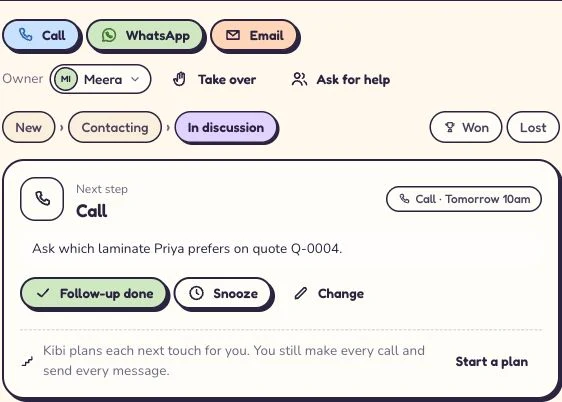
Meera has a call tomorrow at 10. Her note asks which laminate Priya prefers on quote Q-0004. Read this screen at full size +
On a phone, swipe inside the enlarged screen.
2 The quote is still open+

The same enquiry shows quote Q-0004 as Opened. Priya has seen the quote and has yet to accept it. Read this screen at full size +
On a phone, swipe inside the enlarged screen.
Questions fit-out teams ask before sending a revised quote
What should I write when sending a revised quotation on WhatsApp?
Name the customer and project, say what is changing, then share the new quote reference and link. Say which version it replaces and give the customer a clear next step. Repeat the total only if it matches the current quote.
Can the office follow up while our estimator is on site?
Yes. Have the estimator confirm the scope, keep the change and current quote with the enquiry, and assign the callback to someone who has access. In Kibi CRM, the covering teammate can open Today to see the call and its reason.
What if our customer already accepted the old quotation?
Keep the accepted original. Agree the change with the customer through your business’s change process, including any revised price or timing, then record what they approve before proceeding.
Can I send tomorrow’s WhatsApp follow-up if the chat window has closed?
On the WhatsApp Business Platform, a free-form reply is allowed within 24 hours of the customer’s last message. After that, use an approved template and follow Meta’s permission rules. A saved callback in Today is a reminder for your teammate to act.
Try one quote handover with a teammate
Open a sample enquiry and give it an open quote. Update one line, share the new quote link with your test contact and put tomorrow’s callback in Today. Then ask your teammate to find the right quote and tell you why they’re calling.
You can try the workflow in Kibi free for 14 days with no card. If you just want to practise assigning the next call, the guided UAE demo uses a sample WhatsApp enquiry.
Try one thing on the next enquiry.
Pick a change your team can use tomorrow.